当前位置:网站首页>QLabel 文字水平滚动显示
QLabel 文字水平滚动显示
2022-06-25 22:00:00 【北极熊的奋斗史】
先上效果图:
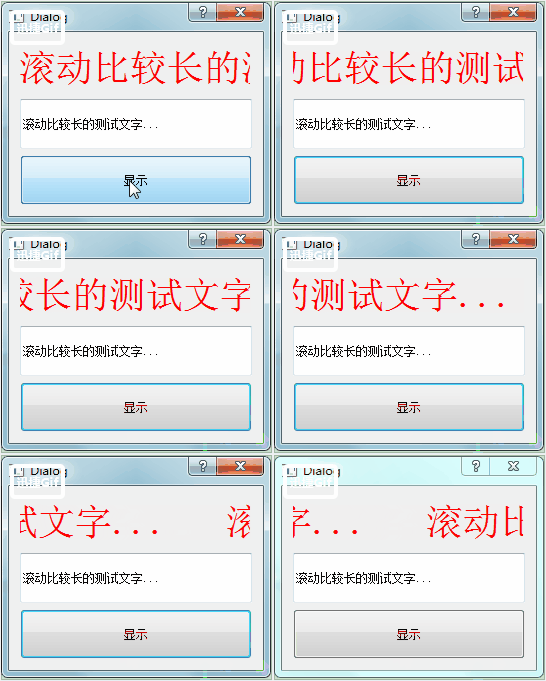
看源码:
1. 自适应函数,判断label文本是否需要滚动起来。
void MLabel::upateLabelRollingState()
{
    //  获取文本大小,小于文本框长度,则无需滚动
    QFont ft = font();
    ft.setPointSize(fontSize);

    QFontMetrics fm(ft);
    int nW = fm.width(text());

    left = 0;
    //  开启文本框滚动
    if(nW > width())
    {
        timerId = startTimer(100);
    }
    //  关闭文本框滚动
    else
    {
        if(timerId >= 0)
        {
            killTimer(timerId);
            timerId = -1;
        }
    }
}
2. 定时移动文本位置
void MLabel::timerEvent(QTimerEvent *e)
{
    if(e->timerId() == timerId && isVisible())
    {
        //  每次左移1个像素
        left += 1;

        //  判断是否已经完成一遍循环,完成则恢复起始位置,重新开始循环
        QFont ft = font();
        ft.setPointSize(fontSize);
        QFontMetrics fm(ft);
        int txtWidth = fm.width(text());
        int spaceWidth = fm.width(strSpace);

        if((txtWidth + spaceWidth) < left)
            left = 0;

        repaint();
    }

    QLabel::timerEvent(e);
}
3. 重绘事件,动态显示文本
void MLabel::paintEvent(QPaintEvent *e)
{
    QPainter p(this);

    //  获取文本框的大小
    QRect rc = rect();
    rc.setHeight(rc.height() - 2);
    rc.setWidth(rc.width() - 2);

    //  设置即将绘制文字的字体
    QFont ft = font();
    ft.setPointSize(fontSize);
    p.setFont(ft);
    p.setPen(QPen(Qt::red));

    //  设置绘制文字的开始位置,也就是将文字往左移动多少
    rc.setLeft(rc.left() - left);

    //  如果文字已经显示到末尾,则再添加一遍文字,做出循环滚动的效果
    QString strText = text();
    if(timerId >= 0)
        strText += strSpace + text();

    //  绘制文字
    p.drawText(rc, Qt::AlignVCenter, strText);
}
4. 使用效果,在设置文本、缩放事件两次调用自适应的函数。
void MLabel::setText(const QString & txt)
{
    QLabel::setText(txt);

    upateLabelRollingState();
}

void MLabel::resizeEvent(QResizeEvent *e)
{
    QLabel::resizeEvent(e);

    upateLabelRollingState();
}
完成,使用时,将QLabel提升为MLabel即可。
最后附上源码下载地址:https://download.csdn.net/download/chenxipu123/10966082
吐槽一下:CSDN不让设置资源所需的下载积分,所以源码没法免费共享。
边栏推荐
- 【opencv450-samples】inpaint 使用区域邻域恢复图像中的选定区域
- C language (I)
- ACM. HJ16 购物单 ●●
- Utilisation de la classe Ping d'Unity
- Some points to pay attention to when closing mongodb services (as well as related commands when opening)
- [opencv450 samples] create image list yaml
- 统计字符串中不同回文子序列的个数
- Paper notes: multi tag learning MSWl
- [modulebuilder] GP service realizes the intersection selection of two layers in SDE
- 信息学奥赛一本通 1353:表达式括号匹配(stack) | 洛谷 P1739 表达式括号匹配
猜你喜欢

Problem recording and thinking

The applet draws a simple pie chart
【无标题】打开一个项目连接,无法正常显示时,ping一下ip

Circuit module analysis exercise 6 (switch)
Utilisation de la classe Ping d'Unity

ACM. HJ16 购物单 ●●
 [email protected]@COLLATION_ CONNECTION */"/>
. SQL database import error: / *! 40101 SET @OLD_ COLLATION_ [email protected]@COLLATION_ CONNECTION */

Pycharm student's qualification expires, prompting no suitable licenses associated with account solution

What is Unified Extensible Firmware Interface (UEFI)?

Ue4 Ue5 combine le plug - in de reconnaissance vocale de bureau pour la reconnaissance vocale
随机推荐
RepOptimizer: 其实是RepVGG2
ES6 const constants and array deconstruction
RK3568+鸿蒙工控板工业网关视频网关解决方案
Meta universe standard forum established
The Ping class of unity uses
Unity的Ping類使用
zabbix_ Server configuration file details
[opencv450 samples] inpaint restores the selected region in the image using the region neighborhood
Pit resolution encountered using East OCR (compile LAMS)
论文笔记: 多标签学习 MSWL
What is Unified Extensible Firmware Interface (UEFI)?
pdm的皮毛
[2023 proofreading and bidding questions] Part 1: Measurement Technology FPGA post (roughly analytical version)
User interaction scanner usage Advanced Edition example
STM32开发板+机智云AIoT+家庭监测控制系统
#23class介绍
22 years of a doctor in Huawei
1281_ FreeRTOS_ Implementation analysis of vtaskdelayuntil
Huawei cloud SRE deterministic operation and maintenance special issue (the first issue)
NLP text summary: use the pre training model to perform text summary tasks [transformers:pipeline, T5, Bart, Pegasus]