当前位置:网站首页>CUDA programming based on Visual Studio 2015 (1): basic configuration
CUDA programming based on Visual Studio 2015 (1): basic configuration
2022-08-02 16:32:00 【Zhi Zhao】
一、CUDA简介
CUDA是一种由NVIDIA推出的通用并行计算架构,该架构使GPU能够解决复杂的计算问题.它包含了CUDA指令集架构(ISA)以及GPU内部的并行计算引擎.开发人员可以使用C语言来为CUDA架构编写程序,所编写出的程序可以在支持CUDA的处理器上以超高性能运行.
目前为止,基于 CUDA 的 GPU 销量已达数以百万计,软件开发商、科学家以及研究人员正在各个领域中运用 CUDA,其中包括图像与视频处理、计算生物学和化学、流体力学模拟、CT 图像再现、Seismic analysis and ray tracing, etc.
二、CUDA的下载和安装
下载CUDA应用程序时,It is necessary to determine the corresponding driver version of the computer graphics card in advanceCUDA版本.
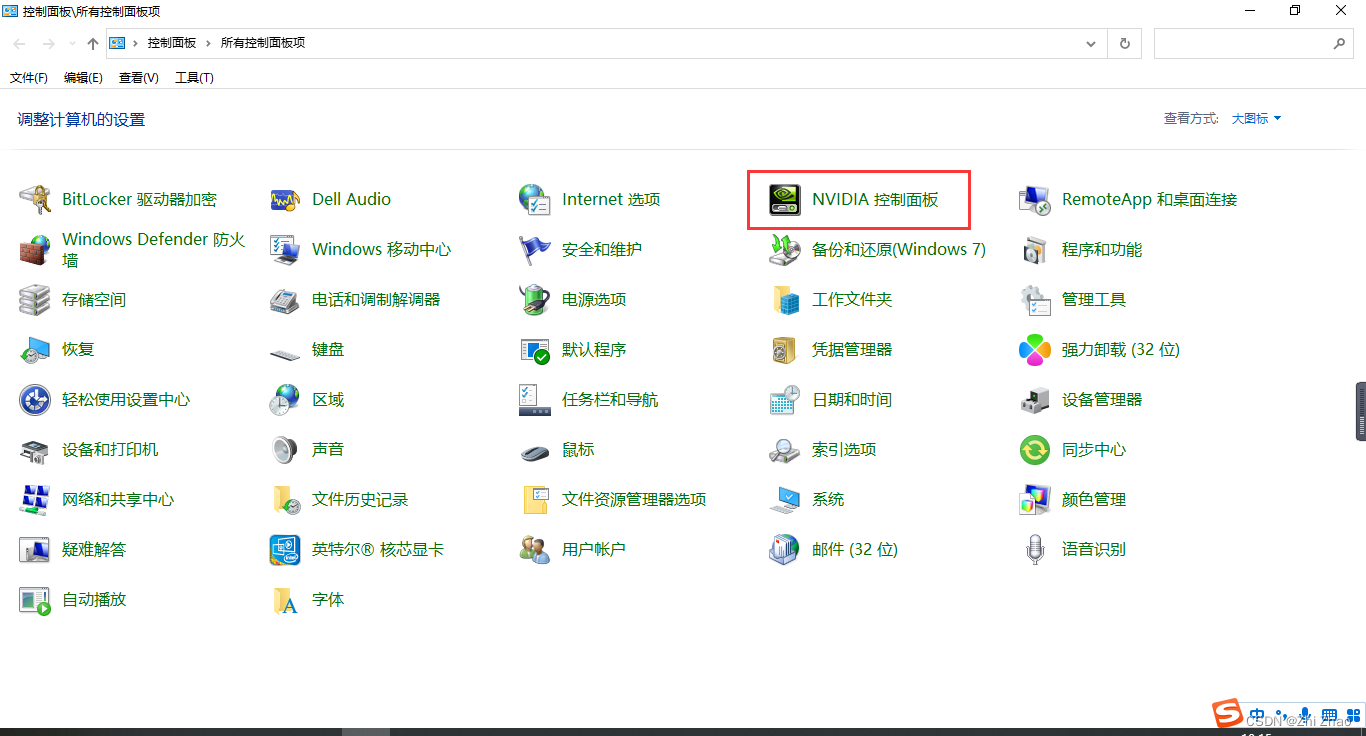
1)进入控制面板,找到NVIDIA控制面板,双击进入.
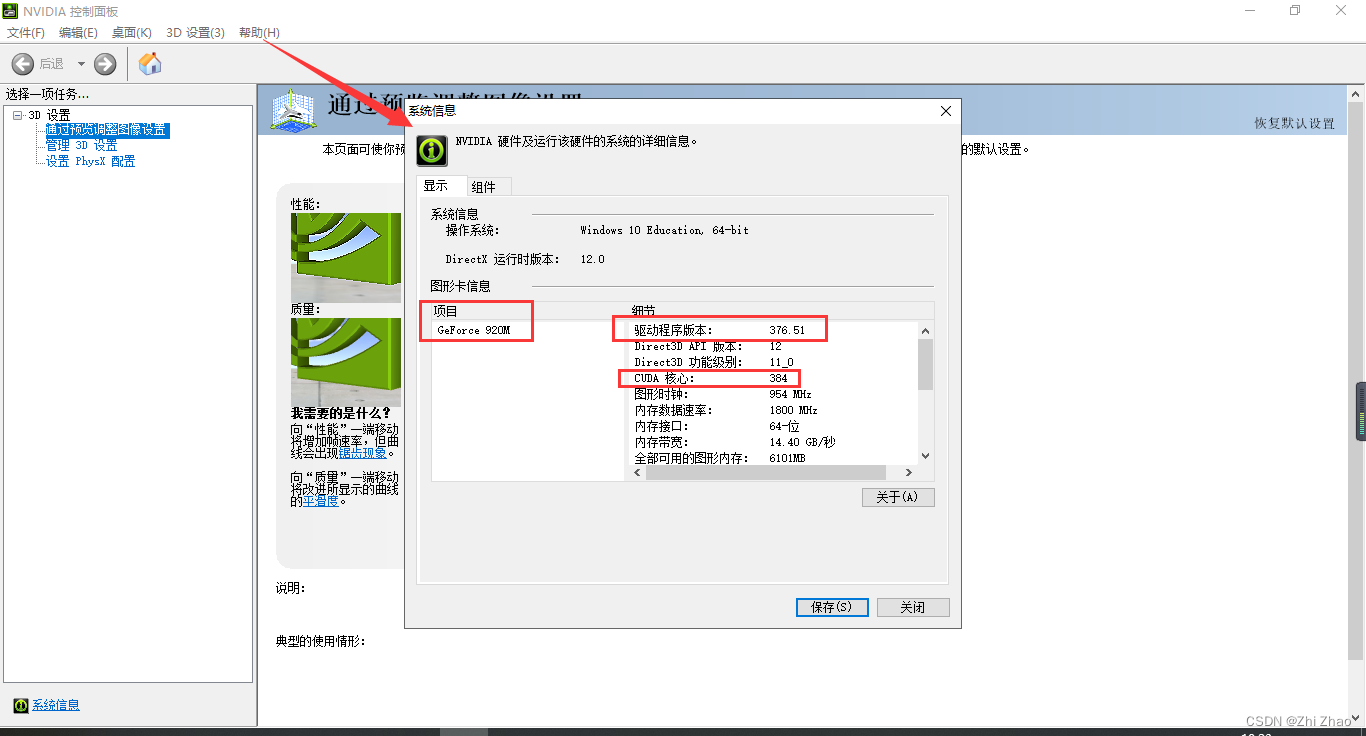
2)点击“帮助”按钮下的“系统信息”,Get the model of the graphics cardGeForce 920M,驱动程序版本为376.51.
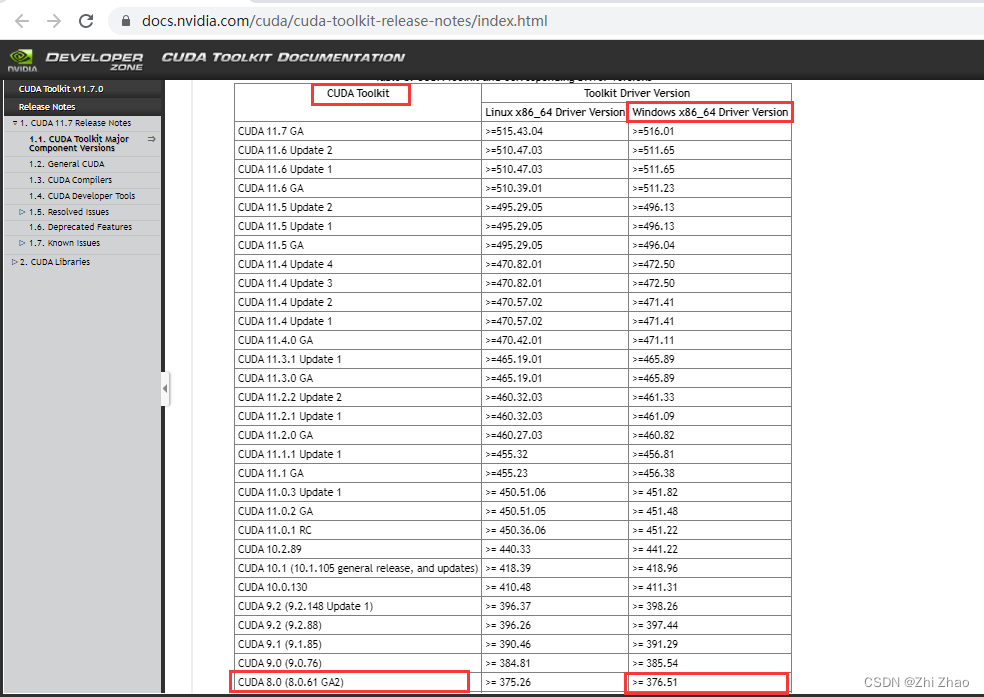
3)通过CUDA官网提供的信息,获取CUDAVersion corresponding to the graphics card driver version.
CUDA Toolkit and Corresponding Driver Versions
4)搜索对应的CUDA版本并下载.
5)安装CUDA
Many installation tutorial articles can be found online,Among them, I think a blog post is better,It also mentioned how to configure the deep learning librarycuDNN,If you just do parallel computing, you don't need to install this library.
三、创建CUDA项目
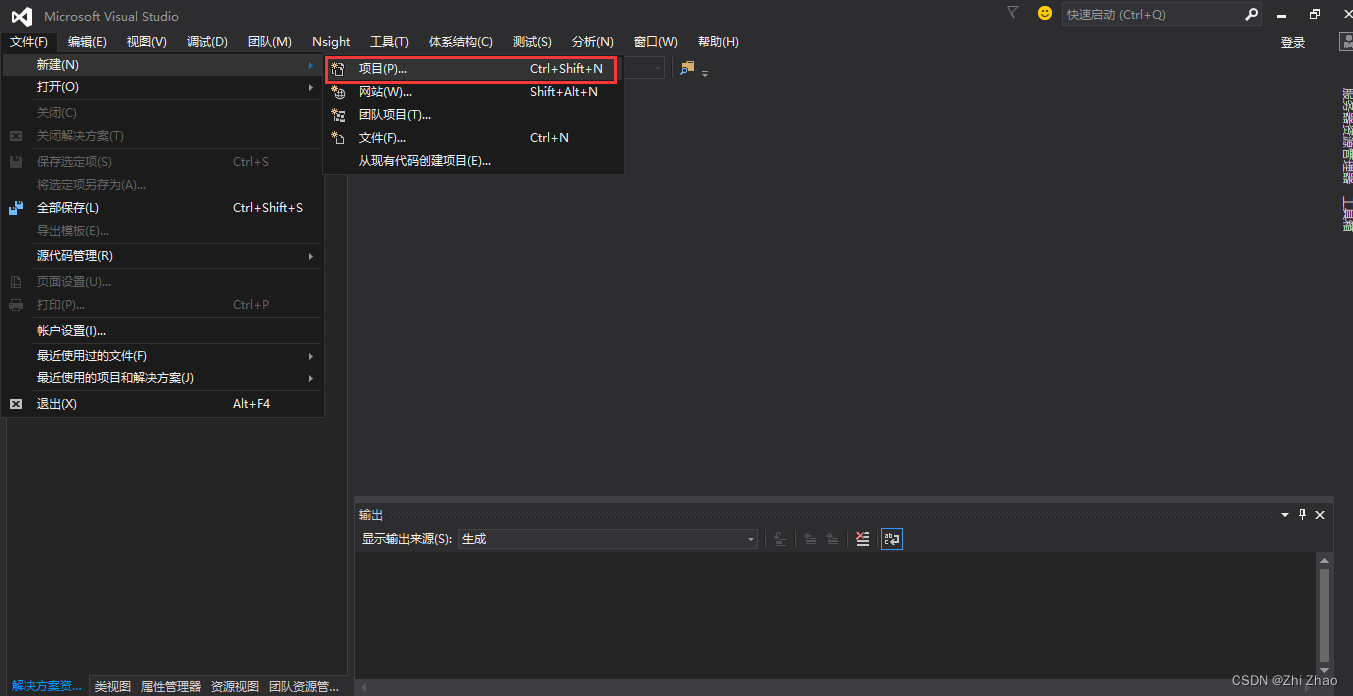
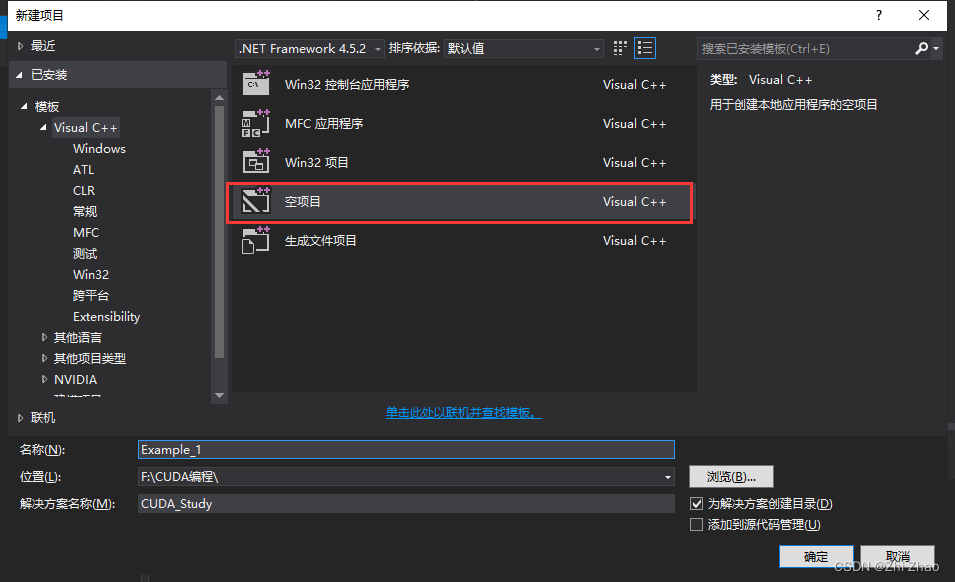
1)点击“文件”,选择“新建”,“项目”,定位到“Visual C++”选项卡.
2)选择“空项目”,Solutions and names can be entered by yourself,如图中所示,The location where the project is saved can be changed by yourself.
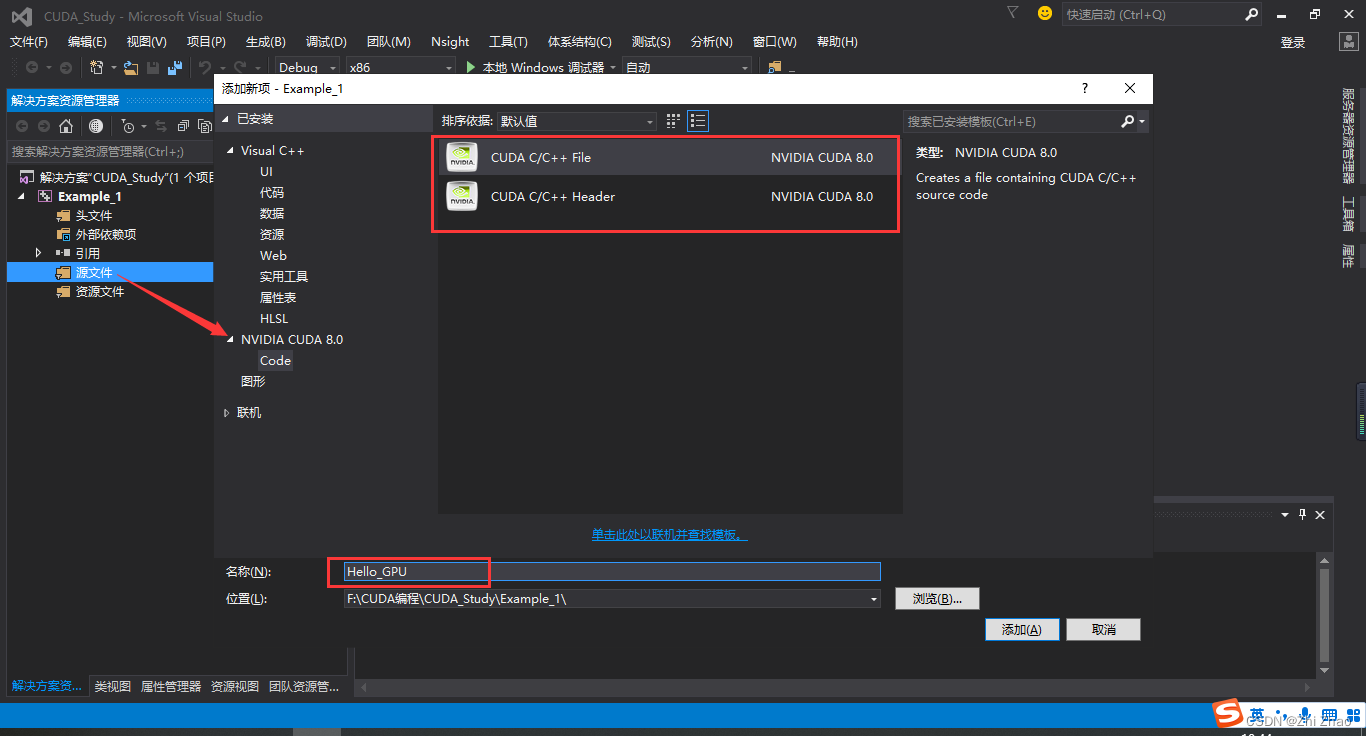
3)选择“源文件”,点击鼠标右键,选择“添加”→“新建项”,再选择“CUDA C/C++ File”,就可以创建一个.cu文件.
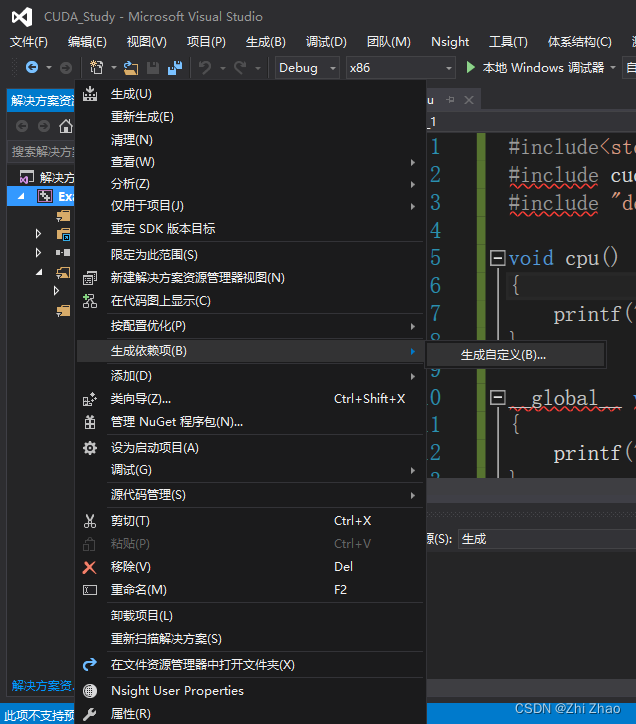
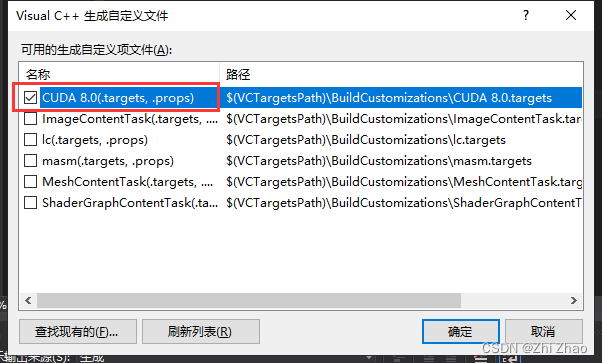
4)选中“Example_1”,点击鼠标右键,选择“生成依赖项“→“生成自定义”→选择“CUDA”CUDA8.0→确定.
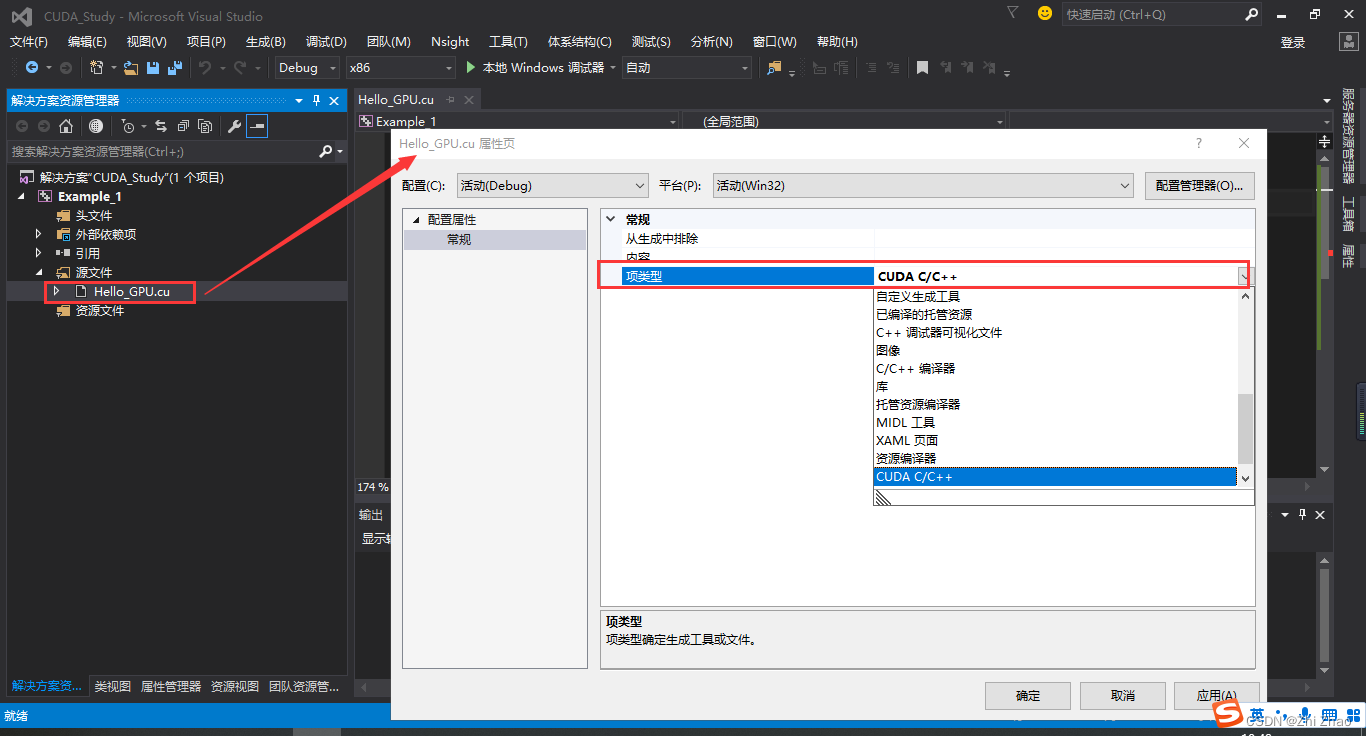
5)选中“Hello_GPU.cu”文件,点击鼠标右键,选择“属性”→“配置属性”→“常规”→“项类型”→“CUDA C/C++”.
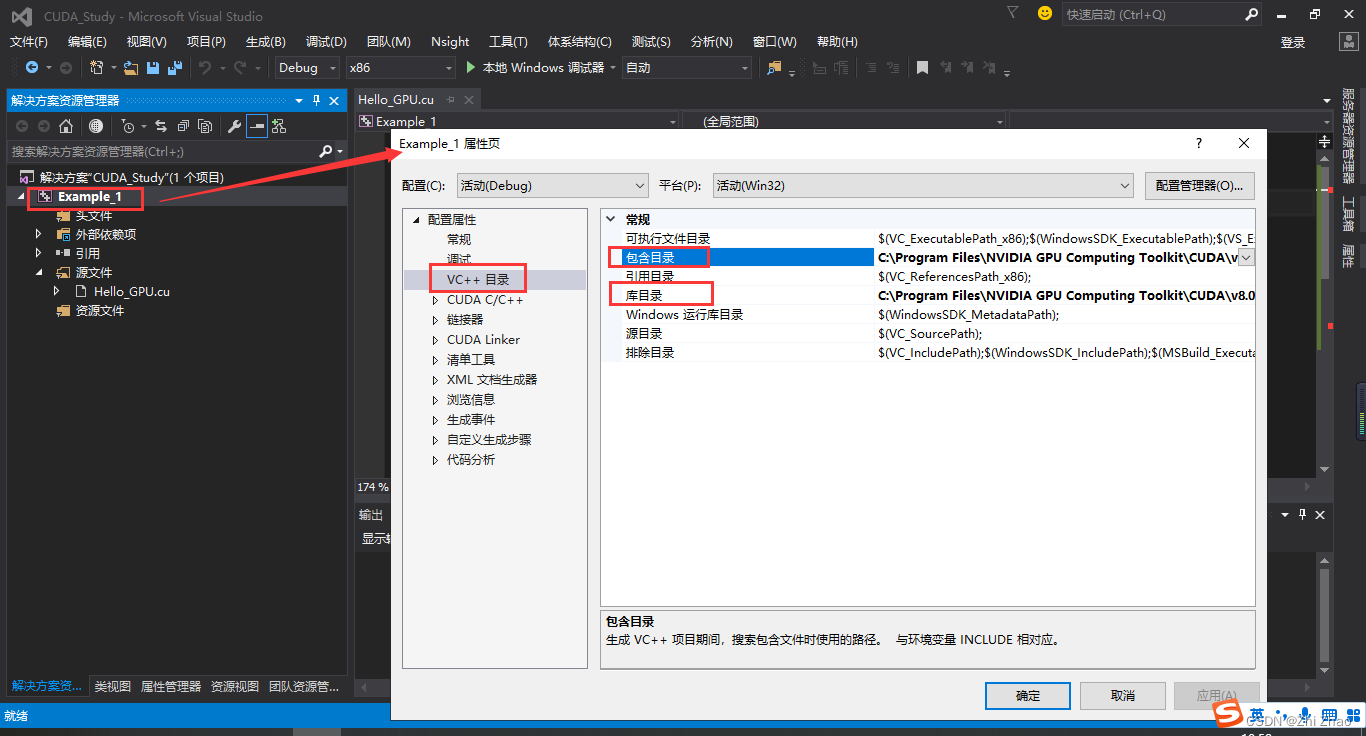
6)选中“Example_1”,点击鼠标右键,选择“属性“→“VC++目录”,在“包含目录”中添加:C:\Program Files\NVIDIA GPU Computing Toolkit\CUDA\v8.0\include
在“库目录”中添加:C:\Program Files\NVIDIA GPU Computing Toolkit\CUDA\v8.0\lib\x64
(x64Indicates that the computer's operating system is 64位,The above two paths are installed by themselvesCUDA的位置有关).
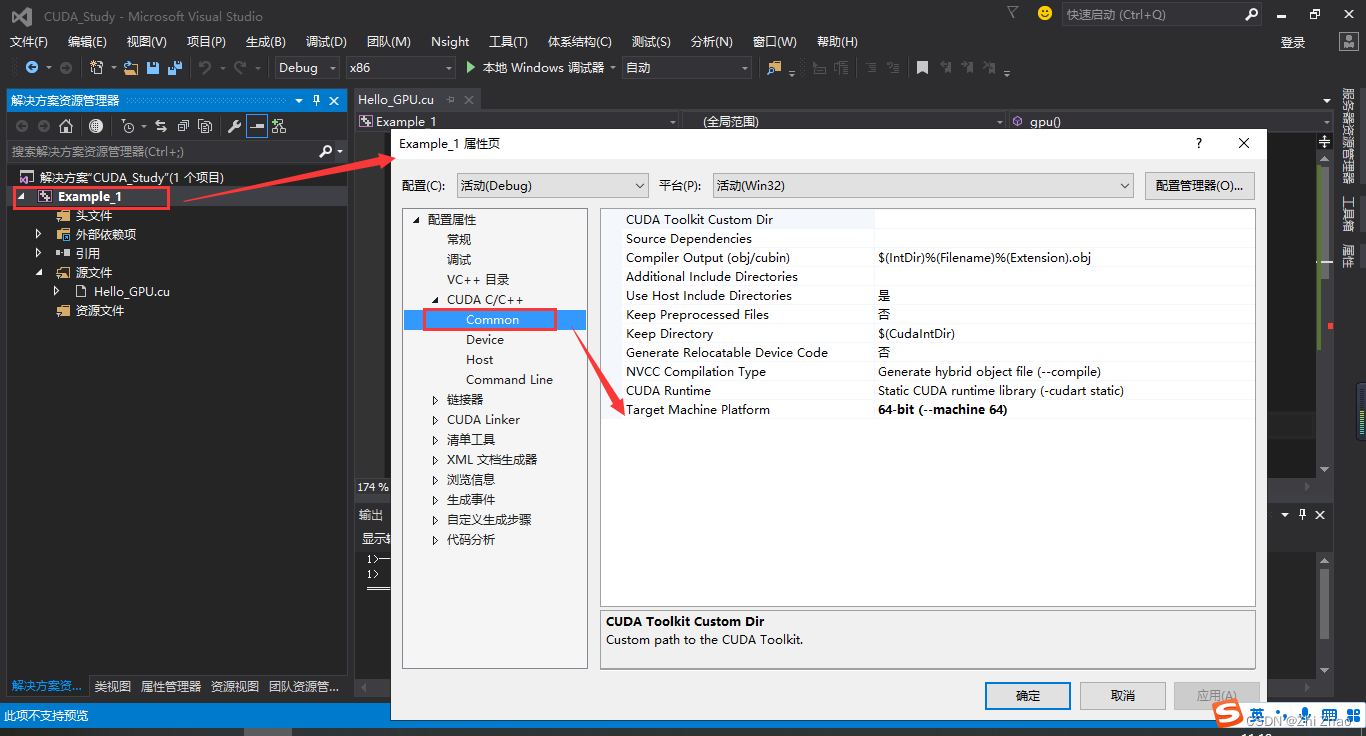
点击“CUDA C/C++”选项,选择“Common”,Set the target machine platform to “64-bit”.
7)选中“Example_1”,点击鼠标右键,选择“属性“→“链接器”→“输入”→“附加依赖项”.
添加自己需要的.lib文件名称,例如:
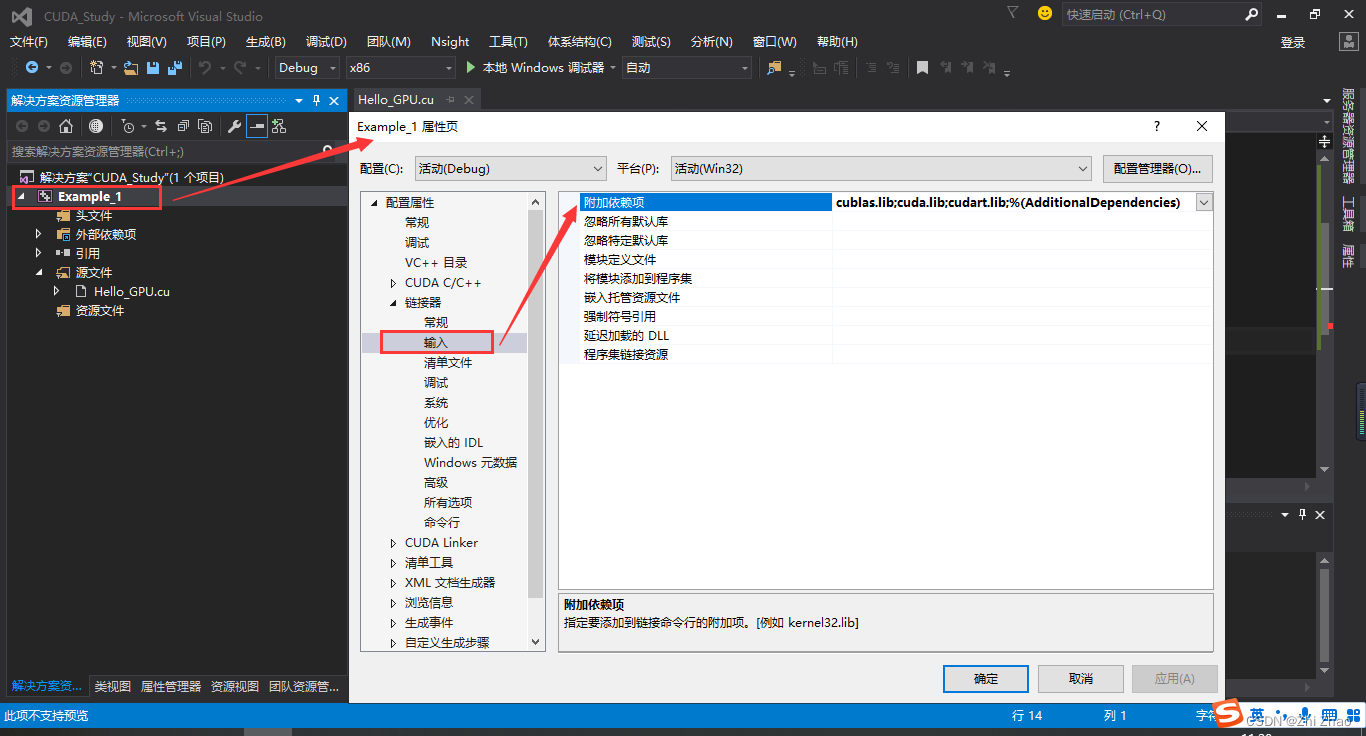
cublas.lib
cuda.lib
cudart.lib
cufft.lib
.libThe location of the file is shown in the image below.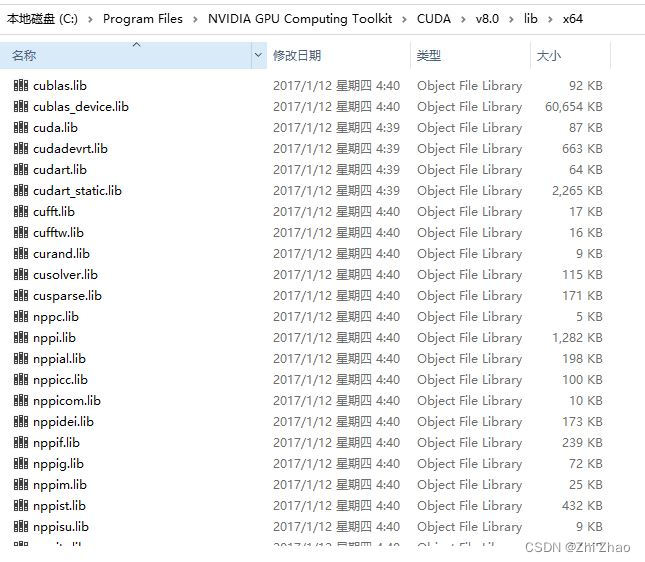
上面其实就是“库目录”下的文件.
到此,Visual Studio 2015里面所有为CUDAThe options set by programming have been completed,接下来可以利用CUDA编程调用GPUImplement the function of parallel operation.
四、CUDA的C代码
CPU和GPU实现的功能相同,There are differences in the way the program is executed.
#include<stdio.h>
#include "cuda_runtime.h"
#include "device_launch_parameters.h"

void cpu()
{

	printf("hello,cpu\n");
}

__global__ void gpu()
{

	printf("hello,gpu\n");
}

int main()
{

	cpu();
	gpu << <1, 1 >> >();
	cudaDeviceSynchronize();
}
程序运行结果如图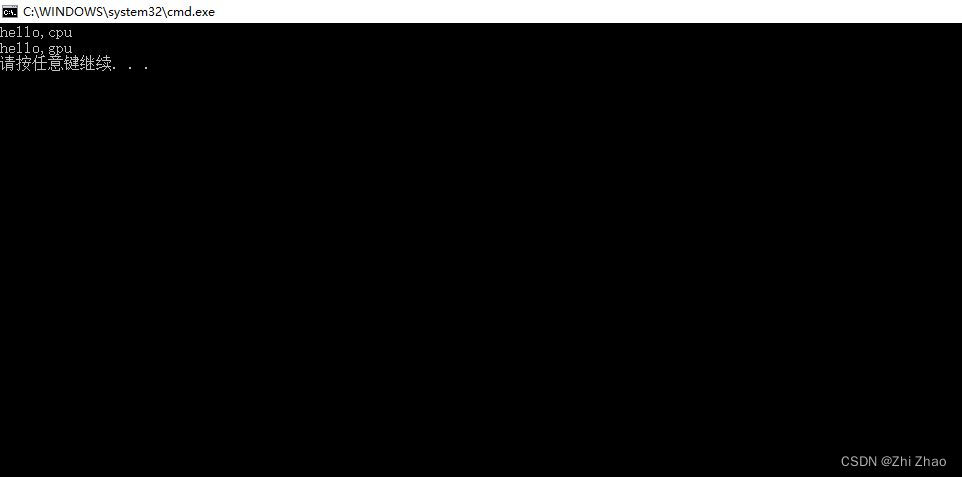
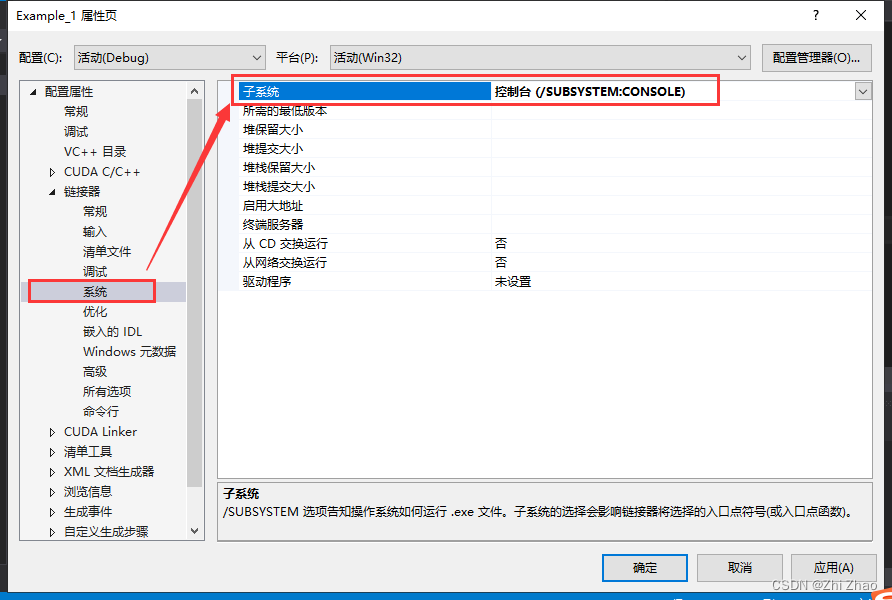
In order to solve the problem that the console flashes back after the program is running,可以进行下面的设置.
选中“Example_1”,点击鼠标右键,选择“属性“→“链接器”→“系统”→“子系统”,在“子系统里面”选择“控制台”.
All like-minded friends,If you think this blog post is well written or just solved your problem,请动动手指,点个赞 再走.
If you have any questions, please comment below the article,I will answer point by point,Both can solve your problem,There may also be ideas for solutions to others.If you have any questions, you can privately message me!
边栏推荐
猜你喜欢
随机推荐
golang中使用泛型
Nvm,Nrm使用教程
小知识点系列:数组与多维数组
Jenkins 参数化构建(Extended Choice Parameter)
小知识点系列-基于H2数据库单元测试
golang时间-时间戳的获取-转换-计算
Mobile copy constructor
MYSQL5.7详细安装步骤
Oauth2.0 Supplement
【个人向】线性表复习
Oauth2.0 authentication server adds verification code login method
DOM —— 事件代理
RouteOS 导入至PVE
flask获取post请求参数
【软件测试】自动化测试selenium3
【软件测试】selenium自动化测试2
MATLAB中dist与pdist、pdist2的区别与联系
网络运维系列:二级域名启用与配置
appium 报错:AttributeError:
面试追问系列-Redis技术原理