当前位置:网站首页>IDEA自动补全
IDEA自动补全
2022-06-29 08:45:00 【精益的态度成就不一样的人生】
有时候希望使用自动补全,因为不偷懒的程序员不是好程序员。但是Idea的默认快捷键是 Ctrl + 空格。 对于安装中文输入法的普通人来说那就是杯具了,你懂的。
修改方法如下:
点击 文件菜单(File) –> 点击 设置(Settings… Ctrl+Alt+S), –> 打开设置对话框。
在左侧的导航框中点击 KeyMap。
接着在右边的树型框中选择 Main menu –> Code –> Completion.
接着需要做两件事:
1. 移除原来的Cycle Expand Word 的 Alt+斜杠 快捷键绑定。
2. 在 Basic 上点击右键,去除原来的 Ctrl+空格 绑定,然后添加 Alt + 斜杠 快捷键。
边栏推荐
- 1.4 regression of machine learning methods
- MySQL configuring master-slave databases
- pytorch总结—TENSOR ON GPU
- Detecting and counting tiny faces
- UE4 去掉材质中Mask透明白边
- Five heart charity matchmaker team
- 3DMax 卡死、白屏、渲染死机问题总结
- The difference between cokkie and session
- # 《网络是怎么样连接的》读书笔记 - WEB服务端请求和响应(四)
- Self cultivation (XXI) servlet life cycle, service method source code analysis, thread safety issues
猜你喜欢

长安链数据存储介绍及Mysql存储环境搭建

五心公益红红娘团队

Summary of 3DMAX jamming, white screen and rendering crash
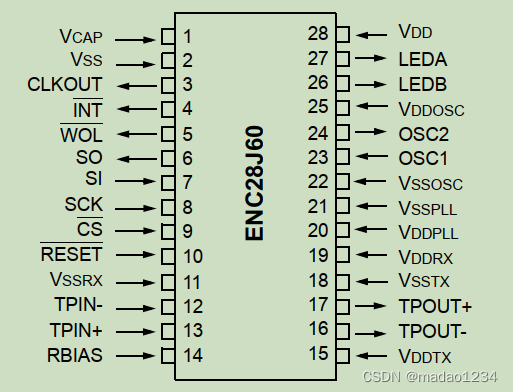
Gd32f4xx Ethernet chip (ENC28J60) driver migration

Wechat applet determines the file format of URL

Reading notes on how to connect the network - Web server request and response (IV)

Write down some written test questions
GD32F4xx 以太網芯片(enc28j60)驅動移植
Gd32f4xx Ethernet Chip (ENC28J60) Drive transplantation

Print service IP setting scheme
随机推荐
How to do unit test well
Factory mode
Mysql database and table splitting strategy and application scenarios
Modify EXIF information
基于PyQt5和Qt Designer的简易加法计算器的制作
Wechat applet wx Navigateback returns the parameters carried on the previous page
How to implement observer mode
Chang'an chain go language smart contract writing and compilation
pytorch总结学习系列-广播机制
Instance error iopub data rate exceeded
LeetCode刷题——泰波那契数列
Difference between factory mode and strategy mode
KiCad学习笔记--快捷键
Simple use of promise method
LSM6DSL之SPI驱动
After aikuai is installed or reset, the PC or mobile terminal cannot obtain IP
Pytorch Summary - Automatic gradient
UE4 VS的Visual Assist插件设置
云管理平台:OpenStack架构设计及详细解读
UE4 material UV texture does not stretch with model scale