当前位置:网站首页>圖像處理7-圖像增强
圖像處理7-圖像增强
2022-06-30 06:12:00 【<Hunter>】
圖像處理系列:
本文源碼見本人資源,可免費下載。
圖像增强
(1)網上任意下載三張圖
(2)對圖片進行預處理;
(3)導出預處理後的圖片。
1.導入包
如圖1.1,導入要使用的包。

圖1.1 導入需要使用的包
2.圖片下載
如圖1.2,使用該代碼進行圖片自動化下載,從必應圖片特定搜索的結果中下載照片。

圖1.2 圖片自動化爬取代碼
3.各種預處理
本部分嘗試使用各種圖片增强方法處理圖片,並展示效果。
a.圖片讀取
使用如圖1.3的代碼進行圖片讀取,並顯示。

圖1.3 圖片讀取與顯示
b.隨機比例縮放
使用圖1.4的代碼進行圖片比例縮放,並顯示。

圖1.4 圖片比例縮放和顯示
c.隨機比特置裁剪和中心比特置裁剪
使用圖1.5的代碼進行隨機比特置裁剪和顯示。

圖1.5 隨機比特置裁剪
使用圖1.6的代碼進行中心比特置裁剪,並顯示。

圖1.6 中心比特置裁剪
d.隨機水平和豎直翻轉
使用圖1.7的代碼進行水平翻轉,並顯示。

圖1.7 隨機水平翻轉
使用圖1.8的代碼進行豎直翻轉,並顯示。

圖1.8 隨機豎直翻轉
e.隨機角度翻轉
使用圖1.9的代碼進行隨機角度翻轉並顯示。

圖1.9 隨機角度翻轉
f.色度、亮度、飽和度、對比度、灰度變化
使用圖1.10的代碼進行色度變化並顯示。

圖1.10 色度變換
使用圖1.11的代碼進行亮度變化並顯示。
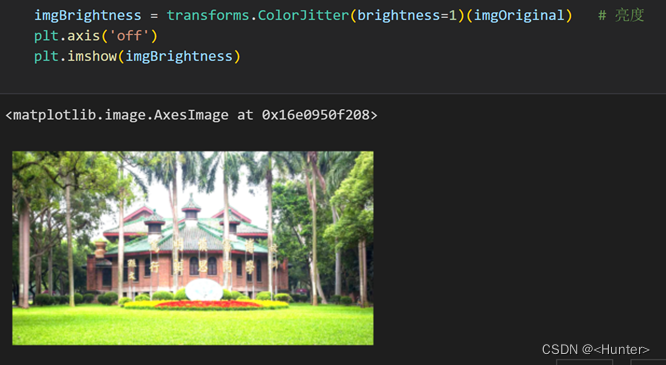
圖1.11 亮度變換
使用圖1.12的代碼進行飽和度變換,並顯示。

圖1.12 飽和度變化
使用圖1.13的代碼進行對比度變化,並顯示。

圖1.13 對比度變化
使用如圖1.14的代碼進行灰度變化,並顯示。

圖1.14 灰度變化
g.擴充
使用圖1.15的代碼進行擴充,並顯示。

圖1.15 擴充
h.使用PiPeLine變化
使用圖1.16將想要進行的系列操作,封裝進一個compose,對圖片進行組合變化,並顯示。

圖1.16 使用PiPeLine變化
4.批量圖像自動化處理
結合上述的嘗試,我們可以使用圖1.17的代碼先將系列的隨機變換,封裝到一個PiPeLine

圖1.17 批量圖像增强自動預處理代碼
中,然後對圖片文件夾的照片進行批量的讀入,對每張照片批量的處理,並保存到文件夾中效果見圖1.18。

圖1.18 自動化圖像增强效果
边栏推荐
- Cisco VXLAN配置
- [Alibaba cloud] student growth plan answers
- ES6 extended operator (...)
- Base64 explanation: playing with pictures Base64 encoding
- Zibll sub theme v6.4.1wordpress open source download_ Crack the original / use it directly / no tutorial required
- Network basics
- [openstack]-01- basic introduction
- 关于Glide加载图片模糊不清楚
- requests. The difference between session () sending requests and using requests to send requests directly
- VLAN access mode
猜你喜欢
![[GPU] basic operation of GPU (I)](/img/ce/0ca8c63525038fea64c40aabd17fc6.jpg)
![[Alibaba cloud] student growth plan answers](/img/34/cba975c0960d5595433adcb23f6e64.jpg)




随机推荐
ES6箭头函数
Redux source code implementation
STM32F103系列控制的OLED IIC 4针
数据读写:Unity中基于C#脚本实现数据读写功能
谁不想要一个自己的博客网站呢 - 搭建博客网站wordpress
C language code record
[wechat applet: single or multiple styles, background color, rounded corners]
Turn off automatic outlining in Visual Studio - turning off automatic outlining in Visual Studio
Create priority queue
MySQL存储系统
ES6 deconstruction assignment
Data read / write: realize data read / write function based on C # script in unity
MySQL 索引
Dao -- a beautiful new world?
从零开发 stylelint规则(插件)
How to print pthread_ t - How to print pthread_ t
Use of observer mode and status mode in actual work
A complete performance test process
Common NPM install errors
ES6 array