当前位置:网站首页>El select drop-down box style combined with El table (pseudo) combined with drop-down selection
El select drop-down box style combined with El table (pseudo) combined with drop-down selection
2022-06-11 23:27:00 【RxnNing】
Let's start with something simple
One 、 The data is local data in , Query selection
Let's see the renderings first 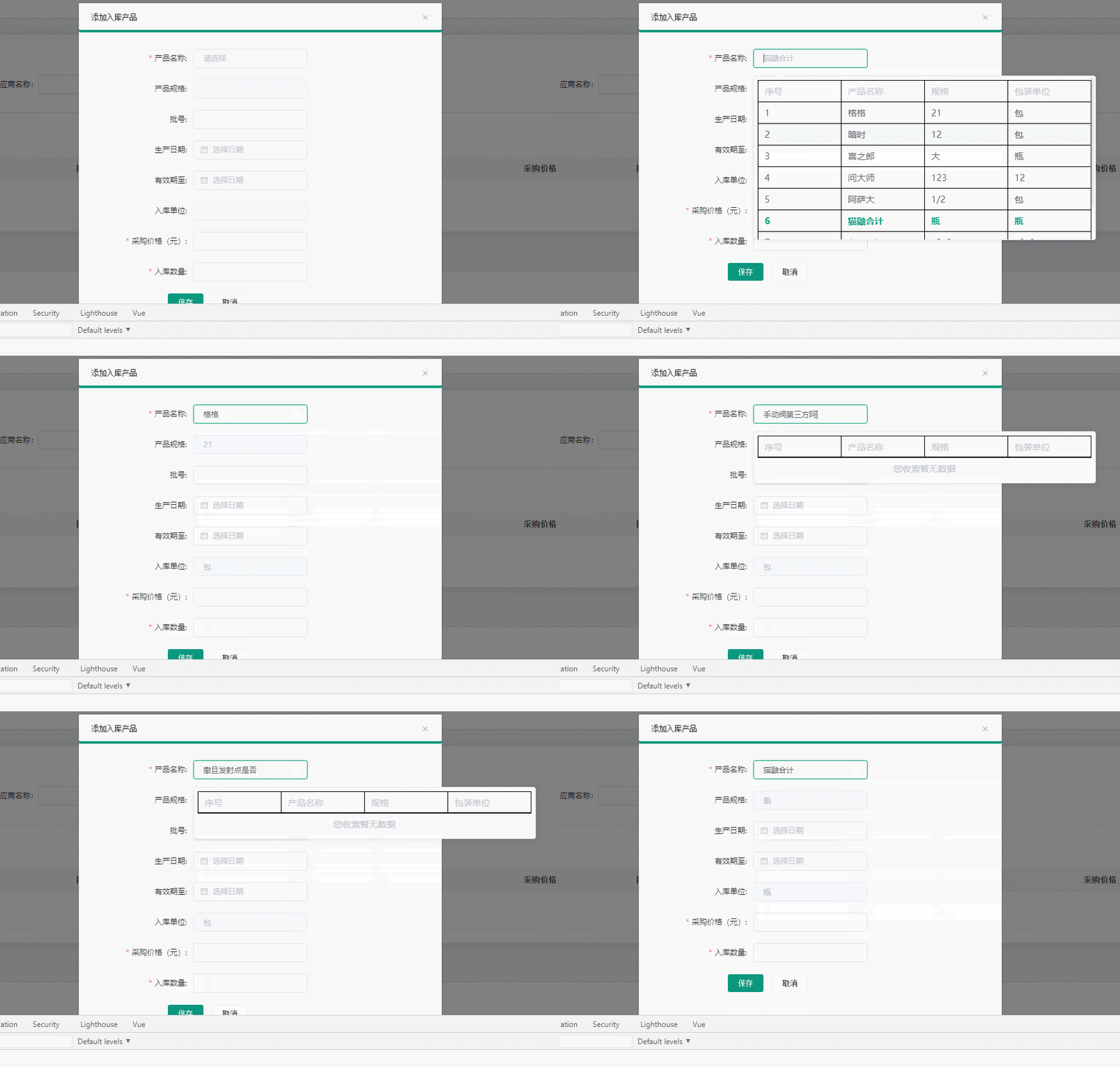
First of all, we introduce... Into the components we need to use 、 register 、 Use
The binding attribute used
v-model Bound data :arrData Bound test data :defalutValue Default el-select The binding of label and value attribute change change event The default parameter is Selected value value options Drop down table Header name (name) and The data attributes to be displayed in the table body (value)
<template>
   <my-select
	  v-model="message"
	  :arrData="testData"
	  :defalutValue="{label: 'name',value: 'name'}"
	  @change="handleSelect"
	  :options="[{name: ' The product name ', value: 'name'},{name: ' specifications ', value: 'standard'},{name: ' Packaging unit ', value: 'unitname'}]"
	></my-select>
</template>

<script>
import MySelect from '@/components/selectTable/my-select.vue' // Import components
export default {

	components: {
    MySelect}, // Certified components
	data() {

		return {

			message: null,// Bound properties
			testData: [// Local data
		        {

		          id: 70,
		          companyid: 7,
		          type: " Special medicine ",
		          name: " Dark time ",
		          standard: "12",
		        },
		        {

		          id: 36,
		          companyid: 7,
		          type: " Special medicine ",
		          name: " Ask the master ",
		          standard: "123",
		        },
		        {

		          id: 30,
		          companyid: 7,
		          type: " drug ",
		          name: " Asada ",
		          standard: "1/2",
		        },
		        {

		          id: 7,
		          companyid: 7,
		          type: "222",
		          name: "1wew1",
		          standard: "e2e2e",
		        },
		        {

		          id: 5,
		          companyid: 7,
		          type: "221",
		          name: " Invincible potion ",
		          standard: "21",
		        },
      		],
		}
	},
	methods: {

		handleSelect(value) {
     // Trigger when content changes
			console.log(value)
		}

	}
	···
}
</script>
Two 、 Remote server requests fuzzy data query
New binding attribute
getData Remote request fuzzy data function Ask to return a promis object @click Get the click drop-down box Select the overall object of the data
Remote request arrData You can omit it
``
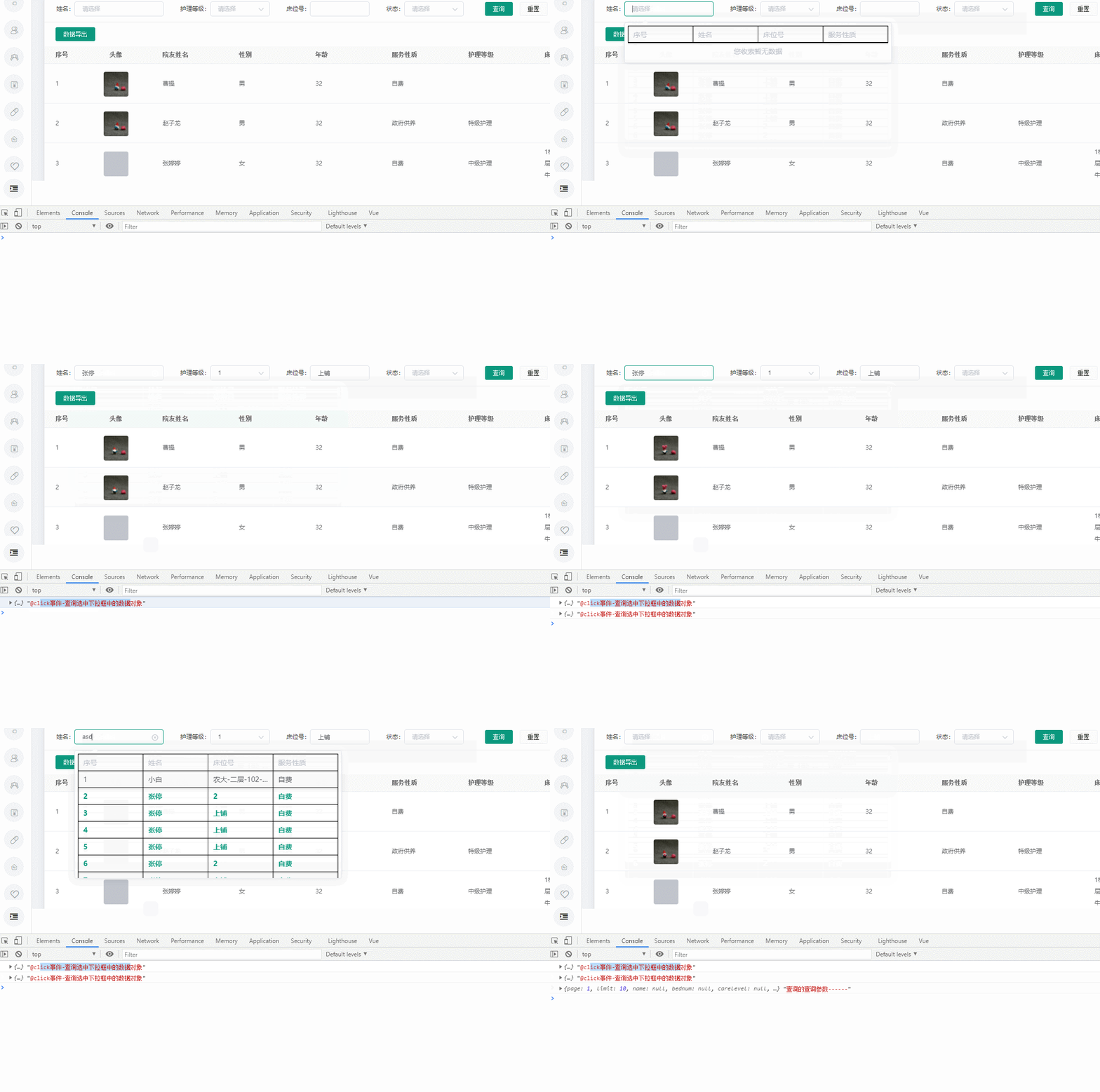
Look at the picture again
<my-select
	v-model="form.name"
	:defalutValue="{label: 'name',value: 'name'}"
	:setstyle="{'min-width': '160px'}"
	:getData="querySearch"
	@click="handleSelect"
	:options="[{name: ' full name ', value: 'name'},{name: ' ID number ', value: 'idcard'}]"
></my-select>

methods: {

	querySearch(queryString) {

	      // console.log(queryString," Fuzzy name query -------------");
	      let companyid = sessionStorage.getItem("companyid");
	      let params = {

	        key: queryString,
	      };
	      return this.$api.friendincompanylist(params, companyid) // Encapsulated axios request
	}
}
This is the encapsulated code
/*<my-select v-model="changeForm.productname" // Data bound in two directions  ( Will pass ) :arrData="cpNameOptions" // value  ( Drop down list data )( Internal automatic filtering ) ( Not necessarily ) :defalutValue="{label: 'name',value: 'name'}" // Default binding value  and lable ( Not necessarily ) @change="changeEvent" // Select the event triggered when a change occurs  ( Parameters : Selected value ) :options="[{name: ' The product name ', value: 'name'},{name: ' specifications ', value: 'standard'},{name: ' Packaging unit ', value: 'unitname'}]"// Header name name   and body  Data presented value attribute  ( Will pass ) :getData="querynameSearch // Asynchronous requests : Data functions pulled from the server , This function returns promise object  (arrData attribute   and  getData  One is required )  Such as :querynameSearch(queryString) { // console.log(queryString," Fuzzy name query -------------"); let companyid = sessionStorage.getItem("companyid"); let params = { key: queryString, }; return this.$api.friendincompanylist(params, companyid) } @click=" Parameters are objects item" // Click the selected object  setstyle="span  The name of the class "  Such as : :setstyle="{'min-width': '160px'}" // Cell style  ></my-select> */
<template>
<!-- <el-form-item label=" The product name :" prop="selectValue" :rules="{
    required: true,
                      message: ' Base name cannot be empty 1',
                      trigger: 'change'}"> -->
  <el-select
    :value="selectValue"
    @input="inputEvent"
    style="width: 180px"
    clearable
    filterable
    remote
    :remote-method="remoteMethod"
    @visible-change="focusEvent1"
    @change="handleSelect"
  >
    <!-- @change="handleSelect" -->
    <el-option class="asdasd" :disabled="true" value="" label="">
      <div>
        <span :style="setstyle"> Serial number </span>
        <span :style="setstyle" v-for="(item, index) in options" :key="item.name+index+Math.random()">{
    {
     item.name }}</span>
      </div>
    </el-option>

    <el-option
      v-show="filterArr.length != 0"
      v-for="(item, index) in filterArr || this.arrData"
      :key="item.id+ Math.random()"
      class="asdasd"
      :label="item[defalutValue.label]"
      :value="item[defalutValue.value]"

    >
    <div @click="clickOption(item)">
      <span :style="setstyle">{
    {
     index + 1 }}</span>
      <span :style="setstyle" v-for="(item1,index1) in options" :key="index1 + item[item1.value]+ Math.random()">{
    {
     item[item1.value] }}</span>
    </div>
    </el-option>
    <el-option
      v-show="filterArr.length == 0"
      value=""
      label=""
      style="text-align: center; border-top: 1px solid black; margin: 0 6px"
      :disabled="true"
    >
      <div>
        <span :style="setstyle"> No data is available for your claim </span>
      </div>
    </el-option>
  </el-select>
  <!-- </el-form-item> -->
</template>

<script>
export default {

  mounted() {

    this.filterArr = JSON.parse(JSON.stringify(this.arrData));
    this.selectValue = this.value? JSON.parse(JSON.stringify(this.value)): null;
  },
  data() {

    return {

      selectValue: "", // Selected value
      filterArr: [], // Filtered array
    };
  },
  watch: {

      value: {

          handler(newvalue,oldvalue) {
    // monitor   Parent bound  v-model  change
                  this.selectValue = this.value
          },
          deep: true
      }
    // filterArr: {

    // handler(oldvalue, newvalue) {

    // console.log(oldvalue,newvalue,111)
    // },
    // deep: true
    // }
  },
  props: {

    value: {

        default: null
    },
    setstyle:{

        type: Object,
        default() {

            return {
    }
        }
    },
    defalutValue: {

      // Default display data value  and  label value
      type: Object,
      default() {

        return {

          value: "id",
          label: "name",
        };
      },
    },
    arrData: {

      // The array queried
      type: Array,
      default() {

        return [];
      },
    },
    options: {

      type: Array,
      request: true,
    },
    getData: {

        type: Function,
        default: null
    }
  },
  methods: {

    // Click the event in the drop-down box clickOption
    clickOption(item) {

        // console.log(item,' Click the event in the drop-down box clickOption')
        this.$emit('click',item)
    },
    //$emit('input', $event)
    inputEvent(value) {

    // console.log(value, "inputEvent-----------");
      this.selectValue = value;//value  For the selected value
      this.$emit("input", value);
    },
    // handleSelect  Triggered when the selected state changes
    handleSelect($event) {

        // console.log('Select Events trigger --',$event)
      this.$emit('change',$event)//$event  For the selected value
    },
    // Trigger when the drop-down box is hidden
    async focusEvent1(flag) {

      // console.log(flag, " Trigger when the drop-down box is hidden --");
      if (flag) {

        if(this.getData) {
    // Triggered when the request data function exists
          let {
    result} = await this.getData('')
        // console.log(result, 'result=-------')
          this.filterArr = result
          return;
        }
        this.filterArr = this.arrData; // Reset the filtered array
      }
    },
    // Fuzzy query method
    async remoteMethod(query) {

    // console.log( query,"query-----",);
      if(this.getData) {
    // Triggered when the request data function exists
          let {
    result} = await this.getData(query)
        // console.log(result, 'result=-------')
          this.filterArr = result
          return;
      }
      if (query != "") {

        // If the input is not empty
        this.filterArr = this.arrData.filter((item) => {

          return (
            item[this.defalutValue.label]
              .toLowerCase()
              .indexOf(query.toLowerCase()) > -1
          );
        });
      } else {

        // If the input is empty
        this.filterArr = this.arrData;
      }
    },
  },
};
</script>

<style >
.asdasd {

  white-space: nowrap;
  width: unset;
  border-right: 1px solid black;
  border-top: 1px solid black;
  padding: 0;
  margin: 0 6px;
}
/* .asdasd:first-child{ border-right: 1px solid black; } */
.asdasd:nth-last-child(2){

  border-bottom: 1px solid black;
}
.asdasd div {

    width: 100%;
    display: flex;
}
.asdasd div span {

  min-width: 120px;
  padding-left: 10px;
  overflow-x:hidden;
  text-overflow: ellipsis;
  /* border-right: 1px solid black; */
  border-left: 1px solid black;
  border-collapse: separate;
}
.asdasd:last-of-type {

  border-bottom: 1px solid black;
  width: 60px;
}
.asdasd div:first-of-type span {

  width: 60px;
}
</style>
边栏推荐
- postgresql10 進程
- Jetpack architecture component learning (3) -- activity results API usage
- 2022 high voltage electrician test question simulation test question bank and online simulation test
- Wake up wrist - neural network and deep learning (tensorflow application) updating
- Inventory | more than 20 typical security incidents occurred in February, with a loss of nearly $400million
- 【Day2 文献精读】Time in the mind: Using space to think about time
- How to make scripts executable anywhere
- [technology sharing] after 16 years, how to successfully implement the dual active traffic architecture of zhubajie.com
- Solr之基础讲解入门
- 2022 safety officer-b certificate theoretical question bank and simulation test
猜你喜欢

Why can't Google search page infinite?
2022高压电工考试题模拟考试题库及在线模拟考试
![[day3 literature intensive reading] Oriental time and space interaction in tau and kappa effects](/img/90/4470dca9b19dbcd0f99655f7d9d23e.png)
[day3 literature intensive reading] Oriental time and space interaction in tau and kappa effects

唤醒手腕 - 神经网络与深度学习(Tensorflow应用)更新中
Application of Lora wireless communication module Lora technology in smart home light control

Lake Shore - supertran continuous flow cryogenic thermostat system

Jetpack架构组件学习(3)——Activity Results API使用
![[day6-7 intensive literature reading] a unifying Bayesian framework accounting for spatiotemporal interactions with a](/img/a9/c0f3a6b76d789d47172727d353d9be.png)
[day6-7 intensive literature reading] a unifying Bayesian framework accounting for spatiotemporal interactions with a

商品热销排行【项目 商城】
Small program startup performance optimization practice
随机推荐
Why can't Google search page infinite?
Method for WiFi wireless transmission module to access cloud platform using esp8266 chip scheme
2022年起重机司机(限桥式起重机)考试题模拟考试题库及模拟考试
Wireless communication comparison of si4463, si4438 and Si4432 schemes of wireless data transmission module
Teacher lihongyi, NTU -- tips for DNN regulation
VS code 编写汇编代码【微机原理】
Leetcode must review 20 lintcode (5466421166978227)
帝国理工等最新《胶囊网络综述》论文,29页pdf阐述胶囊的概念、方法与应用
【Day3 文献精读】Asymmetrical time and space interference in Tau and Kappa effects
C language simple exercise No.17, about the combination of for and while loops
How to construct PostgreSQL error codes
H. 265 introduction to coding principles
显示商品详情【项目 商城】
Postgresql错误码是如何构造的
Jetpack架构组件学习(3)——Activity Results API使用
Two ways of using reuqests in RF
GMN of AI medicine article interpretation
Queue (C language)
商品热销排行【项目 商城】
通用树形结构的迭代与组合模式实现方案