当前位置:网站首页>c#磁盘驱动器及文件夹还有文件类的操作
c#磁盘驱动器及文件夹还有文件类的操作
2022-06-25 06:43:00 【ykxxcs】
c#文件及文件夹类的操作大全
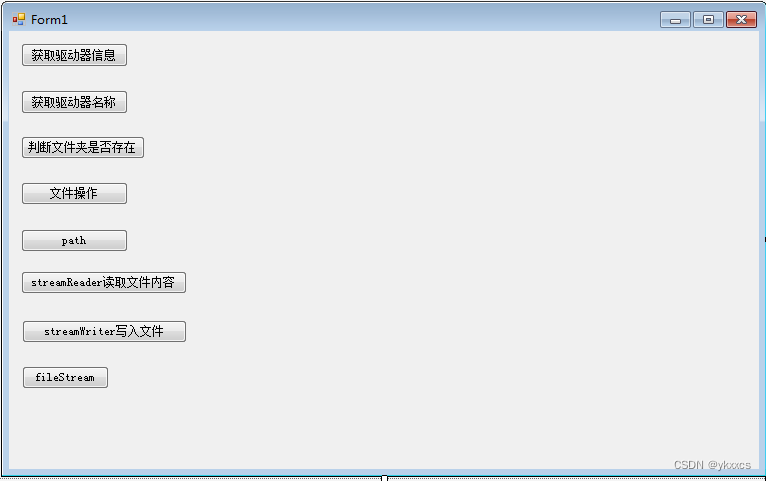
public partial class Form1 : Form
    {
        public Form1()
        {
            InitializeComponent();
        }

        private void button1_Click(object sender, EventArgs e)
        {
            //Driveinfo driveInfo = new Driveinfo("C");  //从网上抄的,有错
            DriveInfo driveInfo = new DriveInfo("C");
            MessageBox.Show(driveInfo.ToString());
            MessageBox.Show("驱动器的名称:" + driveInfo.Name);
            MessageBox.Show("驱动器的根目录:" + driveInfo.RootDirectory);
            MessageBox.Show("驱动器是否准备好:" + driveInfo.IsReady);
            MessageBox.Show("磁盘上可用空闲量:" + driveInfo.AvailableFreeSpace);
            MessageBox.Show("驱动器上的可用空闲空间总量:" + driveInfo.TotalFreeSpace);
            MessageBox.Show("驱动器上存储空间总大小:" + driveInfo.TotalSize);
            MessageBox.Show("文件系统格式名称:" + driveInfo.DriveFormat);
            MessageBox.Show("驱动器类型:" + driveInfo.DriveType);
            MessageBox.Show("驱动器的卷标:" + driveInfo.VolumeLabel);

        }
 //获取计算机中所有驱动器名称和文件格式
        private void button2_Click(object sender, EventArgs e)
        {

            DriveInfo[] drives = DriveInfo.GetDrives();
            foreach (DriveInfo drive in drives)
            {
                if (drive.IsReady)
                {
                    MessageBox.Show("驱动器名称:" + drive.Name);
                    MessageBox.Show("文件格式:" + drive.DriveFormat);
                }
            }

        }
         //使用 Directory 类在 D 盘上操作 code 文件夹,要求先判断是否存在该文件夹,
        private void button3_Click(object sender, EventArgs e)
        {

            //如果存在则删除,否则创建该文件夹
            if (Directory.Exists(@"D:\code"))
                Directory.Delete(@"D:\code", true);
            else
                Directory.CreateDirectory(@"D:\code");
            MessageBox.Show("ok");

        }

        private void button4_Click(object sender, EventArgs e)
        {
            //在 D 盘的 code 文件夹下创建名为 test1.txt 的文件,并获取该文件的相关属性,然后将其移动到D盘下的 code-1 文件夹中。
            Directory.CreateDirectory(@"D:\code");
            FileInfo fileInfo = new FileInfo(@"D:\code\test1.txt");
            if (!fileInfo.Exists)
                fileInfo.Create().Close();//创建文件。Close()关闭流并释放与之关联的所有资源

            fileInfo.Attributes = FileAttributes.Normal;
            MessageBox.Show("文件名:" + fileInfo.Name);
            MessageBox.Show("文件父目录:" + fileInfo.Directory);
            MessageBox.Show("文件的完整目录:" + fileInfo.FullName);
            MessageBox.Show("目录的完整路径:" + fileInfo.DirectoryName);
            MessageBox.Show("文件创建时间:" + fileInfo.CreationTime);
            MessageBox.Show("文件扩展名:" + fileInfo.Extension);
            MessageBox.Show("文件是否只读:" + fileInfo.IsReadOnly);
            MessageBox.Show("上次访问文件时间:" + fileInfo.LastAccessTime);
            MessageBox.Show("上次写入文件时间:" + fileInfo.LastWriteTime);
            MessageBox.Show("文件大小:" + fileInfo.Length);


            Directory.CreateDirectory(@"D:\code-1");//创建 code-1 文件夹
            FileInfo newFileInfo = new FileInfo(@"D:\code-1\test1.txt");//判断 code-1文件夹下是否存在test1.txt
            if (!newFileInfo.Exists)
                fileInfo.MoveTo(@"D:\code-1\test1.txt");//不存在则移动文件

        }

        private void button5_Click(object sender, EventArgs e)
        {
            // Path path = new Path();
            //string path = @"d:\code";
        }

        private void button6_Click(object sender, EventArgs e)
        {
            //  Directory.CreateDirectory(@"D:\code");//创建目录
            // File.Create(@"D:\code\test.txt").Close(); //在目录下创建文件

 //====================================读取 D 盘 code 文件夹下 test.txt 文件中的信息。 ============

            string path = @"D:\code\test.txt";
            StreamReader reader = new StreamReader(path);
            if (reader.Peek() != -1)//判断文件中是否有字符
            {
               // string str = reader.ReadLine();//只读一行
                string str = reader.ReadToEnd();//全部读完
                MessageBox.Show(str);
                Console.ReadLine();
            }
            reader.Close();

        }

        private void button7_Click(object sender, EventArgs e)
        {
            //向 D 盘 code 文件夹的 test.txt 文件中写入姓名和手机号码
            string path = @"D:\code\test.txt";
            using (StreamWriter writer = new StreamWriter(path))
            {
                writer.WriteLine("姓名");
                writer.WriteLine("手机号码");
                writer.Flush();//刷新缓存
            }
        }

        private void button8_Click(object sender, EventArgs e)
        {
            //在 D 盘 code 文件夹的 student.txt 文件中写入学生的学号信息
            File.Create(@"D:\code\student.txt").Close();
            string path = @"D:\code\student.txt";
            string mes = "学号:3188906224";
            byte[] bytes = Encoding.UTF8.GetBytes(mes);//将数据从字符串类型转换成字节类型
            using (FileStream fileStream = new FileStream(path, FileMode.Open, FileAccess.Write))
            {
                fileStream.Write(bytes, 0, bytes.Length);
                fileStream.Flush();
            }

            //从 D 盘的 code 文件夹中将 student.txt 文件中的学号读取出来,并显示到控制台上
            if (File.Exists(path))
            {
                using (FileStream fileStream = new FileStream(path, FileMode.Open, FileAccess.Read))
                {
                    byte[] b = new byte[fileStream.Length];//定义存放文件信息的字节数组
                    fileStream.Read(b, 0, b.Length);//读取文件信息
                    char[] c = Encoding.UTF8.GetChars(b);//将读取的数据从字节类型转换成字符类型
                    Console.WriteLine(c);

                }
            }
            else
                Console.WriteLine("文件不存在");
            Console.ReadLine();

        }
    }
}
在此,感谢博主:阿月浑子2021,本文部分内容转自下面链接
https://blog.csdn.net/weixin_56814032/article/details/120242871
边栏推荐
- Force deduction 76 questions, minimum covering string
- 57. 插入区间
- 使用Adobe Acrobat Pro调整PDF页面为统一大小
- AttributeError: ‘Upsample‘ object has no attribute ‘recompute_ scale_ factor‘
- SSL证书免费获取教程
- MySQL simple permission management
- Tips on how to design soft and hard composite boards ~ 22021/11/22
- Cifar-10 dataset application: quick start data enhancement method mixup significantly improves image recognition accuracy
- How to use ad wiring for PCB design?
- TCP的那点玩意儿
猜你喜欢

【论文学习】《VQMIVC》

挖掘微生物暗物质——新思路

The fourth floor is originally the fourth floor. Let's have a look

How to use ad wiring for PCB design?

网络模型——OSI模型与TCP/IP模型

How much do you know about electronic components on PCB?

传统的IO存在什么问题?为什么引入零拷贝的?

Import data into Matlab
Can bus working condition and signal quality "physical examination"

CAN透传云网关CANIOT,CANDTU记录CAN报文远程收发CAN数据
随机推荐
网络模型——OSI模型与TCP/IP模型
Atlassian Confluence 远程代码执行漏洞(CVE-2022-26134漏洞分析与防护
【补题】2021牛客暑期多校训练营6-n
洛谷P2048 [NOI2010] 超级钢琴(RMQ+优先队列)
饮食干预减轻癌症治疗相关症状和毒性
Tips on how to design soft and hard composite boards ~ 22021/11/22
洛谷P6822 [PA2012]Tax(最短路+边变点)
50 pieces of professional knowledge of Product Manager (IV) - from problem to ability improvement: amdgf model tool
Introduction to the main functions of the can & canfd comprehensive test and analysis software lkmaster of the new usbcan card can analyzer
1464. 数组中两元素的最大乘积
417-二叉树的层序遍历1(102. 二叉树的层序遍历、107.二叉树的层次遍历 II、199.二叉树的右视图、637.二叉树的层平均值)
力扣76题,最小覆盖字串
Dietary intervention reduces cancer treatment-related symptoms and toxicity
bat启动.NET Core
Ph中和过程建模
socket问题记录
单位转换-毫米转像素-像素转毫米
FM信号、调制信号和载波
【视频】ffplay 使用mjpeg格式播放usb摄像头
ffmpeg+SDL2实现音频播放