当前位置:网站首页>PDF转Word有那么难吗?做一个文件转换器,都解决了
PDF转Word有那么难吗?做一个文件转换器,都解决了
2022-08-01 22:54:00 【InfoQ】
前言:

一、对KML文件的经纬度操作(想要看PDF转换直接跳到PDF转换位置)
1.1读取KML文件的经纬度
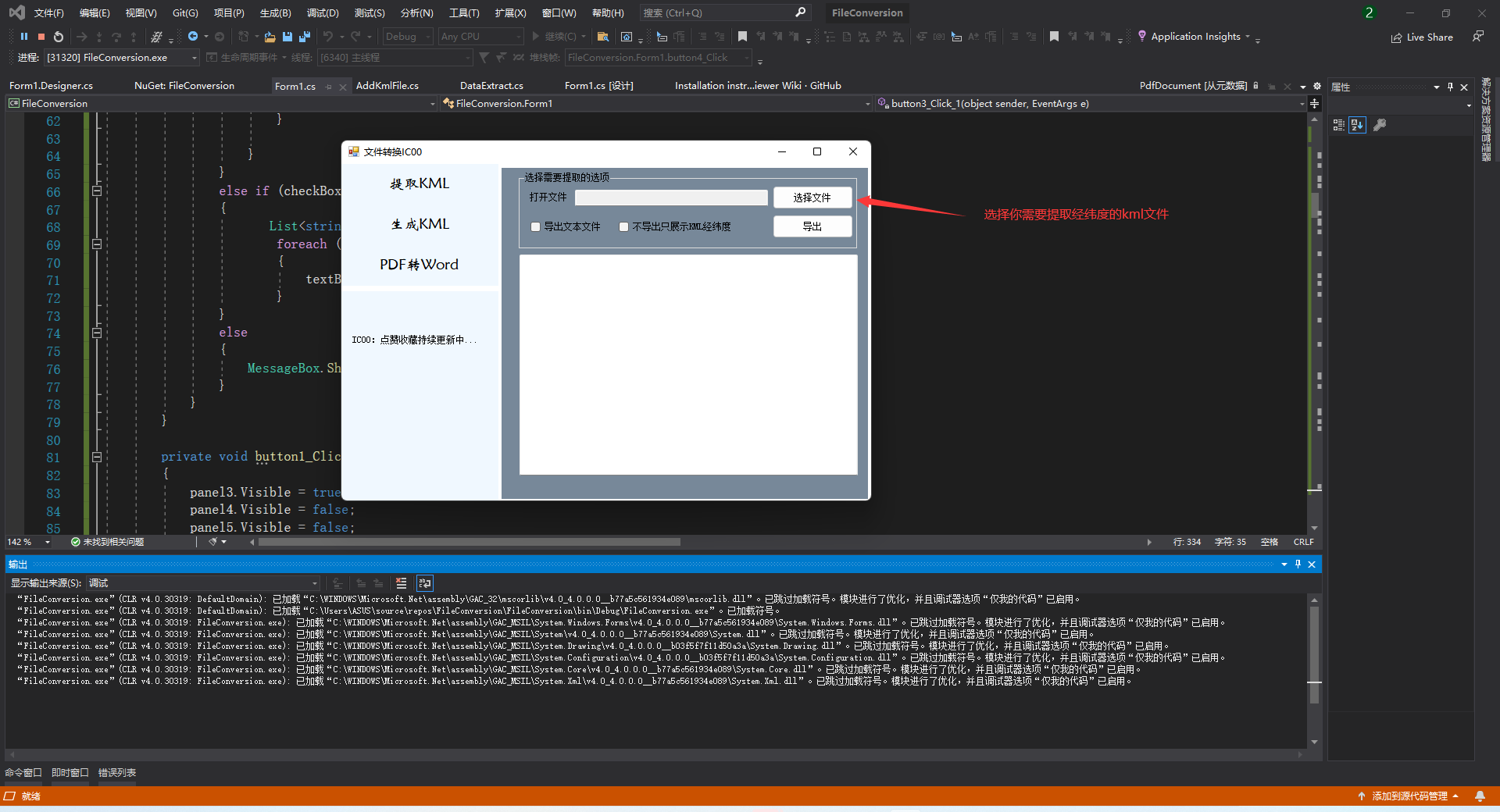
1.1提取过程,不导出TXT文档
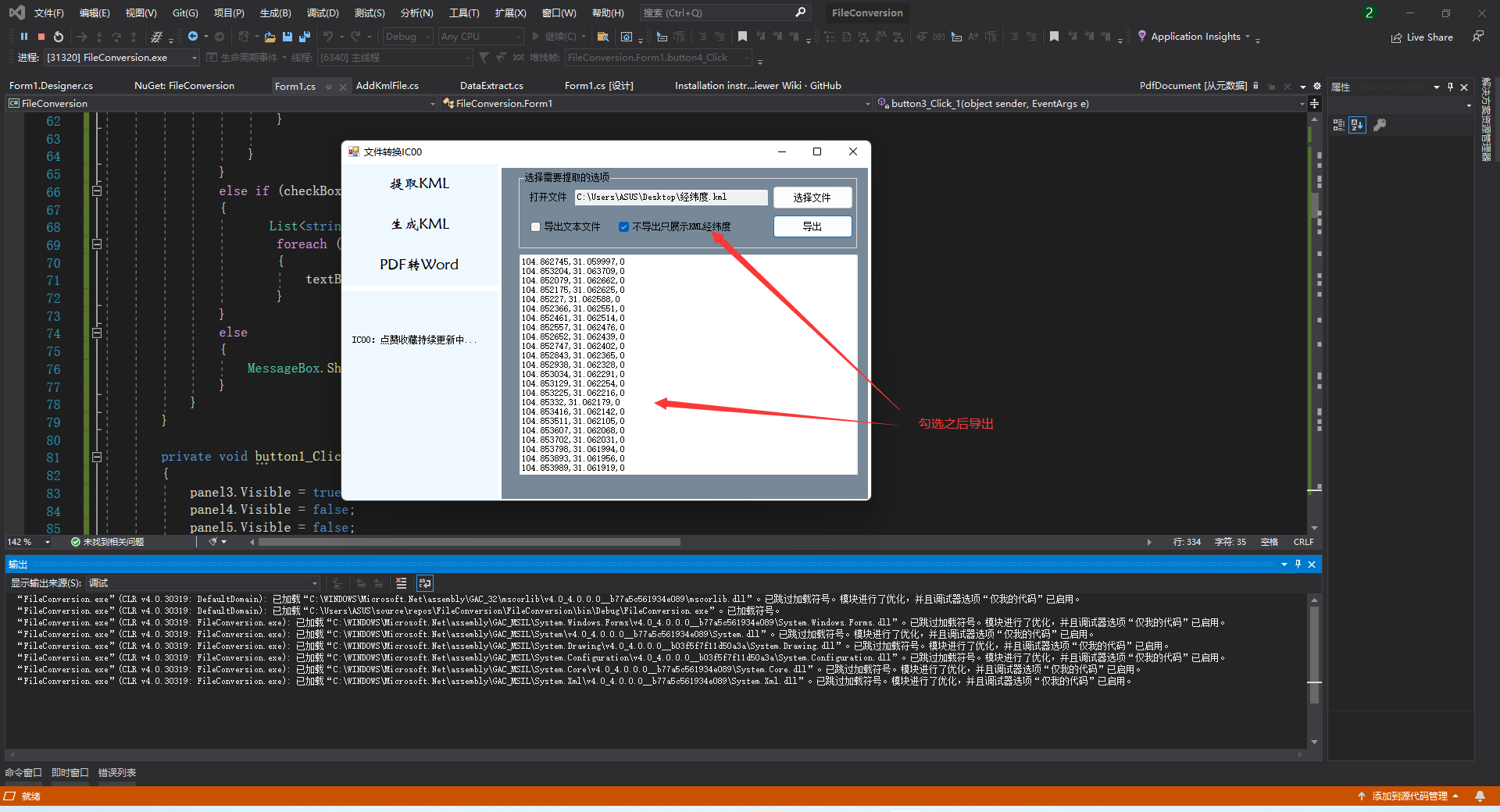
1.2提取过程,导出TXT文档

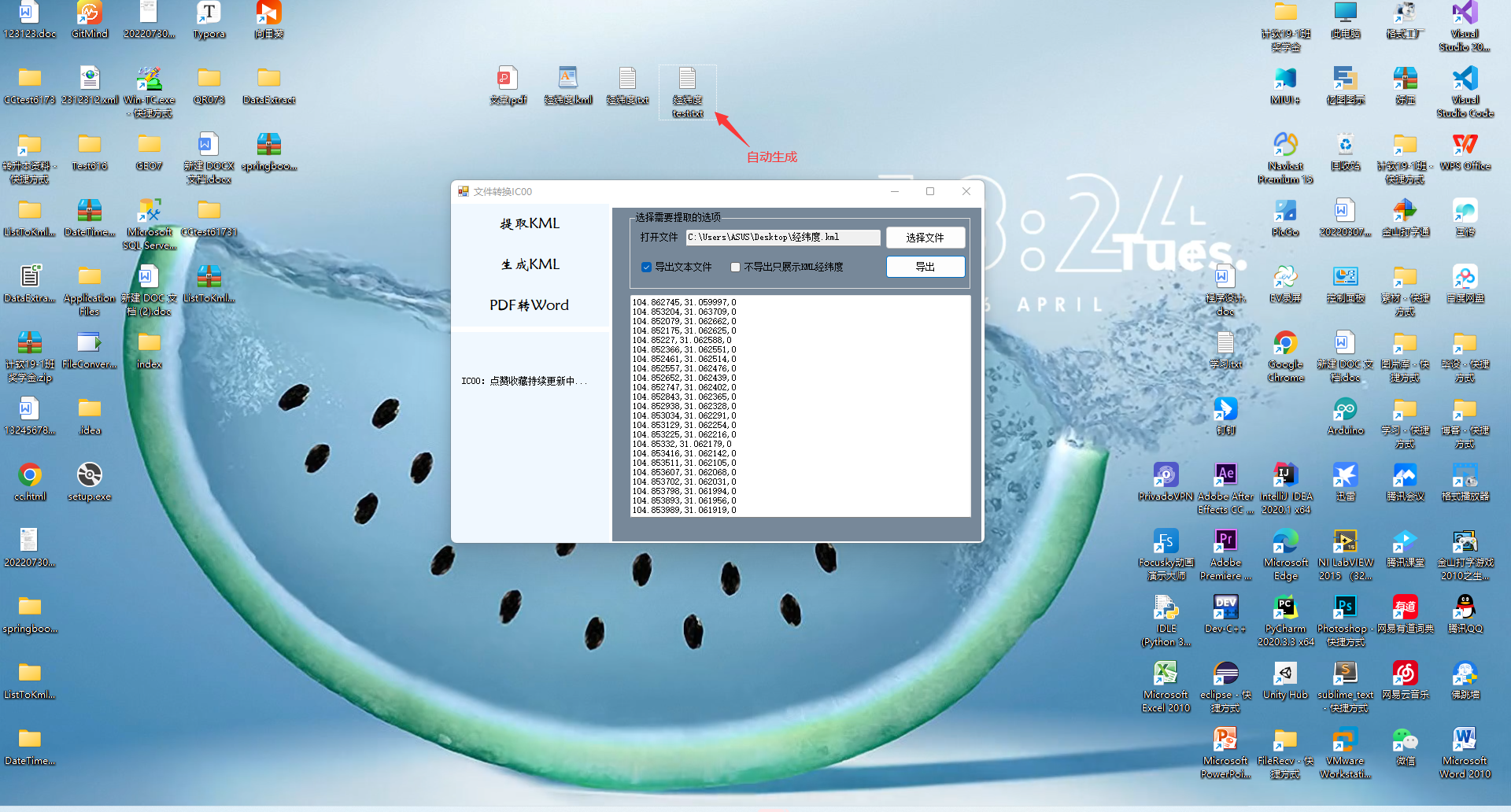
1.2 读取TXT文件生成KML文件
1.1读取过程使用文件
1.2读取过程使用输入框

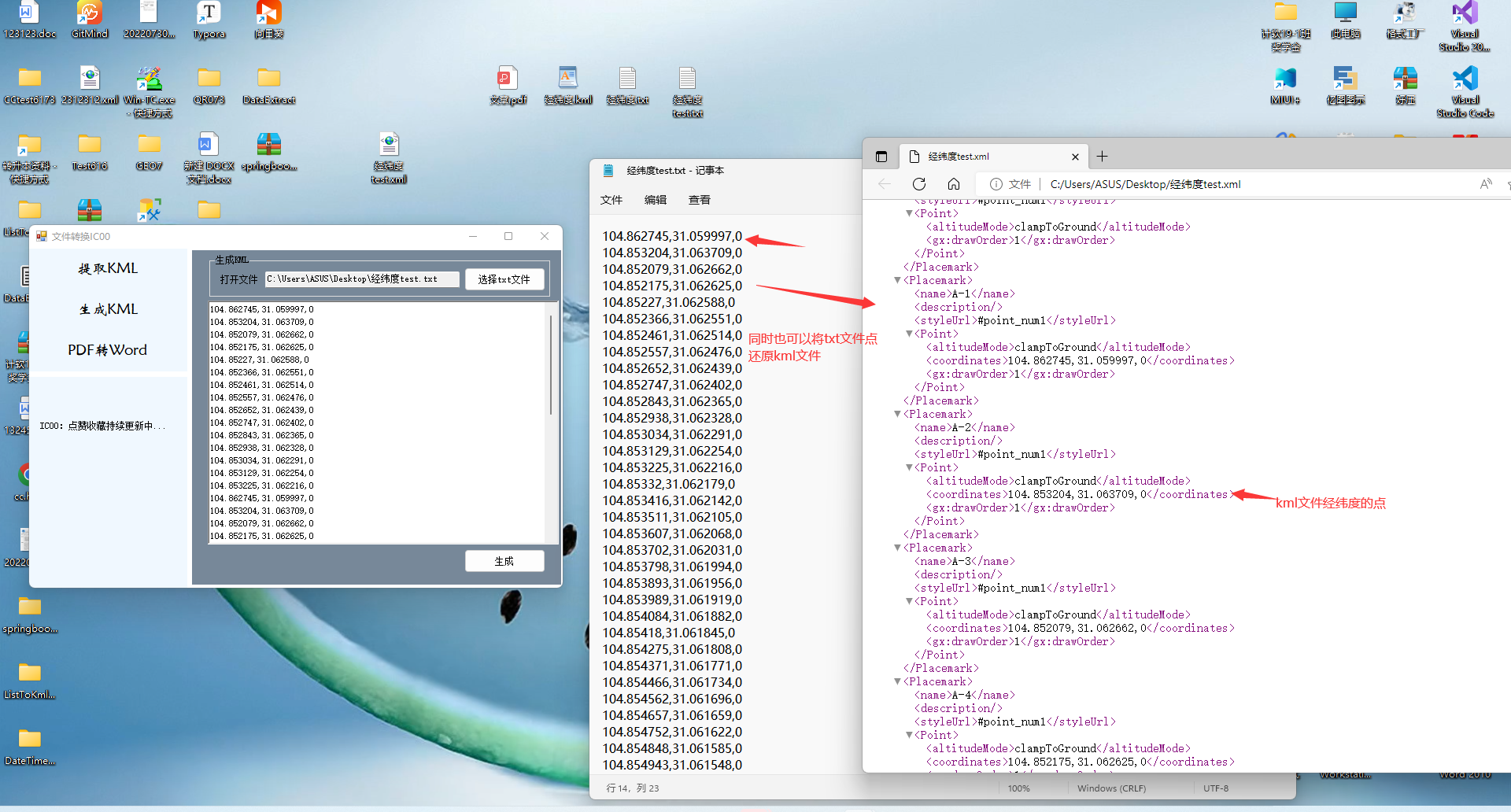
1.3注意事项
二、对PDF文件的格式转换
1.1PDF转Word文档


1.2PDF转EXCEl和HTML

1.3PDF转图片
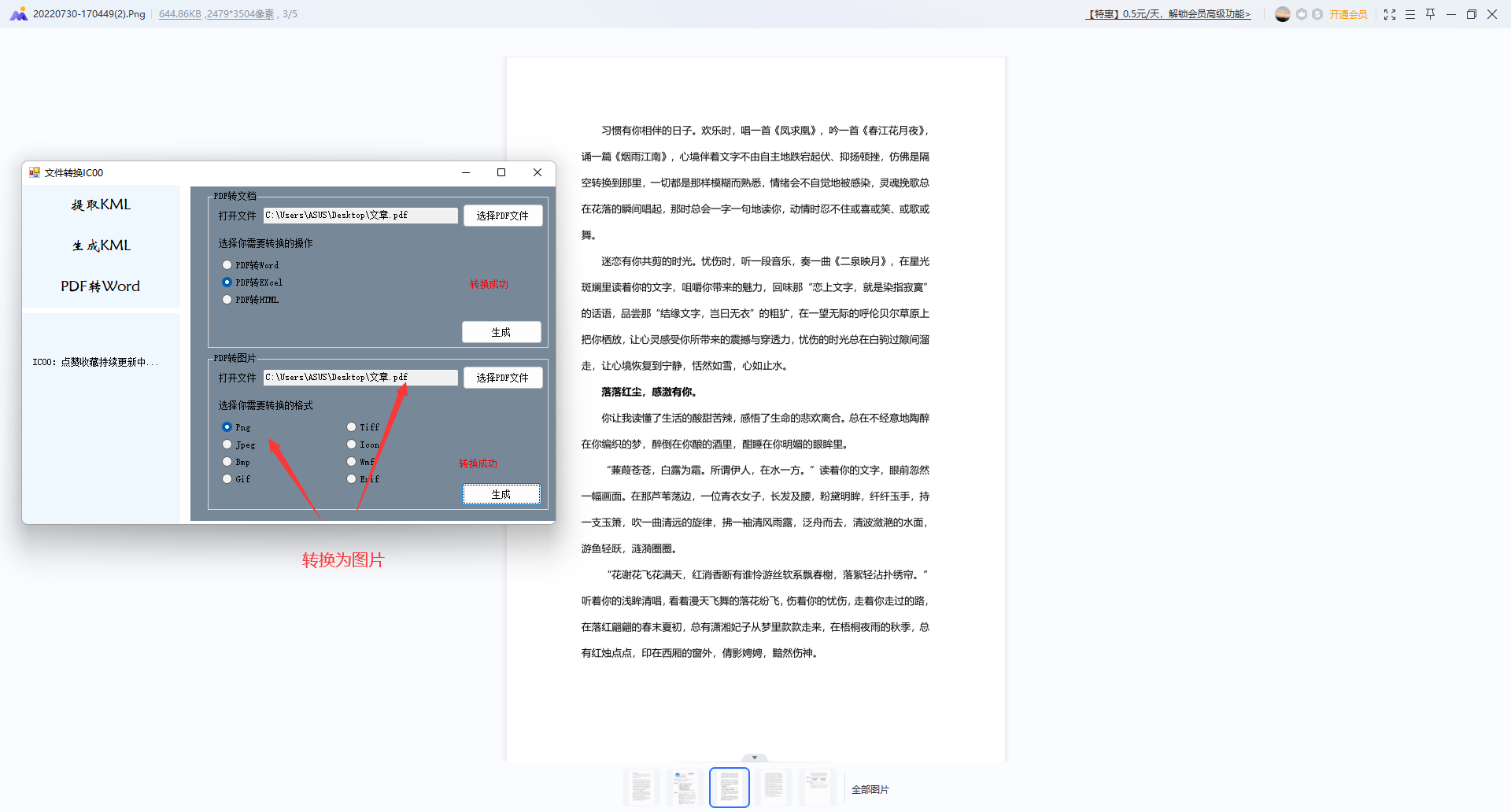
1.4注意事项
三、小工具界面设计


四、代码逻辑
using PdfiumViewer;
using Spire.Pdf;
using System;
using System.Collections.Generic;
using System.Drawing.Imaging;
using System.IO;
using System.Linq;
using System.Text;
using System.Windows.Forms;
namespace FileConversion
{
public partial class Form1 : Form
{
public Form1()
{
InitializeComponent();
}
public string KmlPath="";
public string txtPath = "";
public string PDFPath = "";
public string PDFPhotoPath = "";
public bool flag = false;
private void button6_Click(object sender, EventArgs e)
{
OpenFileDialog openFile = new OpenFileDialog();
openFile.Filter = "KML文件(*.kml)|*.kml|所有文件|*.*";
if (openFile.ShowDialog() != DialogResult.OK)//打开文件是否点击了取消
return ;
KmlPath = openFile.FileName;
textBox1.Text = KmlPath;
}
private void button7_Click(object sender, EventArgs e)
{
DataExtract data = new DataExtract();
if(KmlPath.Equals("")==true)
{
MessageBox.Show("选择文件之后才能导出");
}
else
{
if (checkBox1.Checked == true && checkBox2.Checked == false|| checkBox1.Checked == true && checkBox2.Checked == true)
{
List<string> list = data.MapConfigs(KmlPath);
string localFilePath = "";//文件路径
SaveFileDialog save = new SaveFileDialog();
save.Filter = "Txt(*.txt)|*.txt"; //设置文件类型
save.RestoreDirectory = true; //保存对话框是否记忆上次打开的目录
if (save.ShowDialog() == DialogResult.OK)//点了保存按钮进入
{
localFilePath = save.FileName.ToString(); //获得文件路径
string fileName = localFilePath.Substring(localFilePath.LastIndexOf("\\") + 1); //获取文件名,不带路径
//FileStream file = new FileStream(localFilePath, FileMode.Create);
foreach (string kml in list)
{
textBox2.Text += kml + "\r\n";
File.AppendAllText(localFilePath, kml+"\r\n");
}
}
}
else if (checkBox1.Checked == false && checkBox2.Checked == true)
{
List<string> list = data.MapConfigs(KmlPath);
foreach (string kml in list)
{
textBox2.Text += kml + "\r\n";
}
}
else
{
MessageBox.Show("选择你需要的项");
}
}
}
private void button1_Click(object sender, EventArgs e)
{
panel3.Visible = true;
panel4.Visible = false;
panel5.Visible = false;
}
private void button9_Click(object sender, EventArgs e)
{
OpenFileDialog openFile = new OpenFileDialog();
openFile.Filter = "Txt(*.txt)|*.txt";
if (openFile.ShowDialog() != DialogResult.OK)//打开文件是否点击了取消
return;
txtPath = openFile.FileName;
textBox4.Text = txtPath;
}
private void button8_Click(object sender, EventArgs e)
{
AddKmlFile addKml = new AddKmlFile();
List<string> list = new List<string>();
if (txtPath.Equals("") == true && richTextBox1.Text.Equals("") == true)
{
MessageBox.Show("不能生成空KMl,导入txt文件或者在文本框粘贴");
}
else if(txtPath.Equals("")==false&& richTextBox1.Text.Equals("") == true)
{
list.Clear();
string[] stringlines = File.ReadAllLines(txtPath, Encoding.Default);
for (int i = 0; i < stringlines.Length; i++)
{
list.Add(stringlines[i]);
}
addKml.addKmlFile(list);
}
else
{
string str = "";
list.Clear();
TextReader read = new System.IO.StringReader(richTextBox1.Text);
str= read.ReadLine();
while(str!=null)
{
list.Add(str);
str = read.ReadLine();
}
addKml.addKmlFile(list);
}
}
private void Form1_Load(object sender, EventArgs e)
{
panel3.Visible = true;
panel4.Visible = false;
panel5.Visible = false;
}
private void button2_Click(object sender, EventArgs e)
{
panel3.Visible = false;
panel4.Visible = true;
panel5.Visible = false;
}
private void button10_Click(object sender, EventArgs e)
{
Spire.Pdf.PdfDocument pdf = new Spire.Pdf.PdfDocument();
if(textBox3.Text.Equals("")!=true&&(radioButton1.Checked!=false|| radioButton2.Checked != false || radioButton3.Checked != false) )
{
if (radioButton1.Checked)
{
try
{
SaveFileDialog save = new SaveFileDialog();
save.Filter = "DOC(*.doc)|*.doc"; //设置文件类型
save.RestoreDirectory = true; //保存对话框是否记忆上次打开的目录
save.FileName = "请输入你要保存的文件名";
if (save.ShowDialog() == DialogResult.OK)//点了保存按钮进入
{
label6.Text = "转换中请耐心等待.....";
pdf.LoadFromFile(PDFPath);
pdf.SaveToFile(save.FileName.ToString(), FileFormat.DOC);//生成word的物理路径
label6.Text = "转换成功";
}
}
catch
{
label6.Text = "转换失败";
}
}
else if(radioButton2.Checked)
{
try
{
SaveFileDialog save = new SaveFileDialog();
save.Filter = "XlS(*.xlsx)|*.xlsx"; //设置文件类型
save.RestoreDirectory = true; //保存对话框是否记忆上次打开的目录
if (save.ShowDialog() == DialogResult.OK)//点了保存按钮进入
{
label6.Text = "转换中请耐心等待.....";
pdf.LoadFromFile(PDFPath);
pdf.SaveToFile(save.FileName.ToString(), FileFormat.XLSX);//生成word的物理路径
label6.Text = "转换成功";
}
}
catch
{
label6.Text = "转换失败";
}
}
else if(radioButton3.Checked)
{
try
{
SaveFileDialog save = new SaveFileDialog();
save.Filter = "HTML(*.html)|*.html"; //设置文件类型
save.RestoreDirectory = true; //保存对话框是否记忆上次打开的目录
if (save.ShowDialog() == DialogResult.OK)//点了保存按钮进入
{
label6.Text = "转换中请耐心等待.....";
pdf.LoadFromFile(PDFPath);
pdf.SaveToFile(save.FileName.ToString(), FileFormat.HTML);//生成word的物理路径
label6.Text = "转换成功";
}
}
catch
{
label6.Text = "转换失败";
}
}
}
else
{
MessageBox.Show("选择路径和转换方式之后才能生成文件");
}
}
private void button11_Click(object sender, EventArgs e)
{
OpenFileDialog openFile = new OpenFileDialog();
openFile.Filter = "PDF(*.pdf)|*.pdf";
if (openFile.ShowDialog() != DialogResult.OK)//打开文件是否点击了取消
return;
PDFPath = openFile.FileName;
textBox3.Text = PDFPath;
}
public static void PDFConvertTo(string inFilePath, string outFilePath, ImageFormat format)
{
outFilePath = $"{outFilePath}\\{DateTime.Now.ToString("yyyyMMdd-HHmmss")}";
using (var document = PdfiumViewer.PdfDocument.Load(inFilePath))
{
var pageCount = document.PageCount;
for (int i = 0; i < pageCount; i++)
{
string outFile = $"{outFilePath}({i + 1}).{format}";
var dpi = 300;
using (var image = document.Render(i, dpi, dpi, PdfRenderFlags.CorrectFromDpi))
{
var encoder = ImageCodecInfo.GetImageEncoders().First(c => c.FormatID == format.Guid);
var encParams = new EncoderParameters(1);
encParams.Param[0] = new EncoderParameter(
System.Drawing.Imaging.Encoder.Quality, 10L);
image.Save(outFile, encoder, encParams);
}
}
}
}
private void button5_Click(object sender, EventArgs e)
{
OpenFileDialog openFile = new OpenFileDialog();
openFile.Filter = "PDF(*.pdf)|*.pdf";
if (openFile.ShowDialog() != DialogResult.OK)//打开文件是否点击了取消
return;
PDFPhotoPath = openFile.FileName;
textBox5.Text = PDFPhotoPath;
}
private void button4_Click(object sender, EventArgs e)
{
if (textBox5.Text.Equals("") != true &&( radioButton5.Checked != false || radioButton6.Checked != false || radioButton7.Checked != false || radioButton8.Checked != false || radioButton9.Checked != false || radioButton10.Checked != false || radioButton11.Checked != false || radioButton12.Checked != false))
{
try
{
SaveFileDialog save = new SaveFileDialog();
save.RestoreDirectory = true; //保存对话框是否记忆上次打开的目录
save.FileName = "选择你需要保存的位置";
if (save.ShowDialog() == DialogResult.OK)//点了保存按钮进入
{
label7.Text = "转换中请耐心等待.....";
if(radioButton5.Checked==true)
{
PDFConvertTo(PDFPhotoPath, save.FileName.Substring(0, save.FileName.LastIndexOf("\\")), ImageFormat.Gif);
}
else if(radioButton6.Checked==true)
{
PDFConvertTo(PDFPhotoPath, save.FileName.Substring(0, save.FileName.LastIndexOf("\\")), ImageFormat.Bmp);
}
else if (radioButton7.Checked == true)
{
PDFConvertTo(PDFPhotoPath, save.FileName.Substring(0, save.FileName.LastIndexOf("\\")), ImageFormat.Jpeg);
}
else if (radioButton8.Checked == true)
{
PDFConvertTo(PDFPhotoPath, save.FileName.Substring(0, save.FileName.LastIndexOf("\\")), ImageFormat.Png);
}
else if (radioButton9.Checked == true)
{
PDFConvertTo(PDFPhotoPath, save.FileName.Substring(0, save.FileName.LastIndexOf("\\")), ImageFormat.Exif);
}
else if (radioButton10.Checked == true)
{
PDFConvertTo(PDFPhotoPath, save.FileName.Substring(0, save.FileName.LastIndexOf("\\")), ImageFormat.Wmf);
}
else if (radioButton11.Checked == true)
{
PDFConvertTo(PDFPhotoPath, save.FileName.Substring(0, save.FileName.LastIndexOf("\\")), ImageFormat.Icon);
}
else if (radioButton12.Checked == true)
{
PDFConvertTo(PDFPhotoPath, save.FileName.Substring(0, save.FileName.LastIndexOf("\\")), ImageFormat.Tiff);
}
label7.Text = "转换成功";
}
}
catch
{
label6.Text = "转换失败";
}
}
else
{
MessageBox.Show("选择路径和转换格式之后才能生成文件");
}
}
private void button3_Click_1(object sender, EventArgs e)
{
panel3.Visible = false;
panel4.Visible = false;
panel5.Visible = true;
}
}
}
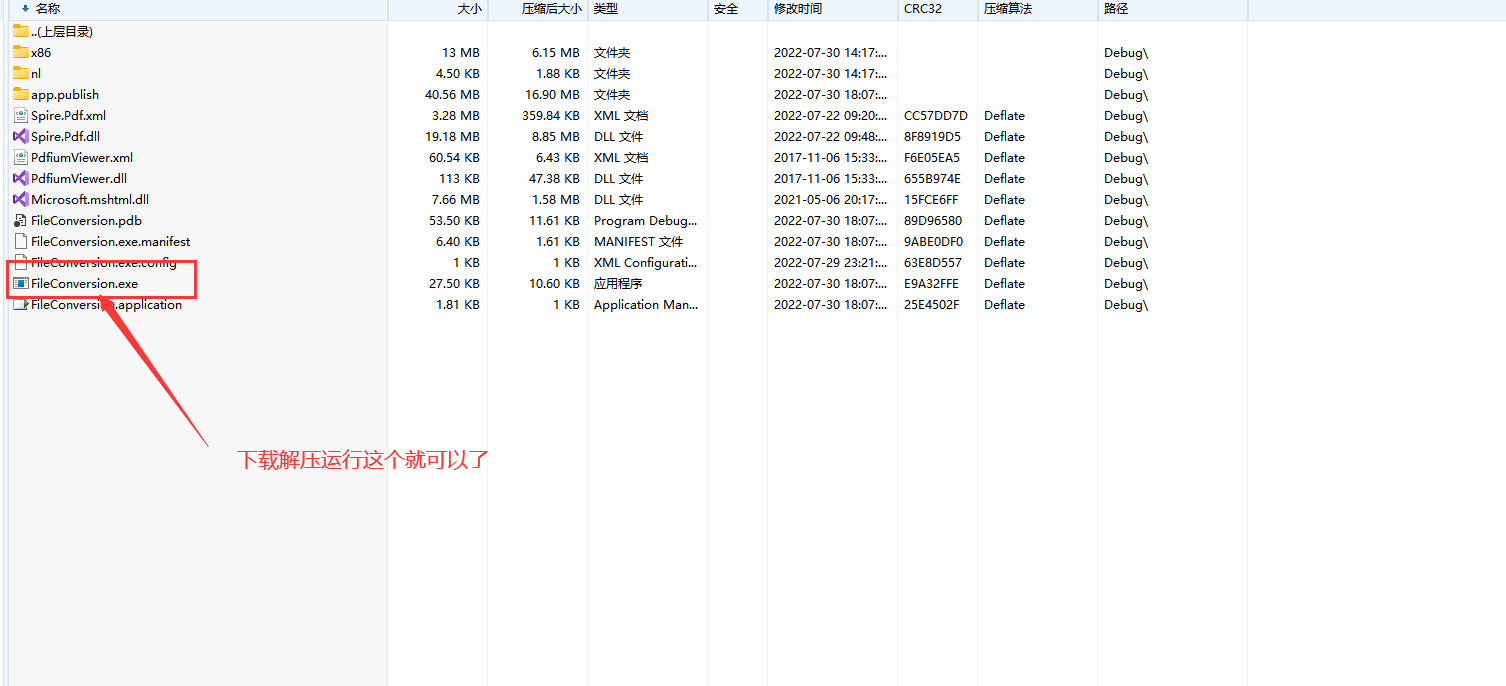
五、软件小工具下载安装
总结

边栏推荐
猜你喜欢
Mini Program Graduation Works WeChat Food Recipe Mini Program Graduation Design Finished Product (8) Graduation Design Thesis Template

03、GO语言变量定义、函数
How to add a game character to a UE4 scene

Prufer sequence
系统可用性:SRE口中的3个9,4个9...到底是个什么东西?

华为无线设备配置全局双链路冷备份(AC全局配置方式)

Advanced Algebra_Proof_The algebraic multiplicity of any eigenvalue of a matrix is greater than or equal to its geometric multiplicity

Deep Learning Course2 Week 2 Optimization Algorithms Exercises
Use Jenkins for continuous integration, this knowledge point must be mastered
13、学习MySQL 分组
随机推荐
JS prototype hasOwnProperty in Add method Prototype end point Inherit Override parent class method
NgRx Store createSelector 的单步调试和源代码分析
Prufer序列
SQL Server (design database--stored procedure--trigger)
PHP算法之有效的括号
PHP算法之电话号码的字母组合
JS 数组去重(含简单数组去重、对象数组去重)
JS prototype hasOwnProperty in 加方法 原型终点 继承 重写父类方法
PHP算法之最接近的三数之和
excel edit a cell without double clicking
复现gallerycms字符长度限制短域名绕过
[Recommended books] The first self-driving technology book
用virtualenv和Virtualenvwrapper虚拟环境管理工具创建虚拟环境
小程序毕设作品之微信美食菜谱小程序毕业设计成品(6)开题答辩PPT
【SeaTunnel】从一个数据集成组件演化成企业级的服务
力扣第 304 场周赛复盘
03、GO语言变量定义、函数
Go 微服务开发框架DMicro的设计思路
ROS2初级知识(8):Launching启动多节点
华为无线设备配置全局双链路冷备份(AC全局配置方式)