当前位置:网站首页>ROS topic name setting
ROS topic name setting
2022-07-27 06:19:00 【Three assassins】
1 rosrun Set topic remapping
Unmapped previous rqt_graph

rosrun Name remapping Syntax : rorun Package name The node name Topic name := New topic name
Realization teleop_twist_keyboard There are two communication schemes with turtle display node :
1. programme 1
take teleop_twist_keyboard The topic of the node is set to /turtle1/cmd_vel
Start keyboard control node :rosrun teleop_twist_keyboard teleop_twist_keyboard.py /cmd_vel:=/turtle1/cmd_vel
Start the tortoise display node : rosrun turtlesim turtlesim_node
The two can realize normal communication
The modified rqt_graph
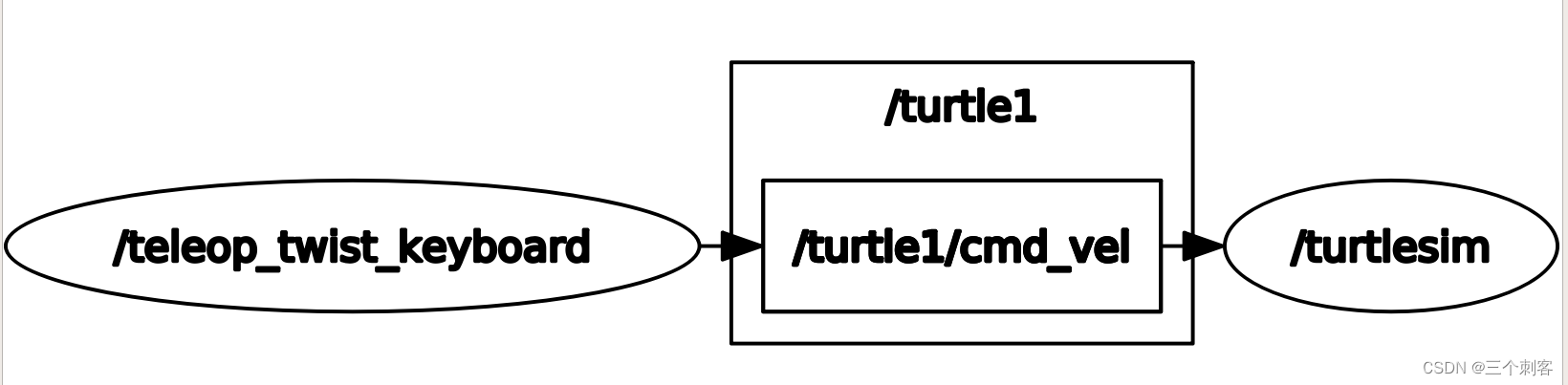

At this time, there is no /cmd_vel
2. programme 2
Set the topic of the tortoise display node to /cmd_vel
Start keyboard control node :rosrun teleop_twist_keyboard teleop_twist_keyboard.py
Start the tortoise display node : rosrun turtlesim turtlesim_node /turtle1/cmd_vel:=/cmd_vel
The two can realize normal communication


2 launch File set topic remapping
launch File set topic remapping Syntax :
<node pkg="xxx" type="xxx" name="xxx">
<remap from=" The original topic " to=" New topics " />
</node>
Realization teleop_twist_keyboard There are two communication schemes with turtle display node :
1. programme 1
take teleop_twist_keyboard The topic of the node is set to /turtle1/cmd_vel
<launch>

    <node pkg="turtlesim" type="turtlesim_node" name="t1" />
    <node pkg="teleop_twist_keyboard" type="teleop_twist_keyboard.py" name="key">
        <remap from="/cmd_vel" to="/turtle1/cmd_vel" />
    </node>

</launch>
2. programme 2
Set the topic of the tortoise display node to /cmd_vel
<!--  Keyboard controls tortoise movement  -->
<launch>
    <!--  Set the turtle's topic to be consistent with the keyboard control  -->
    <node pkg="turtlesim" type="turtlesim_node" name="t1">
         <remap from="/turtle1/cmd_vel" to="/cmd_vel" />
    </node>
    <node pkg="teleop_twist_keyboard" type="teleop_twist_keyboard.py" name="key" />
    <!--  Set the topic controlled by the keyboard to be consistent with the tortoise  -->
</launch>
3 Code and set the topic name
The name of the topic and the namespace of the node 、 The name of the node has a certain relationship , Topic names can be roughly divided into three types :
- overall situation ( Topic reference ROS System , Level with node namespace )
- relative ( The topic refers to the namespace of the node , Level with node name )
- private ( Topic reference node name , Is a child of the node name )
Demonstrate specific relationships with coding .
int main(int argc, char *argv[])
{
    //1. Initialize the node and set a node name
    //2. Set different types of topics
    //3. When starting the node , Pass a  __ns:= xxx
    //4. After the node is started , Use  rostopic  View topic information
    ros::init(argc,argv,"hello");
    //ros::NodeHandle nh;

    // The core : Set different types of topics
    //1. overall situation    ---  The topic name needs to be written with / start ( You can also set your own namespace ), In this case, and nodes ( Namespace and name ) It doesn't matter.
    //ros::Publisher pub = nh.advertise<std_msgs::String>("/chatter",1000);
    //ros::Publisher pub = nh.advertise<std_msgs::String>("/yyy/chatter",1000);
    //2. relative
    //ros::Publisher pub = nh.advertise<std_msgs::String>("chatter",1000);
    //ros::Publisher pub = nh.advertise<std_msgs::String>("yyy/chatter",1000);
    //3. private    Need to create specific  NodeHandle
    ros::NodeHandle nh("~");
    //ros::Publisher pub = nh.advertise<std_msgs::String>("chatter",1000);
    ros::Publisher pub = nh.advertise<std_msgs::String>("yyy/chatter",1000);
    // Be careful : If private NH Create a topic with  /  start ( Global topics ), The generated topic is global and non private
    // Global topics have higher priority
    while(ros::ok())
    {

    }
    return 0;
}
1.1 Global name
Format : With / The name at the beginning , It has nothing to do with the node name
Example 1:
ros::Publisher pub = nh.advertise<std_msgs::String>("/chatter",1000);
result 1:
/chatter
Example 2:
ros::Publisher pub = nh.advertise<std_msgs::String>("/yyy/chatter",1000);
result 2:
/yyy/chatter
1.2 Relative name
Format : Not / The name at the beginning , Reference namespace ( Level with node name ) To determine the topic name
Example 1:
ros::Publisher pub = nh.advertise<std_msgs::String>("chatter",1000);
result 1:
xxx/chatter
Example 2:
ros::Publisher pub = nh.advertise<std_msgs::String>("yyy/chatter",1000);
xxx/yyy/chatter
1.3 Private name
Format : With ~ The name at the beginning
Example 1:
ros::NodeHandle nh("~");
ros::Publisher pub = nh.advertise<std_msgs::String>("chatter",1000);
result 1:
/xxx/hello/chatter
Example 2:
ros::NodeHandle nh("~");
ros::Publisher pub = nh.advertise<std_msgs::String>("yyy/chatter",1000);
result 2:
/xxx/hello/yyy/chatter
PS: When using ~, And topic names sometimes / At the beginning , Then the topic name is absolute
Example 3:
ros::NodeHandle nh("~");
ros::Publisher pub = nh.advertise<std_msgs::String>("/yyy/chatter",1000);
result 3:
/yyy/chatter
边栏推荐
猜你喜欢






随机推荐
Brief introduction to unity menu interface
Solve binary tree (7)
力扣题解 二叉树(7)
机器人导航
ROM of IP core
Install Wireshark correctly
Unityshader Gaussian blur
ROS分布式通信
软件测试基础概念篇
Ulcl function --5gc
SQL初识
wireshark功能介绍
Remote sensing image recognition training strategy
力扣每日一题(链表模拟)
Dynamic planning for solving problems (3)
PZK学C语言之初识指针
TF坐标变换
Automated Deployment Project
Tangent space and TBN matrix
Leetcode one question per day 30. Concatenate substrings of all words