当前位置:网站首页>中文输入法输入事件composition的使用
中文输入法输入事件composition的使用
2022-06-11 11:29:00 【Michael18811380328】
中文输入法输入事件composition的使用
最近遇到一个问题:如果一个 INPUT 中,用户使用中文输入法,那么原生的键盘事件就会发生变化,无法获取正确的 keycode 及对应的输入内容。从前端的能力,只能操作浏览器相关的 API,不能获取中文输入法的内置 API。查阅资料后,可以使用 composition 事件来监听相关的时间。
不同中文输入法的情况可能大同小异(例如搜狗输入法,中文输入时,keycode 就是225,这样无法检测到点击的键)
composition 事件组合分成三个事件:compositionstart、compositionupdate、compositionend,分别对应中文输入法下,开始输入、更新输入、结束输入的事件。具体的细节如下。
文本合成系统如 input method editor(即输入法编辑器)开始新的输入合成时会触发 compositionstart 事件。
例如,当用户使用拼音输入法开始输入汉字时,这个事件就会被触发。
示例
// 首先获取INPUT元素,或者全局document元素
const inputElement = document.querySelector('input[type="text"]');

// 当输入区域获取焦点后,点击键盘,会触发 composition 事件组合,通过 event.data 可以获取输入的字符
inputElement.addEventListener('compositionstart', (event) => {

  console.log(`generated characters were: ${
      event.data}`);
});
下面可以显示三个不同事件的触发顺序
点击Input获取焦点,切换到中文输入法,点击键盘,然后触发下面事件:
首先触发一次 compositionstart 开始输入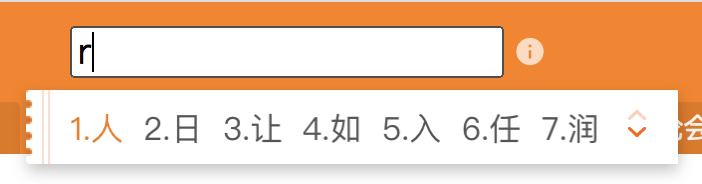
然后触发一次 compositionupdate,如果继续点击键盘,那么继续触发这个事件
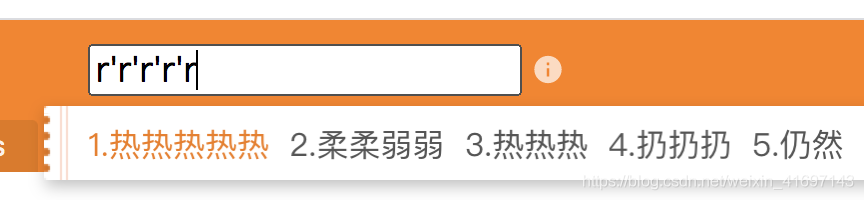
最后,点击空格键输入中文时,触发 compositionend 事件

const inputElement = document.querySelector('input[type="text"]');
const log = document.querySelector('.event-log-contents');
const clearLog = document.querySelector('.clear-log');

clearLog.addEventListener('click', () => {

    log.textContent = '';
});

function handleEvent(event) {

    log.textContent = log.textContent + `${
      event.type}: ${
      event.data}\n`;
}

inputElement.addEventListener('compositionstart', handleEvent);
inputElement.addEventListener('compositionupdate', handleEvent);
inputElement.addEventListener('compositionend', handleEvent);
参考文献
https://developer.mozilla.org/en-US/docs/Web/API/CompositionEvent
https://developer.mozilla.org/en-US/docs/Web/API/Element/compositionstart_event
https://www.jianshu.com/p/e9c837eba083
http://shenyujie.cc/2017/08/24/indirectInput/
https://blog.csdn.net/nosuchobjecterror/article/details/93193229
边栏推荐
- Appearance mode -- it has been used in various packages for a long time!
- 苹果MobileOne: 移动端仅需1ms的高性能骨干
- Is it safe for Xiaobai to open an account directly on the flush?
- 17.4创建多个线程、数据共享问题分析与案例代码
- [go] interpretation of gin source code
- Problems encountered when using nailing intranet to penetrate and upload PHP projects
- Node connects to MySQL database and writes fuzzy query interface
- 文件excel导出
- WordPress数据库缓存插件:DB Cache Reloaded
- Split data - horizontal split and vertical split
猜你喜欢
![Définir l'adresse de réception par défaut [Centre commercial du projet]](/img/eb/2864b124b66d01849315a367948ed4.png)
Définir l'adresse de réception par défaut [Centre commercial du projet]

Node连接MySql数据库写模糊查询接口

CAP理论听起来很高大上,其实很简单
设置默认收货地址【项目 商城】

Introduction to database system -- Chapter 2 -- relational database (2.4 relational algebra)

SpingBoot+Quartrz生产环境的应用支持分布式、自定义corn、反射执行多任务

收货地址列表展示【项目 商城】

Enterprise wechat applet pit avoidance guide, welcome to add...

01_ Description object_ Class diagram

再不刷题就晚了,最全的BAT大厂面试题整理
随机推荐
Node connects to MySQL database and writes fuzzy query interface
统计出现次数最多的前K个字符串
沒有財富就不能自由嗎?
The complete manual of the strongest Flink operator is a good choice for the interview~
WordPress数据库缓存插件:DB Cache Reloaded
Liufan, CFO of papaya mobile, unleashes women's innovative power in the digital age
Modify WordPress management account name plug-in: admin rename extended
拆分数据---水平拆分和纵向拆分
Introduction to database system -- Chapter 2 -- relational database (2.4 relational algebra)
文件excel导出
JS interview questions - arrow function, find and filter some and every
MSF CS OpenSSL traffic encryption
Exploration of kangaroo cloud data stack on spark SQL optimization based on CBO
广东市政安全施工资料管理软件2022新表格来啦
找到自己的优势,才能干活不累,事半功倍!
The no category parents plug-in helps you remove the category prefix from the category link
Vscade -- vscode multi window name is configured as project name
快速搭建ELK7.3
命令模式--进攻,秘密武器
JVM class loading process