当前位置:网站首页>Win11麦克风测试在哪里?Win11测试麦克风的方法
Win11麦克风测试在哪里?Win11测试麦克风的方法
2022-07-02 22:10:00 【小白一键重装系统】
Win11麦克风测试在哪里?如果你的麦克风很久没使用了,想要测试麦克风能否正常使用,那么可以参考以下小编带来的Win11测试麦克风的两种方法,这个步骤教程还是比较简单的。
还有详细的系统重装教程可参考
方法一:
1、首先,按键盘上的【 Win + X 】组合键,或右键点击任务栏上的【Windows开始徽标】,在打开的右键菜单项中,选择【设置】;

2、Windows 设置窗口,左侧选择的是【系统】,右侧找到并点击【声音(音量级别、输出、输入、声音设备)】;

3、当前路径为:系统>声音,输入下,点击【麦克风】设备;
4、输入设置下,点击测试麦克风旁的【开始测试】。

方法二:
1、按【 Win + S 】组合键,打开Windows 搜索,或直接点击任务栏上的【搜索图标】,在打开的Windows 搜索,搜索框中,输入【控制面板】,然后点击打开系统给出的最佳匹配【控制面板应用】;

2、控制面板窗口,类别查看方式下,找到并点击【轻松使用】;

3、当前路径为:控制面板>轻松使用,点击语音识别下的【设置麦克风】;

4、根据自己的麦克风类型进行选择,比如选择【桌面麦克风(这些麦克风放在桌面上)】,选择好之后,点击【下一页】;

5、接着,根据系统提示【设置麦克风】;

6、清晰读出系统要求的语句,完成麦克风测试;

7、麦克风设置完成后,点击【完成】。

Win11麦克风测试在哪里?如果你的麦克风很久没使用了,想要测试麦克风能否正常使用,那么可以参考以下小编带来的Win11测试麦克风的两种方法,这个步骤教程还是比较简单的。
方法一:
1、首先,按键盘上的【 Win + X 】组合键,或右键点击任务栏上的【Windows开始徽标】,在打开的右键菜单项中,选择【设置】;
2、Windows 设置窗口,左侧选择的是【系统】,右侧找到并点击【声音(音量级别、输出、输入、声音设备)】;
3、当前路径为:系统>声音,输入下,点击【麦克风】设备;

4、输入设置下,点击测试麦克风旁的【开始测试】。
方法二:
1、按【 Win + S 】组合键,打开Windows 搜索,或直接点击任务栏上的【搜索图标】,在打开的Windows 搜索,搜索框中,输入【控制面板】,然后点击打开系统给出的最佳匹配【控制面板应用】;
2、控制面板窗口,类别查看方式下,找到并点击【轻松使用】;
3、当前路径为:控制面板>轻松使用,点击语音识别下的【设置麦克风】;
4、根据自己的麦克风类型进行选择,比如选择【桌面麦克风(这些麦克风放在桌面上)】,选择好之后,点击【下一页】;
5、接着,根据系统提示【设置麦克风】;
6、清晰读出系统要求的语句,完成麦克风测试;
7、麦克风设置完成后,点击【完成】。
边栏推荐
- 从底层结构开始学习FPGA----Xilinx ROM IP的定制与测试
- psnr,ssim,rmse三个指标的定量分析
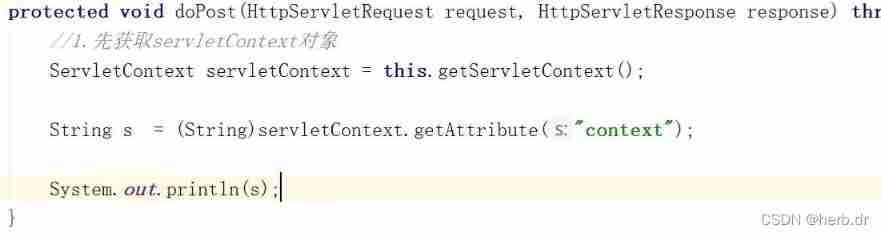
- ServletContext learning diary 1
- Application of containerization technology in embedded field
- Splunk audit 的设定
- golang中new与make的区别
- Static file display problem
- The first batch of Tencent cloud completed the first cloud native security maturity assessment in China
- Xshell configuration xforward forwarding Firefox browser
- xshell配置xforward转发火狐浏览器
猜你喜欢






随机推荐
Application of containerization technology in embedded field
Splunk audit 的设定
MySQL reset password, forget password, reset root password, reset MySQL password
Boot actuator - Prometheus use
SQL advanced syntax
P7072 [csp-j2020] live broadcast Award
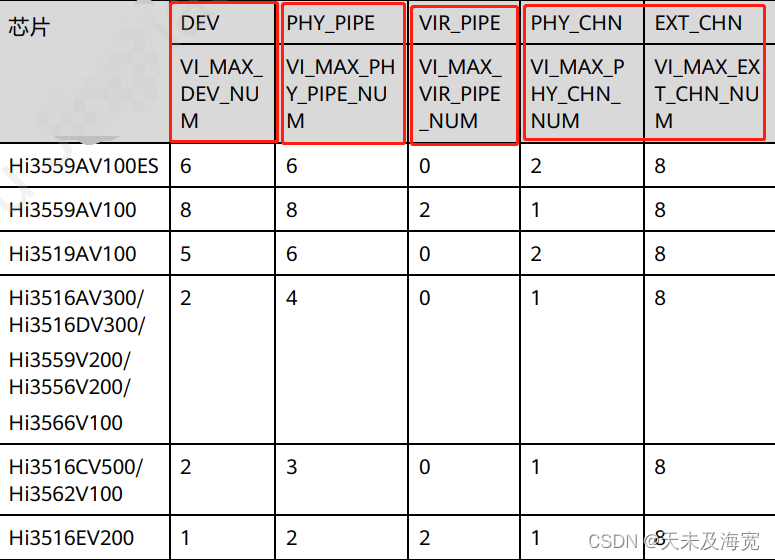
Construction of Hisilicon 3559 universal platform: draw a frame on the captured YUV image
Call vs2015 with MATLAB to compile vs Project
20220524_数据库过程_语句留档
设置单击右键可以选择用VS Code打开文件
Potplayer set minimized shortcut keys
Tronapi-波场接口-源码无加密-可二开--附接口文档-基于ThinkPHP5封装-作者详细指导-2022年7月1日08:43:06
Set right click to select vs code to open the file
Jericho's thimble reaction when directly touching the prototype is abnormal [chapter]
C#中Linq用法汇集
P1007 single log bridge
【喜欢的诗词】好了歌
PMP project integration management
抖音实战~点赞数量弹框
QT qsplitter splitter