当前位置:网站首页>ELK - X-Pack设置用户密码
ELK - X-Pack设置用户密码
2022-06-11 11:27:00 【如锋】
之前记录过怎样使用Nginx代理为Kibana添加登录验证功能,但其实Elastic本身也提供了基本的访问控制功能。
虽然相关功能在X-Pack里,但还是可以免费使用的。
参考官网subscriptions,可以看到在Basic License下的Security项目中包含了Role-based access control。
Enable X-Pack Security
Elasticsearch设置密码命令如下。
$ sudo /usr/share/elasticsearch/bin/elasticsearch-setup-passwords interactive

Unexpected response code [500] from calling GET http://192.168.1.88:9200/_security/_authenticate?pretty
It doesn't look like the X-Pack security feature is enabled on this Elasticsearch node.
Please check if you have enabled X-Pack security in your elasticsearch.yml configuration file.

ERROR: X-Pack Security is disabled by configuration.
设置前,需要先enable X-Pack security。
sudo vi /etc/elasticsearch/elasticsearch.yml
xpack.security.enabled: true
xpack.security.transport.ssl.enabled: true
SSL也要同时enable,否则报错。
[2019-10-10T15:11:09,630][ERROR][o.e.b.Bootstrap          ] [appserver01] node validation exception
[1] bootstrap checks failed
[1]: Transport SSL must be enabled if security is enabled on a [basic] license. Please set [xpack.security.transport.ssl.enabled] to [true] or disable security by setting [xpack.security.enabled] to [false]
现在可以开始设置密码。
可以看到Elasticsearch预置了许多角色和用户。
$ sudo /usr/share/elasticsearch/bin/elasticsearch-setup-passwords interactive
Initiating the setup of passwords for reserved users elastic,apm_system,kibana,logstash_system,beats_system,remote_monitoring_user.
You will be prompted to enter passwords as the process progresses.
Please confirm that you would like to continue [y/N]y


Enter password for [elastic]:
Reenter password for [elastic]:
Enter password for [apm_system]:
Reenter password for [apm_system]:
Enter password for [kibana]:
Reenter password for [kibana]:
Enter password for [logstash_system]:
Reenter password for [logstash_system]:
Enter password for [beats_system]:
Reenter password for [beats_system]:
Enter password for [remote_monitoring_user]:
Reenter password for [remote_monitoring_user]:
Changed password for user [apm_system]
Changed password for user [kibana]
Changed password for user [logstash_system]
Changed password for user [beats_system]
Changed password for user [remote_monitoring_user]
Changed password for user [elastic]
重启
sudo systemctl restart elasticsearch.service
需要加密码才能访问。
$ curl localhost:9200
{"error":{"root_cause":[{"type":"security_exception","reason":"missing authentication credentials for REST request [/]","header":{"WWW-Authenticate":"Basic realm=\"security\" charset=\"UTF-8\""}}],"type":"security_exception","reason":"missing authentication credentials for REST request [/]","header":{"WWW-Authenticate":"Basic realm=\"security\" charset=\"UTF-8\""}},"status":401}(base)

$ curl localhost:9200 -uelastic:<password>
{
  "name" : "appserver01",
  "cluster_name" : "elasticsearch",
  "cluster_uuid" : "wCDlDy6UTriUSuZuDrqWrw",
  "version" : {
    "number" : "7.3.2",
    "build_flavor" : "default",
    "build_type" : "rpm",
    "build_hash" : "1c1faf1",
    "build_date" : "2019-09-06T14:40:30.409026Z",
    "build_snapshot" : false,
    "lucene_version" : "8.1.0",
    "minimum_wire_compatibility_version" : "6.8.0",
    "minimum_index_compatibility_version" : "6.0.0-beta1"
  },
  "tagline" : "You Know, for Search"
}
Update Kibana Configure
After password setup in Elasticsearch, have to update configure for Kibana, Logstash and Beats.
e.g. Kibana
sudo vi /etc/kibana/kibana.yml
# sudo vi /etc/heartbeat/heartbeat.yml
elasticsearch.username: "elastic"
elasticsearch.password: "<password>"
sudo systemctl restart kibana.service
After restart, refresh Kibana and you will be asked for username and password now.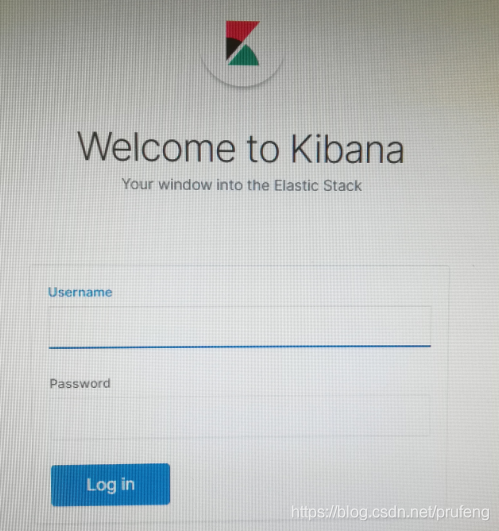
To change the password, can go to Kibana Management -> Security -> Users.

Or change data in Elasticsearch directly.
POST /_security/user/elastic/_password
{
  "password": "123456"
}
边栏推荐
- Template engine - thymeleaf
- Etcd的运行时重配置
- Liufan, CFO of papaya mobile, unleashes women's innovative power in the digital age
- An introduction to creating VOC datasets or Yolo datasets using labelimg
- 17.5 互斥量的概念、用法、死锁演示与解决详解
- WordPress用户名修改插件:Username Changer
- Is the securities account opened by qiniu Gang safe and reliable?
- 装饰模式--小美的生日蛋糕
- Application of volatile in single chip microcomputer
- 如何养成一个好习惯?靠毅力?靠决心?都不是!
猜你喜欢

An introduction to creating VOC datasets or Yolo datasets using labelimg

Introduction to database system -- Chapter 2 -- relational database (2.4 relational algebra)

SpingBoot+Quartrz生产环境的应用支持分布式、自定义corn、反射执行多任务

再不刷题就晚了,最全的BAT大厂面试题整理

MYCAT sub database and sub table

The complete manual of the strongest Flink operator is a good choice for the interview~

Use pydub to modify the bit rate of the wav file, and an error is reported: c:\programdata\anaconda3\lib\site packages\pydub\utils py:170: RuntimeWarning:
![my.cnf中 [mysql]与[mysqld] 的区别 引起的binlog启动失败的问题](/img/bd/a28e74654c7821b3a9cd9260d2e399.png)
my.cnf中 [mysql]与[mysqld] 的区别 引起的binlog启动失败的问题

Display of receiving address list 【 project mall 】

适配器模式--能不能好好说话?
随机推荐
推荐几款Gravatar头像缓存插件
What is the best annuity insurance product in 2022?
Node连接MySql数据库写模糊查询接口
Lifeifei: I am more like a scientist in physics than an engineer
迭代器模式--沙场秋点兵
MyCat-分库分表
The tutor transferred me 800 yuan and asked me to simulate a circuit (power supply design)
使用pydub修改wav文件的比特率,报错:C:\ProgramData\Anaconda3\lib\site-packages\pydub\utils.py:170: RuntimeWarning:
Études à la fin de l'enseignement 03
李飞飞:我更像物理学界的科学家,而不是工程师|深度学习崛起十年
Node connects to MySQL database and writes fuzzy query interface
Publish WordPress database cache plug-in: DB cache reloaded 3.1
JS interview questions - arrow function, find and filter some and every
Where is it safer to open an account for soda ash futures? How much capital is needed to buy soda ash futures?
How to understand CPU load
Is it safe for Xiaobai to open an account directly on the flush?
設置默認收貨地址【項目 商城】
202年最新热门收益较高的年金险产品是什么?
No category parents插件帮你去掉分类链接中的category前缀
CPU负载怎么理解