当前位置:网站首页>The simplest DIY serial port Bluetooth hardware implementation scheme
The simplest DIY serial port Bluetooth hardware implementation scheme
2022-06-23 11:00:00 【daodanjishui】
51 SCM Internet of things smart car series article catalog
Chapter one : The most simple DIY Of 51 Bluetooth remote control car design
Second articles : The most simple DIY Serial port Bluetooth hardware implementation scheme
List of articles
Preface
daodanjishui The simplest of the core original technologies of the Internet of things DIY Serial port Bluetooth hardware implementation scheme .
There are various open source smart cars on the market , But there are complex and simple , If you want to get started DIY Internet of things smart car Bluetooth controller , This plan will give you a quick and efficient plan .
One 、 The most simple DIY What is the hardware implementation scheme of serial port Bluetooth ?
In the first article, we realized 51 SCM intelligent car , But at that time, the Bluetooth debugging assistant was used to send remote control commands to control the car . The reason is that getting started doesn't need to be too complicated , Now we need to make a Bluetooth remote control to replace the mobile phone Bluetooth , So I used ESP32 Single chip microcomputer , Because this MCU has Bluetooth function .
Although there are many open-source smart car remote control solutions on the market , I also played many wireless remote control aircraft models when I was a child , However, the scheme designed independently by its own software and hardware was not formally realized until a few years ago , Now write it down in words , Deep memories of my childhood and prospects for the future technology .“ Make a remote controller behind closed doors ” Although a little painful , But when you see your own car moving on the ground through a self-made Bluetooth remote control , You will find that all the efforts are worth it ! The family photo of the car is shown in the figure below :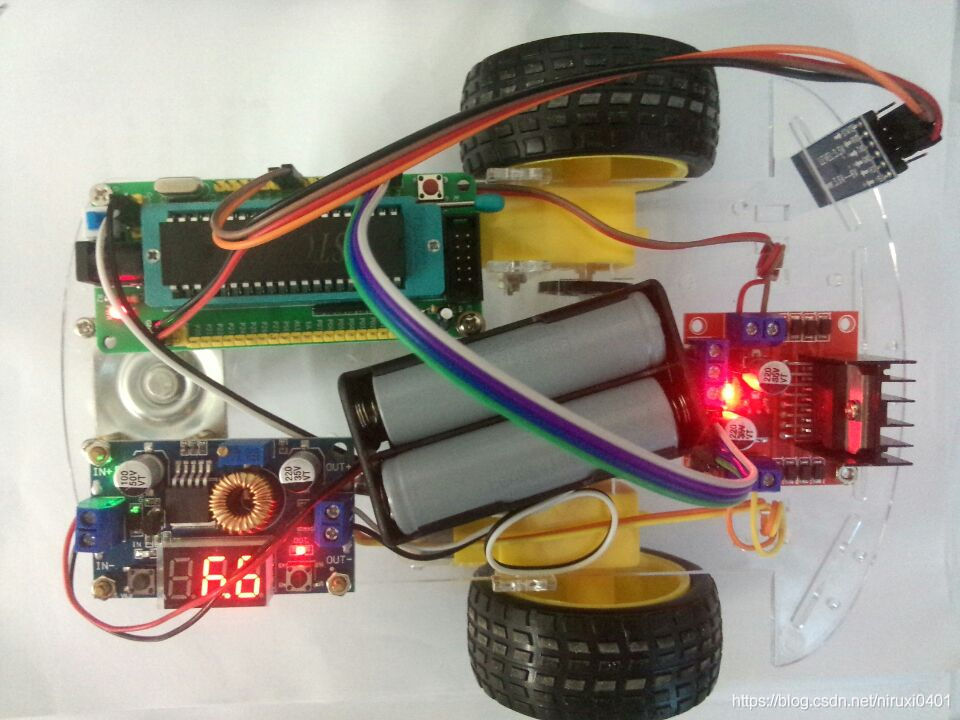
51 The minimum system board of single chip microcomputer is as follows :
The self-made serial port Bluetooth remote controller is as follows :
The family photos of the remote control and the car are as follows :
Send control instructions through the computer's serial port debugging assistant , This ESP32 SCM will send the serial port control instructions through wireless Bluetooth , After receiving the Bluetooth information, the serial port Bluetooth module of the smart car controls the car to move . The information of the serial port debugging assistant is shown in the following figure :
Youku Video Portal :https://player.youku.com/embed/XNDg5ODQ4NzUzMg==
Watch the video directly
ESP32 Act as a computer serial port Bluetooth remote control Bluetooth device
Two 、 Production steps
1. build ESP32 development environment
1.1 Buy ESP32 Single chip microcomputer ,ESP32DEVKITV1 Development board , The price is lower. You can buy it at a treasure for more than ten yuan , This download program can directly use the mobile phone data line to follow ESP32 Connect , Follow ESP32-CAM SCM is different ,CAM And one more USB turn TTL Module to download the program
The appearance of the single chip microcomputer is as follows :
Schematic diagram is as follows :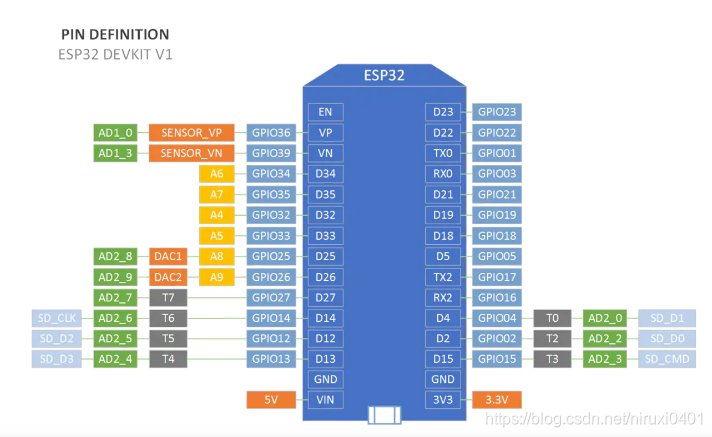

1.2 build Arduino development environment , Buyers who can't build a development environment can go to :https://www.cirmall.com/circuit/19141 Set up according to the instructions .
2. Download code
This Arduino ESP32 The Bluetooth code of MCU is also quite simple , Although it was originally written by myself , But it has also undergone strict deliberation and verification . If many readers can't write Bluetooth communication code, I suggest you take a good look at my code ! The code screenshot is as follows :
The first arrow in the screenshot indicates the Bluetooth hotspot name and password of the serial port Bluetooth module used by my smart car ( This hotspot will be generated as soon as the serial port Bluetooth is powered on , It is usually written dead after buying it , Readers can adjust the account and password of the source code according to the serial port Bluetooth module they have purchased , This is the key to success )
//This example code is in the Public Domain (or CC0 licensed, at your option.)
//By Victor Tchistiak - 2019
//
//This example demostrates master mode bluetooth connection and pin
//it creates a bridge between Serial and Classical Bluetooth (SPP)
//this is an extention of the SerialToSerialBT example by Evandro Copercini - 2018
//
//author by:daodanjishui 2020.10.10
#include "BluetoothSerial.h"
BluetoothSerial SerialBT;
String MACadd = "AA:BB:CC:11:22:33";
uint8_t address[6]  = {
    0xAA, 0xBB, 0xCC, 0x11, 0x22, 0x33};
//uint8_t address[6] = {0x20, 0x18, 0x04, 0x15, 0x25, 0x13};
//String name = "OBDII";
String name = "HC-05";
char *pin = "1234"; //<- standard pin would be provided by default
bool connected;
void setup() {

  Serial.begin(115200);
  //SerialBT.setPin(pin);
  SerialBT.begin("ESP32test", true);
  //SerialBT.setPin(pin);
  Serial.println("The device started in master mode, make sure remote BT device is on!");

  // connect(address) is fast (upto 10 secs max), connect(name) is slow (upto 30 secs max) as it needs
  // to resolve name to address first, but it allows to connect to different devices with the same name.
  // Set CoreDebugLevel to Info to view devices bluetooth address and device names
  connected = SerialBT.connect(name);
  //connected = SerialBT.connect(address);

  if(connected) {

    Serial.println("Connected Succesfully!");
  } else {

    while(!SerialBT.connected(10000)) {

      Serial.println("Failed to connect. Make sure remote device is available and in range, then restart app.");
    }
  }
  // disconnect() may take upto 10 secs max
  if (SerialBT.disconnect()) {

    Serial.println("Disconnected Succesfully!");
  }
  // this would reconnect to the name(will use address, if resolved) or address used with connect(name/address).
  SerialBT.connect();
}

void loop() {

  if (Serial.available()) {

    SerialBT.write(Serial.read());
  }
  if (SerialBT.available()) {

    Serial.write(SerialBT.read());
  }
  delay(20);
}
Program description : It's using arduino The project I wrote , The reader can take his time , If in order to succeed , You can buy a serial port Bluetooth module of the same model as me .
3. Complete hardware connection according to software and hardware
Connect via Android data cable ESP32 And computers , Such as “ Remote control and car family photo ” As shown in the figure
Using the computer serial port debugging assistant to send instructions to the car can realize wired control of the car , Such as “ Serial debugging assistant information ” As shown in the figure .
Note that the serial port debugging assistant is arduino default “ Serial monitor ” The test of .
3、 ... and 、 Simulation and debugging
1. Get the hardware ready , Power on and open the trolley arduino“ Serial monitor ”, Input instruction , Click Send .
As shown in the figure :
The arrow in the lower left corner is the default sending \r\n It means .
such as FFF\r\n It's going forward ,
Here's a step back :BBB\r\n
Here is a left turn : LLL\r\n
Finally, turn right : RRR\r\n( And so on )
2. Receive the response returned by the trolley
Look at the screenshot above , received :FFF It indicates that the trolley has responded to the forward command .
And so on .
Input FFF, Click on “ send out ” Button , The car goes ahead , In the serial port debugging window, you can see the car reply FFF, Input BBB It's going backwards , Turn left yes LLL, Turn right yes RRR.
Note that the baud rate is 115200
summary
Trolley is used ESP32 The single chip microcomputer replaces the Bluetooth debugging assistant of Android mobile phone and controls it in the form of sending instructions by the computer serial port debugging assistant , So it is the simplest Bluetooth remote control car remote control DIY. But with the steering gear, manipulator, joystick or mobile phone control app, It becomes high-end , Coming soon . This version is free , But the function is still very complete and powerful , The code is easy to understand , No drag .
Download project code :https://www.cirmall.com/circuit/20409/
Point, I'll jump
边栏推荐
- AI芯片技术-2022年
- Win10 微软输入法(微软拼音) 不显示 选字栏(无法选字) 解决方法
- Cool photo album code, happy birthday to the object!
- Noi OJ 1.3 13: reverse output of a three digit C language
- Why does the pointer not change the corresponding value as a formal parameter
- How to write a literature review? What should I do if I don't have a clue?
- list的介绍及使用
- Why should poll/select use Nonblock when opening
- Maui uses Masa blazor component library
- NOI OJ 1.2 06:浮点数向零舍入
猜你喜欢

Simplest DIY remote control computer system based on STM32 ② (wireless remote control + key control)

Unity technical manual - lifecycle lifetimebyemitterspeed - color in the cycle coloroverlifetime- speed color colorbyspeed

Maui uses Masa blazor component library
Go zero micro Service Practice Series (VI. cache consistency assurance)

图片存储--引用

flutter系列之:flutter中的Wrap

Unity technical manual - limit velocity over lifetime sub module and inherit velocity sub module

Solve the problem that Preview PDF cannot be downloaded

Simplest DIY mpu6050 gyroscope attitude control actuator program based on stm32f407 Explorer development board

最简单DIY基于51单片机、PCA9685、IIC、云台的舵机集群控制程序

随机推荐
R and rstudio download and install detailed steps
NOI OJ 1.3 14:大象喝水 C语言
Maui uses Masa blazor component library
智慧园区效果不满意?请收下ThingJS这份秘籍
基于SqlSugar的开发框架循序渐进介绍(9)-- 结合Winform控件实现字段的权限控制
分享一个手游脚本源码
Flush recommended? Is it safe to open a mobile account?
Analysis of LinkedList source code
ESP32-CAM高性价比温湿度监控系统
Noi OJ 1.3 04: C language with remainder Division
flutter系列之:flutter中的Wrap
PHP regular expression
为什么poll/select在open时要使用非阻塞NONBLOCK
Design and implementation of esp32-cam wireless monitoring intelligent gateway
安装typescript环境并开启VSCode自动监视编译ts文件为js文件
Implementing Domain Driven Design - using ABP framework - General guidelines
Noi OJ 1.4 03: odd even judging C language
SPI与IIC异同
Win10 微软输入法(微软拼音) 不显示 选字栏(无法选字) 解决方法
NOI OJ 1.3 17:计算三角形面积 C语言