当前位置:网站首页>PHP導出word方法(一mht)
PHP導出word方法(一mht)
2022-07-03 11:56:00 【ignativs amor】
相關文章:
phpword生成word文檔,phpword的使用
背景
項目中有需要自定義樣式,導出用戶的簡曆的功能,簡曆嘛,最好是導出word或者pdf的,最後選擇了導出成word
調研
導出word有好幾種方法,今天先說使用MHT保存word的方法
使用前期知識補充
1. 什麼是MHT
MHT,全稱為mono html。MHTML文件又稱為聚合HTML文檔、Web檔案或單一文件網頁。單個文件網頁可將網站的所有元素(包括文本和圖形)都保存到單個文件中。這種封裝使您可將整個網站發布為單個內嵌MIME (MIME:通過 Internet 連接傳遞多媒體資源的一列標准。MIME類型通知程序對象所包含的內容(如圖形、聲音或視頻)的聚合HTML文檔(MHTML)文件,或將整個網站作為一個電子郵件或附件發送。Internet Explorer 4.0及更高版本支持此格式。
2. 什麼是HTML
HTML,全稱HyperTextMark-upLanguage,即超文本標記語言或超文本鏈接標示語言,是目前網絡上應用最為廣泛的語言,也是構成網頁文檔的主要語言。設計HTML語言的目的是為了能把存放在一臺電腦中的文本或圖形與另一臺電腦中的文本或圖形方便地聯系在一起,形成有機的整體,人們不用考慮具體信息是在當前電腦上還是在網絡的其它電腦上。我們只需使用鼠標在某一文檔中點取一個圖標,Internet就會馬上轉到與此圖標相關的內容上去,而這些信息可能存放在網絡的另一臺電腦中。 HTML文本是由HTML命令組成的描述性文本,HTML命令可以說明文字、圖形、動畫、聲音、錶格、鏈接等。HTML的結構包括頭部(Head)、主體(Body)兩大部分,其中頭部描述瀏覽器所需的信息,而主體則包含所要說明的具體內容
3. MHT與HTML的區別
mht格式和html很類似,只不過在mht格式中,外部鏈接進來的文件,比如圖片、Javascript、CSS會被base64進行編碼存儲。因此,單個mht文件就可以保存一個網頁中的所有資源,當然,相比html,它的尺寸也會比較大。
- a *本質上,這兩者,沒有什麼區別,都是一種直觀的網頁瀏覽的格式.
- b *簡單理解的話,他們的區別在於保存上,mht可以直接保存所有所見,html的話則不能保存全部,服務器端文件不能保存到本地,需要依賴網絡,
4.了解word
word本身的功能還是很强大的,它可以打開html格式的文件,並且能够保留格式,即使後綴為doc,它也能識別正常打開。這就為我們提供了方便。
但是有一個問題,html格式的文件中的圖片只有一個地址,真正的圖片是保存在其他地方的,也就是說,如果將HTML格式寫入doc中,那麼doc中將不能包含圖片。那我們如何創建包含圖片的doc文檔呢?我們可以使用和html很接近的mht格式。
5. mht格式能被word識別嗎
我們來實驗一下,隨便打開一個網頁,將起保存為mht文件,然後修改後綴名為doc,再用word打開,OK,word也可以識別mht文件,並且可以顯示圖片。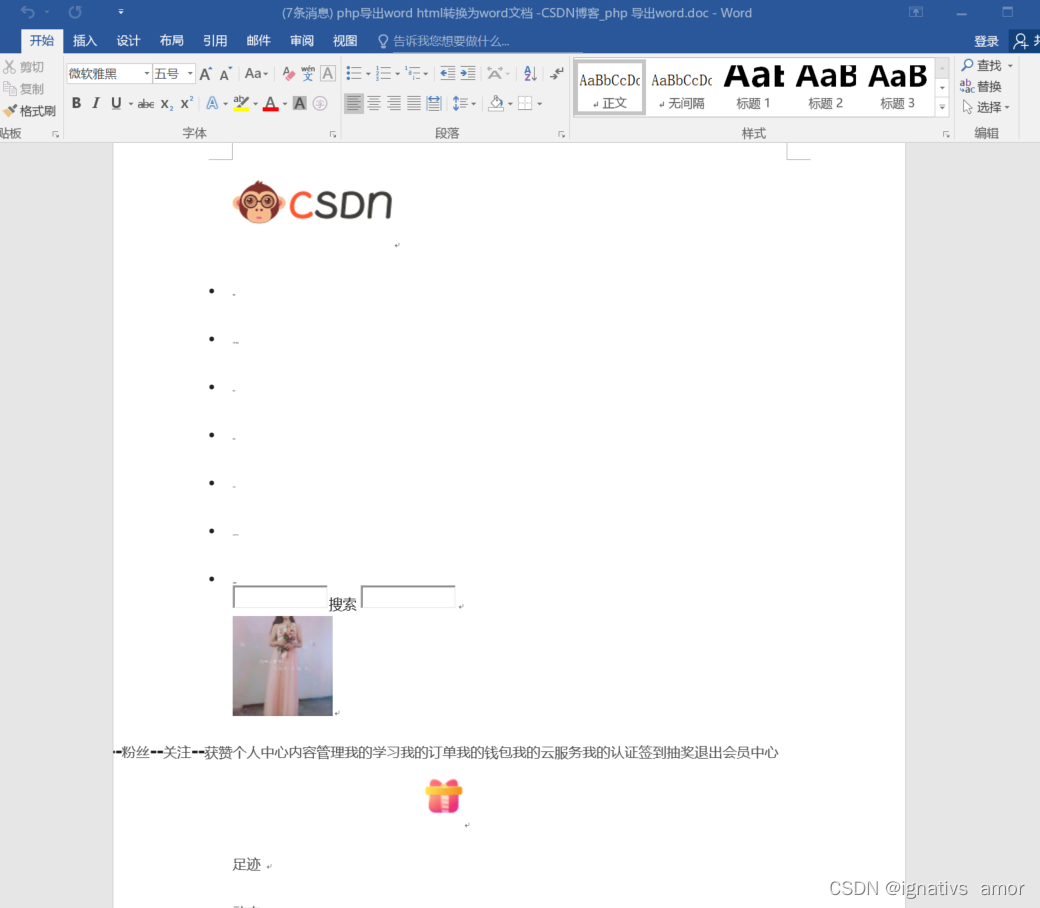
既然doc可以識別mht,下面就是考慮如何將圖片放入mht了。由於html代碼中的圖片的地址都是寫在img標簽的src屬性中,因此,只要提取html代碼中的src屬性值,就可以獲得圖片地址。當然,有可能您獲取到的是相對路徑,沒關系,加上URL的前綴,改成絕對路徑就可以了。有了圖片地址,我們就可以通過file_get_content函數獲取到圖片文件的具體內容,然後調用base64_encode函數將文件內容編碼成base64編碼,最後插入到mht文件的合適比特置即可
使用
步驟1. 先渲染好頁面樣式
list($oResume,$oIntension,$oWorkexp,$oEduexp,$oAttach) = self::ViewResume($iMedliveId);

$sHtmlContent = view('enterprise.resume.resume_doc',
                compact('oResume','oIntension','oWorkexp','oEduexp','oAttach','title','updated_at'))
                ->render();

 return $sHtmlContent;
步驟2. 根據HTML代碼獲取word文檔內容
通過以上的原理介紹,封裝成導出函數,這個函數可以將HTML代碼導出成一個mht文檔,參數有3個,其中後2個為可選參數:
- content:要轉換的HTML代碼
- absolutePath: 如果HTML代碼中的圖片地址都是相對路徑,那麼這個參數就是HTML代碼中缺少的絕對路徑。
- isEraseLink:是否去掉HTML代碼中的超鏈接
	/** * 根據HTML代碼獲取word文檔內容 * 創建一個本質為mht的文檔,該函數會分析文件內容並從遠程下載頁面中的圖片資源 * 該函數依賴於類MhtFileMaker * 該函數會分析img標簽,提取src的屬性值。但是,src的屬性值必須被引號包圍,否則不能提取 * param string $content HTML內容 * param string $absolutePath 網頁的絕對路徑。如果HTML內容裏的圖片路徑為相對路徑,那麼就需要填寫這個參數,來讓該函數自動填補成絕對路徑。這個參數最後需要以/結束 * param bool $isEraseLink 是否去掉HTML內容中的鏈接 */
	public static function getWordDocument( $content , $absolutePath = "" , $isEraseLink = false )
	{

		$mht = new MhtFileMaker();
		if ($isEraseLink){

			$content = preg_replace('/<a\s*.*?\s*>(\s*.*?\s*)<\/a>/i' , '$1' , $content);   //去掉鏈接
		}
		$images = array();
		$files = array();
		$matches = array();
		//這個算法要求src後的屬性值必須使用引號括起來 || preg_match_all('/url\s*\(([^\)]+)\)/i',$content ,$matches )
		 if ( preg_match_all('/<img.*?src="(.*?)".*?>/is',$content ,$matches)){

			$arrPath = $matches[1];

				for ( $i=0;$i<count($arrPath);$i++){

					$path = $arrPath[$i];
					$imgPath = trim( $path );
					if ( $imgPath != "" ){

						$files[] = $imgPath;
						if( substr($imgPath,0,7) == 'http://'){

							//絕對鏈接,不加前綴
						}else{

// $imgPath = $absolutePath.$imgPath;
							$imgPath = public_path($imgPath);
						}
						$images[] = $imgPath;
					}
				}
			}

			$mht->AddContents("tmp.html",$mht->GetMimeType("tmp.html"),$content);
			for ( $i=0;$i<count($images);$i++){

				$image = $images[$i];
				info($image);
				if ( @fopen($image , 'r') ){

					$imgcontent = @file_get_contents( $image );
						if ( $content )
					$mht->AddContents($files[$i],$mht->GetMimeType($image),$imgcontent);
				}else{

					return ;//echo "file:".$image." not exist!<br />";
				}
			}
			return $mht->GetFile();
	}
步驟3.類MhtFileMaker
<?php
namespace App\Services;
/** *@author *@version 1.0 */
class MhtFileMaker{

    var $config = array();
    var $headers = array();
    var $headers_exists = array();
    var $files = array();
    var $boundary;
    var $dir_base;
    var $page_first;

    function MhtFile($config = array()){


    }

    function SetHeader($header){

        $this->headers[] = $header;
        $key = strtolower(substr($header, 0, strpos($header, ':')));
        $this->headers_exists[$key] = TRUE;
    }

    function SetFrom($from){

        $this->SetHeader("From: $from");
    }

    function SetSubject($subject){

        $this->SetHeader("Subject: $subject");
    }

    function SetDate($date = NULL, $istimestamp = FALSE){

        if ($date == NULL) {

            $date = time();
        }
        if ($istimestamp == TRUE) {

            $date = date('D, d M Y H:i:s O', $date);
        }
        $this->SetHeader("Date: $date");
    }

    function SetBoundary($boundary = NULL){

        if ($boundary == NULL) {

            $this->boundary = '--' . strtoupper(md5(mt_rand())) . '_MULTIPART_MIXED';
        } else {

            $this->boundary = $boundary;
        }
    }

    function SetBaseDir($dir){

        $this->dir_base = str_replace("\\", "/", realpath($dir));
    }

    function SetFirstPage($filename){

        $this->page_first = str_replace("\\", "/", realpath("{$this->dir_base}/$filename"));
    }

    function AutoAddFiles(){

        if (!isset($this->page_first)) {

            exit ('Not set the first page.');
        }
        $filepath = str_replace($this->dir_base, '', $this->page_first);
        $filepath = 'http://mhtfile' . $filepath;
        $this->AddFile($this->page_first, $filepath, NULL);
        $this->AddDir($this->dir_base);
    }

    function AddDir($dir){

        $handle_dir = opendir($dir);
        while ($filename = readdir($handle_dir)) {

            if (($filename!='.') && ($filename!='..') && ("$dir/$filename"!=$this->page_first)) {

                if (is_dir("$dir/$filename")) {

                    $this->AddDir("$dir/$filename");
                } elseif (is_file("$dir/$filename")) {

                    $filepath = str_replace($this->dir_base, '', "$dir/$filename");
                    $filepath = 'http://mhtfile' . $filepath;
                    $this->AddFile("$dir/$filename", $filepath, NULL);
                }
            }
        }
        closedir($handle_dir);
    }

    function AddFile($filename, $filepath = NULL, $encoding = NULL){

        if ($filepath == NULL) {

            $filepath = $filename;
        }
        $mimetype = $this->GetMimeType($filename);
        $filecont = file_get_contents($filename);
        $this->AddContents($filepath, $mimetype, $filecont, $encoding);
    }

    function AddContents($filepath, $mimetype, $filecont, $encoding = NULL){

        if ($encoding == NULL) {

            $filecont = chunk_split(base64_encode($filecont), 76);
            $encoding = 'base64';
        }
        info($filecont);
        $this->files[] = array('filepath' => $filepath,
            'mimetype' => $mimetype,
            'filecont' => $filecont,
            'encoding' => $encoding);
    }

    function CheckHeaders(){

        if (!array_key_exists('date', $this->headers_exists)) {

            $this->SetDate(NULL, TRUE);
        }
        if ($this->boundary == NULL) {

            $this->SetBoundary();
        }
    }

    function CheckFiles(){

        if (count($this->files) == 0) {

            return FALSE;
        } else {

            return TRUE;
        }
    }

    function GetFile(){

        $this->CheckHeaders();
        if (!$this->CheckFiles()) {

            exit ('No file was added.');
        } //www.jb51.net
        $contents = implode("\r\n", $this->headers);
        $contents .= "\r\n";
        $contents .= "MIME-Version: 1.0\r\n";
        $contents .= "Content-Type: multipart/related;\r\n";
        $contents .= "\tboundary=\"{$this->boundary}\";\r\n";
        $contents .= "\ttype=\"" . $this->files[0]['mimetype'] . "\"\r\n";
        $contents .= "X-MimeOLE: Produced By Mht File Maker v1.0 beta\r\n";
        $contents .= "\r\n";
        $contents .= "This is a multi-part message in MIME format.\r\n";
        $contents .= "\r\n";
        foreach ($this->files as $file) {

            $contents .= "--{$this->boundary}\r\n";
            $contents .= "Content-Type: $file[mimetype]\r\n";
            $contents .= "Content-Transfer-Encoding: $file[encoding]\r\n";
            $contents .= "Content-Location: $file[filepath]\r\n";
            $contents .= "\r\n";
            $contents .= $file['filecont'];
            $contents .= "\r\n";
        }
        $contents .= "--{$this->boundary}--\r\n";
        return $contents;
    }

    function MakeFile($filename){

        $contents = $this->GetFile();
        $fp = fopen($filename, 'w');
        fwrite($fp, $contents);
        fclose($fp);
    }

    function GetMimeType($filename){

        $pathinfo = pathinfo($filename);
        switch ($pathinfo['extension']) {

            case 'htm': $mimetype = 'text/html'; break;
            case 'html': $mimetype = 'text/html'; break;
            case 'txt': $mimetype = 'text/plain'; break;
            case 'cgi': $mimetype = 'text/plain'; break;
            case 'php': $mimetype = 'text/plain'; break;
            case 'css': $mimetype = 'text/css'; break;
            case 'jpg': $mimetype = 'image/jpeg'; break;
            case 'jpeg': $mimetype = 'image/jpeg'; break;
            case 'jpe': $mimetype = 'image/jpeg'; break;
            case 'gif': $mimetype = 'image/gif'; break;
            case 'png': $mimetype = 'image/png'; break;
            default: $mimetype = 'application/octet-stream'; break;
        }
        return $mimetype;
    }
}
步驟4.將處理好的mht文件保存或者下載
我們有兩種方法將文件發送給客戶端:
一種是先在服務器端生成一個doc文檔,然後將這個doc文檔的地址記錄下來,最後讓客戶端下載這個doc。
還有一種是直接發送html請求,修改HTML協議的header部分,直接將文件內容發送給客戶端,也可以讓客戶端下載到這個doc文檔。
例如:直接下載到客戶端:
		$filename = $oUser->truename?$oUser->truename."的簡曆":"簡曆";
		header("Content-type: application/octet-stream");
		header("Accept-Ranges: bytes");
		header("Accept-Length: ".strlen($content));
		header('Content-Type: application/octet-stream');
		$filename=iconv("utf-8","gb2312",$filename);
		header('Content-Disposition: attachment; filename='.$filename.'.doc');
		header("Pragma:no-cache");
		header("Expires:0");
		echo $content;
結束
還有另外的方法,那就是使用PHPword擴展,下一篇再來記錄
边栏推荐
- Test classification in openstack
- Hongmeng third training (project training)
- ftp登录时,报错“530 Login incorrect.Login failed”
- 安装electron失败的解决办法
- 2022年湖南工学院ACM集训第二次周测题解
- vulnhub之cereal
- Ripper of vulnhub
- Quantitative calculation research
- (database authorization - redis) summary of unauthorized access vulnerabilities in redis
- Qt OpenGL 纹理贴图
猜你喜欢



随机推荐
Kibana~Kibana的安装和配置
Unity3D学习笔记5——创建子Mesh
During FTP login, the error "530 login incorrect.login failed" is reported
STL tutorial 10 container commonalities and usage scenarios
This article explains the complex relationship between MCU, arm, MCU, DSP, FPGA and embedded system
vulnhub之raven2
Vulnhub pyexp
Kubernetes 三打探针及探针方式
Colleagues wrote a responsibility chain model, with countless bugs
同事写了一个责任链模式,bug无数...
typeScript
Go语言实现静态服务器
PHP基础
Excel表格转到Word中,表格不超边缘纸张范围
STL tutorial 8-map
Capturing and sorting out external Fiddler -- Conversation bar and filter [2]
mysql使用update联表更新的方法
836. 合并集合(DAY 63)并查集
Slam mapping and autonomous navigation simulation based on turnlebot3
鸿蒙第四次培训