当前位置:网站首页>Hiding skills of Photoshop clipping tool
Hiding skills of Photoshop clipping tool
2022-07-27 04:58:00 【macw_ q】
Photoshop It is an indispensable tool for later revision , Mastering some skills can make our work more efficient . Today, I'd like to share a few Photoshop Clipping tool hiding techniques , come quick GET once !!
- 1. Cutting composition Guide
When we choose the cutting tool , When preparing to crop the picture ,PS The settings are provided intimately Overlay options for the crop tool The function of , Its function is to provide a reference line for clipping in composition , It mainly includes trisection 、 grid 、 Diagonally 、 triangle 、 Golden ratio 、 Six composition principles of golden spiral , The selection operation is also very simple , Right click directly and select... From the drop-down menu , Or you can click on the letter O Key to order selection , As shown in the figure below :

PS: When choosing triangle or golden spiral , Press shift+o You can change the direction of both .
- 2. Change the clipping direction
Now everyone has multiple screens , So many times, we are faced with changing the horizontal diagram to the vertical diagram , Or change the vertical diagram to the horizontal diagram , In the crop tool , Click on X key , You can change the clipping direction while maintaining the proportion , As shown in the figure below :

- 3. Hide Crop Region
stay PS By default , When we cut , The cropped part will be displayed on the canvas in a dimmed form , And if we don't need it to display , You can click Pinion Button to activate the drop-down menu , Uncheck the Show Crop Region that will do , Or by pressing H Key to switch between showing or hiding the crop region , As shown in the figure below :

Check show crop region effect :
Uncheck show crop region effect :

PS: meanwhile , This menu can also set the color of the canvas , And opacity .
- 4. Classic crop pattern : Crop frame
By default , When cutting , The reference line of the clipping composition guide is fixed , We can only move the image to determine which ones are cropped , What is left . And when you don't like this mode , You can click on the options bar Pinion Button , Check on Use classic mode Or just press the shortcut key P, You can keep the picture still , The reference line of the clipping composition guide can be moved 、 Rotation, etc .

- 5. Determine the method of clipping
After cutting , There are many ways to be sure to accept the clipping results , Include :
· Directly by Enter key
· Double click on the image
· Click the check mark on the right side of the cropping tool option bar to confirm
· Right click on the image , Select crop... In the context menu
· Through the menu bar image - tailoring


- 6. Perspective cutting tools
When shooting buildings , Occasionally, I will encounter the situation that the building in the drawing is distorted and the perspective is not equal , At this time, you can choose the menu bar edit - Perspective deformation , Then when the border appears , Fix the four corners to tell PS How to do it , Finally, click Enter key Enter that will do . perhaps , You can also use ACR The lens correction function in the filter .


- 7. Non destructive cutting
We were using the PS When , I found that I did something wrong , The return operation is lossless 、 It's non-destructive , At this time, there are two ways to achieve non-destructive :
· Uncheck Delete cropped pixels
· Turn the cropped image layer into Intelligent objects , When you want to start over , Choose... From the menu bar Images - Show all that will do , As shown in the figure :

- 8. Expand the canvas clipping tool
This is an alternative demand , In addition to the commonly used small cutting ,PS It also supports us to cut bigger , Just pull out the clipping box , Continue to enlarge the clipping box . And then click Enter key OK , If the picture in the document has no background layer , The extended part will be the transparent layer , If there is a background layer , The extended part is the background color .

- 9. The correction image
The cropping tool also provides image correction , It's easy to operate , Open the picture , Then long press command key , Pull out a straight line with the mouse , enter determine .

That's all PS Hidden skills of cutting tools , I hope to learn from my friends PS Help .
That's all MacW What Xiaobian brought to you “Photoshop Clipping tool hiding techniques ”, Key words of this article :“Photoshop,Photoshop Cutting tools , An indispensable tool for later revision ”, link :“Photoshop Clipping tool hiding techniques - macw Download Station ”, Reprint please keep .
边栏推荐
- 「Photoshop2021入门教程」对齐与分布制作波点图案
- 有趣的C语言
- 多态的详讲
- Replication of df-gan experiment -- detailed steps of replication of dfgan and forwarding from remote port to local port using mobaxtem
- [error reporting]: cannot read properties of undefined (reading 'prototype')
- 接口和抽象类/方法学习 demo
- 负数的右移
- STM32 cubeMX HAL-----PWM—改变频率
- 2022 T2i text generated image Chinese Journal Paper quick view-1 (ecagan: text generated image method based on channel attention mechanism +cae-gan: text generated image technology based on transforme
- 【Acwing】第61场周赛 题解
猜你喜欢
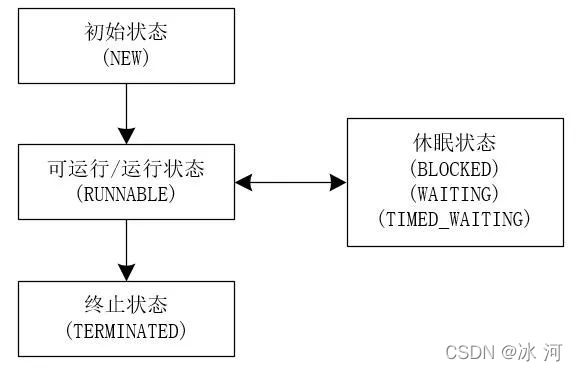
Interview must ask | what stages does a thread go through from creation to extinction?

Photoshop裁剪工具隐藏技巧
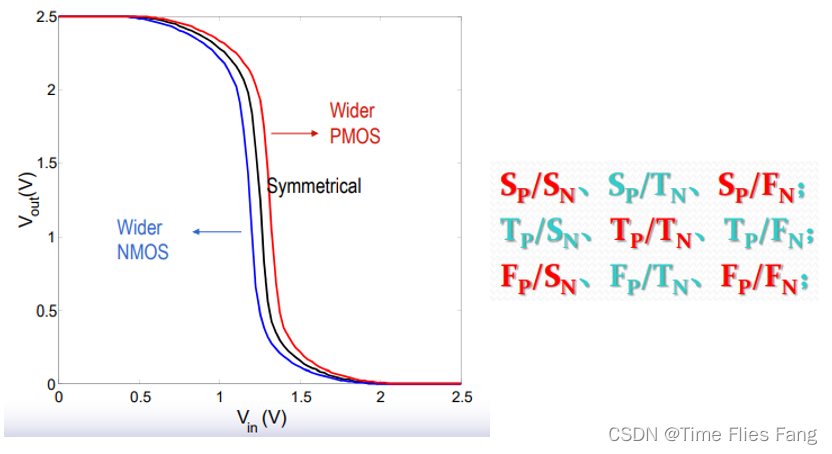
Digital integrated circuit: CMOS inverter (I) static characteristics
![[C language] dynamic memory management](/img/20/3970cd2112204774a37b5a1d3bdce0.png)
[C language] dynamic memory management

【搜索】双向广搜 + A*

如何将Photoshop图层复制到其他文档

How to do smooth data migration: Double write scheme

单元测试chapter6
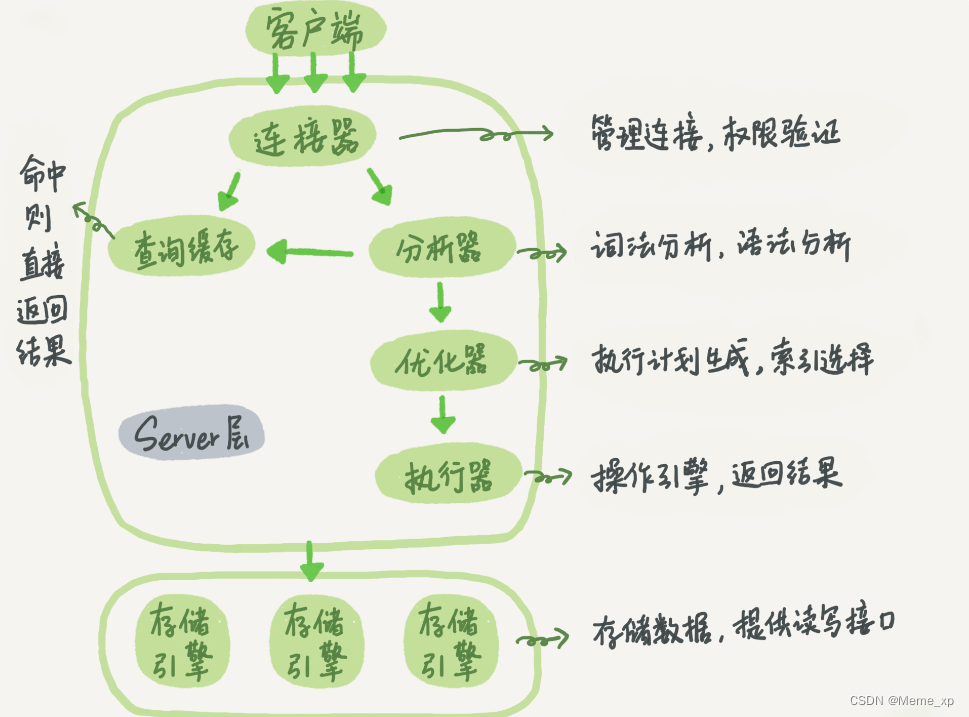
The execution process of a select statement in MySQL
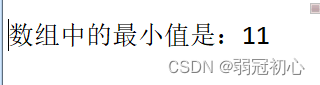
数组中的最大值,最小值,冒泡排序
随机推荐
「Photoshop2021入门教程」“拉平”带有透视感的图像
The execution process of a select statement in MySQL
strlen和sizeof的区别
2019 top tennis cup upload
Summary of fire safety training materials
Shift right of negative numbers
Structural mode - facade mode
如何将Photoshop图层复制到其他文档
On the problem that Gorm's beforedelete hook method does not work
关于gorm的BeforeDelete钩子方法不生效的问题
【搜索】—— 多源BFS + 最小步数模型
Photoshop裁剪工具隐藏技巧
多态的详讲
Qstring conversion char*
不需手动安装cuda和cudnn,通过一行程序即可安装tensorflow-gpu,以tensorflow-gpu2.0.0,cuda10.0,cudnn7.6.5为例
Digital integrated circuit: CMOS inverter (I) static characteristics
[search] - multi source BFS + minimum step model
Replication of df-gan experiment -- detailed steps of replication of dfgan and forwarding from remote port to local port using mobaxtem
【AtCoder Beginner Contest 260 (A·B·C)】
STM32 cubeMX HAL-----PWM—改变频率