当前位置:网站首页>华为无线设备WDS配置命令
华为无线设备WDS配置命令
2022-07-26 01:23:00 【Tony_long7483】
[huawei]wlan
[huawei-wlan-view]ap auth-mode mac-auth //配置AP认证模式为MAC认证,缺省为MAC地址认证
[huawei-wlan-view]ap auth-mode sn-auth //配置AP认证模式为SN认证
[huawei-wlan-view]ap auth-mode no-auth //配置AP认证模式为不认证
[huawei-wlan-view]display ap unauthorized record //查看未认证通过的AP信息
[huawei-wlan-view]ap-confirm all //确认未认证通过的AP,确认后,AP将进入“normal”状态
[huawei-wlan-view]ap-confirm mac 1000-0000-0000
[huawei-wlan-view]ap-group name g1
[huawei-wlan-ap-group-g1]radio 0
[huawei-wlan-group-radio-g1/0]channel 20mhz 1 //配置指定射频的工作带宽和信道
[huawei-wlan-group-radio-g1/0]coverage distance 3 //配置射频覆盖距离参数,缺省所有射频的射频覆盖距离参数为3,单位为100m
[huawei-wlan-group-radio-g1/0]antenna-gain 1 //配置射频的天线增益
[huawei-wlan-group-radio-g1/0]eirp 127 //配置射频的发射功率,缺省为127dBm
[huawei-wlan-group-radio-g1/0]frequency 5g //配置射频0工作在5GHz频段,缺省射频0工作在2.4GHz频段,射频2工作在5GHz频段
[huawei-wlan-view]radio-2g-profile name r2
[huawei-wlan-radio-2g-prof-r2]wifi-light signal-strength //配置AP的Wireless灯闪烁表示为信号强度
[huawei-wlan-radio-2g-prof-r2]undo ht a-mpdu disable //使能802.11n协议的帧汇聚功能
[huawei-wlan-radio-2g-prof-r2]ht a-mpdu max-length-exponent 3 //配置802.11n协议汇聚帧长度,缺省MPDU帧长度索引为3,对应帧最大长度为65535字节
[huawei-wlan-radio-2g-prof-r2]beamforming enable //使能波束成形功能
[huawei-wlan-view]wired-port-profile name w1 //创建并进入AP有线口模板视图
[huawei-wlan-wired-port-w1]mode root //配置AP有线口的工作模式为root模式, root AP和AC相连的有线口必须工作在root模式
[huawei-wlan-wired-port-w1]mode endpoint //配置AP有线口的工作模式为endpoint模式, 可以直接连接主机或者部署二层网络
[huawei-wlan-wired-port-w1]vlan pvid 10 //配置AP有线口的pvid
[huawei-wlan-wired-port-w1]vlan tagged 10 //配置AP有线口加入的VLAN,缺省AP有线口放通所有VLAN,其中VLAN1以untagged方式加入AP有线口,其他VLAN以tagged方式加入AP有线口
[huawei-wlan-wired-port-w1]vlan untagged 10
[huawei-wlan-wired-port-w1]user-isolate all //使能AP有线口的用户隔离功能
[huawei-wlan-wired-port-w1]user-isolate l2
[huawei-wlan-view]wds-whitelist-profile name w1 //创建并进入WDS白名单模板视图
[huawei-wlan-wds-whitelist-w1]peer-ap mac 1000-0000-0000 //在WDS白名单模板中添加允许接入的邻居AP的物理MAC地址
[huawei-wlan-view]wds-profile name w1 //创建并进入WDS模板
[huawei-wlan-wds-prof-w1]wds-name w1 //配置WDS模板的网桥标识,WDS相邻节点之间通过网桥标识来建立链接,缺省WDS模板的网桥标识为“HUAWEI-WLAN-WDS”
[huawei-wlan-wds-prof-w1]wds-mode root //配置WDS模板的网桥模式
[huawei-wlan-wds-prof-w1]wds-mode middle
[huawei-wlan-wds-prof-w1]wds-mode leaf
[huawei-wlan-wds-prof-w1]security-profile s1 //在WDS模板上引用安全模板,缺省WDS模板引用了名称为“default-wds”的安全模板
[huawei-wlan-wds-prof-w1]vlan tagged 10 //在WDS模板上以Tagged形式加入一个VLAN
[huawei-wlan-wds-prof-w1]beacon-2g-rate 1 //配置2.4GHz射频类型Beacon帧的发送速率,缺省情为1Mbps
[huawei-wlan-wds-prof-w1]beacon-5g-rate 6 //配置5GHz射频类型Beacon帧的发送速率,缺省为6Mbps
[huawei-wlan-wds-prof-w1]mu-mimo enable //开启MU-MIMO功能
[huawei-wlan-wds-prof-w1]dhcp trust port //在WDS模板上配置DHCP端口信任
[huawei-wlan-wds-prof-w1]priority-map trust dot1p //配置WDS空口优先级映射信任类型,缺省是dscp
[huawei-wlan-wds-prof-w1]priority-map trust dscp
[huawei-wlan-wds-prof-w1]priority-map dscp 1 dot11e 0 //配置WDS空口的DSCP到802.11e的优先级映射关系
[huawei-wlan-view]ap-group name g1
[huawei-wlan-ap-group-g1]wds-profile w1 radio all //在AP组中引用WDS模板
[huawei-wlan-ap-group-g1]radio 0
[huawei-wlan-group-radio-g1/0]wds-profile w1 //配置AP射频引用WDS模板
[huawei]display references wds-profile name w1 //查看指定WDS模板的引用信息
[huawei]display wds-profile all //查看WDS模板的信息
[huawei]display references wds-whitelist-profile name w1 //查看指定WDS白名单模板的引用信息
[huawei]display wds-whitelist-profile all //查看WDS白名单模板的信息
[huawei]display wds vap all //查看所有的WDS型VAP的信息
[huawei]display wds vap ap-group g1 //查看WDS型VAP的相关信息
[huawei]display wlan wds link all //查看WDS链路的相关信息
[huawei-wlan-view]vap-profile name v1 //创建VAP模板,并进入模板视图
[huawei-wlan-vap-prof-v1]temporary-management enable //配置VAP为离线管理VAP和天线对准VAP
[huawei-wlan-view]ap-system-profile name s1 //创建并进入AP系统模板视图
[huawei-wlan-ap-system-prof-s1]temporary-management enable //使能AP离线管理VAP功能和天线对准VAP功能
边栏推荐
- MulDA: A Multilingual Data Augmentation Framework for Low-Resource Cross-Lingual NER 阅读笔记
- Fastjason handles generics
- Oracle is nested at multiple levels, and the alias problem of the table cannot be found
- 【Go】如何控制协程的最大并发数
- NLP introduction + practice: Chapter 4: using pytorch to manually realize linear regression
- 8、学习MySQL 创建数据表
- What if win11 cannot open its own anti-virus software? Win11's built-in anti-virus function cannot be turned on
- 光纤通信中信号劣化的原因
- [Code] refers to the repeated number in the offer 03 array
- Cross-lingual Transfer of Correlations between Parts of Speech and Gaze Features 阅读笔记
猜你喜欢

Working principle of ZK rollups

Kubernetes Pod启动流程

Format JS code and debug JS code
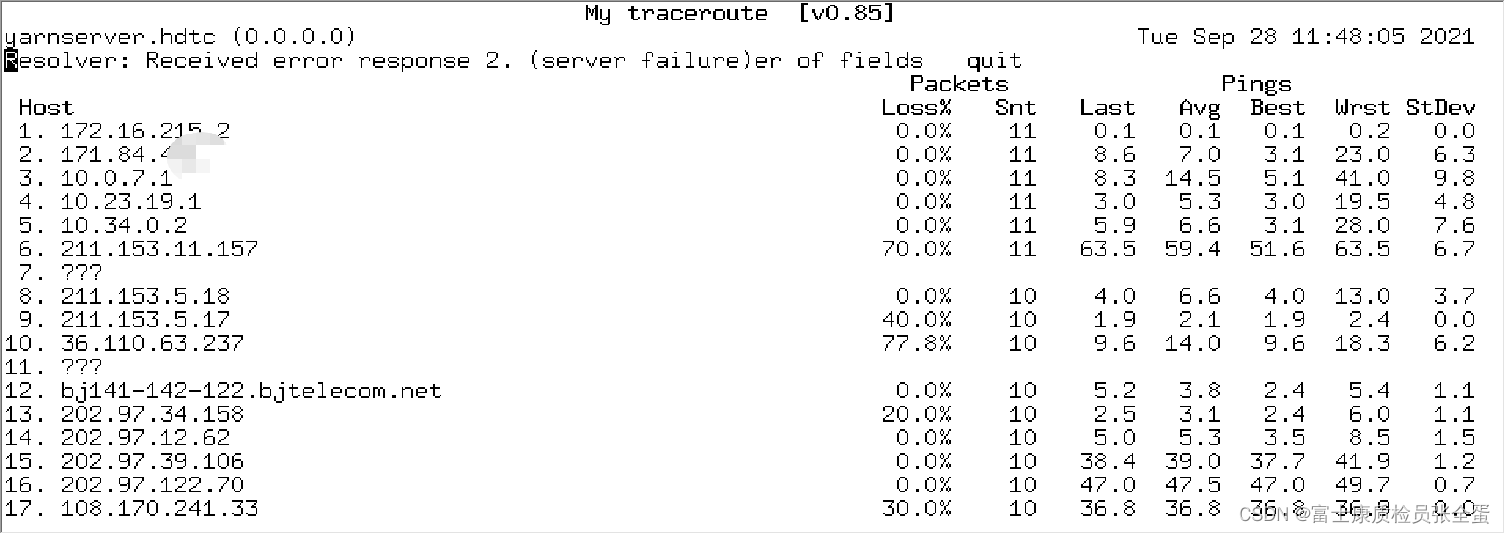
Network performance evaluation tool ping/mtr

Cross linguistic transfer of correlations between parts of speech and Gazette Features Reading Notes

Modify CSV
![[go] III. The simplest restful API server](/img/1f/f6fc8cc9a3891d01a25e709170188d.png)
[go] III. The simplest restful API server

Game thinking 17: Road finding engine recast and detour learning II: recast navigation grid generation process and limitations
![[ickim 2022] the Fourth International Conference on knowledge and information management](/img/e0/1d7aebc6a6fe42c4f4ddd47a2045ec.jpg)
[ickim 2022] the Fourth International Conference on knowledge and information management

1.30 upgrade bin file, add suffix and file length
随机推荐
[CTF] crypto preliminary basic outline
Dijkstra 求最短路
SQL的CASE WHEN
Should we test the Dao layer?
The gym closes 8000 stores a year. How does the studio that bucks the trend and makes profits open?
Introduction to API testing
Small sample learning data set
Is it safe to buy funds on e fund? Professional answers
Modify CSV
数据库系统原理与应用教程(053)—— MySQL 查询(十五):字符型函数的用法
Detailed explanation of rest assured interface testing framework
“元气可乐”不是终点,“中国可乐”才是
Basic version of Google browser debugging tool (I)
NodeJS 基于 Dapr 构建云原生微服务应用,从 0 到 1 快速上手指南
RHCE之at和crontab命令详解及chrony部署
"Yuanqi Cola" is not the end point, "China Cola" is
Easyrecovery15 data recovery software with high recovery rate and high download volume
Record a failure caused by a custom redis distributed lock
Tutorial on principles and applications of database system (055) -- MySQL query (XVII): usage of mathematical functions
PTGui Pro12垂直线纠正