当前位置:网站首页>CMake教程(一)
CMake教程(一)
2022-06-28 23:05:00 【开始沸腾了】
CMake官方文档
参考官方cmake3.24教程翻译。我这里使用cmake 3.16来演示例子。
https://cmake.org/cmake/help/v3.24/guide/tutorial/A%20Basic%20Starting%20Point.html
1、基础的起点
构建并运行一个最基础的项目(从源代码文件构建的可执行文件),这将是我们教程的起点。
1.1、创建项目文件夹
创建项目文件夹rd-project, 并进入
mkdir rd-project
cd rd-project
1.2、创建源代码文件
源代码文件tutorial.cxx, 文件内容同官方教程计算平方根的代码tutorial.cxx (在cmake源码Step1目录中提供)
#include <stdio.h>
#include <stdlib.h>
#include <math.h>
int main(int argc, char* argv[]){

    if(argc<2){

        fprintf(stdout, "Uage: %s number\n", argv[0]);
        return 1;
    }
    double inputValue = atof(argv[1]);
    double outputValue = sqrt(inputValue);
    fprintf(stdout, "The square root of %g is %g\n",inputValue, outputValue);
    return 0;
}
1.3、编写CMakeLists.txt文件
在Step1目录中创建一个CMakeLists.txt文件,最基础的项目只需要一个三行CMakeLists.txt文件。
vi CMakeLists.txt
# cmake版本 # 查看cmake版本cmake --version 这里用的3.16
cmake_minimum_required(VERSION 3.16)

# 工程名
project(Tutorial)

#  添加app的源文件
add_executable(Tutorial tutorial.cxx)
注意,这个例子在CMakeLists.txt文件中使用了小写命令。CMake支持大写、小写和混合大小写命令。
2、构建和运行
2.1、创建一个构建目录
cd ..
mkdir rd_build
2.2、生成本地构建系统
进入构建目录并运行CMake来配置项目并生成一个本地构建系统
cd rd_build
cmake ../rd-project
2.3、实际编译/链接项目
通过本地构建系统来实际编译/链接项目:
cmake --build .
至此,构建编译完成。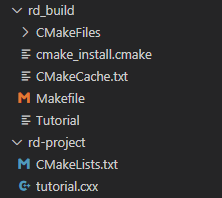
2.4、尝试运行可执行程序
./Tutorial 4294967296
./Tutorial 10
./Tutorial
运行结果如下
3、为项目添加版本号和可配置的头文件
我们将添加的第一个特性是为我们的可执行文件和项目提供一个版本号。虽然我们可以在源代码中单独完成此操作,但使用CMakeLists.txt提供了更大的灵活性。
3.1、使用project()命令设置项目名称和版本号
cmake_minimum_required(VERSION 3.16)

# set the project name and version
project(Tutorial VERSION 1.0)
3.2、配置一个头文件,将版本号传递给源代码
configure_file(TutorialConfig.h.in TutorialConfig.h)
3.3、由于配置文件将被写入到二叉树中,我们必须将该目录添加到路径列表中以搜索包含文件。
target_include_directories(Tutorial PUBLIC
                           "${PROJECT_BINARY_DIR}"
                           )
3.4、使用你喜欢的编辑器,在源目录下创建TutorialConfig.h.in,包含以下内容:
// the configured options and settings for [email protected]@引用的变量可以通过CMakeLists.txt来设置
#define Tutorial_VERSION_MAJOR @[email protected]
#define Tutorial_VERSION_MINOR @[email protected]
当CMake配置这个头文件时,@[email protected]和@[email protected]的值将被替换。
tutorial.cxx中包含配置头文件TutorialConfig.h
更新tutorial.cxx源码,打印出可执行文件的名称和版本号。cxx内容如下:
#include <math.h>
#include <stdio.h>
#include <stdlib.h>
#include <iostream>
#include "TutorialConfig.h"

int main(int argc, char *argv[]) {

  if (argc < 2) {

    // report version
    std::cout << argv[0] << " Version " << Tutorial_VERSION_MAJOR << "."
              << Tutorial_VERSION_MINOR << std::endl;
    std::cout << "Usage: " << argv[0] << " number" << std::endl;
    return 1;
  }

// double inputValue = atof(argv[1]);
  const double inputValue = std::stod(argv[1]);
  double outputValue = sqrt(inputValue);
  fprintf(stdout, "The square root of %g is %g\n", inputValue, outputValue);
  return 0;
}
4、指定c++标准
接下来,让我们在tutorial.cxx中将atof替换为std::stod,为我们的项目添加一些c++ 11特性。同时,删除
#include 。
//文件tutorial.cxx

// double inputValue = atof(argv[1]);
  const double inputValue = std::stod(argv[1]);
我们需要在CMake代码中显式地声明它应该使用的正确标准。
在CMake中启用对特定c++标准的支持最简单的方法是使用CMAKE_CXX_STANDARD变量。
在本教程中,将cmakellists .txt文件中的CMAKE_CXX_STANDARD变量设置为11,并将CMAKE_CXX_STANDARD_REQUIRED设置为True。
必须确保在add_executable调用的上方添加了CMAKE_CXX_STANDARD声明。
教程到此时,完整的CMakeLists.txt内容如下:
# cmake版本 # 查看cmake版本cmake --version 这里用的3.16
cmake_minimum_required(VERSION 3.16)

# specify the C++ standard
set(CMAKE_CXX_STANDARD 11)
set(CMAKE_CXX_STANDARD_REQUIRED True)

# 工程名
# project(Tutorial)
# set the project name and version
project(Tutorial VERSION 1.0)

#  添加app的源文件
add_executable(Tutorial tutorial.cxx)

# 配置文件
configure_file(TutorialConfig.h.in TutorialConfig.h)

target_include_directories(Tutorial PUBLIC
                           "${PROJECT_BINARY_DIR}"
                           )
5、重新构建并测试更改
参考上文步骤 2.2 到 2.4 进行重构,并尝试运行可执行程序,观察更改

边栏推荐
- Is the account opening of Guosheng securities really safe and reliable
- k线图基础知识图解——单根K线的含义
- 他原来是这么刷题的!
- Fanuc robot_ Introduction to Karel programming (2)_ Usage of general IO signal
- 生产环境sonarqube安装
- Embedded dynamic Arabic string conversion LCD display string [thanks for Jianguo ambition]
- Keil project, RTT cannot print after too many programs are written
- C语言-单词分析解析
- Leetcode detailed explanation of stack type
- 网上办理股票开户安全性高吗?
猜你喜欢

深入虚拟内存(Virtual Memory,VM)
![Leetcode 324 swing sort ii[sort double pointer] the leetcode path of heroding](/img/41/b8ba8d771b7224eac1cc8c54fe9d29.png)
Leetcode 324 swing sort ii[sort double pointer] the leetcode path of heroding

Fanuc robot_ Introduction to Karel programming (2)_ Usage of general IO signal

This simple little function saves 213 hours for our production research team in half a year

YuMinHong set up two funds funded by his hometown
FANUC机器人_KAREL编程入门(2)_通用IO信号的使用方法

在线SQL转HTMLTable工具

How powerful is the Zadig build? Practice together

After crossing, she said that the multiverse really exists
What is the difference between WMS warehouse management system and ERP
随机推荐
Qtcreater5.15.0 source code compilation process record
Summary of time series prediction series (code usage)
超级工厂里的生意图鉴
没找到实习,他总结了这些
在长投学堂开通证券账户是安全可靠的吗?
Online sql to htmltable tool
Google Earth Engine(GEE)——利用sentinel-2数据进行农作物提取分析
TDD案例实战
收藏 | VLOOKUP函数的这些妙用你都知道吗?
两栏布局左边图片显示部分由右边内容高度决定
设计电商秒杀系统
CPU、GPU、TPU、NPU区别
浅析搭建校园在线教学视频汇聚平台的必要性及解决方案
The Best of Many Worlds_ Dual Mirror Descent for Online Allocation Problems
[Chapter 2 of word tutorial series] how to set the table on each page to have a header in word
生产环境sonarqube安装
C# 面试题目_20220627记录一下
长投学堂帮忙开证券账户是安全靠谱的吗?个人如何开
Online linear programming: Dual convergence, new algorithms, and regret bounds
Detailed steps for MySQL to recover data through IBD files