当前位置:网站首页>Go log -uber open source library zap use
Go log -uber open source library zap use
2022-06-27 05:44:00 【CK continues to grow】
Catalog
3. Use Namespace Building nested formats
4. Tectonic Logger Object options Option
Last we talked about go Log official standard library log How to use , official log The standard library is simple , Nor does it rely on third-party implementations , But the function is relatively weak , Log level is not supported 、 Log segmentation 、 Log format, etc , So it is rarely used directly in the project , It is generally used for fast debugging and verification . In this article, let's introduce Uber Official open source log library zap.
1. zap Package introduction
zap yes uber Open source log package , Famous for its high performance .zap In addition to the basic functions of logging , It also has many powerful features :
- Support common log levels , for example :Debug、Info、Warn、Error、DPanic、Panic、Fatal.
- Very high performance , It is suitable for scenarios with high performance requirements .
- Support structured logging .
- Support preset log fields .
- Support for specific log levels , Output call stack .
- Be able to print basic information , Such as calling file / Function name and line number , Log time, etc .
- Support hook.
zap Performance optimization points :
- Use strong type , Avoid using interface{}, zap Provide zap.String, zap.Int And other basic types of field output methods .
- Don't use reflections . Reflection comes at a price , When the user logs , It should be clear that each field is populated with the type that needs to be passed in .
- Output json When formatting data , Don't use json.Marshal and fmt.Fprintf be based on interface{} How reflection is implemented , It's about realizing json Encoder, Call... By explicit type , Concatenate strings directly , Minimize performance overhead .
- Use sync.Pool Cache to reuse objects , To reduce the GC.zap in zapcore.Entry and zap.Buffer All use cache pool technology ,zapcorea.Entry Represents a complete log message .
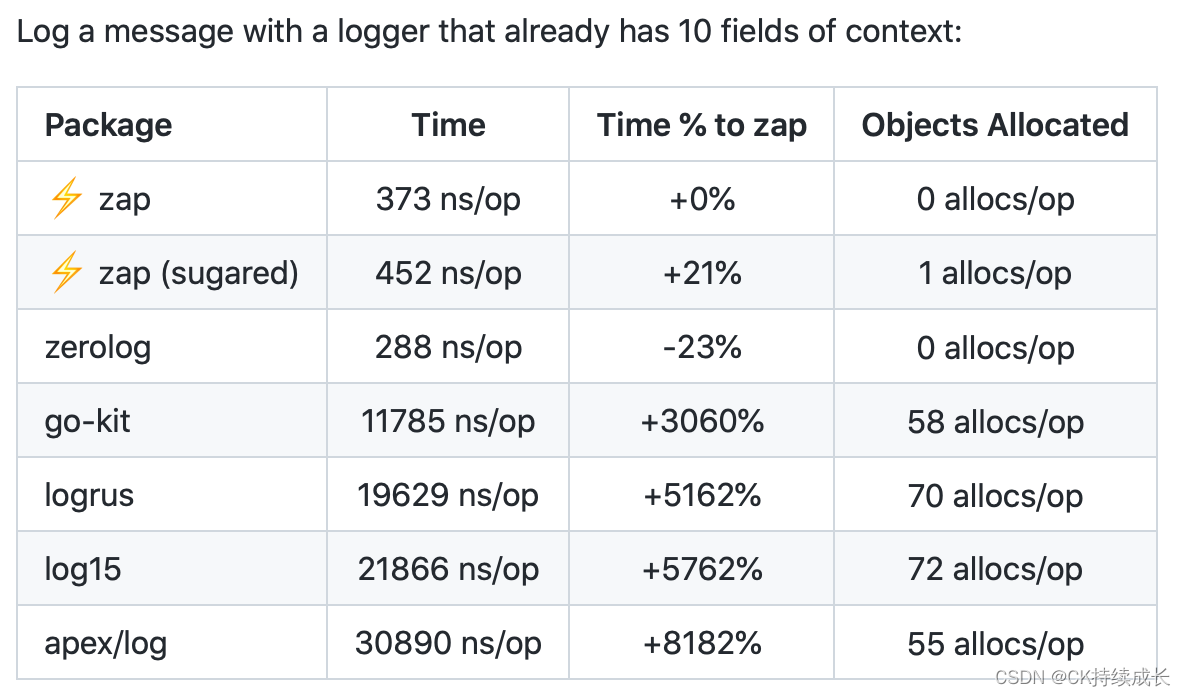
The official response to zap It is also compared with other log libraries , Here's the picture :

2. zap Use
First we install zap library
> go get -u go.uber.org/zapZap There are two types of logging :SugaredLogger and Logger.
In a context where performance is good but not critical , have access to SugaredLogger. It's faster than other structured log packages 4-10 times , It also includes structured and printf Style api.
When performance and type safety are critical , Please use Logger. It is better than SugaredLogger faster , It takes up much less memory , But it only supports structured logging .
Let's write a simple example to see zap Of logger Use
    logger := zap.NewExample()
    defer logger.Sync()

    const url = "http://api.ckeen.cn"

    logger.Info("fetch url:",zap.String("url", url))

    sugar := logger.Sugar()

    sugar.Infow("Failed to fetch URL.",
	    "url", url,
        "token", "xxxx",
	    "attempt", 3,
	    "backoff", time.Second,
    )
    sugar.Infof("Failed to fetch URL: %s", url)

    logger.Info("Failed to fetch URL.",
	    zap.String("url", url),
        zap.String("token", "xxxx"),
	    zap.Int("attempt", 3),
	    zap.Duration("backoff", time.Second),
    )


//  printout
// {"level":"info","ts":1655827513.5442681,"caller":"zap/main.go:22","msg":"fetch url:","url":"http://api.ckeen.cn"}
// {"level":"info","ts":1655827513.544397,"caller":"zap/main.go:25","msg":"Failed to fetch URL.","url":"http://api.ckeen.cn","token":"xxxx","attempt":3}
// {"level":"info","ts":1655827513.54445,"caller":"zap/main.go:30","msg":"Failed to fetch URL: http://api.ckeen.cn"}
// {"level":"info","ts":1655827513.5444632,"caller":"zap/main.go:32","msg":"Failed to fetch URL.","url":"http://api.ckeen.cn","token":"xxxx","attempt":3}
zap Provides NewExample/NewProduction/NewDevelopment Constructor creation Logger. Here we use zap.NewExample() Create a Logger Example . I think the official API Interface provides functions for :

In addition to creating Logger, We can also create Logger Object's Sugar() The function returns SugaredLogger Example .SugaredLogger Structured logging for api It's loose type
establish Logger perhaps SugaredLogger After an instance of the , We can call functions at different levels of log output Info,Debug,Error Wait to print out the log .
Just Info In terms of functions , Except that the first parameter you can output is string Type of msg Outside , You can also output multiple Field Parameters of type . and Field The type is by zap Functions of different data types under the package , For example, in the above example code , We use zap.String() To construct a Field. see zap.String You can see its structure from the source code of Filed Type data for :

zap Other... Are provided under the package zap.Int,zap.Bool,zap.Float32 And other functions are used to support different data types . For specific functions, please refer to the information at the end of the article .
3. Use Namespace Building nested formats
We can use zap.Namespace(key string) Field Construct a Namespace , Follow up Field Are recorded in this namespace , In this way, a json Nested output of :
func main(){
	logger := zap.NewExample()
	defer logger.Sync()

	logger.Info("top level log",
		zap.Namespace("params"),
		zap.String("desc", "sub level log"),
		zap.Int("traceId", 1),
		zap.Int("spanId", 1),
		)

	logger2 := logger.With(
		zap.Namespace("params"),
		zap.String("desc", "sub level log"),
		zap.Int("traceId", 1),
		zap.Int("spanId", 1),
	)
	logger2.Info("tracked sub level")
}

//  Print the results
// {"level":"info","msg":"top level log","params":{"desc":"sub level log","traceId":1,"spanId":1}}
// {"level":"info","msg":"tracked sub level","params":{"desc":"sub level log","traceId":1,"spanId":1}}
You can see from the example and the printed results , have access to zap Of Info Of Filed Parameters of the incoming zap.Namespace Output nested structure in the way of , It can also be used With Function to build a new nested structure Logger Then output . It should be noted here that Filed The parameters are sequential , be ranked at zap.Namespace hinder Field Fields are nested in namespace Inside the structure of .
4. Tectonic Logger Object options Option
We can see the above structure Logger Object supplied NewExample/NewProduction/NewDevelopment The functions of all provide Option Type to create Logger object , The official has provided us with the following Option Parameters :

Here are some key functions :
4.1 AddCaller and WithCaller Output file name and line number
Creating Logger When using objects , Use AddCaller and WithCaller The name and line number of the file that can be called . But in the above NewExample/NewProduction/NewDevelopment in , Use NewProduction/NewDevelopment establish Logger example , Pass in AddCaller and WithCaller Of Option It works , and NewExampleAddCaller and WithCaller Pass in Option It's invalid . Check the source code and create Logger Of Config When , Incoming EncoderConfig The parameters of , When creating a Encoder If you set CallerKey, To output caller Information , and NewExample establish Logger This parameter is not set when . Refer to the printout of the following code :
    logger := zap.NewExample(zap.AddCaller())
	defer logger.Sync()
	logger.Info("tracked root level", zap.String("foo", "bar"))

	logger2, _ := zap.NewProduction(zap.AddCaller())
	defer logger2.Sync()

	logger2.Info("tracked root level", zap.String("foo", "bar"))

	logger3, _ := zap.NewDevelopment(zap.AddCaller())
	defer logger3.Sync()

	logger3.Info("tracked root level", zap.String("foo", "bar"))
printout :
{"level":"info","msg":"tracked NewExample root level","foo":"bar"}
{"level":"info","ts":1655890681.2474399,"caller":"zap/main.go:99","msg":"tracked NewProduction root level","foo":"bar"}
2022-06-22T17:38:01.247+0800 INFO zap/main.go:105 tracked NewDevelopment root level {"foo": "bar"}
4.2 AddStacktrace Output call stack
Logger Of AddStacktrace You can control the printing of detailed stack information for different levels of code calls , For detailed examples, please refer to the following Fields The setting part of the code
4.3 Fields Set default log fields
adopt Fileds Of Option Set up , We can configure some common fields contained in the log , For example, set the log traceId etc. , Examples are as follows :
    logger,_ := zap.NewProduction(zap.Fields(
		zap.Namespace("sample4"),
		zap.String("traceId", "1100"),
		zap.String("spanId", "200")),             //  Set preset fields
		zap.AddStacktrace(zapcore.DebugLevel),    // Set the output call stack information
		zap.WithCaller(true))
	defer logger.Sync()

	logger.Info("print one log", zap.String("foo", "bar"))
Print the results :
{"level":"info","ts":1655890937.63424,"caller":"zap/main.go:116","msg":"print one log","sample4":{"method":"main","foo":"bar"},"stacktrace":"main.sample4\n\t/Users/ckeen/Documents/code/gosource/go-awesome/go-samples/zap/main.go:116\nmain.main\n\t/Users/ckeen/Documents/code/gosource/go-awesome/go-samples/zap/main.go:128\nruntime.main\n\t/usr/local/go/src/runtime/proc.go:255"}
4.4 Hooks Provide hook functions for logs
Hooksw by Logger Provides options for registering hook functions . According to the following Hooks Function definition of , You can see when Logger Write one at a time Entry when , These functions will be called .
func Hooks(hooks ...func(zapcore.Entry) error) OptionWe can do some log statistics or forwarding through the registered hook function , Like forward to kafka And so on. .
5. Reference material
- https://pkg.go.dev/go.uber.org/zap
- https://medium.com/a-journey-with-go/go-how-zap-package-is-optimized-dbf72ef48f2d
- depth | from Go High performance log Library zap See how to achieve high performance Go Components
边栏推荐
猜你喜欢


随机推荐
Qt使用Valgrind分析内存泄漏
【Cocos Creator 3.5.1】this.node.getPosition(this._curPos)的使用
693. 交替位二进制数
Unity中跨平台获取系统音量
Senior [Software Test Engineer] learning route and necessary knowledge points
【Cocos Creator 3.5.1】input.on的使用
Machunmei, the first edition of principles and applications of database... Compiled final review notes
[nips 2017] pointnet++: deep feature learning of point set in metric space
Webrtc Series - Network Transport 7 - ice Supplement nominations and ice Modèle
Dual position relay dls-34a dc0.5a 220VDC
Spark 之 built-in functions
unity点光源消失
C语言实现定时器
Ad22 Gerber files Click to open the Gerber step interface. Official solutions to problems
NEON优化1:软件性能优化、降功耗怎么搞?
C language implementation timer
Two position relay rxmvb2 r251 204 110dc
How JQ gets the ID name of an element
双位置继电器JDP-1440/DC110V
WebRTC系列-網絡傳輸之7-ICE補充之提名(nomination)與ICE_Model