当前位置:网站首页>Installation and use of Jenkins
Installation and use of Jenkins
2022-06-28 15:25:00 【Your little Liao】
Jenkins What is it? ?
Jenkins yes ⼀ Alone ⽴ The open source ⾃ Automation server , can ⽤ On ⾃ Automation and construction 、 test 、 Deliver or deploy software related tasks
For our testing, there is no shortage of Jenkins, Next, we will install Jenkins
- Jenkins Installation
- download Jenkins War package
Enter official website https://www.jenkins.io/download/#downloading-jenkins
- Deploy Jenkins
After downloading, unzip it to the computer folder
Because we are downloading war package , So as long as we can transport ⾏java Land ⽅ You can build Jenkins; So we found Jenkins.war Of route And proceed under the changed path ⼊cmd perhaps The input terminaljava -jar <jenkins.war The path of >
After operation , Will automatically build a local service , And will be in c A hidden folder is generated under the user file under the disk jenkins Service support , We can also search in cmd Find the path in the data returned from the window

Because a local service will be generated automatically , Let's open it now Enter the local service URL 127.0.0.1:8080
We will see that this page requires an administrator password , This password is actually in our cmd Window run start Jenkins Can be found in the data returned in Search for initialAdminPassword
After we get the password Go back to the page just now Enter the password and click continue

Then wait for the installation to complete
If installation fails , There are usually a few reasons
1、 Your plug-in installation update source needs to be changed to the domestic image source
modify Jenkins⼯ do ⽬ Recorded hudson.model.UpdateCenter.xml ⽂ Pieces of , take url Change by http://mirrors.tuna.tsinghua.edu.cn/jenkins/updates/updatecenter.json
modify Jenkins⼯ do ⽬ Recorded updates/default.json ⽂ Pieces of , take updates.jenkins.io/download All replacement
become mirrors.tuna.tsinghua.edu.cn/jenkins And will www.google.com Replace all with www.baidu.com
restart Jenkins service
2、 It's because of you ⽹ Bad communication , So if something goes wrong , Please visit again , Just reinstall ;
www.hctestedu.com Chinese survey Education -CICD
After the normal installation is successful , We can create ⼀ An administrator ⽤ The door is closed ,⾃⼰ Set administrator's ⽤ Account name and password 
After creating this administrator, you will jump to the instance configuration page Here we don't need to click save directly to complete 

Page Jump to the home page , So our installation is complete 
Note if the plug-in installation fails :
1、 Record the name of the plug-in
2、 open Jenkins Enter settings
3、 Enter plug-in management , And copy the name of the failed plug-in to the search box for download and installation ( The plug-in installation needs to be restarted to take effect )
- Jenkins Use
Simply make ⽤ term ⽬ There are only three steps to interact with the operating system : Build tasks 、 Set up the build script 、 shipment ⾏ term
⽬
Create a project That is to create a new task
So let's create a new task
Don't worry about the rest , Select the first back point to confirm , Enter the project configuration interface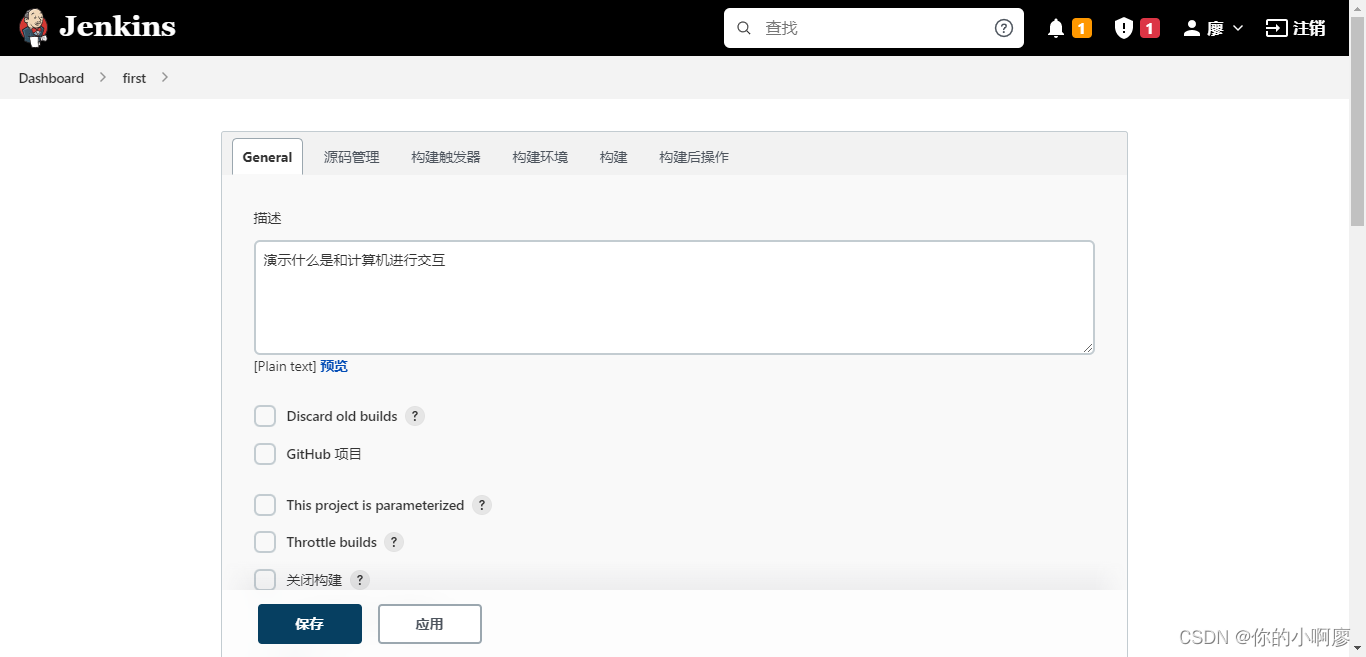
Slide down to build options
Click OK after selection , Pop up the input box
After saving, we have a task , Page jumps to workbench , We can run the new task
Select the console output button on the operation record page , Go to the console page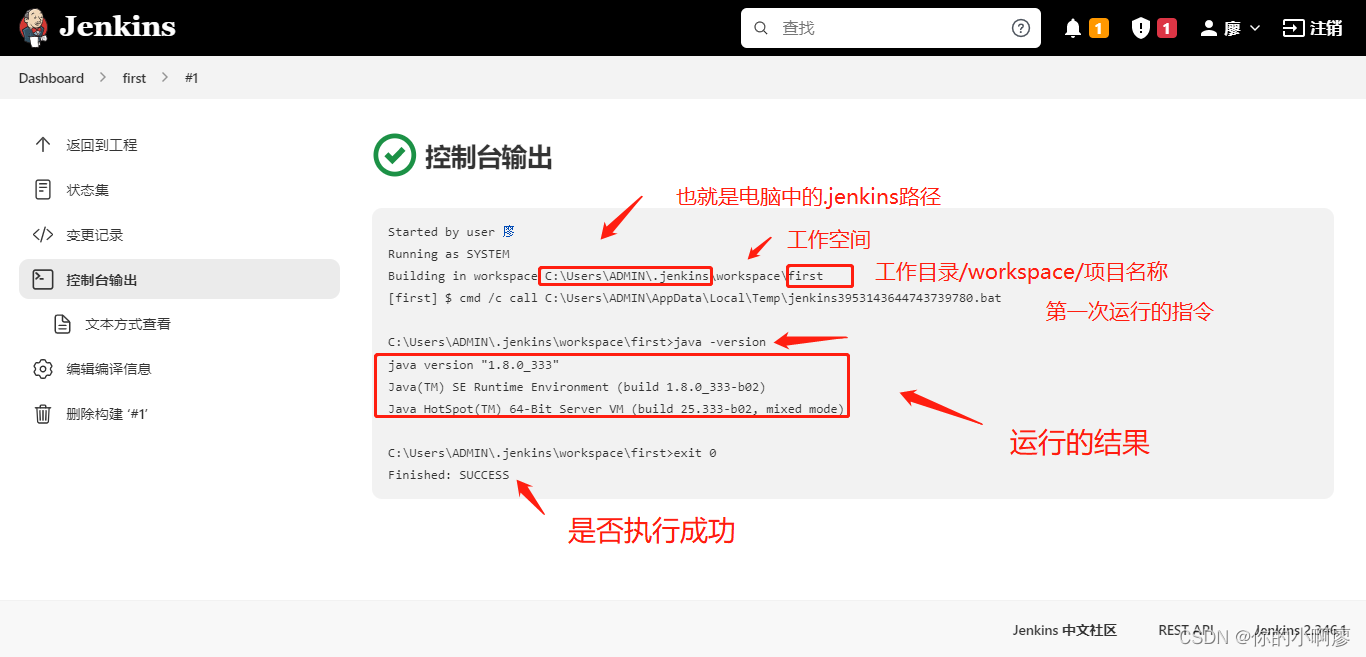
Be careful : If we were pychar Terminal running command in , For example, we need to run a test.py file , Then we are pychar Does the terminal have to input commandspython test.py
So we're in Jenkins in , The command file address must be an absolute path You can't type inpython test.pyAnd the command cannot contain Chinese
Why? ?
1、 because Jenkins The principle of the running script is that it is passed to in the form of data Jenkins
2、 Data transfer to Jenkins Then there is the operation of saving , The data will change during the saving process
How to solve it ?
Restart Jenkins ( Be careful not to open the URL )
Startup time Specified encoding : java -Dfile.encoding=utf-8 -jar <Jenkins The path of >
边栏推荐
- Application of mongodb in Tencent retail premium code
- 关于针对tron API签名广播时使用curl的json解析问题解决方案及针对json.loads方法的问题记录
- How to solve the following problems in the Seata database?
- Flutter dart语言特点总结
- C#/VB. Net to convert PDF to excel
- ROS知识点——使用VScode搭建ROS开发环境
- 环保产品“绿色溢价”高?低碳生活方式离人们还有多远
- Leetcode 48. Rotate image (yes, resolved)
- A bug liver a week I can't help mentioning issue
- Realization of a springboard machine
猜你喜欢

Express template engine
Oracle11g database uses expdp to back up data every week and upload it to the backup server

Innovation and upgrading of supply chain system driven management mode in petrochemical industry and strengthening internal management of enterprises
![Experiment 6 8255 parallel interface experiment [microcomputer principle] [experiment]](/img/70/394ccf6e08a0774acade1eb1b8bf00.png)
Experiment 6 8255 parallel interface experiment [microcomputer principle] [experiment]

Facebook出手!自适应梯度打败人工调参
MIPS assembly language learning-03-cycle
Oracle11g数据库使用expdp每周进行数据备份并上传到备份服务器

Fleet |「后台探秘」第 3 期:状态管理
![[C language] how to generate normal or Gaussian random numbers](/img/31/964e0922e698a3746599b840501cdf.png)
[C language] how to generate normal or Gaussian random numbers

如何从零搭建10万级 QPS 大流量、高并发优惠券系统

随机推荐
【黑马早报】腾讯回应大批用户QQ号被盗;薇娅丈夫公司被罚19万;中国恒大被申请清盘;关晓彤奶茶店回应被加盟商起诉...
R language ggplot2 visualization: the patchwork package is used to customize and combine the three ggplot2 visualization results to form a composite graph. After the horizontal combination of two sub
Could you tell me whether the batch addition of Oracle such as insert all was not blocked?
MIPS汇编语言学习-01-两数求和以及环境配置、如何运行
Does Frankfurt currently support SQL?
雷科防务:4D毫米波雷达产品预计可以在年底量产供货
Talking about open source - Linus and Jim talk about open source in China
sql语句 练习题
Spark SQL generate JSON
从五大能力到 “1+5+N”,华为让政企转型更稳健
经典模型——Transformer
扩充C盘(将D盘的内存分给C盘)
浪擎与浪潮,一个从OEM到价值共生的生态样板
分布式理论须知
从莫高窟到太平洋,海量数据找到了新家园
R语言ggplot2可视化:使用patchwork包(直接使用加号+)将一个ggplot2可视化结果和一段文本内容横向组合起来形成最终结果图
C语言学习-19-全排列
笔试面试算法经典–最长回文子串
Steve Jobs of the United States, died; China jobs, sold
R language ggplot2 visualization: use the patchwork package (directly use the plus sign +) to horizontally combine a ggplot2 visualization result and a piece of text content to form a final result gra