当前位置:网站首页>Oculus quest2 | unity configures the oculus quest2 development environment and packages an application for real machine testing
Oculus quest2 | unity configures the oculus quest2 development environment and packages an application for real machine testing
2022-06-30 15:35:00 【A little y who taps the code】

List of articles
- Unity To configure Oculus Quest2 development environment
- The first 1️⃣ Step , Create a new one Unity Project and import Oculus Integration package
- The first 2️⃣ Step , Import Oculus XR Plugin and XR Plugin Management
- The first 3️⃣ Step , Switch Android Platform and check Oculus
- The first 4️⃣ Step , Select a sample scenario to package
- The first 5️⃣ Step , Load the packaged application into Quest Real machine test
- summary
Preface
- That was true in the last article Oculus Quest2 I made a brief introduction , You can read the following article .
- Oculus Quest2 | Oculus Quest2 First experience ,Quest2 Development history and parameter introduction
- The next step is configuration Oculus Quest2 Develop the environment and integrate SDK 了 , Let's take a look at how to operate ~
Unity To configure Oculus Quest2 development environment
Now that the integration has started SDK 了 , Instructions for Unity I am already quite skilled , That's basic Unity There's not much to say about the operation , Let's start the operation directly !
The first 1️⃣ Step , Create a new one Unity Project and import Oculus Integration package
- stay Unity Create a new 3D project .
- From the menu , go to Window > Asset Store.
- stay Unity Asset Store in , Search for Oculus Integration.
- From the results , single click Oculus Integrate , Then click Import .
- stay Import Unity Package Window , Select all files and folders , And then click Import.
- When prompted to update Oculus Utilities When the plug-in , Click on Yes, And then click Restart.
This step ensures that you are using... Bundled with the package you are installing Oculus Utilities plug-in unit . If you choose not to update the plug-in at this time , You need to update it manually later . - When prompted to update Spatializer When the plug-in , single click Upgrade, And then click Restart.


And then wait Oculus Integration Just import the package .
The first 2️⃣ Step , Import Oculus XR Plugin and XR Plugin Management
open Windows-> Package Manager , Import Oculus XR Plugin and XR Plugin Management package
As shown in the figure below :
If the above two packages are not imported , You can also click it directly Project Settings Of XR Plug-in Management
There will be one for you to install XR Package options , Just click Install .
The test result here is similar to the manual import above Oculus XR Plugin and XR Plugin Management package An effect ~

Some tutorials also say that you need to install one XR Interaction Toolkit package , What exactly does this bag do , I will go into details later , Here is a brief introduction to how to install .
This package is installed in the same way as the above two packages , There are differences Unity Version in Package Manager You can't find it directly in !
When we can't find it, we can use the following two methods :
Method 1 : stay Package Manager Click inside Advanced, Check Show Preview Packages, And then in Unity Registry Mid search XR Interaction Toolkit Can be installed .
Method 2 : stay Project Settings -> Package Manager The admission Enable Preview Package, Then return to Package Manager Refresh and search again !


The first 3️⃣ Step , Switch Android Platform and check Oculus
stay File -> Build Setting... Next switch to Android platform 
And then in PlayerSetting Click on the XR Plug-in Management, Check Oculus
The first 4️⃣ Step , Select a sample scenario to package
stay Oculus There are many sample scenarios in the project of , Here I use DIstanceGrad scene Package and make a demonstration .
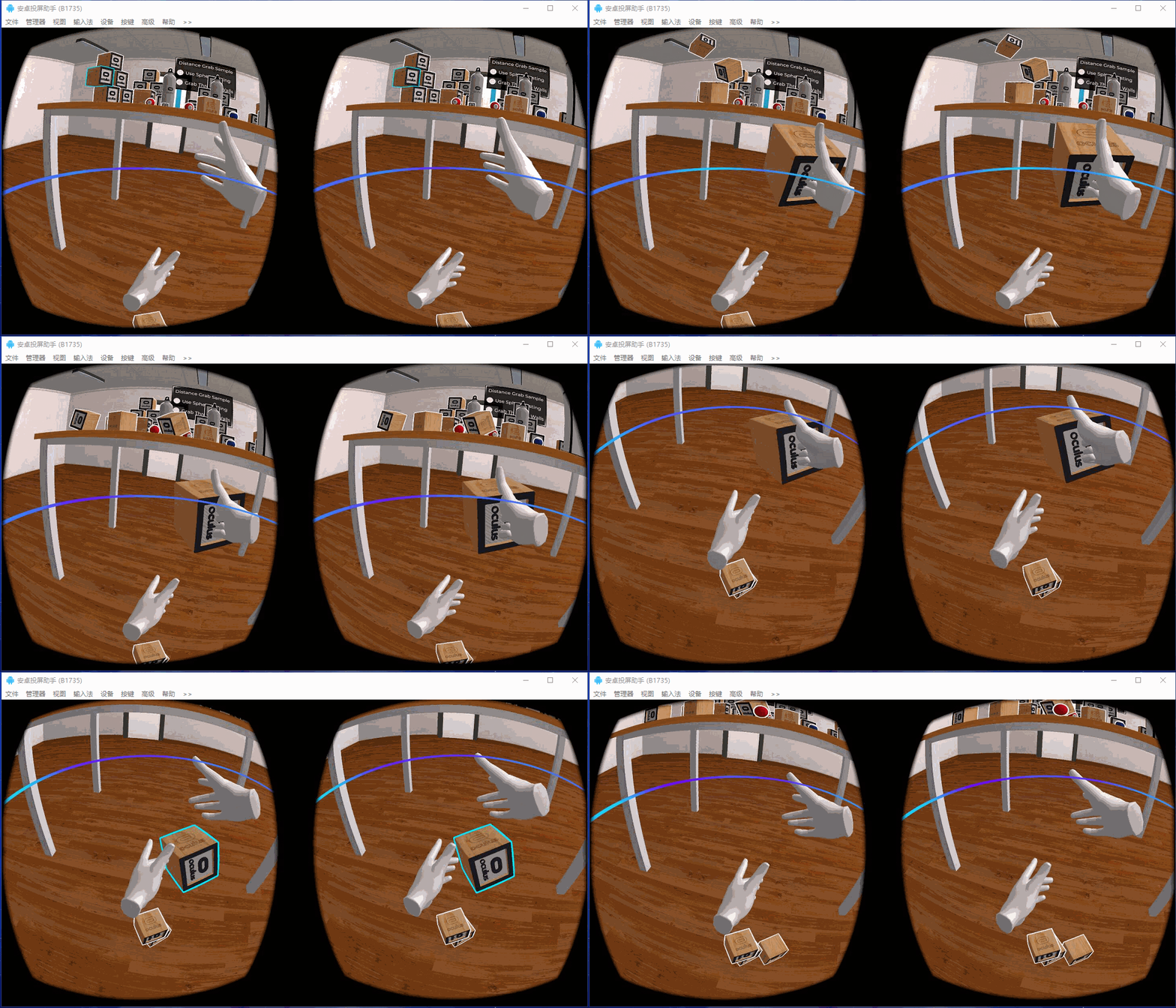
This sample scenario is a demonstration of Remote capture Demo, As shown in the figure below :
open File -> Build Settings -> Player Setting Add this scene , Click on Player Setting After modifying the company name and product name , Click on Build Just pack it 
The first 5️⃣ Step , Load the packaged application into Quest Real machine test
Now we have packed one Quest Instance scenario application of , Load it Quest Real machine test is enough .
Quest To install an application, you need to set Developer model , How to set the development mode is not described in detail here , Just search the Internet .
As long as the developer mode is enabled , The machine Quest The device can normally install our packaged applications like a mobile phone .
Here is how I put the packaged application into Quest The test results of the real machine , Let's have a look !

summary
- This article introduces How to use Unity To configure Oculus Quest2 Develop the environment and integrate Oculus Package an application to the real machine for testing .
- Follow the tutorial step by step , Overall, it is very simple .
- However, there may be errors such as reporting errors in a small step , Just test a few more times .
- Set developer mode There are many tutorials online , Just follow the instructions , If you have any questions, please leave a message in the comment area ~
- About Oculus Quest2 The tutorial article , There will be some updates later , If you like, remember to like this article and subscribe to this column ~
边栏推荐
- Abstract meaning
- How to do a good job in high concurrency system design? I have summarized three points
- C. Registration system(map)
- The difference between queue and stack
- Soap comparison result file description
- N - Is There A Second Way Left? (minimum spanning tree, Kruskal)
- 001 data type [basic]
- The short video and live broadcast incubation training camp with goods opens nationwide enrollment!
- Summary of system stability construction practice
- Infrastructure is code. What are you talking about?
猜你喜欢

Rte2021 review HDR technology product practice and exploration

Industry analysis | the future of real-time audio and video
![001 data type [basic]](/img/36/90fdf51a20f8c708b9c38610b377d6.jpg)
001 data type [basic]

RTC monthly tabloid programming challenge ended successfully in June; Review of the first anniversary of sound network's listing

Management joint examination - mathematical formula
![[ten thousand words long article] thoroughly understand load balancing](/img/58/5fcc75bf42582cf08a31923f35aebb.jpg)
[ten thousand words long article] thoroughly understand load balancing

4.4 string

Matlab function for limit, definite integral, first-order derivative, second-order derivative (classic examples)
![[matlab] 2D drawing summary](/img/de/6bb5385f440a2997dbf9cbb9a756eb.jpg)
[matlab] 2D drawing summary

Developer practice - the future of Agora home AI audio and video
随机推荐
FoxPro and I
4.2 escape characters
Scattered knowledge of C language (unfinished)
How many questions can you answer for the interview of Mechanical Engineer?
The short video and live broadcast incubation training camp with goods opens nationwide enrollment!
Flask Sqlalchemy - automatically export the table model (flask sqlacodegen) & no single primary key problem ---orm (8)
4.7 type() function query data type
Three types of technical debt that programmers often encounter: code, data, and architecture
Pointer understanding
数控加工中心打刀缸工作原理及故障处理
Is Domain Driven Design (DDD) reliable?
How does sd-rtn ensure the high availability of RTE services after infrastructure failure
Forward declaration of classes
Explain service idempotency design in detail
深入理解.Net中的线程同步之构造模式(二)内核模式1.内核模式构造物Event事件
4.6 floating point number
国债逆回购在哪个平台上买比较安全?
DR-TANet: Dynamic Receptive Temporal Attention Network for Street Scene Change Detection
Some reference routines for cache update
Xiao Sha's pain (thinking problem)