当前位置:网站首页>Mysql database operation - stored procedure, view, transaction, index, database backup
Mysql database operation - stored procedure, view, transaction, index, database backup
2022-06-28 02:59:00 【Test the prettiest guy】
1. Data preparation
--  establish student library :student
create database student default character set utf8 collate utf8_general_ci;
/*  Create student table :students,  Student number is Sid, The data type is varchar(10), Primary key ,  The name is name, The data type is varchar(10),  The gender is sex, The data type is varchar(1),  Age is age, The data type is int,  Class for class, The data type is varchar(10),  The ID card number is card, The data type is varchar(20),  The city is for city, The data type is varchar(20) */
create table students(
	Sid varchar(10) primary key,
	name varchar(10),
	sex varchar(1),
	age int,
	class varchar(10),
	card varchar(20),
	city varchar(20)
);
--  Insert data into the student table
insert into students values
('001',' Wang Zhaojun ',' Woman ',30,'3 class ','634101199003157654',' Beijing '),
('002',' Zhugeliang ',' male ',29,'2 class ','110102199104262354',' Shanghai '),
('003',' Ruban master ',' male ',30,'1 class ','820102199003047654',' nanjing '),
('004',' White ',' male ',35,'4 class ','840202198505177654',' anhui '),
('005',' Big Joe ',' Woman ',28,'3 class ','215301199204067654',' tianjin '),
('006',' Sun shangxiang ',' Woman ',25,'1 class ','130502199506137654',' hebei '),
('007',' Hundred Li xuance ',' male ',39,'2 class ','140102198107277654',' shanxi '),
('008',' Little Joe ',' Woman ',25,'3 class ',null,' Henan '),
('009',' Hundred Li keep the promise ',' male ',31,'1 class ','',' hunan '),
('010',' Daji ',' Woman ',24,'2 class ','440701199607147654',' guangdong '),
('011',' Lian po ',' male ',30,'1 class ','110202199005017754',' Beijing '),
('012',' Sun Bin ',' male ',36,'3 class ','650102198401297655',' xinjiang ');
/*  Create a curriculum :courses  The course number is Cid, The data type is varchar(10), Primary key ,  The course is called Cname, The data type is varchar(10) */
create table courses(
	Cid varchar(10) primary key,
	Cname varchar(10)
);
--  Insert data into the curriculum
insert into courses values
('01',' Chinese language and literature '),
('02',' mathematics '),
('03',' English '),
('04',' biological '),
('05',' Politics '),
('06',' Geography '),
('07',' Physics ');
/*  Create a score table :scores,  Student number is Sid, The data type is varchar(10), Student table foreign keys ,  The course number is Cid, The data type is varchar(10), Curriculum foreign key ,  The score is score, The data type is tinyint */
create table scores(
	Sid varchar(10),
	Cid varchar(10),
	score tinyint,
	foreign key (Sid) references students(Sid),
	foreign key (Cid) references courses(Cid)
);
--  Insert data into the score table
insert into scores values
('001','01',49),
('001','02',75),
('001','03',54),
('001','04',66),
('001','05',59),
('001','06',94),
('002','01',58),
('002','02',57),
('002','03',74),
('002','04',90),
('002','05',55),
('002','06',64),
('003','01',83),
('003','02',73),
('003','04',50),
('003','05',67),
('003','06',87),
('004','01',97),
('004','02',50),
('004','03',56),
('004','04',69),
('004','05',72),
('004','06',51),
('005','01',54),
('005','02',66),
('005','03',61),
('005','05',49),
('005','06',86),
('006','01',97),
('006','02',77),
('006','03',66),
('006','04',76),
('007','01',49),
('007','02',40),
('007','03',99),
('007','04',86),
('007','05',78),
('007','06',55),
('008','01',82),
('008','02',72),
('008','03',98),
('008','05',47),
('008','06',68),
('009','01',84),
('009','02',56),
('009','03',74),
('009','04',64),
('009','05',79),
('009','06',97),
('010','02',85),
('010','03',85),
('010','04',90),
('010','05',93),
('010','06',61),
('011','01',85),
('011','02',63),
('011','03',71),
('011','04',58),
('011','05',80),
('011','06',66);
2. stored procedure
Definition : A stored procedure is a section with a name sql Code , It consists of one or more SQL A collection of statements , Used to accomplish a specific function together
Create stored procedure
sqlyog grammar :
delimiter $$
create procedure  Stored procedure name ( Parameters , Parameters )
begin
sql sentence 1;
sql sentence 2;
end$$
delimiter ;
explain :delimiter $$ It means to define $$ by SQL Statement Terminator ;
If there is no parameter after the stored procedure name, you may not write the parameter
Navicat grammar :
create procedure  Stored procedure name ( Parameters , Parameters )
begin
sql sentence 1;
sql sentence 2;
end
practice 1:
--  Create stored procedure stu_pro, Content is query students All data of table (Navicat)
create procedure stu_pro()
begin
select * from students;
end;
Query stored procedures for all databases
grammar :
show procedure status;
practice 1:
--  Query stored procedures for all databases
show procedure status;
A stored procedure that queries a database
grammar :
show procedure status where db=' Database name ';
practice 1:
--  Inquire about student Stored procedure of database
show procedure status where db='student';
Query the detailed definition information of the stored procedure
grammar :
show create procedure Database name . Stored procedure name ;
practice 1:
--  The query stored procedure name is stu_pro Detailed definition information of
show create procedure student.stu_pro;
Calling stored procedure
grammar :
call Stored procedure name ();
practice 1:
--  Calling stored procedure stu_pro
call stu_pro();
Delete stored procedure
grammar :
drop procedure Stored procedure name ;
Be careful : When deleting a stored procedure, you do not need to write the parentheses after the stored procedure name
practice 1:
--  Delete stored procedure stu_pro
drop procedure stu_pro;
3. View
Definition : The view is based on SQL A visual virtual table of the result set of the statement
Create view
grammar :
create view View name as sql sentence ;
practice 1 :
--  Create a view named stu_nan, Content is query students Table all the information about boys
create view stu_nan as
select * from students where sex=' male ';
Use view
grammar :
select * from View name ;
explain : You can treat the view as a table , But only read-only access to data ( We can only check , Can't add 、 Change 、 Delete )
practice 1:
--  Use view stu_nan
select * from stu_nan;
Delete view
grammar :
drop view View name ;
practice 1:
--  Delete view stu_nan
drop view stu_nan;
practice 2:
--  If the view stu_nan Delete if it exists
drop view if exists stu_nan;
4. Business
Definition : A transaction is a sequence of operations on a database , It is an indivisible work unit , Or all the operations in this sequence will be executed , Or none at all
characteristic :
Atomicity : All operations in a transaction are indivisible in the database , Or all , Or none at all ;
Uniformity : Transactions are executed sequentially , The intermediate state between the start and end of a transaction will not be seen by other transactions ;
Isolation, : If there are multiple transactions executing concurrently , Changes made by each transaction must be isolated from other transactions ;
persistence : After the transaction completes , Changes to database data are persisted
grammar :
--  Start business
begin;
--sql Execute statement
sql sentence ;
--  Roll back the transaction
rollback;
--  Commit transaction
commit;
Be careful : If only the transaction starts , But there is no rollback transaction or commit transaction , By default, the transaction is rolled back
practice 1:
--  Start business
begin;

--  Change Wang Zhaojun's age to 35, And change Wang Zhaojun's Chinese score to 95
update students set age=35 where name=' Wang Zhaojun ';
update scores set score=95 where Sid in (select Sid from students where name=' Wang Zhaojun ')
and Cid in (select Cid from courses where Cname=' Chinese language and literature ');

--  Roll back the transaction
rollback;

--  Commit transaction
commit;
understand : A transaction needs to start first (begin), tell sql I'm going to start a business , And then execute insert、update、delete sentence , The results of the execution are placed in the cache ( At this time, the data in the cache is used to query Wang Zhaojun's age and language scores ), But if you directly open the table to view the data, you will find that there are no changes , Because it hasn't been submitted yet , When you submit a transaction , To really modify the table , otherwise sql It will be rolled back automatically before the transaction starts , That is, nothing has changed .
5. Indexes
Definition : Index is help MySQL Data structure for efficient data acquisition . Generally speaking, an index is like a book catalog , Greatly accelerate the query speed of the database
Advantages and disadvantages :
advantage : Greatly improved select Query speed of statement
shortcoming : Will slow down the update of tables , for example :insert、update、delete operation
Create index
grammar :
create index The index name on Table name ( Field name ( length ));
Be careful :
If the specified field is a string , You need to specify the length , The recommended length is the same as the length when defining the field ;
If the field type is not a string , It is not necessary to fill in the length part ;
For primary keys , The system will automatically create an index , That's the primary key index
practice 1:
--  to students Tabular name Field creation index name_index
create index name_index on students(name(10));
Look at the index
grammar :
show index from Table name ;
practice 1:
--  see students All indexes of the table
show index from students;
Delete index
grammar :
drop index The index name on Table name ;
practice 1:
--  Delete students Index of tables name_index
drop index name_index on students;
explain : The field name is required to create the index , If a table has an index , As long as you use this field in the query criteria , Then it will automatically use the index
6. Database backup
command :
mysqldump -u user name -p password -A > / The file path to store / File name .sql
边栏推荐
- Opencv -- Hough transform and some problems encountered
- Opencv -- geometric space transformation (affine transformation and projection transformation)
- 【倒立摆控制】基于UKF无迹卡尔曼滤波的倒立摆控制simulink仿真
- You got 8K in the 3-year function test, but were overtaken by the new tester. In fact, you are pretending to work hard
- Usage details of staticlayout
- "Dadao Zhichuang" won a ten million prea+ round of financing and launched a technology consumption robot
- 【插件-statistic】统计代码行数和相关数据
- 音视频技术开发周刊 | 251
- Initial linear regression
- > Could not create task ‘:app:MyTest.main()‘. > SourceSet with name ‘main‘ not found.问题修复
猜你喜欢
![[today in history] June 18: JD was born; The online store platform Etsy was established; Facebook releases Libra white paper](/img/88/6cdd2b604522261e2a88020c5d6ae7.jpg)
[today in history] June 18: JD was born; The online store platform Etsy was established; Facebook releases Libra white paper

数仓的字符截取三胞胎:substrb、substr、substring

Flashtext, a data cleaning tool, has directly increased the efficiency by dozens of times

STM32F1与STM32CubeIDE编程实例-金属触摸传感器驱动

be fond of the new and tired of the old? Why do it companies prefer to spend 20K on recruiting rather than raise salaries to retain old employees
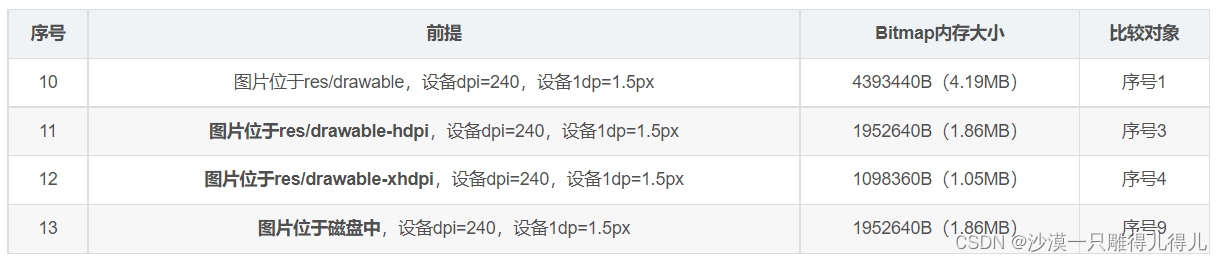
ByteDance Interviewer: how to calculate the memory size occupied by a picture
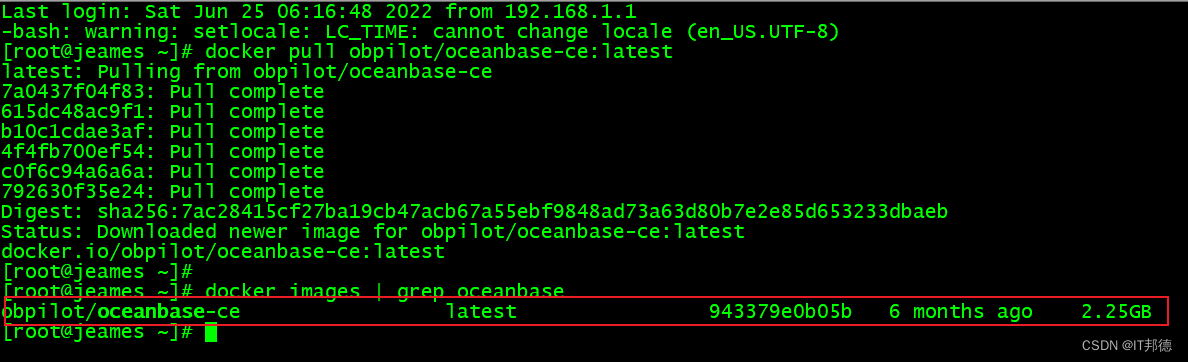
【云原生】-Docker安装部署分布式数据库 OceanBase
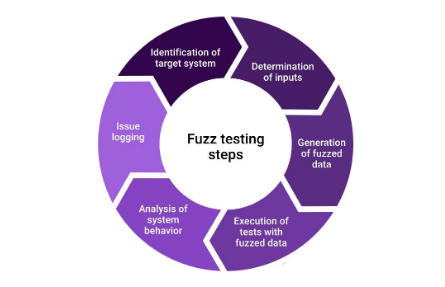
Summary of software testing tools in 2021 - fuzzy testing tools

榜单首发——前装搭载率站上10%大关,数字钥匙方案供应商TOP10
![Packet capturing and sorting out external Fiddler -- understanding the toolbar [1]](/img/5f/24fd110a73734ba1638f0aad63c787.png)
Packet capturing and sorting out external Fiddler -- understanding the toolbar [1]
随机推荐
树莓派-环境设置和交叉编译
Severe Tire Damage:世界上第一个在互联网上直播的摇滚乐队
Win11如何关闭最近打开项目?Win11关闭最近打开项目的方法
[today in history] June 7: kubernetes open source version was released; Worldofwarcraft landed in China; Birth of the inventor of packet switching network
【活动早知道】LiveVideoStack近期活动一览
MFC CString互转LPVOID
JDBC and MySQL databases
How to judge that the thread pool has completed all tasks?
微信小程序中生成二维码
PHP 代码 微信、公众号、企业微信 发送表情符号 [U+1F449]
[today in history] June 20: the father of MP3 was born; Fujitsu was established; Google acquires dropcam
把腾讯搬上云:云服务器 CVM 的半部进化史
分布式事务—基于消息补偿的最终一致性方案(本地消息表、消息队列)
How fiddle uses agents
Shardingsphere-proxy-5.0.0 establish MySQL read / write separation connection (6)
无心剑汉英双语诗004.《剑》
【云原生】-Docker安装部署分布式数据库 OceanBase
isEmpty 和 isBlank 的用法區別
Online JSON to plaintext tool
Shuttle uses custompaint to paint basic shapes