当前位置:网站首页>node和express实现mySql模糊搜索
node和express实现mySql模糊搜索
2022-06-11 00:14:00 【呵呵的牛】
node和express实现mySql模糊搜索
作为一名前端开发 少了后端总觉的缺点什么 于是也在学习的 express的路上。
1.实现方式
实现服务端的搜索主要是通过调用mySql语句,去查询数据库中想要的数据。
思路:
前端传给后端参数
后端拿到参数
拿到参数后把参数拼接成可以使用的mysql语句
express返回响应结果返回给前端
具体是上面四步,怎么实现呢 ? 一步一步来。
1.前端传给后端参数
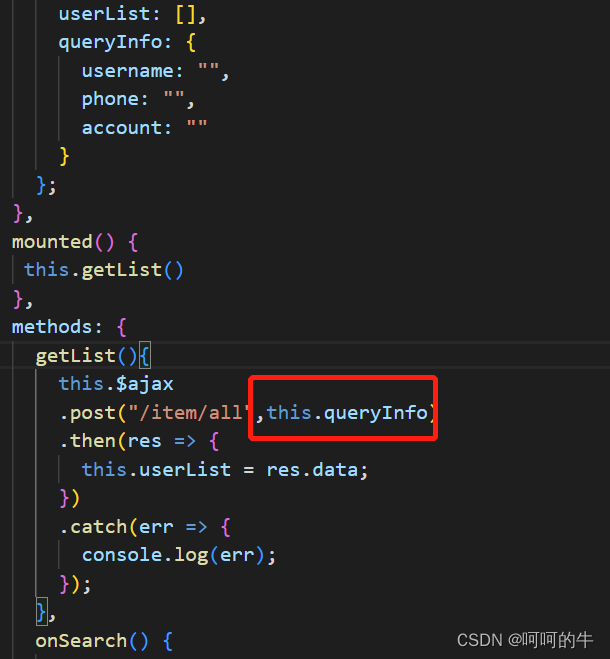
在这里this.queryInfo 就是前端需要传给后端的参数。
2.后端拿到参数

红框显示就是后端拿到前端穿过来的参数
3.拿到参数后把参数拼接成可以使用的mysql语句

拿到参数后 拿到所有的参数 拼接成最后的sql语句 下面sql语句就能拿到 电话号码带11的所有手机号码。
select * from userlist where phone like "%11%" sql

4.express返回响应结果

express 通过回调 返回查询结果给前端使用

mysql返回给express 的数据 express通过回调返回给前端 ,前端拿到这个数据去渲染表格。
最后贴下所有代码 希望对你有用
服务端代码
	var express = require("express");
var router = express.Router();
var sqlMap = require('../../config/sqlMap');
var conn = require('../../config/db');
var verify = require('../../utils/utils');

router.post('/all', function (req, res) {
    if (req.header.token || verify(req.headers.token).code === '606') {
        res.json({
            code: 401,
            message: '登录信息已过期,请重新登录'
        })
        return
    }
    // let sql = sqlMap.item.findAllInfo;
    let sql = 'select * from userlist ';
    var params = req.body
    console.log(params, '参数')
    let arr = []
    for (var key in params) {
        arr.push(params[key])
    }
    console.log(arr, '000')
    if (params.username !== '') {
        if (arr[0] !== '') {
            sql += `where username like "%${params.username}%" `;
        } else {
            sql += '';
        }
    }
    if (params.phone !== '') {
        if (arr[0] === '') {
            sql += ` where phone like "%${params.phone}%" `;
        } else {
            sql += ` and phone like "%${params.phone}%" `;
        }
    }
    if (params.account !== '') {
        if (arr[0] === '' && arr[1] === '') {
            sql += ` where account like "%${params.account}%" `;
        } else {
            sql += ` and account like "%${params.account}%" `;
        }
    }
    console.log(sql, 'sql')

    conn.query(sql, (err, result) => {
        if (err) {
            console.log(err)
        }
        if (result) {
            res.json({
                code: 200,
                data: result
            })
        }
    })

})
module.exports = router;//暴露这个路由
客户端代码
	<template>
  <div>
    <el-card>
      <el-form
        :inline="true"
        :model="queryInfo"
        ref="queryInfoRef"
        class="demo-form-inline"
      >
        <el-form-item label="用户名">
          <el-input
            v-model="queryInfo.username"
            placeholder="用户名"
          ></el-input>
        </el-form-item>
        <el-form-item label="电话">
          <el-input v-model="queryInfo.phone" placeholder="电话"></el-input>
        </el-form-item>
        <el-form-item label="类型">
          <el-select v-model="queryInfo.account" placeholder="类型">
            <el-option label="admin" value="admin"></el-option>
            <el-option label="admin1" value="admin1"></el-option>
            <el-option label="admin2" value="admin2"></el-option>
          </el-select>
        </el-form-item>
        <el-form-item>
          <el-button type="primary" @click="onSearch">查询</el-button>
          <el-button @click="onReset('queryInfoRef')">重置</el-button>
        </el-form-item>
      </el-form>
      <el-table :data="userList" border style="width: 100%">
        <el-table-column fixed prop="username" label="用户名" min-width="150">
        </el-table-column>
        <el-table-column prop="phone" label="电话" min-width="120">
        </el-table-column>
        <el-table-column prop="account" label="account" min-width="120">
        </el-table-column>
        <el-table-column fixed="right" label="操作" min-width="100">
          <template slot-scope="scope">
            <el-button @click="handleClick(scope.row)" type="text" size="small"
              >查看</el-button
            >
            <el-button type="text" size="small">编辑</el-button>
          </template>
        </el-table-column>
      </el-table>

      <el-pagination layout="prev, pager, next" :total="this.userList.length"> </el-pagination>
    </el-card>
  </div>
</template>

<script>
export default {
  data() {
    return {
      userList: [],
      queryInfo: {
        username: "",
        phone: "",
        account: ""
      }
    };
  },
  mounted() {
   this.getList()
  },
  methods: {
    getList(){
      this.$ajax
      .post("/item/all",this.queryInfo)
      .then(res => {
        this.userList = res.data;
      })
      .catch(err => {
        console.log(err);
      });
    },
    onSearch() {
      this.getList()
      console.log(this.queryInfo, "000");
    },
    onReset(resetName) {
      for (var key in this.queryInfo) {
        this.queryInfo[key] = "";
        this.getList()
      }
    }
  }
};
</script>
边栏推荐
- Why is the digital transformation of small and medium-sized enterprises so difficult?
- Solid basic knowledge + correct method is the key to quickly read the source code
- 一些有的没的闲话
- SqlServer中的锁
- Recruitment | Nanjing | triostudio Sanli Agency - Interior Designer / construction drawing deepening Designer / device / Product Designer / Intern, etc
- 程序员应对压力的几个小窍门
- Traversal (pre order, middle order, post order) and search of binary tree
- Summary of pytorch classification problems
- 招聘 | 南京 | TRIOSTUDIO 三厘社 – 室内设计师 / 施工图深化设计师 / 装置/产品设计师 / 实习生等
- Viewpager and dot of bottom wireless loop
猜你喜欢

How to solve the deep paging problem in large factories (easy to understand)
WSL 自动更新 ip hosts 文件

【NVIDIA驱动的顽固问题】---- /dev/sdax:clean,xxx/xxx files,xxx/xxx blocks ---- 最全解决方法

About log traffic monitoring and early warning small project | flag log monitoring script

【VBA脚本】提取word文档中所有批注的信息和待解决状态

87.(leaflet之家)leaflet军事标绘-直线箭头修改

Recruitment | Nanjing | triostudio Sanli Agency - Interior Designer / construction drawing deepening Designer / device / Product Designer / Intern, etc

Why can't Google search page infinite?

C language implementation setting desktop wallpaper

对多线程的理解

随机推荐
Array simulation [queue] and [ring queue]_ code implementation
[paper translation] recent advances in open set recognition: a survey
【NVIDIA驱动的顽固问题】---- /dev/sdax:clean,xxx/xxx files,xxx/xxx blocks ---- 最全解决方法
logback日志框架
dma_buf_export
Serrures dans SQLSERVER
ion_dma_buf_begin_cpu_access
MySql 触发器
网络基础(1)-----认识网络
记录oracle的几个参数 db_files,Cursor_sharing ,open_cursor
北京企业前沿引领技术创新补助资金介绍,补助500万
table_exists_action=append和table_exists_action=truncate
Datatemplate in WPF
ion_ mmap
zabbix离线安装
Introduction to prefix, infix and suffix expressions (code implementation of inverse Polish calculator)
Basic introduction of graph and depth first traversal and breadth first traversal
async await
深圳中国专利奖申报流程介绍,补贴100万
Deepstream series fish eye camera test