当前位置:网站首页>tornado环境搭建及基本框架搭建——熟悉的hello world
tornado环境搭建及基本框架搭建——熟悉的hello world
2022-06-11 16:29:00 【InfoQ】
- tornado官方文档:
- 官方英文文档
- 中文4.3
1.项目环境搭建
- 虚拟机中创建本项目运行的python虚拟环境(指定python版本为python3)ubuntu命令:
mkvirtualenv -p python3 tudo
- 安装tornado库(指定版本为5.1.1)ubuntu命令:
pip install tornado==5.1.1
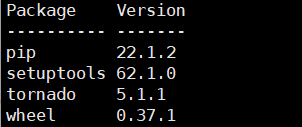
- ubuntu查看安装包命令:
pip list
2.tornado项目基本框架搭建
①熟悉的hello world
- 代码(hello.py):
# -*- coding: utf-8 -*-
"""
__author__ = 孤寒者
"""
# 运行tornado的库
import tornado.ioloop

import tornado.web


# HTTP请求处理 类似Django里的类视图
class MainHandler(tornado.web.RequestHandler):
 def get(self):
 self.write("Hello, world")


# 定义接口
application = tornado.web.Application(
 [(r'/',MainHandler)]
)


if __name__ == '__main__':
 # 定义端口
 application.listen(8080)
 # 运行tornado
 tornado.ioloop.IOLoop.current().start()
- 运行上面的py文件后浏览器访问指定端口(127.0.0.1:8080)出现如下响应即为测试成功——可以进行项目开发!

3.本项目基本框架的搭建
①编写tornado运行文件(app.py):
- 如果所有代码都像测试代码那样写一起,会造成一个py文件过大的后果——同时包含定义接口及类视图等所有代码,而且不易区分具体代码块的功能(当然,如果你非要那样做也不是不可以,tornado就是这么随意~);
- 所以,现采用另一种写法——继承并重写定义接口的类tornado.web.Application,使得定义接口与类视图分开编写!!!
# -*- coding: utf-8 -*-
"""
__author__ = 孤寒者
"""
import tornado.ioloop
import tornado.web

import tornado.options

from tornado.options import define,options

from handlers import main

define('port',default='8000',help='Listeningport',type=int)

class Application(tornado.web.Application):
 def __init__(self):
 handlers = [
 ('/',main.IndexHandler),
 ('/explore',main.ExploreHandler),
 ('/post/(?P<post_id>[0-9]+)',main.PostHandler),
 ]
 settings = dict(
 debug=True,
 # 配置模板路径
 template_path='templates',
 # 配置静态文件路径
 static_path='static'
 )

 super().__init__(handlers, **settings)
application = Application()


if __name__ == '__main__':
 tornado.options.parse_command_line()
 application.listen(options.port)
 print('Server start on port {}'.format(options.port))
 tornado.ioloop.IOLoop.current().start()
②创建handlers包,其内创建main.py文件编写业务逻辑:

# -*- coding: utf-8 -*-
"""
__author__ = 孤寒者
"""
import tornado.web


class IndexHandler(tornado.web.RequestHandler):
 def get(self, *args, **kwargs):
 self.render('index.html')


class ExploreHandler(tornado.web.RequestHandler):
 def get(self, *args, **kwargs):
 self.render('explore.html')


class PostHandler(tornado.web.RequestHandler):
 def get(self, post_id):
 # 传递参数到post.html
 self.render('post.html',post_id=post_id)
③创建模板文件(templates文件夹里):
- 父模板——用于模板继承(base.html):
<!DOCTYPE html>
<html lang="en">
<head>
<meta charset="UTF-8">
<title>{% block title %}Tornado Title{% end %}</title>
</head>
<body>
{% block content %}Default body of base {% end %}
</body>
</html>
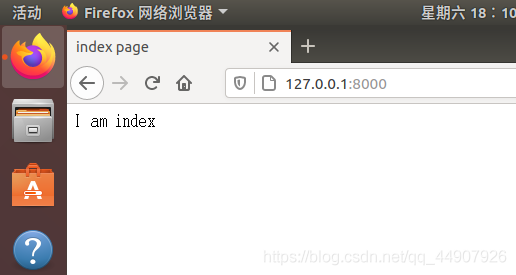
- 首页(index.html):
{% extends 'base.html' %}


{% block title %} index page{% end %}

{% block content %}
I am index
{% end %}
- 发现页(explore.html):
{% extends 'base.html'%}

{% block title %}explore page{% end %}

{% block content %}
I am explore
{% end %}
- 详情页(post.html):【展示接收到的参数post_id
{% extends 'base.html' %}

{% block title %} post page {% end %}
{% block content %}
I am post {{ post_id }}
{% end %}
④创建static文件用于存放js和css
⑤运行项目:


- 完整专栏在CSDN更新,有兴趣的可以去看~
边栏推荐
- 时序预测 | MATLAB实现RBF径向基神经网络时间序列未来多步预测
- C starts an external EXE file and passes in parameters
- Zhenxiang, Huawei gives n+1 for voluntary resignation
- 用户界面之工具栏详解-AutoRunner自动化测试工具
- 2022 high voltage electrician special operation certificate examination question bank and online simulation examination
- [learn FPGA programming from scratch -17]: quick start chapter - operation steps 2-5- VerilogHDL hardware description language symbol system and program framework (both software programmers and hardwa
- 485 days, 21 experiences of my remote office sharing | community essay solicitation
- 虚拟局域网划分与虚拟局域网间路由(VLAN)
- 瑞吉外卖项目(三)员工管理业务开发
- Laravel listening mode
猜你喜欢

2022 molten welding and thermal cutting work license and simulation examination
Pytest测试框架基础篇

【剑指Offer】21.调整数组顺序使奇数位于偶数前面

laravel 监听模式

利用 MATLAB 和 DCRAW 处理数码相机 RAW 文件的完整流程

The flat life of older farmers from Beijing to Holland

什么是泛型?为什么要使用泛型?泛型怎么用?那包装类呢?

Aaai2022 latest "time series data processing" report, 127 pages of PPT describing time series data processing and medical application progress

项目工作区创建步骤-泽众AR自动化测试工具

pycharm和anaconda的基础上解决Jupyter连接不上Kernel(内核)的问题--解决方案1
随机推荐
Production problem troubleshooting reference
什么是泛型?为什么要使用泛型?泛型怎么用?那包装类呢?
完整的测试流程【杭州多测师】【杭州多测师_王sir】
[从零开始学习FPGA编程-17]:快速入门篇 - 操作步骤2-5- VerilogHDL硬件描述语言符号系统与程序框架(软件程序员和硬件工程师都能看懂)
Laravel 2020-01-01t00:00:00.000000z date conversion
(湖南科技大学oj作业)问题 G: 串的模式匹配
为什么芯片设计也需要「匠人精神」?
Learn about Prometheus from 0 to 1
Toolbar details of user interface - autorunner automated test tool
Pytest test framework Basics
2022安全员-C证特种作业证考试题库及答案
真香,华为主动离职也给 N+1
2022 R1 quick opening pressure vessel operation test question bank and simulation test
2022熔化焊接与热切割上岗证题目及模拟考试
Laravel8 implementation of sign in function
Pyqt5 enables the qplaintextedit control to support line number display
C# 启动一个外部exe文件,并传入参数
Graduation project wechat applet OUC campus navigation (I) topic selection and opening report
1267_ FreeRTOS starts the first task interface prvportstartfirsttask implementation analysis
Interview classic question: how to do the performance test? [Hangzhou multi surveyors] [Hangzhou multi surveyors \wang Sir]