当前位置:网站首页>WPF 实现带蒙版的 MessageBox 消息提示框
WPF 实现带蒙版的 MessageBox 消息提示框
2022-07-28 17:31:00 【yanjinhua】
WPF 实现带蒙版的 MessageBox 消息提示框

MessageBox
实现 MessageBox的Show五种方法;Show(string messageBoxText)传入Msg参数;Show(string messageBoxText, string caption)传入Msg与标题参数;Show(string messageBoxText, string caption, MessageBoxButton button)传入Msg与标题、操作按钮参数;Show(string messageBoxText, string caption, MessageBoxImage icon)传入Msg与标题、消息图片参数;Show(string messageBoxText, string caption, MessageBoxButton button, MessageBoxImage icon)传入Msg与标题、操作按钮、消息图片参数;
拿到父级 Window窗体的内容Content,放入一个Grid里,再在容器里放入一个半透明的Grid,最后将整个Grid赋给父级Window窗体的内容Content;
一、MessageBox.cs 代码如下;
using System;
using System.Collections.Generic;
using System.Linq;
using System.Text;
using System.Windows;
using System.Windows.Controls;
using System.Windows.Media;

namespace WPFDevelopers.Minimal.Controls
{
    public static class MessageBox
    {
        public static MessageBoxResult Show(string messageBoxText)
        {
            var msg = new WPFMessageBox(messageBoxText);
            return GetWindow(msg);
        }
        public static MessageBoxResult Show(string messageBoxText, string caption)
        {
            var msg = new WPFMessageBox(messageBoxText, caption);
            return GetWindow(msg);
        }
        public static MessageBoxResult Show(string messageBoxText, string caption, MessageBoxButton button)
        {
            var msg = new WPFMessageBox(messageBoxText, caption, button);
            return GetWindow(msg);
        }
        public static MessageBoxResult Show(string messageBoxText, string caption, MessageBoxImage icon)
        {
            var msg = new WPFMessageBox(messageBoxText, caption, icon);
            return GetWindow(msg);
        }
        public static MessageBoxResult Show(string messageBoxText, string caption, MessageBoxButton button, MessageBoxImage icon)
        {
            var msg = new WPFMessageBox(messageBoxText, caption,button,icon);
            return GetWindow(msg);
        }

        static MessageBoxResult GetWindow(WPFMessageBox msg)
        {
            msg.WindowStartupLocation = WindowStartupLocation.CenterOwner;
            Window win = null;
            if (Application.Current.Windows.Count > 0)
                win = Application.Current.Windows.OfType<Window>().FirstOrDefault(o => o.IsActive);
            if (win != null)
            {
                var layer = new Grid() { Background = new SolidColorBrush(Color.FromArgb(128, 0, 0, 0)) };
                UIElement original = win.Content as UIElement;
                win.Content = null;
                var container = new Grid();
                container.Children.Add(original);
                container.Children.Add(layer);
                win.Content = container;
                msg.Owner = win;
                msg.ShowDialog();
                container.Children.Clear();
                win.Content = original;
            }
            else
                msg.Show();
            return msg.Result;
        }
    }
}
二、Styles.MessageBox.xaml 代码如下;
<ResourceDictionary xmlns="http://schemas.microsoft.com/winfx/2006/xaml/presentation"
                    xmlns:x="http://schemas.microsoft.com/winfx/2006/xaml"
                    xmlns:sys="clr-namespace:System;assembly=mscorlib"
                    xmlns:wpfsc="clr-namespace:WPFDevelopers.Minimal.Controls">

    <ResourceDictionary.MergedDictionaries>
        <ResourceDictionary Source="../Themes/Basic/ControlBasic.xaml"/>
        <ResourceDictionary Source="../Themes/Basic/Animations.xaml"/>
    </ResourceDictionary.MergedDictionaries>

    <Style TargetType="{x:Type wpfsc:WPFMessageBox}">
        <Setter Property="Foreground" Value="{DynamicResource PrimaryTextSolidColorBrush}" />
        <Setter Property="Background"  Value="{DynamicResource WhiteSolidColorBrush}" />
        <Setter Property="BorderBrush" Value="{DynamicResource PrimaryNormalSolidColorBrush}" />
        <Setter Property="SizeToContent"  Value="WidthAndHeight" />
        <Setter Property="ResizeMode" Value="NoResize" />
        <Setter Property="ShowInTaskbar" Value="False" />
        <Setter Property="SnapsToDevicePixels" Value="True"/>
        <Setter Property="UseLayoutRounding" Value="True" />
        <Setter Property="TextOptions.TextFormattingMode" Value="Display" />
        <Setter Property="TextOptions.TextRenderingMode" Value="ClearType" />
        <Setter Property="WindowStyle"  Value="None" />
        <Setter Property="FontFamily" Value="{DynamicResource NormalFontFamily}" />
        <Setter Property="Template">
            <Setter.Value>
                <ControlTemplate TargetType="{x:Type wpfsc:WPFMessageBox}">
                    <Border Background="{TemplateBinding Background}"
                            BorderBrush="{TemplateBinding BorderBrush}"
                            BorderThickness="{TemplateBinding BorderThickness}">
                        <Grid>
                            <Grid.RowDefinitions>
                                <RowDefinition/>
                                <RowDefinition />
                                <RowDefinition/>
                            </Grid.RowDefinitions>
                            <Grid Grid.Row="0">
                                <DockPanel Margin="20,0,0,0">
                                    <TextBlock x:Name="PART_Title"
                                           HorizontalAlignment="Left"
                                           VerticalAlignment="Center"
                                           FontSize="{DynamicResource TitleFontSize}"
                                           Foreground="{DynamicResource PrimaryTextSolidColorBrush}"/>
                                    <Button Name="PART_CloseButton" Margin="0,6"
                                            ToolTip="Close" HorizontalAlignment="Right"
                                            IsTabStop="False" Style="{DynamicResource WindowButtonStyle}">
                                        <Path Width="10" Height="10"
                              HorizontalAlignment="Center"
                              VerticalAlignment="Center"
                              Data="{DynamicResource PathMetroWindowClose}"
                              Fill="{DynamicResource PrimaryTextSolidColorBrush}"
                              Stretch="Fill" />
                                    </Button>
                                </DockPanel>
                            </Grid>
                            <Grid Grid.Row="1" Margin="20">
                                <DockPanel>
                                    <Path x:Name="PART_Path" Data="{DynamicResource PathInformation}"
                                      Fill="{DynamicResource PrimaryNormalSolidColorBrush}"
                                      Height="25" Width="25" Stretch="Fill"></Path>
                                    <TextBlock x:Name="PART_Message" TextWrapping="Wrap"
                                           MaxWidth="500" Width="Auto" VerticalAlignment="Center"
                                           FontSize="{DynamicResource NormalFontSize}"
                                           Padding="10,0"
                                           Foreground="{DynamicResource RegularTextSolidColorBrush}"/>
                                </DockPanel>
                            </Grid>
                            <Grid Grid.Row="2" Margin="140,20,10,10">
                                <StackPanel Orientation="Horizontal" HorizontalAlignment="Right">
                                    <Button x:Name="PART_ButtonCancel" Content="取消" Visibility="Collapsed"/>
                                    <Button x:Name="PART_ButtonOK" Style="{DynamicResource PrimaryButton}"
                                        Margin="10,0,0,0" Content="确认"/>
                                </StackPanel>
                            </Grid>
                        </Grid>
                    </Border>
                </ControlTemplate>
            </Setter.Value>
        </Setter>
    </Style>

</ResourceDictionary>
三、WPFMessageBox.cs 代码如下;
using System;
using System.Collections.Generic;
using System.ComponentModel;
using System.Text;
using System.Windows;
using System.Windows.Controls;
using System.Windows.Media;
using System.Windows.Shapes;

namespace WPFDevelopers.Minimal.Controls
{
    [TemplatePart(Name = TitleTemplateName, Type = typeof(TextBlock))]
    [TemplatePart(Name = CloseButtonTemplateName, Type = typeof(Button))]
    [TemplatePart(Name = MessageTemplateName, Type = typeof(TextBlock))]
    [TemplatePart(Name = ButtonCancelTemplateName, Type = typeof(Button))]
    [TemplatePart(Name = ButtonCancelTemplateName, Type = typeof(Button))]
    [TemplatePart(Name = PathTemplateName, Type = typeof(Path))]
    public sealed class WPFMessageBox : Window
    {

        private const string TitleTemplateName = "PART_Title";
        private const string CloseButtonTemplateName = "PART_CloseButton";
        private const string MessageTemplateName = "PART_Message";
        private const string ButtonCancelTemplateName = "PART_ButtonCancel";
        private const string ButtonOKTemplateName = "PART_ButtonOK";
        private const string PathTemplateName = "PART_Path";

        private string _messageString;
        private string _titleString;
        private Geometry _geometry;
        private SolidColorBrush _solidColorBrush;
        private Visibility _cancelVisibility = Visibility.Collapsed;
        private Visibility _okVisibility;

        private TextBlock _title;
        private TextBlock _message;
        private Button _closeButton;
        private Button _buttonCancel;
        private Button _buttonOK;
        private Path _path;


        static WPFMessageBox()
        {
            DefaultStyleKeyProperty.OverrideMetadata(typeof(WPFMessageBox), new FrameworkPropertyMetadata(typeof(WPFMessageBox)));
        }
        public override void OnApplyTemplate()
        {
            base.OnApplyTemplate();
            _title = GetTemplateChild(TitleTemplateName) as TextBlock;
            _message = GetTemplateChild(MessageTemplateName) as TextBlock;

            if (_title == null || _message == null)
                throw new InvalidOperationException("the title or message control is null!");

            _title.Text = _titleString;
            _message.Text = _messageString;
            _path = GetTemplateChild(PathTemplateName) as Path;
            if (_path != null)
            {
                _path.Data = _geometry;
                _path.Fill = _solidColorBrush;
            }
            _closeButton = GetTemplateChild(CloseButtonTemplateName) as Button;
            if (_closeButton != null)
                _closeButton.Click += _closeButton_Click;
            _buttonCancel = GetTemplateChild(ButtonCancelTemplateName) as Button;
            if (_buttonCancel != null)
            {
                _buttonCancel.Visibility = _cancelVisibility;
                _buttonCancel.Click += _buttonCancel_Click;
            }
            _buttonOK = GetTemplateChild(ButtonOKTemplateName) as Button;
            if (_buttonOK != null)
            {
                _buttonOK.Visibility = _okVisibility;
                _buttonOK.Click += _buttonOK_Click;
            }
            if (Owner == null)
            {
                BorderThickness = new Thickness(1);
                WindowStartupLocation = WindowStartupLocation.CenterScreen;
            }
        }

        private void _buttonOK_Click(object sender, RoutedEventArgs e)
        {
            Result = MessageBoxResult.OK;
            Close();
        }

        private void _buttonCancel_Click(object sender, RoutedEventArgs e)
        {
            Result = MessageBoxResult.Cancel;
            Close();
        }

        private void _closeButton_Click(object sender, RoutedEventArgs e)
        {
            Close();
        }

        protected override void OnClosed(EventArgs e)
        {
            base.OnClosed(e);
            if (Owner == null)
                return;
            var grid = Owner.Content as Grid;
            UIElement original = VisualTreeHelper.GetChild(grid, 0) as UIElement;
            grid.Children.Remove(original);
            Owner.Content = original;
        }

        public MessageBoxResult Result { get; set; }

        public WPFMessageBox(string message)
        {

            _messageString = message;
        }

        public WPFMessageBox(string message, string caption)
        {
            _titleString = caption;
            _messageString = message;

        }

        public WPFMessageBox(string message, string caption, MessageBoxButton button)
        {
            _titleString = caption;
            _messageString = message; ;
        }

        public WPFMessageBox(string message, string caption, MessageBoxImage image)
        {
            _titleString = caption;
            _messageString = message;
            DisplayImage(image);
        }

        public WPFMessageBox(string message, string caption, MessageBoxButton button, MessageBoxImage image)
        {
            _titleString = caption;
            _messageString = message;
            DisplayImage(image);
            DisplayButtons(button);
        }

        private void DisplayButtons(MessageBoxButton button)
        {
            switch (button)
            {
                case MessageBoxButton.OKCancel:
                case MessageBoxButton.YesNo:
                    _cancelVisibility = Visibility.Visible;
                    _okVisibility = Visibility.Visible;
                    break;
                //case MessageBoxButton.YesNoCancel:
                //    break;
                default:
                    _okVisibility = Visibility.Visible;
                    break;
            }
        }
        private void DisplayImage(MessageBoxImage image)
        {
            switch (image)
            {
                case MessageBoxImage.Warning:
                    _geometry = Application.Current.Resources["PathWarning"] as Geometry;
                    _solidColorBrush = Application.Current.Resources["WarningSolidColorBrush"] as SolidColorBrush;
                    break;
                case MessageBoxImage.Error:
                    _geometry = Application.Current.Resources["PathError"] as Geometry;
                    _solidColorBrush = Application.Current.Resources["DangerSolidColorBrush"] as SolidColorBrush;
                    break;
                case MessageBoxImage.Information:
                    _geometry = Application.Current.Resources["PathWarning"] as Geometry;
                    _solidColorBrush = Application.Current.Resources["SuccessSolidColorBrush"] as SolidColorBrush;
                    break;
                case MessageBoxImage.Question:
                    _geometry = Application.Current.Resources["PathQuestion"] as Geometry;
                    _solidColorBrush = Application.Current.Resources["PrimaryNormalSolidColorBrush"] as SolidColorBrush;
                    break;
                default:
                    break;
            }
        }

    }
}
Nuget[1]Install-Package WPFDevelopers.Minimal
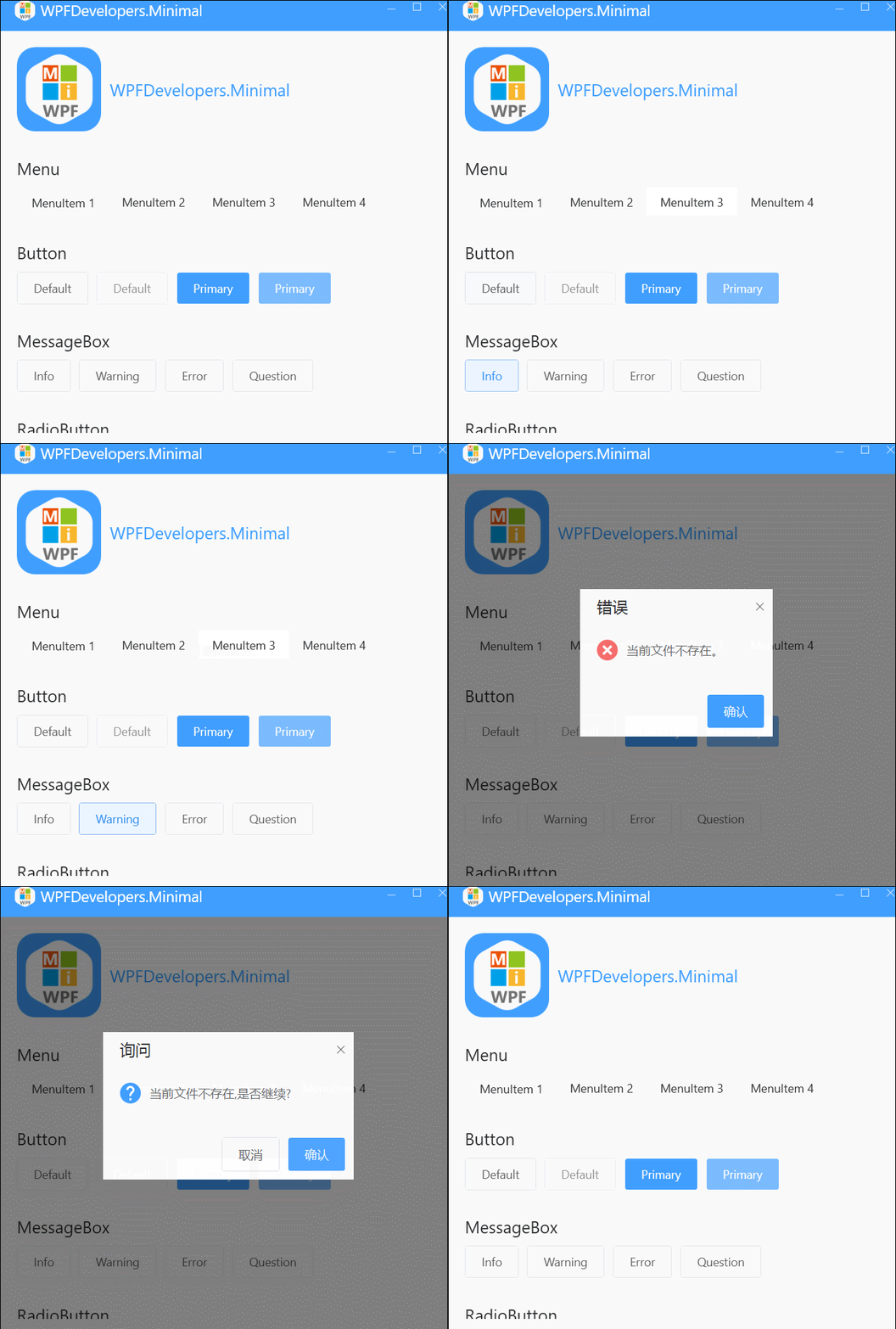
[2][3]
其他基础控件
1.Window
2.Button
3.CheckBox
4.ComboBox
5.DataGrid
6.DatePicker
7.Expander
8.GroupBox
9.ListBox
10.ListView
11.Menu
12.PasswordBox
13.TextBox
14.RadioButton
15.ToggleButton
16.Slider
17.TreeView
18.TabControl
参考资料
Nuget: https://www.nuget.org/packages/WPFDevelopers.Minimal/
[2]GitHub: https://github.com/WPFDevelopersOrg
[3]Gitee: https://gitee.com/WPFDevelopersOrg
边栏推荐
- Module 8 of the construction camp
- Application of time series database in bridge monitoring field
- TSDB and blockchain
- Photoshop responsive web design tutorial
- Update of objects in ES6
- 架构实战营第8模块作业
- 【已解决】AC86U ML改版固件虚拟内存创建失败,提示USB磁盘读写速度不满足要求
- ICLR21(classification) - 未来经典“ViT” 《AN IMAGE IS WORTH 16X16 WORDS》(含代码分析)
- [filter tracking] target tracking based on EKF, TDOA and frequency difference positioning with matlab code
- DevCon. Exe export output to the specified file
猜你喜欢

Pytoch: quickly find the main diagonal elements and non diagonal elements of NxN matrix

Libgdx learning path 01: libgdx introduction and running tutorial

vim学习手册

Rust 入门指南(modules 和工程结构)
![[image hiding] digital image information hiding system based on DCT, DWT, LHA, LSB, including various attacks and performance parameters, with matlab code](/img/a4/5c5a90508e2f9c6b4f8e234bdfdc9e.png)
[image hiding] digital image information hiding system based on DCT, DWT, LHA, LSB, including various attacks and performance parameters, with matlab code
![[radar] radar signal online sorting based on kernel clustering with matlab code](/img/56/1f8e8690b47fc4a1f101d4e530b87f.png)
[radar] radar signal online sorting based on kernel clustering with matlab code

JS 批量添加事件监听onclick this 事件委托 target currentTarget onmouseenter onmouseover
UWB module realizes personnel precise positioning, ultra wideband pulse technology scheme, and real-time centimeter level positioning application

使用SaltStack自动化部署LNMP

架构实战营第8模块作业
随机推荐
Photoshop responsive web design tutorial
Image processing web application development tutorial
Avoidance Adjusted Climbrate
DevCon. Exe export output to the specified file
Application of time series database in intelligent power consumption field
Ardupilot software in the loop simulation and online debugging
Application of time series database in cigarette factory
以数字化转型为契机,3C企业如何通过SRM供应商云协同平台实现高效协同?
New functions of ES6 string
Libgdx learning path 01: libgdx introduction and running tutorial
[image hiding] digital image information hiding system based on DCT, DWT, LHA, LSB, including various attacks and performance parameters, with matlab code
CVPR21-无监督异常检测《CutPaste:Self-Supervised Learning for Anomaly Detection and Localization》
2022年最火的十大测试工具,你掌握了几个
Server body 21: pre compilation processing by different compilers (a brief introduction to MSVC and GCC)
JS 批量添加事件监听onclick this 事件委托 target currentTarget onmouseenter onmouseover
智能合约安全——溢出漏洞
顺序线性表——课上练
Pointer learning of C language -- the consolidation of pointer knowledge and the relationship with functions, arrays and structures
Pandownload revival tutorial
Share several coding code receiving verification code platforms, which will be updated in February 2022