当前位置:网站首页>Batch import of Excel data in applet
Batch import of Excel data in applet
2022-07-01 01:47:00 【Low code preacher】
Catalog
In the previous article, we introduced how to use the user-defined connector of wechat to access the data of Tencent documents , Access is not enough , More importantly, we need to accumulate the collected data , Become the digital asset of the enterprise .
The best way to accumulate data is to store it in a database , In addition to the convenience of visual programming, low code tools , It also provides an online document database . The advantages of document databases over traditional databases are , The return structure of the document database is JSON Format , You can render directly at the front end . Relational databases have to be translated through code .
Another aspect is that the types of document databases are richer , There are attachments 、 Rich text 、 auto number 、 Array 、 object 、 picture 、 Geographic location these business type fields . With these colorful fields , Then we can reduce the compilation of code , Undoubtedly, it is very helpful to improve programming efficiency .
After introducing some basic background, we begin to introduce how to batch store the data of Tencent documents .
1 Establish data source
To store data , You need to establish a data source first . Log in to the micro build console , Click data source , Click new data model 
Enter a name and identification 
After the data source is established, you need to create fields , Click Add field 
The biggest question for beginners is what fields I need to create , What is a field ? Let's first take a look at the online form of our Tencent documents 
Will use excel Everyone knows ,excel There are row and column concepts in . Our fields are actually columns , Each column corresponds to a field . The type of field is actually related to the content of the cell . Such as my A2 The cell is Zhang San , It is obviously a stored character , Then our type is text .C2 It's the date of birth , It should be a date type .D2 It's the contact number , You can choose text or phone type .
After understanding this basic concept , Let's add the following fields respectively , There are four fields in total , full name 、 Gender 、 Date of birth 、 contact number 


2 Prepare the code for warehousing
In the previous section, we introduced how to create a connector to connect Tencent documents , If you can't, you can read the last article Add Tencent document connector
Reading the data of Tencent documents is divided into reading sheet, according to sheet Get the data for each row . Because it is warehousing , You also need to package the parsed data into objects , Call the method of batch adding to stock in . Let's explain it step by step .
2.1 Create low code method
To store , First you need to create a low code method . Click the low code editor in the upper left corner to enter the code interface 
After the low code editor is opened, it will navigate to the current page , stay handler Click next to + To create a low code method 
First, you need to enter a method name , It's better to know the meaning of the method name by looking at the text , We can define one batchAdd Method 
The platform will automatically generate the code structure 
Beginners have not learned programming systematically , The easy mistake is to play freely , Code at will . Let's explain the knowledge here . Usually we are in handler The methods defined in are called functions , The function consists of several parts , Function name 、 Enter the reference 、 The ginseng ( Or return value )
export default function Is the definition of a function , This is called anonymous function , Just don't give a name to the function . If the function body says await 了 , This function needs to be rewritten as an asynchronous function , become export default async function
The inside parentheses are called in parameters , Multiple parameters are separated by commas . We only have one participant here , yes {event,data}. Objects wrapped in a pair of braces are called objects , Object contains specific input parameters .
event It's the object of the event , Generally, we can get the value in the component ,data If the call event passes a parameter , Can be directly from data You can get the value from the . If you want to see the value, we can use the piling technology , The so-called piling is to output specific values on the console .
For example, we can write in this way
export default function({
     event, data}) {

  console.log(event,data)
}
After piling , How to see the result ? Events must be bound to components , Various actions generated by components can trigger events . Just like our batch warehousing , The user needs to actively trigger , You need to put a button , And bind the click event , To trigger the method of batch adding .


Where can I see the result after the event is bound ? Click the development and debugging tool to see the specific output 
At this time, click the button to see the corresponding output 
The output result is quite complicated , Different components produce different event objects , The content inside is different , We will give in-depth explanations on specific scenes . Why is this article going to talk about some basic operations first ? Because many fans follow the steps of the tutorial step by step , I don't understand the basic operation. Sometimes I paste it randomly , Then there are all kinds of errors , I don't know where to look wrong , Wasted a lot of time .
2.2 Calling connector in low code
In our last article, we used variable methods to call connectors , In this article, we use low code method to call the connector . In order to obtain the data in Tencent documents , First, you need to get the information of the worksheet . Let's review how we call variables 
Here is the call getSheets Method , And passed in bookID, In the low code, it is through api The way to call , Enter the following code in the method
const bookID = "DWkxMSFlkU1l2YkRo";
  const {
     sheetData } = await app.cloud.callConnector({

    name: 'txwd_jnegl1q',
    methodName: 'getSheets',
    params: {

      bookID,
    },
  });
console.log(sheetData)
there bookID It was obtained through Tencent document sharing link ,{sheetData} It means deconstruction assignment , You can get the corresponding value directly from the returned result . You can see the results printed on the console

How to look at the returned results , A pair of parentheses means array , The index of the first element of the expanded array is 0, The element in the array is an object , Objects are represented by a pair of braces , There are specific properties and methods in the object . What we need here is sheetID,cloumnCount,rowCount.
Once we understand this, we will define variables to receive the return value , Enter the following code
let sheetID = sheetData[0].sheetID
  let rowCount = sheetData[0].rowCount
  let columnCount = sheetData[0].columnCount
  console.log(sheetID, rowCount, columnCount)
Look at the printed results of the console 
Then we need to call the method to get the cell according to the returned result , This is what we do when we use variables 
This is how the code gets
const {
     rows } = await app.cloud.callConnector({

    name: 'txwd_jnegl1q',
    methodName: 'getRows',
    params: {

      bookID,
      sheetID,
      rows: `2-${
      rowCount}`
    },
  });
console.log(rows)
What the little friend doesn't understand here is this sentence 2-${rowCount}, A representation of the template string wrapped in two backquotes , Inside if you use ${} This syntax represents variables , As soon as the code is executed, it will be translated into 2-3, Read the second line 、 The data in the third line . Take a look at our output 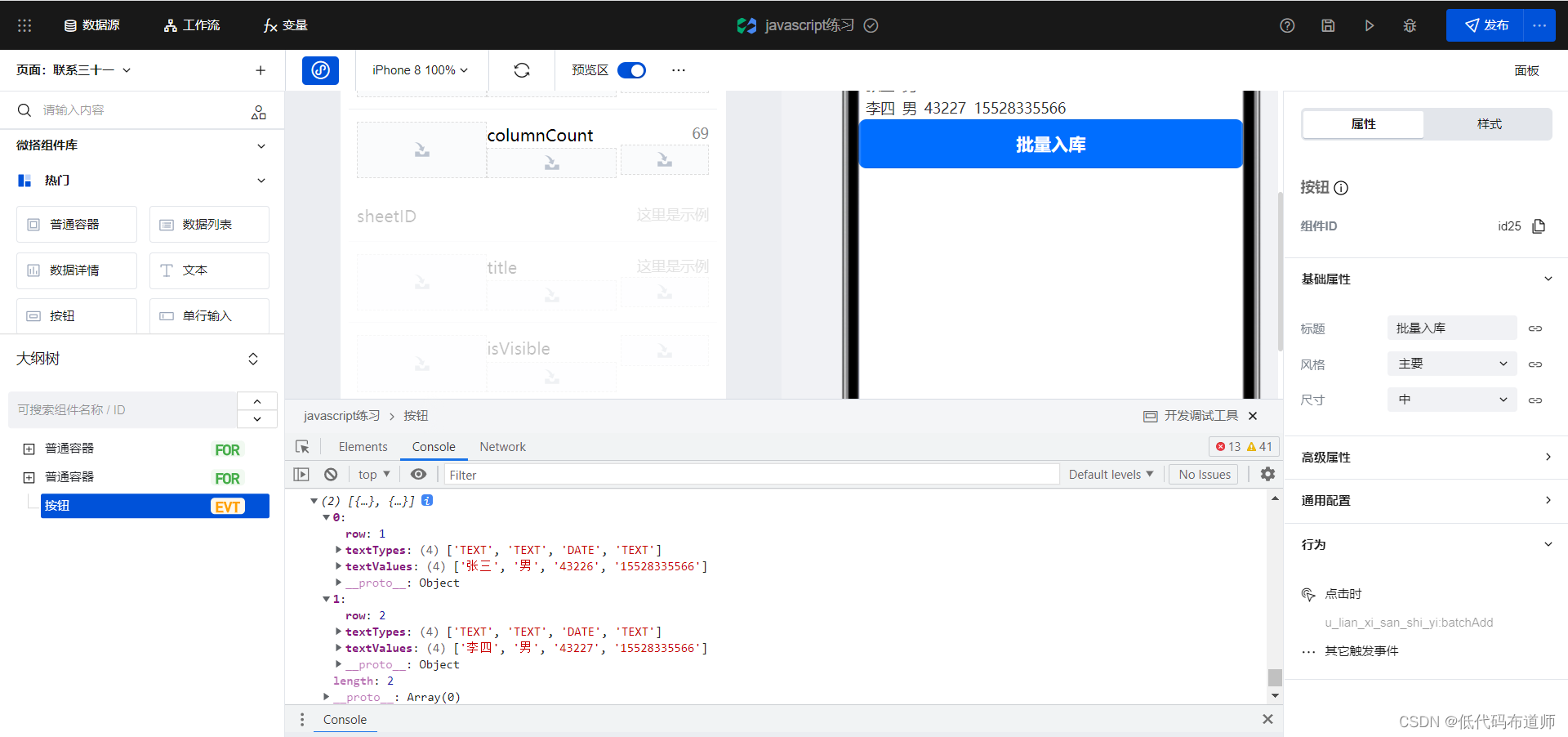
textTypes Represents the field type of each column ,textValues Represents a specific value . Field type we do not need , Just parse out the specific value
In this way, the data of each row is also parsed , You need to sort and store in the required format , Below is the stock in code
const newRecords = [];
  const columns = "xm|xb|csrq|lxdh";


  for(let r = 0; r < rowCount - 1; r++) {

    const {
     textValues } = rows[r];
    const inputParams = {
    };
    const cols = columns.split('|');
    cols.forEach((c, i) => {

      inputParams[c] = textValues[i];
    });

    newRecords.push(inputParams);
  }


  await app.cloud.callModel({

    name: 'txwdsjy_q6rop6n', //  Data model identification
    methodName: 'wedaBatchCreate', //  Add multiple method identifiers
    params: {

      records: newRecords,
    },
  });
here columns Is the field identifier of each field of the internal data source , You can go to the data source to find 
The rest of the code involves specific programming knowledge , You can reuse it directly , Interested students can learn javascript, After knowing the grammar, you can understand
Click the button after writing , Two pieces of data have been written to the database 
But there is a problem that the date of birth is not read correctly , The date of warehousing is 1970-01-01. If you have a solution, you can leave a message in the comment area , It is also convenient for everyone to learn .
3 Final code
export default async function ({
      event, data }) {

  console.log(event, data)
  const bookID = "DWkxMSFlkU1l2YkRo";
  const {
     sheetData } = await app.cloud.callConnector({

    name: 'txwd_jnegl1q',
    methodName: 'getSheets',
    params: {

      bookID,
    },
  });
  console.log(sheetData)
  let sheetID = sheetData[0].sheetID
  let rowCount = sheetData[0].rowCount
  let columnCount = sheetData[0].columnCount
  console.log(sheetID, rowCount, columnCount)
  const {
     rows } = await app.cloud.callConnector({

    name: 'txwd_jnegl1q',
    methodName: 'getRows',
    params: {

      bookID,
      sheetID,
      rows: `2-${
      rowCount}`
    },
  });
  console.log(rows)
  const newRecords = [];
  const columns = "xm|xb|csrq|lxdh";


  for(let r = 0; r < rowCount - 1; r++) {

    const {
     textValues } = rows[r];
    const inputParams = {
    };
    const cols = columns.split('|');
    cols.forEach((c, i) => {

      inputParams[c] = textValues[i];
    });

    newRecords.push(inputParams);
  }


  await app.cloud.callModel({

    name: 'txwdsjy_q6rop6n',
    methodName: 'wedaBatchCreate',
    params: {

      records: newRecords,
    },
  });
}
4 summary
This article describes in detail how to parse Tencent document data in low code , How to batch stock in . Although there is no batch import function in the low code , But we can also do it through Tencent documents , If you learn to do it quickly .
边栏推荐
- Log logrus third party library usage
- Handsontable數據網格組件
- [Qt5 basic \u 1] starting from 0, Mr. Detian will study with you - Introduction to the window
- gin_ gorm
- 短信在企业中的应用有哪些?
- Microbial safety and health, what is biological treatment?
- 微生物检测,土壤微生物的作用有哪些?
- Sort custom function
- Selenium经典面试题-多窗口切换解决方案
- 【Proteus仿真】Arduino UNO +74C922键盘解码驱动4X4矩阵键盘
猜你喜欢

数学知识:求组合数 III—求组合数

neo4j安装、运行以及项目的构建和功能实现

Test essential tool - postman practical tutorial
Mathematical knowledge: finding combinatorial number III - finding combinatorial number
![[无线通信基础-14]:图解移动通信技术与应用发展-2-第一代移动模拟通信大哥大](/img/fa/f9bad44147ba9af21183b7bd630e32.png)
[无线通信基础-14]:图解移动通信技术与应用发展-2-第一代移动模拟通信大哥大

思特奇加入openGauss开源社区,共同推动数据库产业生态发展

7-2 拼题A打卡奖励 dp
KS009基于SSH实现宠物管理系统

哪有什么未来可期,不过是打工人临死前最后的幻想罢了

6月第4周榜单丨飞瓜数据UP主成长排行榜(哔哩哔哩平台)发布!
随机推荐
【模拟】922. Sort Array By Parity II
org.redisson.client.RedisResponseTimeoutException: Redis server response timeout (3000 ms)错误解决
[Qt5 basics] random number display
孙宇晨接受瑞士媒体Bilan采访:熊市不会持续太久
neo4j安装、运行以及项目的构建和功能实现
Some essential differences
图灵奖得主LeCun指明AI未来的出路在于自主学习,这家公司已踏上征途
After working for 6 years, let's take stock of the golden rule of the workplace where workers mix up
日志 logrus第三方库的使用
Basic knowledge 3 - standard unit library
Construction and beautification of personal blog
Thinking about business and investment
The argument type 'function' can't be assigned to the parameter type 'void function()‘
【JS给元素添加属性:setAttribute;classList.remove;classList.add;】
工厂+策略模式
gin_ gorm
Strictmode analysis activity leakage -strictmode principle (3)
org. redisson. client. Redisresponsetimeoutexception: redis server response timeout (3000 ms) error resolution
KS009基于SSH实现宠物管理系统
Use of laravel carbon time processing class