当前位置:网站首页>Review of MySQL (VII): use of tables
Review of MySQL (VII): use of tables
2022-06-12 18:20:00 【BKSW.】
MySql Review ( 7、 ... and ): The use of a watch
Create table
- Grammar format
create table tableName(
   columnName dataType(length),
   ………………..
   columnName dataType(length)
);
set character_set_results='gbk';

show variables like '%char%';

--  When creating a table , There are fields in the table , Each field has :
--     *  Field name
--     *  Field data type
--     *  Field length limit
--     *  Field constraints
- Common data types
| type | describe |
|---|---|
| Char( length ) | Fixed length string , The storage space is fixed , Suitable as primary key or foreign key |
| Varchar( length ) | Variable length string , The storage space is equal to the actual data space |
| double( Number of significant digits , Decimal places ) | Numerical type |
| Float( Number of significant digits , Decimal places ) | Numerical type |
| Int( length ) | integer |
| bigint( length ) | Long integer |
| Date | Date type Specific date |
| DateTime | Date type Specific date Minutes and seconds millisecond |
| time | Date type Minutes and seconds |
| BLOB | Binary Large OBject( Binary big object ) |
| CLOB | Character Large OBject( Character large object ) |
| Other ………………… |
- Create student table
 Create the syntax format of the table statement :
	create table  Table name (
		 Field name 1  data type ,
		 Field name 2  data type ,
		 Field name 3  data type ,
		....
	);
	create table t_student(
		number bigint,
		name varchar(255),
		sex char(1),
		classno varchar(255),
		birth char(10)
	);
Table structure operation
utilize alter table To operate , Does not affect the data in the table
Add fields Add
- You need to add the contact number field to the student table , The field name is :contatct_tel The type is varchar(40)
alter table t_student add contact_tel varchar(40);
Modify fields Modify
- Modify the length of the field : Student names do not meet the needs , The length needs to be changed to 100
alter table t_student modify student_name varchar(100) ;
- Change the name of the field :sex The field doesn't feel easy to use gender Replace
alter table t_student change sex gender char(2) not null ;
Delete field Drop
- Delete the contact number field
alter table t_student drop contact_tel;
Operation of table data (DML)
add to Insert
Grammar format
Grammar format :
insert into Table name ( Field name 1, Field name 2, Field name 3,…) values( value 1, value 2, value 3,…)
requirement : The number of fields is the same as the number of values , And the data types should be the same .Omit the insertion of fields
This method is not recommended , Because when the field position in the database table changes, it will affect insert sentence
insert into emp values(9999,'zhangsan','MANAGER', null, null,3000, 500, 10);Specify the insertion of the field ( It is recommended to use )
insert into t_student(name) values('wangwu'); -- except name Outside the field , All remaining fields are automatically inserted NULL.Insert more than one row of data
insert into t_student
	(no,name,sex,classno,birth)
values
	(3,'rose','1','gaosi2ban','1952-12-14'),(4,'laotie','1','gaosi2ban','1955-12-14');
Be careful :
When one insert After the statement is executed successfully , There must be one more line in the table .
Even if there are more than one line, some fields in the record are NULL, There is no way to carry out it later
insert Statement inserts data , Only use update updated .
Insert date
- The inserted date format is consistent with the displayed date format
insert into emp(empno, ename, job, mgr, hiredate, sal, comm, deptno) values(9997,'zhangsan','MANAGER', null, '1981-06-12',3000, 500, 10);

- use str_to_date
insert into emp(empno, ename, job, mgr, hiredate, sal, comm, deptno) valu
es(9996,'zhangsan','MANAGER',null,str_to_date('1981-06-12','%Y-%m-%d'),3000, 500, 10);
- Add system date (now())
insert into emp(empno, ename, job, mgr, hiredate, sal, comm, deptno) values(9995,'zhangsan','MANAGER',null,now() ,3000, 500, 10);

Replication of tables
Grammar format
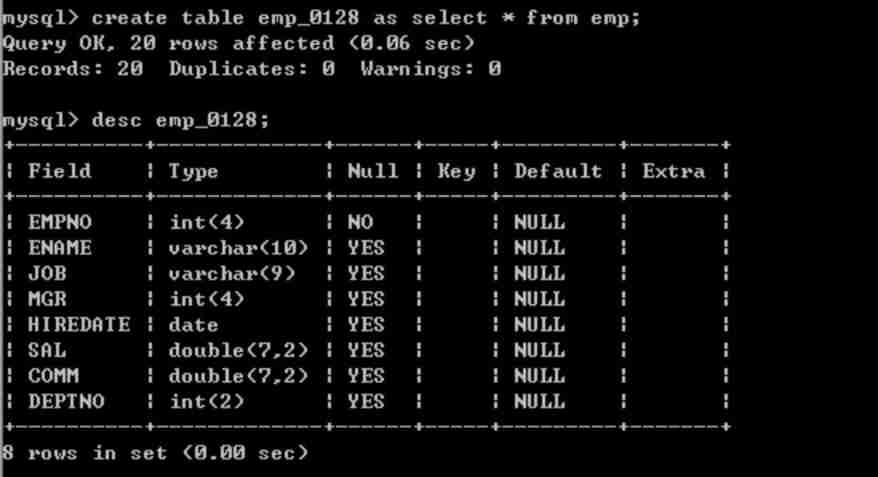
create table Table name as select sentence ;
Create a query as a result .
create table emp_bak as select empno,ename,sal from emp;
Insert the query results into a table
insert into emp_bak select * from emp where sal=3000;

modify Update
Data can be modified , You can modify the data according to the conditions
Grammar format
update Table name set Field name 1= value 1, Field name 2= value 2… where Conditions ;
If conditions are missing , The entire table will be updated !!
- take job by manager The wages of our employees have risen 10 element
update emp set sal = sal+sal*0.1 where job = 'MANAGE '
- Department 10 Of LOC It is amended as follows SHANGHAI, Change the name of the Department to RENSHIBU
update dept1 set loc = 'SHANGHAI',dname = 'RENSHIBU' where deptno = 10;
Delete Delete
You can delete data , Data can be deleted according to conditions
Grammar format :
delete from Table name where Conditions ;
Delete allowance as 500 The employees'
delete from emp where comm=500;
Delete the employee whose allowance is empty
delete from emp where comm is null;
How to delete a large table ?
- truncate table Table name ; // The watch is cut off , Cannot roll back . Permanent loss .
Table constraints
What is a table constraint ?
When creating tables , You can add corresponding constraints to the fields of the table , The purpose of adding constraints is to ensure the consistency of data in the table
Legitimacy 、 effectiveness 、 integrity .
Common constraints are ?
- Non empty constraint (not null): Constraint field cannot be NULL
- Unique constraint (unique): Constraint fields cannot be repeated
- Primary key constraint (primary key): The constraint field cannot be either NULL, It can't be repeated ( abbreviation PK)
- Foreign key constraints (foreign key):…( abbreviation FK)
- Check constraint (check): Be careful Oracle The database has check constraint , however mysql No, , at present mysql The constraint is not supported .
Non empty constraint NOT NULL
- Set the value of a field that is not empty , If the student's name is not empty
drop table if exists t_student;
create table t_student(
	student_id  	int(10),
	student_name 	varchar(20) not null,
	sex		char(2)  default  'm',
	birthday	date,
	email		varchar(30),
	classes_id	int(3)
)

--  Wrong insertion , Student name cannot be blank
insert into t_student(student_id, birthday, email, classes_id)
values
(1002, '1988-01-01', '[email protected]', 10)
Unique constraint ,Unique
- Uniqueness constraint , It can make the value of a field not repeatable , Such as :email Can't repeat :
drop table if exists t_student;
create table t_student(
	student_id  	int(10),
	student_name 	varchar(20) not null,
	sex		char(2)  default  'm',
	birthday	date,
	email		varchar(30)  unique,
	classes_id	int(3)
)

--  A duplicate... Was inserted email, Cause an error
insert into t_student(student_id, student_name , sex, birthday, email, classes_id)
values
(1001,'zhangsan','m', '1988-01-01', '[email protected]', 10)
Primary key constraint Primary key
Each table should have a primary key , A primary key can identify the uniqueness of a record , Primary keys are divided into single primary keys and composite primary keys ( union ) Primary key , A single primary key consists of a single field , Reunite with ( union ) A primary key consists of multiple fields
rop table if exists t_student;
create table t_student()
	student_id  	int(10)  primary key,/* Column level constraints */
	student_name 	varchar(20) not null,
	sex		char(2)  default  'm',
	birthday	date,
	email		varchar(30)  ,
	classes_id	int(3)
)
--  Add student ID to the above table 1001 Two records of , The following error occurred , Because the primary key constraint is added
insert into t_student(student_id, student_name , sex, birthday, email, classes_id)
values
(1001,'zhangsan','m', '1988-01-01', '[email protected]', 10)
- You can name constraints through table level constraints
drop table if exists t_student;
create table t_student(
	student_id  	int(10),
	student_name 	varchar(20) not null,
	sex		char(2)  default  'm',
	birthday	date,
	email		varchar(30)  ,
	classes_id	int(3),
    CONSTRAINT p_id PRIMARY key (student_id)
)
Foreign key constraints Foreign key
Foreign keys are mainly used to maintain the relationship between tables , Mainly to ensure referential integrity , If a field in the table is a foreign key field , The value of this field must come from the primary key of the referenced table , Such as :emp Medium deptno The value must come from dept In the table deptno field value .
- Establish the connection between students and class schedule
- First, create a class table
drop table if exists t_classes;
create table t_classes(
	classes_id int(3),
	classes_name varchar(40),
	constraint pk_classes_id primary key(classes_id)
)
- stay t_student Adding foreign key constraints to
drop table if exists t_student;
create table t_student(
	student_id  	int(10),
	student_name 	varchar(20),
	sex		char(2),
	birthday	date,
	email		varchar(30),
	classes_id	int(3),
	constraint      student_id_pk primary key(student_id),
constraint	fk_classes_id foreign key(classes_id) references t_classes(classes_id)
)
- towards t_student Add data to
insert into t_student(student_id, student_name, sex, birthday, email, classes_id) values(1001, 'zhangsan', 'm', '1988-01-01', '[email protected]', 10)
--  Because there is no class number in the class table 10 class , Foreign key constraints work
--  A table with foreign keys is a child table , The referenced table is the parent table , So there is a parent-child relationship , That is, the master-slave relationship , The main table is the class table , From the table is the student table
The foreign key value can be NULL?
Foreign key can be null.When a foreign key field references a field in another table , Must the referenced field be a primary key ?
Be careful : The referenced field does not have to be a primary key , But at least it has unique constraint , Have uniqueness , Do not repeat !
Cascade update and cascade delete
on update cascade
- mysql It is troublesome to modify some constraints , So we can delete , Add again
alter table t_student drop foreign key fk_classes_id;

alter table t_student add constraint fk_classes_id_1 foreign key(classes_id) references t_classes(classes_id)  on update cascade;
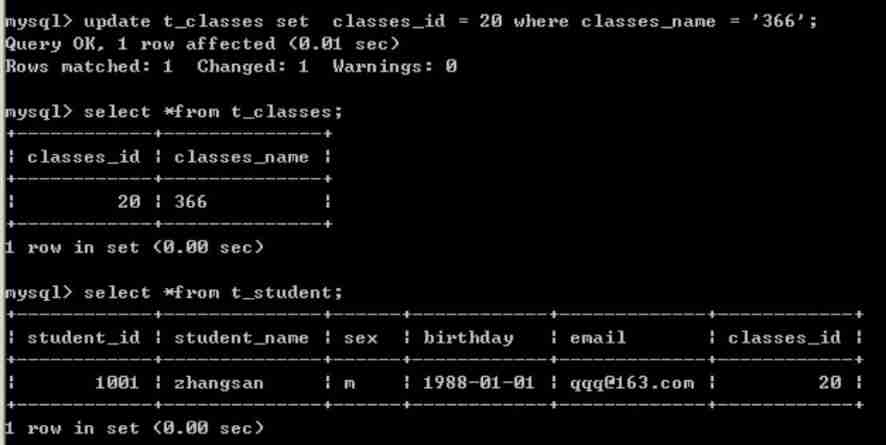
We only modified the data in the parent table , The data in the sub table will also change
on delete cascade;
mysql It is not supported when modifying some constraints , So we can delete , Add again
alter table t_student drop foreign key fk_classes_id;

alter table t_student add constraint fk_classes_id_1 foreign key(classes_id) references t_classes(classes_id)  on delete cascade;
delete from t_classes where classes_id = 20;

We only deleted the data in the parent table , But the data in the sub table will also be deleted .
边栏推荐
- Section qemu+gdb
- Typescript advanced type (2)
- HTTP cache < strong cache and negotiation cache >
- High speed layout guidelines incomplete
- Introduction to service grid and istio - continued
- LCD parameter interpretation and calculation
- torch.where的新用法(很老但是大家忽略的用法)
- Virtual Lab Basic Experiment tutoriel - 4. Diffraction à fente unique
- 低代码平台调研结果
- MIPS general purpose register + instruction
猜你喜欢

Extreme Programming -- Practice of root cause analysis

Variable of C #

Gd32f4xx controls dgus variable display

Pytest automated testing framework (II)
PHP:Fatal error: Allowed memory size of 262144 bytes exhausted (tried to allocat

A method of quickly reusing wechat login authorization in app

VirtualLab基础实验教程-4.单缝衍射

C language practice (4) -- multiplication and division of large numbers

Typescript common types (I)

在思科模拟器Cisco Packet Tracer实现自反ACL
随机推荐
Resttemplateconfig configuration print request response log under soringboot
Relationship between resolution and line field synchronization signal
Applet and app are owned at the same time? A technical scheme with both
静态内存分配和动态内存分配小结
Review of MySQL (3): query operation
Extreme Programming -- Practice of root cause analysis
网盘和对象云存储管理之磁盘映射工具比较
High speed layout guidelines incomplete
Gd32f4xx controls dgus touch keys
Leetcode 718 longest common substring
leetcode 718 最长公共子串
C#的变量
JS sum of two numbers
JS dichotomy
Gossip about the 88 of redis source code
Nixos 22.05 installation process record
JS moves the 0 in the array to the end
01-复杂度
01 complexity
Gd32f4xx controls dgus variable display