当前位置:网站首页>Review of MySQL (3): query operation
Review of MySQL (3): query operation
2022-06-12 18:18:00 【BKSW.】
MySq Review ( 3、 ... and ): Query operation
Grammar format :( Any one sql All statements are based on “;” At the end of the )
select Field name 1, Field name 2, Field name 3,…from Table name ;
Simple query statements
Query a field
Check the name of the employee
select ename frome emp;
select Is the key word ,select And field names are separated by spaces 1,from Represents the table to query , It is separated from the field by a space .

Query multiple fields
Query employee's number and name
select empno,enmae from emmp;Be careful : Query multiple fields ,select The fields in are separated by commas , The last field is in from The fields before cannot use commas .
Query all fields
You can put all the fields in select After statement , But if there are too many fields , inconvenient . You can use the following convenient ways to query all fields .
select * from Table name ;
select * from emp;
Calculate the employee's annual salary
List the employee's number , Name and annual salary
select empno,ename,sal*12 from emp;

select You can use operators in statements , But there are some problems , The field name of annual salary is not accurate . Use as Keyword rename the fields of the table .
Display the queried fields as user-defined names or Chinese
 select empno ' Employee number ',ename as " Employee name ",sal as ' Annual salary ' from emp;
--  Be careful : Although in cmd Windows can be without double or single quotation marks , But in the later standard format, the string must be added with English single quotation marks  |  Double quotes , among as You can omit it
Conditions of the query
Conditional query needs to use where sentence ,where Must be on from After the statement table .
The following operators are supported :
| Operator | explain |
|---|---|
| = | be equal to |
| <> or != | It's not equal to |
| < | Less than |
| <= | Less than or equal to |
| > | Greater than |
| >= | Greater than or equal to |
| between … and …. | Between two values , Equate to >= and <= |
| is null | by null(is not null Not empty ) |
| and | also |
| or | perhaps |
| in | contain , It's equivalent to more than one or(not in Not in this range ) |
| not | not You can take non , Mainly used in is or in in |
| like | like It is called fuzzy query , Support % Or underline match % Match any character underscore , An underscore matches only one character |
The equal sign operator
The inquiry salary is 500 The employees'
select empno,enmae,sal from empp where sal = 5000;Inquire about job by MANAGE The employees'
select empno,ename from emp where job = "manager";
--  because job For the string , So add double or single quotation marks
select empno,ename from emp where job = 'manager';
-- mysql The statements of are case insensitive by default , So it can also be written as the following
select empno,ename from emp where job = "MANAQER";
<> The operator
Inquiring about salary is not equal to 5000 The employees'
select empno,ename,sal from emp where sal <> 5000;It can also be written in the following way , But the first one
select empno,ename,sal from emp where sal != 5000;Querying a job position is not equal to MANAGER The employees'
select empno, ename from emp where job <> 'MANAGER';
--  Again , Double quotation marks or single quotation marks should be added to the string
between…and… The operator
- Check the salary in 1600 To 3000 The employees'
use >= and <=
select empno,ename,sal from emp where sal >= 1600 and sal <= 3000;use between…and…
select empno, ename, sal from emp where sal between 1600 and 3000;
is null Operator
null It's empty , But it's not an empty string , by null You can set this field to be left blank , If the query is null Field of , use is null
Query the employee whose allowance is empty
--  because null type 1 A special , You have to use is To compare
select * from emp where comm is null;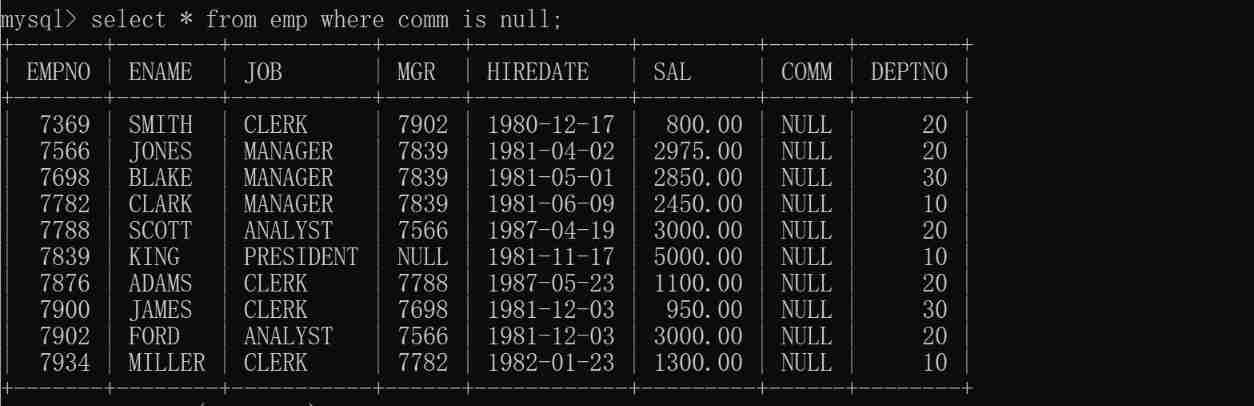
because null A special , use = There is no result in comparison .

AND Operator
and The meaning of and , All conditions must be met
The job position is MANAGER, Salary greater than 2500 The employees'
select * from emp where job = "MANAGER" and sal > 2500;
OR Operator
or As long as the conditions are met , It is equivalent to containing
Query out job by manager perhaps job by salesman The employees'
select * from emp where job = 'MANAGER' or job = 'SALESMAN';
The priority of the expression
- Query salary greater than 1800, And the department code is 20 perhaps 30 People who
Wrong writing
select * from emp where sal > 1800 and deptno = 20 or deptno = 30;As a result, the salary will be less than 1800 The data of , The reason is the priority of the expression , Filter first sal > 1800 and deptno = 20, And then deptno = 30 The staff merged , So it's not right
Write it correctly
Try to use parentheses !
select * from emp where sal > 1800 and (deptno = 20 or deptno = 30);
IN Operator
in Means to include , It can be used or Express , however in It will be more concise .
- Find out job by manager perhaps job by salesman The employees'
select * from emp where job in ('manager','salesman');

- Find out the salary is 1600 perhaps 3000 The employees'
select * from emp where sal in (1600,3000);
NOT Operator
- Find out that the salary does not include 1600 And does not contain 3000 The employees'
- The first way to write it
select * from emp where sal <> 1600 and sal <> 3000;
- The second way
select * from emp where not (sal = 1600 or sal = 3000);
- The third way
select * from emp where sal not in (1600,3000);
- Find out that the allowance is not null All employees
select * from emp where sal is not null;

LIKE Operator
- like Fuzzy query can be realized ,like Support % Match the underline
- Check the name with M Employees at the beginning
select * from emp where ename like 'M%';
- Check the name with N All employees at the end
select * from emp where ename like '%N';
- The query name contains O All employees
select * from emp where enmae like '%O%';
- The second character in the query name is A All employees
select * from emp where ename like '_A%';

Like in % and _ The difference between ?
% Matches the number of occurrences of any character
The underscore can only match one character
Like Expressions in must be enclosed in single or double quotation marks !
边栏推荐
- GD32F4xx 与符合DLT645的电能表通信_2
- JS judge palindromes
- Interior design style type, rendering 100 invitation code [1a12]
- C language learning -- data storage in memory
- Virtual Lab Basic Experiment tutoriel - 4. Diffraction à fente unique
- 深圳3月14日起全市停工停业7天居家办公心得|社区征文
- JS中的栈(含leetcode例题)<持续更新~>
- VirtualLab基础实验教程-5.泊松亮斑
- Gd32f4xx controls dgus variable display
- 静态内存分配和动态内存分配小结
猜你喜欢

The server time zone value ‘� й ��� ʱ ��‘ is unrecognized or represents more than one time zone. ......

Variable of C #
C#的变量

Machine learning series (5): Naive Bayes

LCD parameter interpretation and calculation

Adjust CEPH cluster image source

网盘和对象云存储管理之磁盘映射工具比较

HTTP缓存<强缓存与协商缓存>
![Interior design style type, rendering 100 invitation code [1a12]](/img/90/8bbfbe33c5b412498744c0ea0ed559.jpg)
Interior design style type, rendering 100 invitation code [1a12]

VirtualLab基礎實驗教程-4.單縫衍射
随机推荐
Is it safe to open an account in flush
"Big fat • small lesson" - talk about big file segmentation and breakpoint sequel
JS moves the 0 in the array to the end
Introduction to service grid and istio - continued
Adjust CEPH cluster image source
Machine learning series (3): logistic regression
C#的变量
MYSQL:Expression #4 of SELECT list is not in GROUP BY clause and contains nonaggregated column
VirtualLab基础实验教程-6.闪耀光栅
深圳3月14日起全市停工停业7天居家办公心得|社区征文
GD32F4xx控制DGUS触控按键
Title 66: input 3 numbers a, B, C, and output them in order of size.
Queue priority of message queue practice
Introduction to reinforcement learning and analysis of classic items 1.3
Installation and configuration of window version pytorch entry depth learning environment
Self made calculator (1 realized by Boolean logic operation unit and control unit programming)
Section qemu+gdb
Applet and app are owned at the same time? A technical scheme with both
USB转串口那些事儿—串口驱动类型
C语言学习——数据在内存中的存储