当前位置:网站首页>zabbix5客户端安装和配置
zabbix5客户端安装和配置
2022-07-02 18:20:00 【gsls200808】
接上一篇docker安装zabbix5 服务端,这一篇来配置客户端
centos7配置
安装
wget http://repo.zabbix.com/zabbix/5.4/rhel/7/x86_64/zabbix-agent2-5.4.12-1.el7.x86_64.rpm
rpm -ivh zabbix-agent2-5.4.12-1.el7.x86_64.rpm
编辑设置zabbix agent2配置文件
修改如下内容
Server=192.168.3.54
ServerActive=192.168.3.54
HostMetadataItem=system.uname
其中Server和ServerActive改成你自己的服务端IP,HostMetadataItem要去掉前面的注释再修改内容
启动 查看状态 开机自启
systemctl start zabbix-agent2
systemctl status zabbix-agent2
systemctl enable zabbix-agent2
关闭selinux(可能不需要这步)
命令vi /etc/selinux/config,将SELINUX=enforcing改为SELINUX=disabled
放行防火墙
firewall-cmd --permanent --add-port=10050/tcp
firewall-cmd --reload
ubuntu18.04配置
安装
wget http://repo.zabbix.com/zabbix/5.4/ubuntu/pool/main/z/zabbix/zabbix-agent2_5.4.12-1%2Bubuntu18.04_amd64.deb
sudo dpkg -i zabbix-agent2_5.4.12-1+ubuntu18.04_amd64.deb
编辑设置zabbix agent2配置文件
修改如下内容
Server=192.168.3.54
ServerActive=192.168.3.54
HostMetadataItem=system.uname
其中Server和ServerActive改成你自己的服务端IP,HostMetadataItem要去掉前面的注释再修改内容
启动 查看状态 开机自启
systemctl start zabbix-agent2
systemctl status zabbix-agent2
systemctl enable zabbix-agent2
使用iptables放行端口
iptables -A INPUT -p tcp --dport 10050 -j ACCEPT
iptables -A OUTPUT -p tcp --sport 10050 -j ACCEPT
保存放行端口
# 安装iptables-persistent工具,使端口配置持久化
sudo apt-get install iptables-persistent
#弹出框一路回车

# 端口配置永久生效
sudo netfilter-persistent save
sudo netfilter-persistent reload
放行端口配置完后需要重启zabbix-agent2
systemctl restart zabbix-agent2windows配置
windows agent2下载
下载选型页
https://www.zabbix.com/cn/download_agents?version=5.4&release=5.4.12&os=Windows&os_version=Any&hardware=amd64&encryption=OpenSSL&packaging=MSI&show_legacy=0
直达
https://cdn.zabbix.com/zabbix/binaries/stable/5.4/5.4.12/zabbix_agent2-5.4.12-windows-amd64-openssl.msi
双击安装,安装后在界面中配置Server和ServerActive为你自己的服务端IP,如图

服务端主机添加
先添加自定义群组名 配置--主机群组-创建群组
主机添加 配置-主机-创建主机
windows主机添加如图
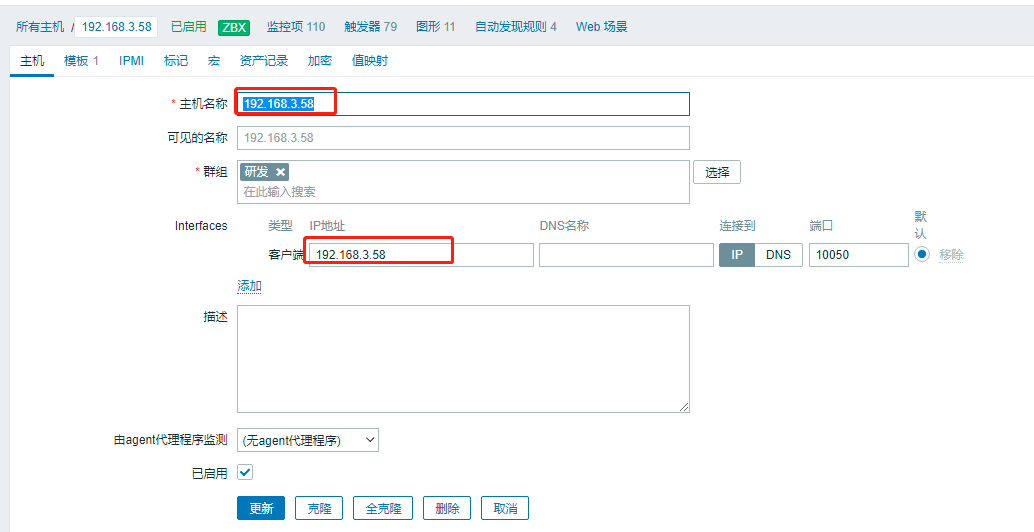
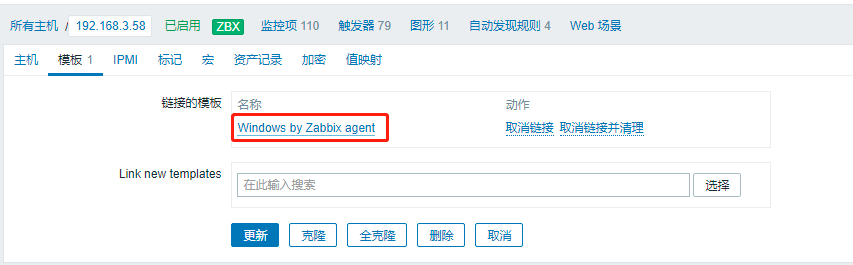
linux主机配置如图,主要是模板不一样


过一段时间zabbix图标就变绿了
边栏推荐
- C文件输入操作
- Windows2008R2 安装 PHP7.4.30 必须 LocalSystem 启动应用程序池 不然500错误 FastCGI 进程意外退出
- 仿京东放大镜效果(pink老师版)
- IEDA refactor的用法
- Microservice technology - distributed global ID in high concurrency
- 论文导读 | 关于将预训练语言模型作为知识库的分析与批评
- Transformation of thinking consciousness is the key to the success or failure of digital transformation of construction enterprises
- Thread application instance
- 【测试开发】一文带你了解什么是软件测试
- 使用CLion编译OGLPG-9th-Edition源码
猜你喜欢

Web2.0 giants have deployed VC, and tiger Dao VC may become a shortcut to Web3

使用 Cheat Engine 修改 Kingdom Rush 中的金钱、生命、星

IEDA refactor的用法
Learning summary of MySQL advanced 6: concept and understanding of index, detailed explanation of b+ tree generation process, comparison between MyISAM and InnoDB
yolov3 训练自己的数据集之生成train.txt

9D电影是怎样的?(+维度空间常识)

云呐|为什么要用固定资产管理系统,怎么启用固定资产管理系统

机器学习笔记 - 时间序列预测研究:法国香槟的月销量

Develop fixed asset management system, what voice is used to develop fixed asset management system
Web2.0 giants have deployed VC, and tiger Dao VC may become a shortcut to Web3
随机推荐
PHP asymmetric encryption method private key and public key encryption and decryption method
线程应用实例
2022.7.1-----leetcode.241
ORA-01455: converting column overflows integer datatype
Emmet basic syntax
为什么要做企业固定资产管理系统,企业如何加强固定资产管理
预处理和预处理宏
Data dimensionality reduction factor analysis
Quanzhi A33 uses mainline u-boot
2022软件工程期末考试 回忆版
高频面试题
#gStore-weekly | gStore源码解析(四):安全机制之黑白名单配置解析
思维意识转变是施工企业数字化转型成败的关键
PHP parser badminton reservation applet development requires online system
QT中的QPropertyAnimation使用和toast案列
[100 cases of JVM tuning practice] 01 - introduction of JVM and program counter
GMapping代码解析[通俗易懂]
IDEA编辑器去掉sql语句背景颜色SQL语句警告No data sources are configured to run this SQL...和SQL Dialect is Not Config
虚拟机初始化脚本, 虚拟机相互免秘钥
SIFT特征点提取「建议收藏」