当前位置:网站首页>Installation software operation manual (continuous update)
Installation software operation manual (continuous update)
2022-06-30 07:29:00 【My deep blue】
Installation software operation manual ( Continuous updating )
install JDK
download Oracle JDK
https://www.oracle.com/java/technologies/javase-jdk14-downloads.html
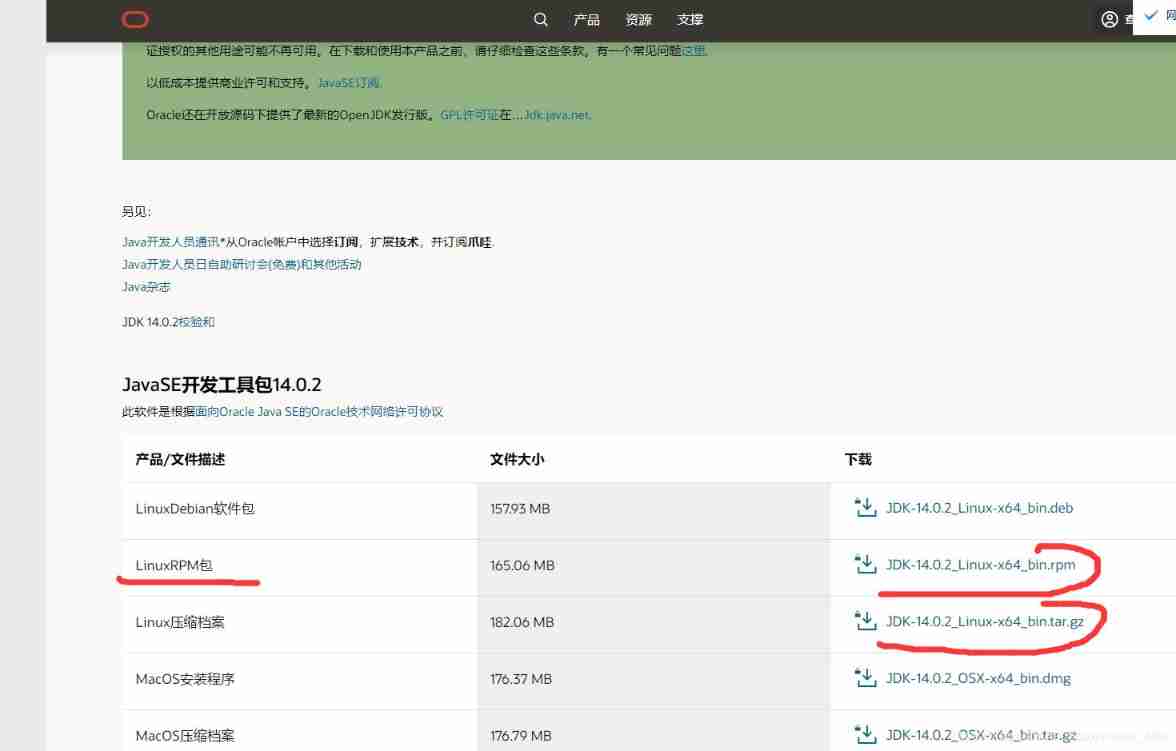
1、 decompression
tar -xvf jdk-14.0.2_linux-x64_bin.tar.gz
2、 The configuration file
vim /etc/profile
Add the following to the last line
export JAVA_HOME=/usr/local/jdk/jdk-14.0.2
export PATH=$JAVA_HOME/bin:$PATH
export CLASSPATH=.:$JAVA_HOME/lib/dt.jar:$JAVA_HOME/lib/tools.jar
3、 To make a document effective
source /etc/profile
4、 see jdk edition
java -version
install Nginx
1、 download nginx
wget http://nginx.org/download/nginx-1.17.1.tar.gz
2、 Unzip and enter the file
3、 Install dependency packages
yum install gcc-c++

yum install pcre

yum install pcre-devel

yum install zlib

yum install zlib-devel

yum install openssl

yum install openssl-devel
4、 Check dependency packages
./configure
5、 install nginx
make install
6、 Edit the startup script file
Switch to /lib/systemd/system/ Catalog , establish nginx,service file Re edit vim nginx.service
vim /lib/systemd/system/nginx.service
[Unit]
Description=nginx
After=network.target

[Service]
Type=forking
ExecStart=/usr/local/nginx/sbin/nginx
ExecReload=/usr/1oca1/nginx/sbin/nginx reload
ExecStop=/usr /loca1/nginx/sbin/nginx quit
PrivateTmp=true

[Insta11]
WantedBy=multi-user.target
7、 Set boot up
systemctl enable nginx.service
8、 start-up nginx
systemctl start nginx.service```
 end nginx
systemctl stop nginx. service

 restart nginx
systemctl restart nginx. service
9、 A firewall
 Add port
firewall-cmd --zone=public --add-port=80/tcp --permanent

 Reload
firewall-cmd --reload
10、 Verify that the installation was successful
use IP Address open web page

install redis
1. Download it locally redis package
Download the stable version

2. Linux download redis
// download wegt command
yum -y install wget

// download  redis
wget http://download.redis.io/releases/redis-5.0.5.tar.gz
install redis
1、 Unzip and enter the file
tar -xvf redis-5.0.5.tar.gz
because redis Install through source code , rely on gcC compiler , First confirm the machine gcc edition , Make sure that gcc Version in 4.2 above ,
2、 install gcc compiler
yum install gcc
3、 install redis
make malloc=libc
After installation , Need to use make test Test it

If there is a problem with the compilation test , The direct installation will not pass , The following exceptions may occur

Abnormal information , Remind us that we need tcl rely on ,
- install tcl
yum install tcl
Over and over again make test test , Until success
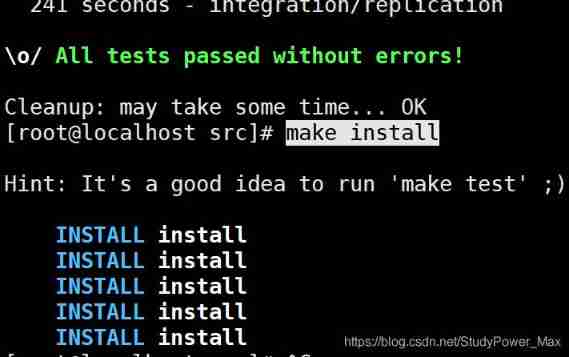
cd src && make install
start-up redis service
1、 Opening service
./redis-server

2、 We need to set the service to start in the background
vim redis.conf
modify redis.conf file , Daemon daemonize no Change it to daemonize yes
3、 Move redis.conf To /etc/redis Under the table of contents , And renamed 6379.conf
4、 Copy the startup script to /etc/rc.d/init.d And changed his name to redisd
cp /mnt/install/redis-5.0.5/utils/redis_init_script /etc/rc.d/init.d/
- Change the name redisd Some contents of the document , Make it a service
1、 Add... To the first line of the script , The new version should not be added
#chkconfig:2345 80 90
2、 modify EXEC、CLIEXEC
# Original content
EXEC=/usr/1oca1/bin/redis-server
CLIEXEC=/usr/loca1/bin/redis-cli

# The revised content
EXEC=  install redis The path of /redis-5.0.5/src/redis-server
CLIEXEC=  install redis The path of /redis-5.0.5/src/redis-cli
3、 stay $EXEC $CONF Followed by &

- Add startup
chkconfig redisd on
- Start by setting the script redis service
service redisd start
- Check if the firewall is on , Add port Open the entrance to the external machine
firewall-cmd --zone=public --add-port=6379/tcp --permanent

 Reload
firewall-cmd --reload
Sign in redis
redis-cli The client side.
- Set the password
vim /etc/redis/6379.conf

requirepass  password

- Set up the connection IP
vim /etc/redis/6379.conf

bind 0.0.0.0 # All can be connected

install telnet Installation command
CD-ROM device directory
/dev/cdrom
1、 Create mount point Directory
mkdir /mnt/setup
2. Mount the optical disk drive to the created directory
mount -r /dev/cdrom /mnt/setup
3. View the... Of the mount directory telnet software package
cd /mnt/setup/Packages// To all installed directories

find *telnet* / Find the installation package ,

telnet-0.17-60.el7.x86_64.rpm 、telnet-server-0.17-60.el7.x86_64.rpm
telnet command / telnet Service for
4、 install telnet
rpm -ivh telnet-0.17-60.el7.x86_64.rpm
边栏推荐
猜你喜欢
![[most complete] install MySQL on a Linux server](/img/5d/8d95033fe577c161dfaedd2accc533.png)
[most complete] install MySQL on a Linux server

Resolution: div failed to get keyboard event

Adjacency matrix representation of weighted undirected graph (implemented in C language)

Final review -php learning notes 11-php-pdo database abstraction layer

Parameter calculation of deep learning convolution neural network

Swiftui creates a beautiful custom press feedback button

动态内存管理
视频播放器(二):视频解码

记录开发过程中无法使用管理员身份修改系统文件问题

How to determine the size of the platform byte order?
随机推荐
Implementation of double linked list in C language
線程池——C語言
Go common commands
What if I don't know what to do after graduating from university?
LabVIEW程序代码更新缓慢
Qtcreator debug code after configuring CDB debugger view variable value display card
Parameter calculation of deep learning convolution neural network
Install go language development tools
QT common macro definitions
Stepper motor
next InitializeSecurityContext failed: Unknown error (0x80092012) - 吊销功能无法检查证书是否吊销。
网络安全-单臂路由、DHCP中继和ICMP协议
String application -- string violent matching (implemented in C language)
Minecraft 1.16.5 module development (50) guide book
Network security - layer 3 switching technology and internal network planning
期末复习-PHP学习笔记6-字符串处理
Private method of single test calling object
02 - bare metal and RTOS development modes: five development modes of bare metal and the introduction of RTOS
Pit stepping record: Supervisor log return information: redis extension is not installed
Next initializesecuritycontext failed: unknown error (0x80092012) - the revocation function cannot check whether the certificate is revoked.