当前位置:网站首页>Games-101-personal summary shading
Games-101-personal summary shading
2022-06-22 02:01:00 【The end of the wind】
( notes : This article is based on the framework of personal knowledge , For the convenience of later review , On the basis of retaining the original course content framework , The introduction of individual concepts may be too simple , Interested readers can go to GAMES Platform in-depth learning )
Catalog
Blinn-Phong Reflectance Model(Blinn-Phong Reflection model )
Diffuse Reflection( Diffuse term )
Ambient Term( Ambient light item )
Shading Frequencies( Coloring frequency ):
Texture Mapping( Texture mapping )
Barycentric coordinates( The coordinates of the center of gravity )
Texture queries( Texture check )
Texture precision is too small ( Multiple pixels correspond to one texture value )
programme :Bilinear Interpolation( Bilinear interpolation )
Texture precision is too high ( Multiple texture values correspond to one pixel )
Scheme 1 :MipMap( Square range query )
Option two :Anisotropic Filtering( Anisotropic filtering : Rectangular range query )
Option three :EWA filtering(Elliptically Weighted Average: Ellipse weighted average )
Environmental Lighting( The ambient light )
Bump/Normal Mapping( Bump / Normal map )
Displacement mapping( Displacement mapping )
The title is a brief introduction
Summary
Definition :The process of applying a material to an object( The process of applying materials to objects )
Illumination & Shading
Blinn-Phong Reflectance Model(Blinn-Phong Reflection model )


Diffuse Reflection( Diffuse term )
- Diffuse reflection and viewing direction v irrelevant .
- Explanation of the formula :
kd: Diffuse reflectance coefficient , Different materials kd Different , It can also be understood as color ;
(I/r^2):I(Intensity) Light intensity ;r: Radius of the sphere of light propagation , Is the distance from the light source to the observation point , This item indicates I And r^2( Spherical radius ) In inverse proportion ;
max(0,n.dot(l)): The component of light in the normal direction of the object surface ( Dot multiplication calculates cosine ), Cannot be negative ( It doesn't make sense for light to hit the observation point from the lower surface of the object );

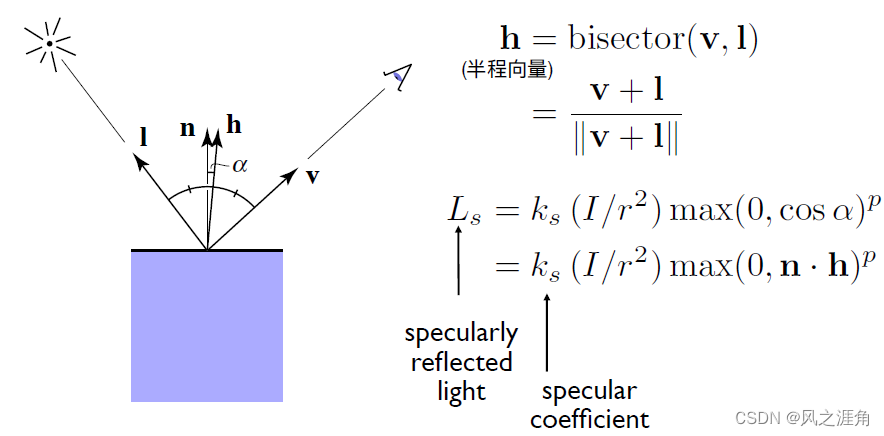
Specular term( Highlights )
1. All parameters refer to diffuse, difference : Hesitant half way vector h The introduction of , Highlight effect and viewing direction v , Direction of light I It matters .
2. Index p: Controls the size of the highlight range (p The larger the highlight, the smaller it is ).
Ambient Term( Ambient light item )

Shading Frequencies( Coloring frequency ):
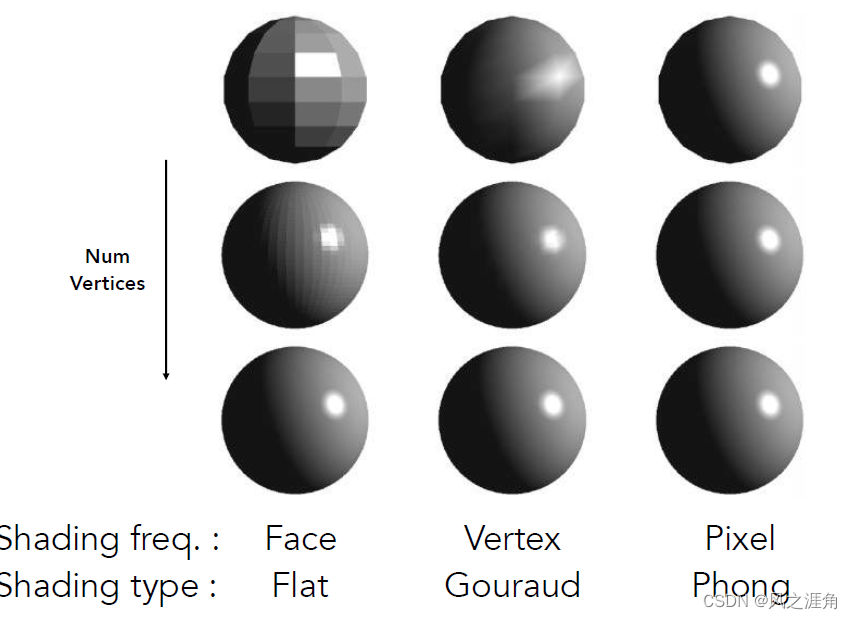
Flat shading: Triangle by triangle ( Plane by plane ) To color
Gouraud shading: Color per vertex
Phong shading: Color per pixel
Graphics Pipeline


Texture Mapping( Texture mapping )
Definition : In a Two dimensional plane Defined on the Three dimensional object surface The basic properties of each point .
methods : Define each Every vertex of a small triangle Corresponding to the coordinates on the texture (UV) Position on .

Barycentric coordinates( The coordinates of the center of gravity )
Definition :
1. Any point in the plane of a triangle , It can be done by Sum of three vertices of different coefficients The way to express , The coefficients are all nonnegative , Indicates that the point is in a triangle .

2. The value of each coefficient is : The area of the point and any two points of the triangle And Area of original triangle The ratio of the . The vertex of the original triangle corresponding to the common edge is the vertex corresponding to the coefficient .( Here's the picture : coefficient beta Corresponding area AB Corresponding to the side AC Corresponding vertex B)

3. General formula :

Purpose : Linear interpolation inside the triangle , Given three vertex colors 、 Normal vector 、 In the case of texture coordinates , Smooth transition effect of triangle inner points
Texture queries( Texture check )
Texture precision is too small ( Multiple pixels correspond to one texture value )
scene : Insufficient texture accuracy
programme :Bilinear Interpolation( Bilinear interpolation )
Take the corresponding pixel Four points around the texture space (u00,u01,u10,u11), Calculate the smooth transition value according to the specific gravity in the horizontal and vertical directions .

Effect comparison : From left to right , Take the texture directly ; Bilinear interpolation ;( I don't know how to translate : Take the texture space around 16 A little bit , The principle is the same as that of bilinear interpolation );

Texture precision is too high ( Multiple texture values correspond to one pixel )
( notes : All shapes covered in this section (mipMap: Suitable for square ;Anisotropic: Suitable for rectangular ;EWA: Diagonals ) refer to The screen 4 The approximate shape formed by mapping pixels into texture space , With mipmap For example : The figure below 4 Points mapped to texture space can be approximated as a square ).

scene : Query the texture value of perspective projection , Directly checking the texture will produce moire patterns ( far ) And serrations ( near ).

Scheme 1 :MipMap( Square range query )
characteristic : Yes Square ( Not rectangular ) Texture do inaccurate Of Fast Range queries .
Definition : Store multi-level texture copies , Query the replicas of different levels directly according to the actual accuracy
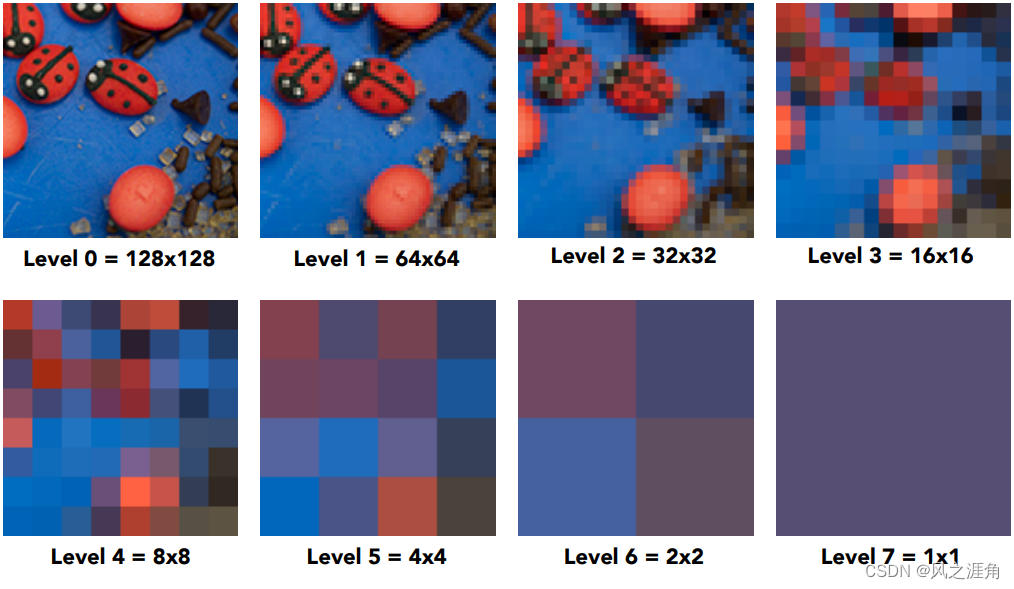
Image pyramid ,( Storage overhead increases 1/3:1+1/4 + 1/16 + 1/64+...)
How ? Calculate two pixels of the screen ( Left ) Corresponding texture space ( Right ) The distance between L, level D = log2(L), That is, the layers in texture space Side length is L Of ( Approximate as ) Square Will become 1 Pixel

The transition between different levels :1.8 How to check the floor ?
Trilinear Interpolation( Trilinear interpolation ): Right. 1 And the 2 Bilinear interpolation is performed for each layer , Do linear interpolation again for the two results ;

problem: Yes ( Axis alignment ) rectangular and Diagonals ( It can also be regarded as a rectangle with misaligned coordinate axes ) unfriendly

Option two :Anisotropic Filtering( Anisotropic filtering : Rectangular range query )
modern GPU Support anisotropic filtering at the hardware level , That is, in the original texture( The first one on the top left of the figure below ) On the basis of horizontal and vertical ( Each difference refers to horizontal and vertical differences ) Sampling with different scaling . The biggest support x16 Level anisotropy , That is, both horizontal and vertical 16 Samples ( Each sample is horizontally \ The vertical direction becomes the previous one 1/2). Therefore, there is no more memory overhead .( About expenses , This course is about infinite approximation 3 times , This is not supported GPU On the basis of sampling ).
solve: Axis aligned rectangle query ;
problem: Diagonal query ;
other: This program is only briefly introduced in the course . Details about how to query , Interested readers can refer to Know this article .

Option three :EWA filtering(Elliptically Weighted Average: Ellipse weighted average )
This program course only briefly mentions , Tell me about my personal understanding :
- Why ellipse ? The ellipse is bounding-box, We know that if it's a regular polygon , Make with a circle bouding-box Maximum coverage can be achieved ,EWA The main purpose of the scheme is to deal with the problem of irregular polygons , So it's an ellipse .
- At the center of the ellipse uv The coordinates indicate that the screen space changes by one pixel , Texture space uv The change of ( The difference between the texture coordinates of the current pixel and the screen space coordinates ), The ratio of the major axis to the minor axis of the ellipse is determined by the actual differential value , This can accurately reflect ( Screen space ) After mapping to texture space uv The change of ( It can be understood as anisotropy based on ellipse ).
- weighted mean ? To map to Texture space After In an elliptical bounding box Weighted average of points . The result values of different ranges are stored in different elliptic rings , It is convenient to do acceleration .
- Inquire about ? From the center of the ellipse from the inside out many times Inquire about , Until the ellipse surrounds all the sampling points in the texture space .
- other: About this scheme , The Chinese explanations on the Internet are inconclusive , Interested and patient students can refer to This paper

Applications of textures
Define texture
In modern GPUs texture = memory + range query (filtering)( modern GPU in , Memory data supporting range query ).

Environmental Lighting( The ambient light )

Bump/Normal Mapping( Bump / Normal map )
- Definition : Define the relative height of a point / normal . Simulate uneven effects ( Do not change the geometric information )
- (2D) The tangent vector (1,dp), According to the rotation formula : Normal vector (-dp, 1), normalization :n(p) = (-dp, 1).normalized();

- (3D) n = (-dp/du, -dp/dv, 1).normalized();( notes :n(p) = (0,0,1) Is the local coordinate system , After calculating the normal vector, you need to change back to the world coordinate system )

Displacement mapping( Displacement mapping )
- comparison bump map, Actually moved the vertex height ( This means that the triangle should be small enough ).
- other:directX Provides a dynamic subdivision ( triangle ) Technology : You don't need a fine enough model at first , Judge whether to subdivide the triangle according to the needs .

Homework three
The title is a brief introduction
Work in progress 2 Based on depth interpolation , Realize the normal vector 、 Color 、 Texture color interpolation ; Add the projection transformation matrix , Run directly to get the implementation result of normal vector ; In turn Blinn-Phong Model calculation Fragment Color;Texture Shading Fragment Shader;Bump mapping.;displacement mapping;
Core code
1. The normal vector 、 Color 、 Texture color interpolation
/// <summary>
/// Screen space rasterization
/// </summary>
/// <param name="t">triangle</param>
/// <param name="view_pos">view position</param>
void rst::rasterizer::rasterize_triangle(const Triangle& t, const std::array<Eigen::Vector3f, 3>& view_pos)
{
    auto v = t.toVector4();
    // compute the bounding box
    int max_x = ceil(MAX(v[0].x(), MAX(v[1].x(), v[2].x())));
    int max_y = ceil(MAX(v[0].y(), MAX(v[1].y(), v[2].y())));

    int min_x = floor(MIN(v[0].x(), MIN(v[1].x(), v[2].x())));
    int min_y = floor(MIN(v[0].y(), MIN(v[1].y(), v[2].y())));

    for (int x1 = min_x; x1 <= max_x; x1++) {
        for (int y1 = min_y; y1 <= max_y; y1++) {
            if (insideTriangle((float)x1 + 0.5, (float)y1 + 0.5, t.v)) {
                // Calculate the coordinates of the triangle center of gravity
                auto [alpha, beta, gamma] = computeBarycentric2D(x1, y1, t.v);

                // Perspective correction interpolation
                float w_reciprocal = 1.0 / (alpha / v[0].w() + beta / v[1].w() + gamma / v[2].w());
                float z_interpolated = alpha * v[0].z() / v[0].w() + beta * v[1].z() / v[1].w() + gamma * v[2].z() / v[2].w();
                z_interpolated *= w_reciprocal;

                if (depth_buf[get_index(x1, y1)] > z_interpolated) {

                    auto interpolated_color = interpolate(alpha,beta,gamma,t.color[0], t.color[1], t.color[2],1);
                    auto interpolated_normal = interpolate(alpha, beta, gamma, t.normal[0], t.normal[1], t.normal[2],1);
                    auto interpolated_texcoords = interpolate(alpha, beta, gamma, t.tex_coords[0], t.tex_coords[1], t.tex_coords[2],1);
                    //view_pos[] Is the vertex of the triangle at view space The coordinates of , Interpolation is to restore in camera space The coordinates of
                    // See http://games-cn.org/forums/topic/zuoye3-interpolated_shadingcoords/
                    auto interpolated_shadingcoords = interpolate(alpha, beta, gamma, view_pos[0], view_pos[1], view_pos[2],1);

                    fragment_shader_payload payload( interpolated_color, interpolated_normal.normalized(), interpolated_texcoords, texture ? &*texture : nullptr);
                    payload.view_pos = interpolated_shadingcoords;
                    //Instead of passing the triangle's color directly to the frame buffer, pass the color to the shaders first to get the final color;
                    auto pixel_color = fragment_shader(payload);

                    //  Update depth
                    depth_buf[get_index(x1, y1)] = z_interpolated;
                    //  to update color
                    set_pixel(Eigen::Vector2i(x1,y1), pixel_color);
                }
            }
        }
    }
}
2.blinn-phong Model implementation
Eigen::Vector3f phong_fragment_shader(const fragment_shader_payload& payload)
{
    Eigen::Vector3f ka = Eigen::Vector3f(0.005, 0.005, 0.005);
    Eigen::Vector3f kd = payload.color;
    Eigen::Vector3f ks = Eigen::Vector3f(0.7937, 0.7937, 0.7937);

    auto l1 = light{
   {20, 20, 20}, {500, 500, 500}};
    auto l2 = light{
   {-20, 20, 0}, {500, 500, 500}};

    std::vector<light> lights = {l1, l2};
    Eigen::Vector3f amb_light_intensity{10, 10, 10};
    Eigen::Vector3f eye_pos{0, 0, 10};

    float p = 150;

    Eigen::Vector3f color = payload.color;
    Eigen::Vector3f point = payload.view_pos;
    Eigen::Vector3f normal = payload.normal;

    Eigen::Vector3f result_color = {0, 0, 0};
    for (auto& light : lights)
    {
        // TODO: For each light source in the code, calculate what the *ambient*, *diffuse*, and *specular*
        // components are. Then, accumulate that result on the *result_color* object.
        //  Except for light  light.intensity  All vectors are calculated as unit vectors .
        Eigen::Vector3f light_direc = (light.position - point).normalized();
        Eigen::Vector3f vision_direc = (eye_pos - point).normalized();
        float r_pow2 = (light.position - point).dot(light.position - point);

        // diffuse
        Eigen::Vector3f Ld = kd.cwiseProduct(light.intensity / r_pow2) * MAX(0.0f, normal.normalized().dot(light_direc));
        // specular
        Eigen::Vector3f h = (vision_direc + light_direc).normalized();// Half range vector
        Eigen::Vector3f Ls = ks.cwiseProduct(light.intensity / r_pow2) * pow(MAX(0.0f, normal.normalized().dot(h)), p);
        // ambient
        Eigen::Vector3f La = ka.cwiseProduct(amb_light_intensity);

        result_color += (Ld + Ls + La);
    }

    return result_color * 255.f;
}
3.Texture Shading Fragment Shader Realization
Eigen::Vector3f texture_fragment_shader(const fragment_shader_payload& payload)
{
    Eigen::Vector3f return_color = {0, 0, 0};
    if (payload.texture)
    {
        // TODO: Get the texture value at the texture coordinates of the current fragment
        return_color = payload.texture->getColor(payload.tex_coords.x(),payload.tex_coords.y());
    }
    Eigen::Vector3f texture_color;
    texture_color << return_color.x(), return_color.y(), return_color.z();

    Eigen::Vector3f ka = Eigen::Vector3f(0.005, 0.005, 0.005);
    Eigen::Vector3f kd = texture_color / 255.f;//  Just replace the diffuse coefficient with  color
    Eigen::Vector3f ks = Eigen::Vector3f(0.7937, 0.7937, 0.7937);

    auto l1 = light{
   {20, 20, 20}, {500, 500, 500}};
    auto l2 = light{
   {-20, 20, 0}, {500, 500, 500}};

    std::vector<light> lights = {l1, l2};
    Eigen::Vector3f amb_light_intensity{10, 10, 10};
    Eigen::Vector3f eye_pos{0, 0, 10};

    float p = 150;

    Eigen::Vector3f color = texture_color;
    Eigen::Vector3f point = payload.view_pos;
    Eigen::Vector3f normal = payload.normal;

    Eigen::Vector3f result_color = {0, 0, 0};

    for (auto& light : lights)
    {
        // TODO: For each light source in the code, calculate what the *ambient*, *diffuse*, and *specular*
        // components are. Then, accumulate that result on the *result_color* object.

        Eigen::Vector3f light_direc = (light.position - point).normalized();
        Eigen::Vector3f vision_direc = (eye_pos - point).normalized();
        float r_pow2 = (light.position - point).dot(light.position - point);

        // diffuse
        Eigen::Vector3f Ld = kd.cwiseProduct(light.intensity / r_pow2) * MAX(0, normal.normalized().dot(light_direc));
        // specular
        Eigen::Vector3f h = (vision_direc + light_direc).normalized();// Half range vector
        Eigen::Vector3f Ls = ks.cwiseProduct(light.intensity / r_pow2) * pow(MAX(0, normal.normalized().dot(h)), p);
        // ambient
        Eigen::Vector3f La = ka.cwiseProduct(amb_light_intensity);
        result_color += (Ld + Ls + La);
    }

    return result_color * 255.f;
}
4.Bump mapping Realization
Eigen::Vector3f bump_fragment_shader(const fragment_shader_payload& payload)
{
    Eigen::Vector3f ka = Eigen::Vector3f(0.005, 0.005, 0.005);
    Eigen::Vector3f kd = payload.color;
    Eigen::Vector3f ks = Eigen::Vector3f(0.7937, 0.7937, 0.7937);

    auto l1 = light{ {20, 20, 20}, {500, 500, 500} };
    auto l2 = light{ {-20, 20, 0}, {500, 500, 500} };

    std::vector<light> lights = { l1, l2 };
    Eigen::Vector3f amb_light_intensity{ 10, 10, 10 };
    Eigen::Vector3f eye_pos{ 0, 0, 10 };

    float p = 150;

    Eigen::Vector3f color = payload.color;
    Eigen::Vector3f point = payload.view_pos;
    Eigen::Vector3f normal = payload.normal;


    float kh = 0.2, kn = 0.1;

    float x = normal.x();
    float y = normal.y();
    float z = normal.z();
    Vector3f t = Eigen::Vector3f(x * y / sqrt(x * x + z * z), sqrt(x * x + z * z), z * y / sqrt(x * x + z * z));
    Vector3f b = normal.cross(t);
    Matrix3f TBN;
    TBN << t.x(), b.x(), normal.x(),
        t.y(), b.y(), normal.y(),
        t.z(), b.z(), normal.z();

    float u = payload.tex_coords.x();
    float v = payload.tex_coords.y();
    float w = payload.texture->width;
    float h = payload.texture->height;

    float dU = kh * kn * (payload.texture->getColor(u + 1 / w, v).norm() - payload.texture->getColor(u, v).norm());
    float dV = kh * kn * (payload.texture->getColor(u, v + 1 / h).norm() - payload.texture->getColor(u, v).norm());
    Vector3f ln(-dU, -dV, 1);
    normal = (TBN * ln).normalized();

    return normal * 255.f;
}
5.displacement mapping Realization
Eigen::Vector3f displacement_fragment_shader(const fragment_shader_payload& payload)
{

    Eigen::Vector3f ka = Eigen::Vector3f(0.005, 0.005, 0.005);
    Eigen::Vector3f kd = payload.color;
    Eigen::Vector3f ks = Eigen::Vector3f(0.7937, 0.7937, 0.7937);

    auto l1 = light{
   {20, 20, 20}, {500, 500, 500}};
    auto l2 = light{
   {-20, 20, 0}, {500, 500, 500}};

    std::vector<light> lights = {l1, l2};
    Eigen::Vector3f amb_light_intensity{10, 10, 10};
    Eigen::Vector3f eye_pos{0, 0, 10};

    float p = 150;

    Eigen::Vector3f color = payload.color;
    Eigen::Vector3f point = payload.view_pos;
    Eigen::Vector3f normal = payload.normal;

    float kh = 0.2, kn = 0.1;

    float x = normal.x();
    float y = normal.y();
    float z = normal.z();
    Vector3f t = Eigen::Vector3f(x * y / sqrt(x * x + z * z), sqrt(x * x + z * z), z * y / sqrt(x * x + z * z));
    Vector3f b = normal.cross(t);
    Matrix3f TBN;
    TBN << t.x(), b.x(), normal.x(),
        t.y(), b.y(), normal.y(),
        t.z(), b.z(), normal.z();

    float u = payload.tex_coords.x();
    float v = payload.tex_coords.y();
    float w = payload.texture->width;
    float h = payload.texture->height;

    float dU = kh * kn * (payload.texture->getColor(u + 1 / w, v).norm() - payload.texture->getColor(u, v).norm());
    float dV = kh * kn * (payload.texture->getColor(u, v + 1 / h).norm() - payload.texture->getColor(u, v).norm());
    Vector3f ln(-dU, -dV, 1);
    point += (kn * normal * payload.texture->getColor(u, v).norm());

    normal = TBN*ln;

    Eigen::Vector3f result_color = {0, 0, 0};

    for (auto& light : lights)
    {
        // TODO: For each light source in the code, calculate what the *ambient*, *diffuse*, and *specular*
        // components are. Then, accumulate that result on the *result_color* object.
        Eigen::Vector3f light_direc = (light.position - point).normalized();
        Eigen::Vector3f vision_direc = (eye_pos - point).normalized();
        float r_pow2 = (light.position - point).dot(light.position - point);

        // diffuse
        Eigen::Vector3f Ld = kd.cwiseProduct(light.intensity / r_pow2) * MAX(0, normal.normalized().dot(light_direc));
        // specular
        Eigen::Vector3f h = (vision_direc + light_direc).normalized();
        Eigen::Vector3f Ls = ks.cwiseProduct(light.intensity / r_pow2) * pow(MAX(0, normal.normalized().dot(h)), p);
        // ambient
        Eigen::Vector3f La = ka.cwiseProduct(amb_light_intensity);

        result_color += (Ld + Ls + La);
    }
    return result_color * 255.f;
}
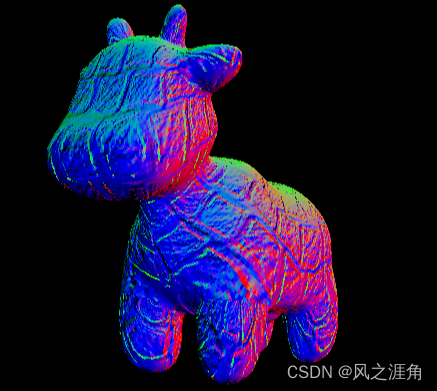
effect
1.normal map

2.blinn-phong

3. Texture mapping

4.
5.

( End of this section )
边栏推荐
- Chapter 08 handwritten digit recognition based on knowledge base matlab deep learning application practice
- 机器学习编译第1讲:机器学习编译概述
- Shardingsphere-proxy-5.0.0 implementation of distributed hash modulo fragmentation (4)
- 2020 csp-j1 csp-s1 first round preliminary round answer analysis and summary, video, etc
- 测试apk-异常管控WiFi Scan攻击者开发
- Google Earth Engine(GEE)——合并VCI指数和TCI温度得时序影像折线图(危地马拉、萨尔瓦多为例)
- Packet capturing tool: Fiddler, a necessary skill for Software Test Engineer
- 手机app测试方法
- Farm Game
- Commission contract on BSV (2)
猜你喜欢

Machine learning compilation lesson 1: overview of machine learning compilation
![[chapter 04 answer sheet recognition based on Hough change]](/img/2a/83ac4875ec7f61e28eb81175d35142.png)
[chapter 04 answer sheet recognition based on Hough change]

LeetCode+ 46 - 50

Mba-day24 best value problem

Pyechart drawing word cloud

手机app测试方法

acwing 836. 合并集合 (并查集)

The way to build the efficiency platform of didi project

Recommended by Alibaba, Tencent and Baidu Software Test Engineers - rapid prototype model of software test model

【第 07 章 基于主成分分析的人脸二维码识别MATLAB深度学习实战案例】
随机推荐
【第 20 章 基于帧间差法进行视频目标检测--MATLAB软件深度学习应用】
第六届世界智能大会“云”端召开在即
【AMD 综合求职经验分享618】
IE浏览器自动跳转edge怎么恢复
Zhongang Mining Co., Ltd.: fluorite is a scarce resource with enhanced attributes, and there may be a gap between supply and demand in the future
测试apk-异常管控Sensor攻击者开发
Mysql数据库轻松学07—select语句书写顺序及执行顺序
五笔 第一讲 指法
Intel history overview
Pyechart drawing word cloud
SQL Server recursive query
Localdatetime format time
Redis cache exceptions and handling scheme summary
LeetCode+ 46 - 50
啊哈C语言 第5章 好戏在后面(第24-25讲)
sql server递归查询
2020 CSP-J1 CSP-S1 第1轮 初赛 答案解析及总结、视频等
Farm Game
Ansible Inventory 主机清单
【第 17 章 基于 Harris 的角点特征检测--Matlab机器学习项目实战】