当前位置:网站首页>Vscode failed to use SSH Remote Connection (and a collection of other problems)
Vscode failed to use SSH Remote Connection (and a collection of other problems)
2022-07-24 09:23:00 【Ton ton don't fight wild】
List of articles
- 1. Common errors and solutions
- 2. Look at the log and find a suitable solution
- 8. solve
- 3. Uninstall completely vscode
- 4. vscode Report errors
- 5. Failed to set up socket for dynamic port forward to remote port
- 6. And terminals pty The connection of the host process is not responding , The terminal may stop working ( restart pty host )
- 7. Other problems
1. Common errors and solutions
Check your mistakes ,
- stay vscode Interface , help -> Switch developer tools
- If it is windows System , Direct shortcut
ctrl+shift+IOpen developer tools .
1.1 ERR Request 7 timed out (15000ms)

ERR Error: Time limit reached, Timeout error ,15000ms It's a parameter. , You can set the response waiting time , The default is 15s, It can be changed to another time
Reference resources Stack Overflow:why ssh connection timed out in vscode?
- file -> Preferences -> Set up
- stay
Common settingsin , findExpand->Remote-SSH - hold 15s Change to longer time

in addition , Another way is to modify a configuration file .
It's still in the setup , Search for ssh, find stay setting.json Editor in chief 
Add to this folder :"remote.SSH.useLocalServer": false,, The edited file is similar to the following :
{

    "security.workspace.trust.untrustedFiles": "open",
    "remote.SSH.useLocalServer": false,
    "remote.SSH.remotePlatform": {

        "10.71.10.49": "linux",
        "10.70.21.10": "linux"
    },
    "workbench.colorTheme": "Quiet Light",
    "workbench.iconTheme": "office-material-icon-theme",
    "terminal.integrated.windowsEnableConpty": false,
}
If it doesn't work , It indicates that the network between local and remote servers may be really bad , In most cases, just reconnect a few times
1.2 ERR Error: WebSocket close with status code 1006
The information in the developer tool is as follows :
It's actually output ->remote ssh in , There will also be some useful information ,
The error message is :
Failed to set up socket for dynamic port forward to remote port XXX: Proxy connection timed out. Is the remote port correct?
The agent timed out ..( Should be vpn There is a problem ? however mobaxterm The connection is still very smooth )
Reference resources Github:Vscode-issue
Some people choose to be demoted , however 2021 Year is 1.52 edition , now 1.66 了 , And the problem has been closed , The new version should have been solved
Reference resources
2. Look at the log and find a suitable solution
2.1 Confirmation error
thank Github Upper issue:Keeps reconnect and reload when Remote SSH with VPN #2565, Inspire me to look at my output , Determine remote log The location of the file .
Use xshell perhaps mobaxterm And other remote connection tools , Check the log file above , for example :
vim /home/user/.vscode-server/.dfd34e8260c270da74b5c2d86d61aee4b6d56977.log
Find the error information , For example, mine is
[15:13:51] [Error: Could not find pty on pty host,
 at C._throwIfNoPty (/home/user/.vscode-server/bin/dfd34e8260c270da74b5c2d86d61aee4b6d56977/out/vs/platform/terminal/node/ptyHostMain.js:20:5336),
 at C.updateTitle (/home/user/.vscode-server/bin/dfd34e8260c270da74b5c2d86d61aee4b6d56977/out/vs/platform/terminal/node/ptyHostMain.js:20:1676),
  at Object.call (/home/user/.vscode-server/bin/dfd34e8260c270da74b5c2d86d61aee4b6d56977/out/vs/platform/terminal/node/ptyHostMain.js:13:8332),
   at E.onPromise (/home/user/.vscode-server/bin/dfd34e8260c270da74b5c2d86d61aee4b6d56977/out/vs/platform/terminal/node/ptyHostMain.js:12:4867),
   at E.onRawMessage (/home/user/.vscode-server/bin/dfd34e8260c270da74b5c2d86d61aee4b6d56977/out/vs/platform/terminal/node/ptyHostMain.js:12:4262),
   at /home/user/.vscode-server/bin/dfd34e8260c270da74b5c2d86d61aee4b6d56977/out/vs/platform/terminal/node/ptyHostMain.js:12:3554,
   at L.invoke (/home/user/.vscode-server/bin/dfd34e8260c270da74b5c2d86d61aee4b6d56977/out/vs/platform/terminal/node/ptyHostMain.js:8:145),
   at l.fire (/home/user/.vscode-server/bin/dfd34e8260c270da74b5c2d86d61aee4b6d56977/out/vs/platform/terminal/node/ptyHostMain.js:8:1856),
   at process.U (/home/user/.vscode-server/bin/dfd34e8260c270da74b5c2d86d61aee4b6d56977/out/vs/platform/terminal/node/ptyHostMain.js:6:34661),
   at process.emit (node:events:390:28),
   at emit (node:internal/child_process:917:12),
   at processTicksAndRejections (node:internal/process/task_queues:84:21)]
2.2 Search for solutions ( Need to wait for the official debug)
Further search vscode remote Error: Could not find pty on pty host, , according to Github Of issue:Could not find pty on pty host #144548.
- As like as two peas of false information. ( Automatic test robot discovery ..)
- 2022.3.7 Just assigned error
- Error code is located at here
- Repair time from 3 The month was put off to 4 month
- Wait
8. solve
The biggest gain ,
- https://code.visualstudio.com/docs/remote/troubleshooting#_configuring-key-based-authentication
- https://code.visualstudio.com/docs/remote/ssh
- These two documents introduce some in detail ssh Connect possible problems and solutions
1. to update vscode edition
the other day vscode Updated , The current version is 1.67.0
help->About
2. To configure ssh secret key
8.2.1 Source of ideas
The inspiration came from when I was looking for alternatives , notice VScode Remote debugging C++ The project includes X11( LAN ) Middle configuration ssh secret key , You can save entering the password .
Remember vscode It has been disconnected before , Always let me enter the password , Then you can avoid this link by directly assigning keys .
8.2.2 Specific operation
Generate the key
- stay windows Input from the command line
ssh-keygen, Then there will be some hints , Enter three times directly . - stay
C:\Users\yourname\.sshYou can see the newly generated key in the folderid_rsa.pubAnd a private keyid_rsa
Copy the public key to the server
- Copy the public key to
~/.ssh/authorized_keysIn file
Test whether the configuration is successful
- Enter... Directly on the command line
ssh [email protected] - See if you can connect directly without a password
After the above is completed , Just go to vscode Make a remote connection , It's usually successful
I actually have an episode here
- Because the company computer will automatically encrypt , I am in the process of copying the public key to the server , Accidentally edited the public key file , So the file is encrypted
- stay vscode Of
Remote-SSHOutput panel , There wasC:\Users\yourname\.ssh\id_rsa invalid formatA hint like this . - Regenerate the key public key , Be careful not to edit when copying , That's how it works
3. Replace the default ssh Tools
Report errors
close - IO is still pending on closed socket. read:0, write:1, io:0000019BC2EE60
Replace OpenSSH by gitSSH
stay vscode Search in settings remote.SSH.path, Enter yourself in the pop-up input box git Of ssh The path of , for example :D:\software\Git\usr\bin\ssh.exe
Set it up and then connect remotely , There will be similar in the output information
[22:59:38.015] Install and start server if needed
[22:59:38.018] Checking ssh with "D:\software\Git\usr\bin\ssh.exe -V"
[22:59:38.736] > OpenSSH_8.8p1, OpenSSL 1.1.1m  14 Dec 2021

[22:59:38.748] Running script with connection command: "D:\software\Git\usr\bin\ssh.exe"
That is, it has been used git Of ssh Remote connection is in progress
Reference resources :
- How can I use Windows’ built-in OpenSSH ssh-agent in VS Code, instead of Git bash’s?
- vscode-remote Of Github issue:Can’t connect to Ubuntu: unreachable or not Linux x86_64 - IO is still pending on closed socket #51
- Environment configuration – About vscode-ssh Under remote connection openssh And git Self contained ssh Conflict resolution
Other : There are generally two solutions ,
- One is to modify vscode Of Remote-SSH Plug in code , Yes ssh Join in
-tParameters , But in what I see Remote-SSH In the output information ,"C:\Users\huangs2\AppData\Local\Temp\vscode-linux-multi-line-command-XXXX-XXX.sh" | ssh -T -L 127.0.0.1:57124:127.0.0.1:33173 "XXX" bash, Has joined-TParameters , It should be that this problem has been fixed , Therefore, it is not considered - Another option is to use gitssh Instead of the default openssh, The following focuses on this scheme
Check your current system SSH edition
- Use vscode When making a remote connection , In fact, this information will be printed , similar
OpenSSH_for_Windows_8.1p1, LibreSSL 3.0.2 - In fact, you can enter directly on the command line
ssh -V, Will also getOpenSSH_for_Windows_8.1p1, LibreSSL 3.0.2 - according to PowerShell/Win32-OpenSSH Of Github issue: close - IO is still pending on closed socket. read:1, write:0, io:0000023DE45AF900 #1899
- This problem may be related to the current system openssh The version is about .
- At first, I thought that if there was an error, I would restart OpenSSH, But there seems to be no place to enter commands ..
Reference resources :VSCode Remote connection configuration . Although this website doesn't look very good , But the above article is really good , Although we can't find the source of the collection .
The following is an excerpt from this article
VSCode Connect to the development machine remotely , debugging Python or C++ The program , By configuring the local ssh, Theoretically, every time in VSCode Connect the remote machine in , After entering the password, you can connect .
First you need to make sure that VSCode Installed in Remote SSH plug-in unit .
Consider two situations :
Can't connect , Or often drop the line
I don't want to enter the password every time
For questions 1, Consider installing git-for-windows, And add Git The installation directory usrin To the system PATH environment variable , And reopen VSCode To take effect ( Use git After installation ssh.exe replace Win10 Bring their own ssh.exe)
For questions 2, Consider configuration ssh-key. according to VSCode Official documents :https://code.visualstudio.com/docs/remote/troubleshooting#_configuring-key-based-authentication
Because of the above VSCode Actions in the document , It's on this machine powershelll/terminal It's operated in , In practice, there may be errors in execution , For example, prompt :
close - IO is still pending on closed socket. read:1, write:0, io:0000001B883956190
4. OpenSSH And gitSSH
Reference resources : Give Way git Use Windows 10 OpenSSH
in addition , You can also refer to :
- Using the OpenSSH client included in Windows 10 (1809) as your Git’s SSH client
- as well as Git on Windows: Force use of OpenSSH [closed]
3. Uninstall completely vscode
It's actually two steps :
- Uninstall the software itself
- Some cache files ( To configure 、 Uninstall plug-ins )
First step : Uninstall the software itself , Find the installation directory , Click on unis000.exe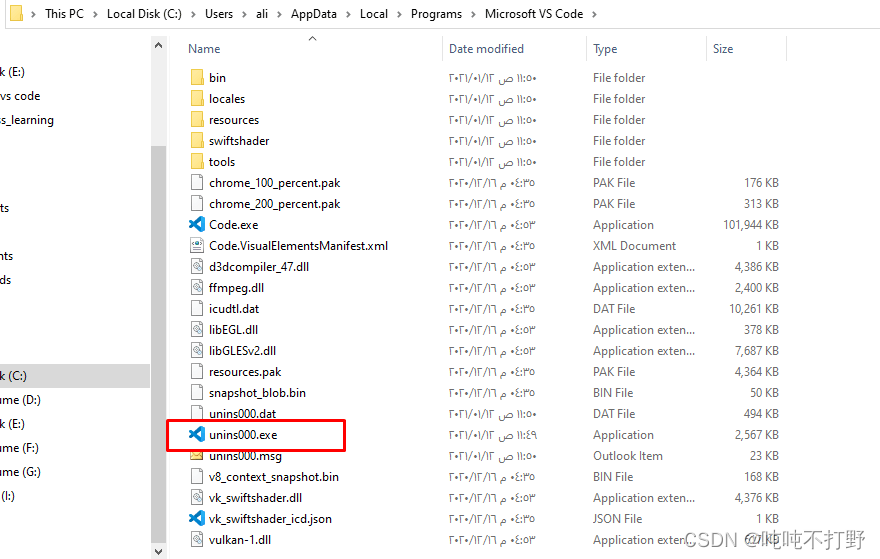
The second step : find C:\Users\yourname\AppData\Roaming Medium Code Folder , Delete .( If not found AppData, stay see The admission Hidden items )
The third step : find C:\Users\yourname Folder , Delete the .vscode Folder

Reference resources :
- How to uninstall VS Code completely?
- How to cleanly / completely re-install VS Code on Mac
- How to reinstall VSCode without losing extensions and user settings
- Uninstall Visual Studio Code
4. vscode Report errors
The window has crashed ( reason :“crashed”, Code :“-1073741819”)
There are two common solutions on the Internet :
- Set to compatibility mode
- Increase the memory
according to Github issue:The window has crashed (reason: ‘crashed’, code: ‘-1073741819’) #132945, In fact, you can open the error record through a command , To see more detailed error information .
According to the document :Creating and symbolicating local crash reports
1.  close vscode
2.  Enter at the command line `code --crash-reporter-directory <absolute-path>`, Note the absolute path , This path is used to store the subsequent generated crash dump file (vscode By default, it is added to path, So you can do )
    for example :`code --crash-reporter-directory D:\package\vscode_dump`
3.  Then this command will automatically open vscode, You need to repeat your mistakes
7.  Then go to the folder `.dmp` File record
Reference resources :
- CSDN Blog : solve vscode The operation item is stuck Tips : The window has crashed ( reason oom)
- Github issue:The window has crashed (reason: ‘crashed’, code: ‘-1073741819’) #132945
- CSDN: solve vscode Window failure
- CSDN: About Visual Studo Code among The window has crashed( Wide port failure ) problem !!!
5. Failed to set up socket for dynamic port forward to remote port
There are many solutions online , I tried it all over , I put it first if it is effective for my problem , The invalid ones are left behind
5.3 Change to server ssh Configuration of
Reference resources VSCode Remote SSH Connection Failed and VSCode Connect Linux Server error
Be careful , Don't change it in the container , Change in the server
# vi /etc/ssh/sshd_config

" You will probably see the following "
# override default of no subsystems
Subsystem       sftp    /usr/lib/openssh/sftp-server

# Example of overriding settings on a per-user basis
#Match User anoncvs
# X11Forwarding no
AllowTcpForwarding yes
" take AllowTcpForwarding  Remove the previous comment , meanwhile no Change it to yes"

" Then restart the service "
systemctl restart sshd
After the change , The short connection is normal
5.2 Delete the server side .vs-code
During remote connection , In fact, you can see in the output information , Contains the following 
Switch to this folder , Delete the folder corresponding to your own connection , It's the one above bin/dfd34e8260c270da74b Folder ,
#  Open it and you will find many other connected files , Just delete your own
/home/user/.vscode-server/bin> ls
6cba118ac49a1b88332f312a8f67186f7f3c1643  8908a9ca0f221f36507231afb39d2d8d1e182702  dfd34e8260c270da74b5c2d86d61aee4b6d56977
7f6ab5485bbc008386c4386d08766667e155244e  c722ca6c7eed3d7987c0d5c3df5c45f6b15e77d1
Connect again , You will find that a file with the same name will be created , Still called dfd34e8260c270da74b5c2d86.
5.1 Change the local configuration file
according to 【Vscode Remote】 Unable to connect :Failed to set up socket for dynamic port forward to remote port
ctrl+shift+P, InputRemote-SSH:Settings, Or find the settinguser->Expand->Remote-SSH.- hold
Remote.SSH:Enable Agent ForwardingRemove the check of
6. And terminals pty The connection of the host process is not responding , The terminal may stop working ( restart pty host )
And at first 2. Look at the log and find a suitable solution The problem of reporting errors in is similar , It's all with pty The host is related .
Report errors : And terminals pty The connection of the host process is not responding , The terminal may stop working ( restart pty host )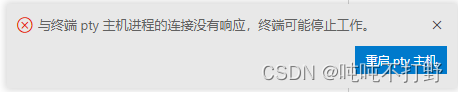
The corresponding English is :The connection to the terminal’s pty host process is unresponsive, the terminals may stop working.
Though some github Upper issue It shows that this problem has been fixed , But thanks Connection to terminal’s pty host process is becoming unresponsive #130320
file -> Preferences -> Set up , Search for Windows Enable Conpty, Remove the check mark 
Reference resources
- Github Issue:Terminal pty, not responding #148307
- Github Issue:The connection to the terminal’s pty host process is unresponsive, the terminals may stop working. #118159
7. Other problems
7.1 Terminal process "C:\Windows\System32\cmd.exe" Boot failure ( Exit code :-1)

It's really a speechless problem , according to Exit codes You know :
The exit code prompted when the terminal fails to start comes from shell, Rather than by VS code Generated .VS code Supports many types of shell, So there are many possible exit codes .
So when solving problems , Need to search shell And the corresponding exit code . for example :PowerShell 4294901760, Or is itcmd 1etc. .
operation 1
Reference resources 2021-11-25 Terminal process “C:\Windows\System32\cmd.exe” Terminated , Exit code : 3221225786.
All terminals can be Use the old console Remove all options , Include powershell,cmd,Anaconda Prompt as well as Anaconda Powershell Prompt
No dice .
operation 2
Reference resources About vscode Terminal process termination occurs , Exit code :1 The situation of
It believes that the reason for the error is :
because vscode There is a space in the file name of the installation directory , Change it to other characters or remove spaces
I do have this problem , After reinstallation , Report another error .
Invalid
7.2 Debug type of installed configuration ’python’, But it is not supported in this environment
Debug type of installed configuration ’python’, But it is not supported in this environment 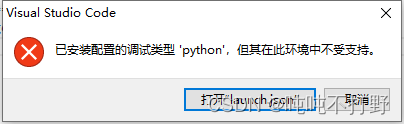
边栏推荐
- DP longest common subsequence detailed version (LCS)
- Six pictures show you why TCP shakes three times?
- From single architecture to distributed architecture, there are many pits and bugs!
- CodeBlocks shortcut key operation Xiaoquan
- Dorissql syntax Usage Summary
- DSP development, using CCS software to establish engineering and burning
- 【基于ROS的URDF练习实例】四轮机器人与摄像头的使用
- How should tiktok shop cooperate with live broadcast in the background?
- 详解LinkedList
- 科目1-2
猜你喜欢
Getting started with web security - open source firewall pfsense installation configuration

详解LinkedList

Open source summer interview | learn with problems, Apache dolphin scheduler, Wang Fuzheng

The difference between & &, | and |
![[don't bother to strengthen learning] video notes (IV) 1. What is dqn?](/img/74/51219a19595f93e7a85449f54d354d.png)
[don't bother to strengthen learning] video notes (IV) 1. What is dqn?

Un7.22: how to upload videos and pictures simultaneously with the ruoyi framework in idea and vs Code?

唐宇迪opencv-背景建模

Re6: reading paper licin: a heterogeneous graph based approach for automatic legal stat identification fro

科目1-3

科目1-2
随机推荐
Matlab各函数说明
Read write lock, shared lock, exclusive lock
Aruba学习笔记06-无线控制AC基础配置(CLI)
SQL 优化原则
Jenkins post build script does not execute
A null pointer exception is reported when the wrapper class inserts into the empty field of the database table
Let's test 5million pieces of data. How to use index acceleration reasonably?
Linked list - 19. Delete the penultimate node of the linked list
分类与回归的区别
Detailed sequence traversal of leetcode102 binary tree
[don't bother with reinforcement learning] video notes (I) 2. Summary of reinforcement learning methods
Account 1-3
js定位大全获取节点的兄弟,父级,子级元素含robot实例
Tiktok shop platform will take disciplinary measures against sellers who violate rules and policies
Definition and initialization of cv:: mat
[assembly language practice] solve the unary quadratic equation ax2+bx+c=0 (including source code and process screenshots, parameters can be modified)
DSP development, using CCS software to establish engineering and burning
科目1-2
Six pictures show you why TCP shakes three times?
What is the component customization event we are talking about?