当前位置:网站首页>Node version switching management using NVM
Node version switching management using NVM
2022-07-31 13:47:00 【Xiao Zhang run.】
When I was developing a project, I was confused by the version of node, because different projects use different versions of node. Some projects can also be installed in a high-version node environment, but most projects areIt can only run under a specific node version, so switching node versions frequently is a headache.
Here the official provides us with NVM, which, as the name suggests, is a version management tool for nodejs.Through it, you can install and switch between different versions of nodejs.
Use of NVM
One, installation
- nvm-noinstall.zip: Green free installation version, but needs to be configured when using.
- nvm-setup.zip: The installation version, it is recommended to use it. Similar to the next step, you can choose the nvm installation path and node installation path by yourself. Note that the installation path should not have Chinese and spaces.
After the installation is completeEnter nvm to check whether the installation is successful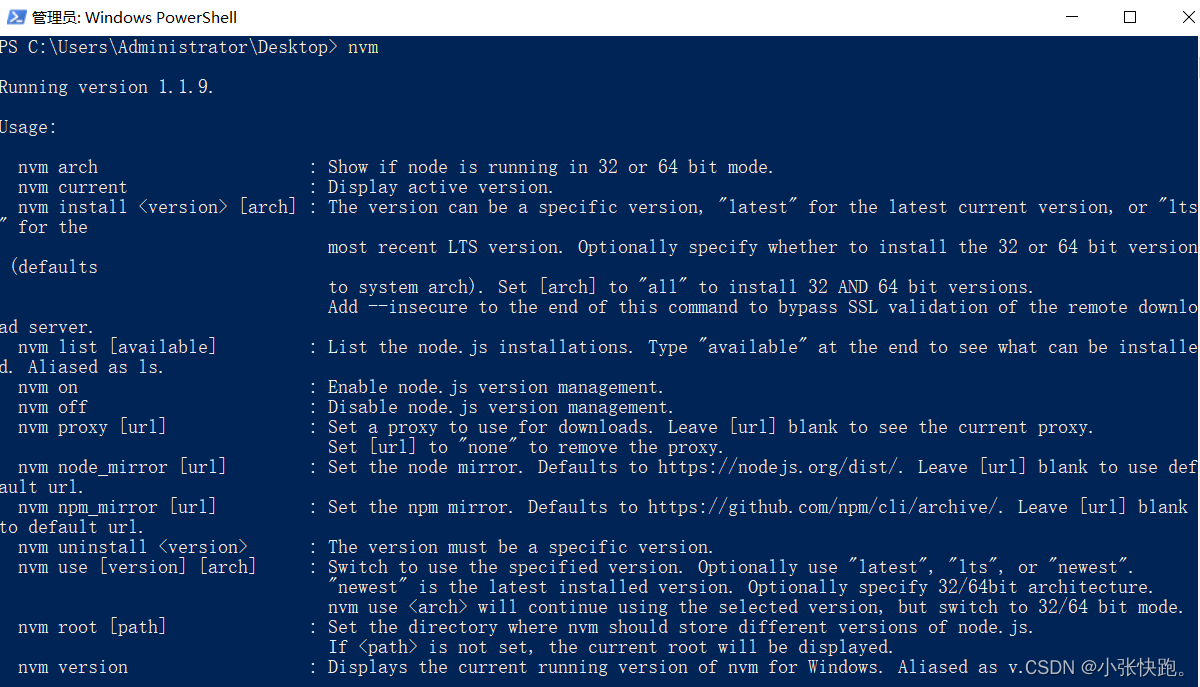
Second, install/manage nodejs
1. View all versions installed locally; there is an optional parameter available, which displays all downloadable versions.
nvm list [available]
2. Install the specified node version. The version number in the command can be customized. For details, refer to the list queried by command 1
nvm install 11.13.0
3. Use a specific node version
nvm use 11.13.0
4. Uninstall
nvm uninstall 11.13.0
Three, command prompt
- nvm arch : Displays whether node is running on 32-bit or 64-bit.
- nvm install [arch] : Install node, version is a specific version or the latest stable version latest.The optional parameter arch specifies whether to install the 32-bit or 64-bit version, and the default is the system bit.You can add --insecure to bypass the remote server's SSL.
- nvm list [available] : Displays the installed list.The optional parameter available, displays all versions that can be installed.list can be simplified to ls.
- nvm on : Enable node.js version management.
- nvm off : Turn off node.js version management.
- nvm proxy [url] : Set download proxy.Without the optional parameter url, the current proxy is displayed.Setting url to none removes the proxy.
- nvm node_mirror [url] : Set the node mirror.The default is nodejs.org/dist/ If no url is written, the default url is used.After setting, you can view the settings.txt file in the installation directory, or operate directly in this file.
- nvm npm_mirror [url] : set npm mirror.github.com/npm/cli/arc… .If no url is written, the default url is used.After setting, you can view the settings.txt file in the installation directory, or operate directly in this file.
- nvm uninstall : Uninstall the specified version of node.
- nvm use [version] [arch] : Use the specified version node.32/64 bits can be specified.
- nvm root [path] : Set the directory where different versions of node are stored.If not set, the current directory is used by default.
- nvm version : Display the nvm version.version can be simplified to v.
边栏推荐
- [RPI]树莓派监控温度及报警关机保护「建议收藏」
- Network layer key protocol - IP protocol
- P5019 [NOIP2018 提高组] 铺设道路
- IDEA can't find the Database solution
- C#中+=的用法
- C# control ToolStripProgressBar usage
- An article makes it clear!What is the difference and connection between database and data warehouse?
- 网络协议及相关技术详解
- The use of C# control CheckBox
- Verilog——基于FPGA的贪吃蛇游戏(VGA显示)
猜你喜欢




随机推荐
为什么 wireguard-go 高尚而 boringtun 孬种
C# List用法 List介绍
Unity学习笔记 关于AVPro视频跳转功能(Seeking)的说明
STM32——软件SPI控制AD7705[通俗易懂]
LeetCode旋转数组
生产力工具和插件
How to quickly split and merge cell data in Excel
网络协议及相关技术详解
C# 中的Async 和 Await 的用法详解
Reasons and solutions for Invalid bound statement (not found)
LeetCode·每日一题·1161.最大层内元素和·层次遍历
C#使用ComboBox控件
The batch size does not have to be a power of 2!The latest conclusions of senior ML scholars
JSP中如何借助response对象实现页面跳转呢?
ADS communicate with c #
golang-gin-pprof-使用以及安全问题
Four ways to clear the float and its principle understanding
CodeIgniter 打开错误日志
Unity study notes Description of AVPro video jump function (Seeking)
Golang - gin - pprof - use and safety