当前位置:网站首页>Webodm win10 installation tutorial (personal test)
Webodm win10 installation tutorial (personal test)
2022-07-27 06:40:00 【LEILEI18A】
WebODM win10 Installation tutorial ( Personal test )
Catalog
0. Why use WebODM
For aerial image generation Three dimensional reconstruction 、 Three dimensional modeling etc. , The interface is simpler ( Compare command line mode )! But a little bit of memory .
The generated 3D The model turns into 3dtiles, use cesium,maptalks,deck.gl load . link
1. Reference link
[1]https://github.com/OpenDroneMap/WebODM
2. Installation steps
[1] Installation environment
win10、git、docker、docker-compose、python、pip、GDAL-python library
win10 Whether home edition or Enterprise Edition 、 Professional version is available ; Home Edition needs to be installed hyper-V, Self Baidu can or reference This blog ; then Program -> Program and function -> Enable or close windows function -> Check Hyper-V, Restart the system ;
win10 install docker desktop Can contain docker、docker-compose. Prompt update wsl-kernel, Click download to install ;
win10 install anaconda, recommend anaconda Warehouse , choice Anaconda3-2021.05-Windows-x86_64, contain pip;
win10 install git, To baidu git download that will do ;
Download and install GDAL window python library , Baidu can solve it by itself ! Also from here download ;
[2] modify docker Source ( important )
Domestic download docker-hub Mirror image , Too slow , Change to domestic source ;
open docker-desktop, open settings( The upper right corner of the software ), Click on docker engine, Fill in the following information :
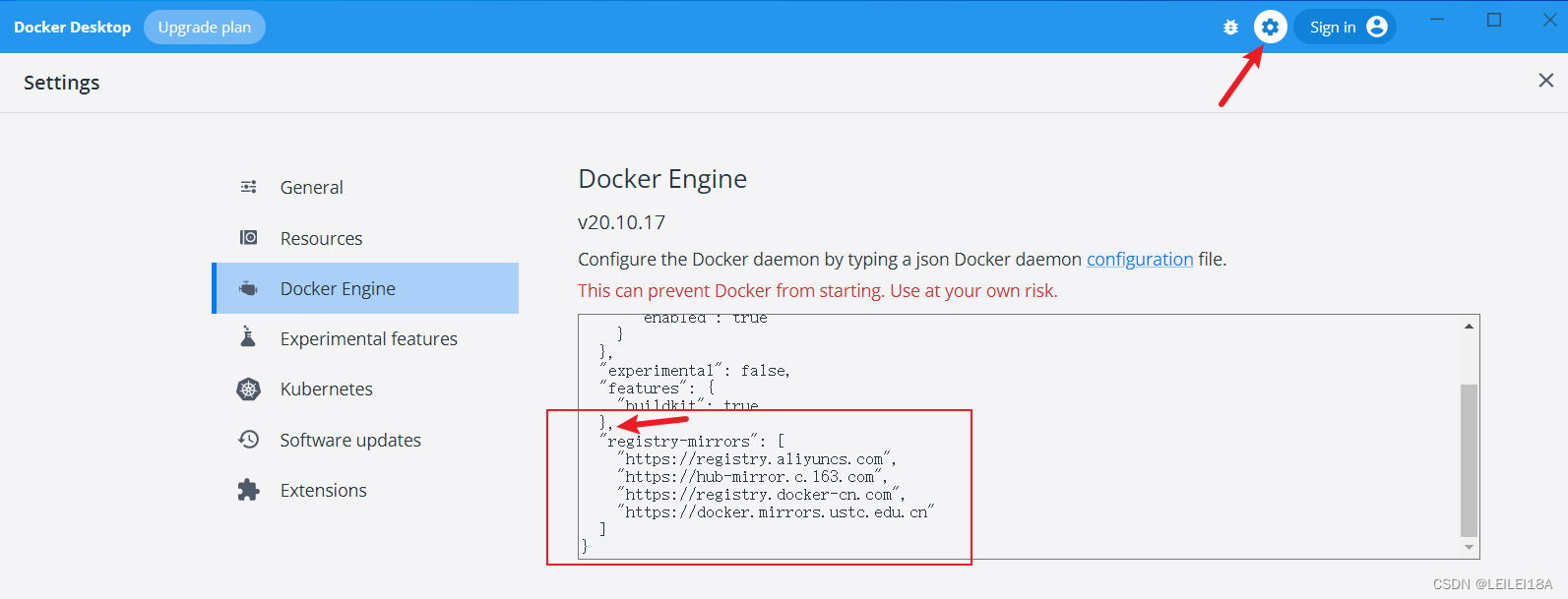
{
  "registry-mirrors": [
    "https://registry.aliyuncs.com",
    "https://hub-mirror.c.163.com",
    "https://registry.docker-cn.com",
    "https://docker.mirrors.ustc.edu.cn"
  ]
}
[3] download WebODM github library
git clone https://github.com/OpenDroneMap/WebODM.git
[4] WebODM install ( Need to be in git Installation in environment , open git bash)
cd WebODM
./webodm.sh start ( Just wait for , It has been replaced by domestic sources , Wait slowly ), Execute if failed ./webodm.sh stop, Then open the docker desktop, Click on volumes, Delete the relevant volume, Again ./webodm.sh start
If this interface finally appears, it will be a success , I also found out later GDAL Library needs , Because I installed Geonode, Just install it python,GDAL-python library ,Postgresql,geoserver, So it's easy here . But here db yes docker Mirror image , There is no need to be alone in win Lower installation .
[5] Log in locally WebODM Interface
Browser input localhost:/8000, Sign up for an account , casual admin-admin that will do


边栏推荐
- Shell programming specification and redirection and pipeline operation
- Introduction to hash table
- 数据库命令
- ArcGIS for JS API (1) get all field names of FeatureLayer
- rsync远程同步
- C language -- string operation function and memory operation function
- 反射器中getattr,hasattr,delattr,setattr的使用
- Basic operation of database on terminal
- bug分类及缺陷和csv文件测试
- regular expression
猜你喜欢





随机推荐
Li Kou daily question (linked list simulation)
Linu性能调优:面对DDOS攻击,我们如何缓解局面?
shell--条件语句(if语句、case语句)
Installation, configuration and use of gradle
互联网简单协议概括
PXE高效批量网络装机
数据库在终端的基础操作
Binary tree - search tree
Header and source files in ROS
Basic knowledge of English: Rules for the use of non predicates Part 1
Shell -- conditional statements (if statements, case statements)
jmeter简介
PXE efficient batch network installation
Remote access and control
DNS domain name resolution service
数据库命令
接口测试概念及Postman工具简介使用
反射器中getattr,hasattr,delattr,setattr的使用
Using markdowm
1. CentOS 7 安装 redis