当前位置:网站首页>Basic operation of database on terminal
Basic operation of database on terminal
2022-07-27 06:26:00 【Envy only mandarin ducks, not immortals】
Catalog
One 、 Database login operation
Two 、 Database operation statement
(1) Check how many databases the current server has
(3) View database creation information
3、 ... and 、 Operation of data table
(1) Check how many tables there are in the selected database
(2) Look at the structure of a table
(6) After the table is created, the attribute is modified
One 、 Database login operation
When both the client and server are local
mysql -u root -p
When using a remote server , Use the complete login command
mysql -h Server's IP Address -p Port number root( user name ) -p
Two 、 Database operation statement
(1) Check how many databases the current server has
show databases;

(2) Create database
create database Database name ;

create database if not exists Database name ;
Judge whether the current database already exists , If it exists, it will not be created

(3) View database creation information
show create database Database name ;

Modify the coding of the existing database
alter database Database name character set Code name ;

(4) Using a database
All data tables are in a database , Therefore, the database must be selected before operation , The data table is Mysql The basic unit for data organization , A database is a folder
use Database name ;

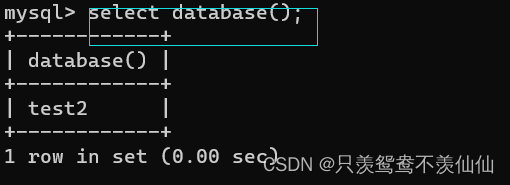
Check the current database
select database();
(5) Delete database
The default storage of the database is C:\ProgramData\MySQL\MySQL Server 5.7\Data

Deleting a database is a very dangerous operation , It's better not to , Be careful "[]" What is inside is optional , The back ones are all the same
drop [if exists] Database name


3、 ... and 、 Operation of data table
The data table is Mysql The basic unit for organizing data
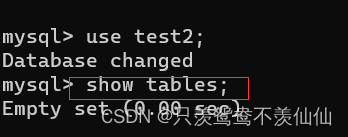
(1) Check how many tables there are in the selected database
show tables;
At this time, no element has been added to the table , So it shows empty


*.frm The file saves the structure of the data table ( Table properties , Attribute type, etc )
*.ibd The file saves the specific data and index information in the table
Pay attention to mysql8.0 Later versions will *.frm The files are merged into *ibd In file
(2) Look at the structure of a table
desc Data table name ;
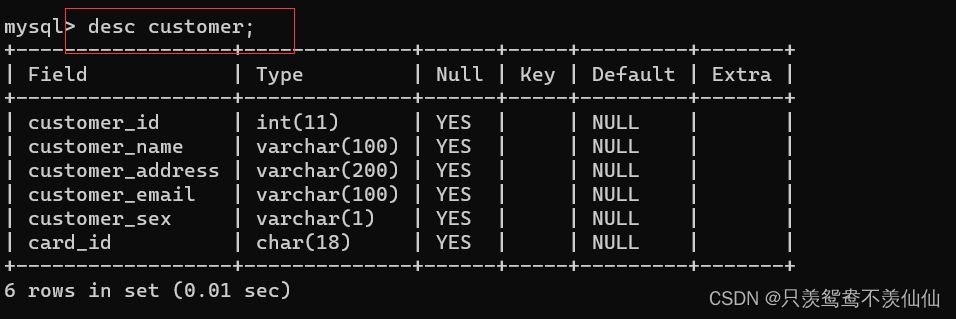
Field Is the property name
Type Is the property type
Null Whether yes is empty
Key It's the index
Default Is the default value
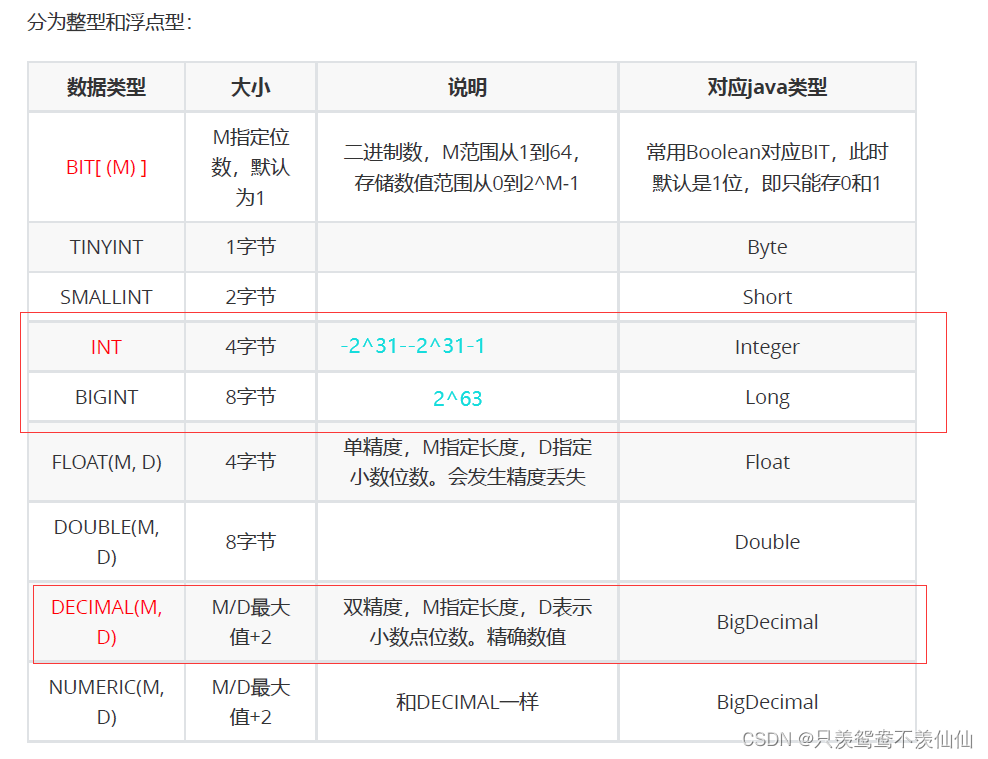
(3) Common data types
value type
String type
varchar(10) Indicates that this data can be stored at most 10 Characters , The number of characters occupied in specific storage shall be subject to the stored data
char(10) Indicates when this data is stored , No matter how many characters are stored , All in accordance with 10 Character storage

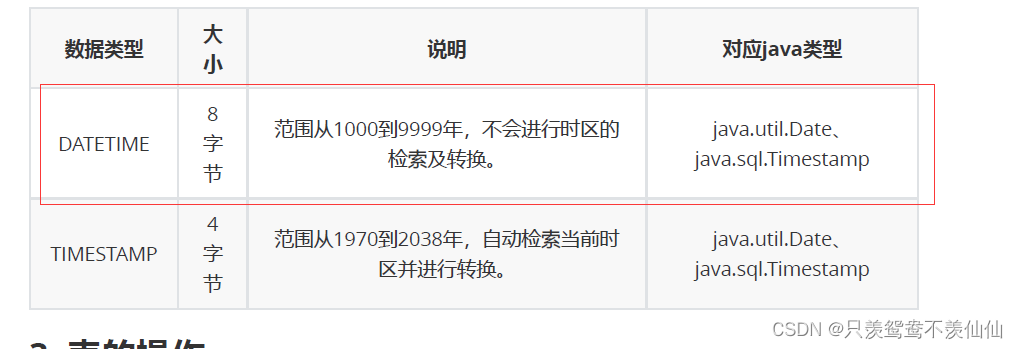
The date type
Time stamp : Current time distance 1970 year 1 month 1 Japan 0 branch 0 The difference between seconds , Returns a long integer
datetime When inserting data, it will detect whether the format conforms to the date format ,'2022-06-03 20:05:10';
If the inserted data is only year month day , At this time, the hours, minutes and seconds are the default 0
If the inserted data has only hours, minutes and seconds , At this time, insert

(4) Create data table
cteate table Table name (
The attribute name 1 Attribute types comment' Field description ',
The attribute name 2 Attribute types comment' Field description ',
.......,
The attribute name n Attribute types comment' Field description '
);

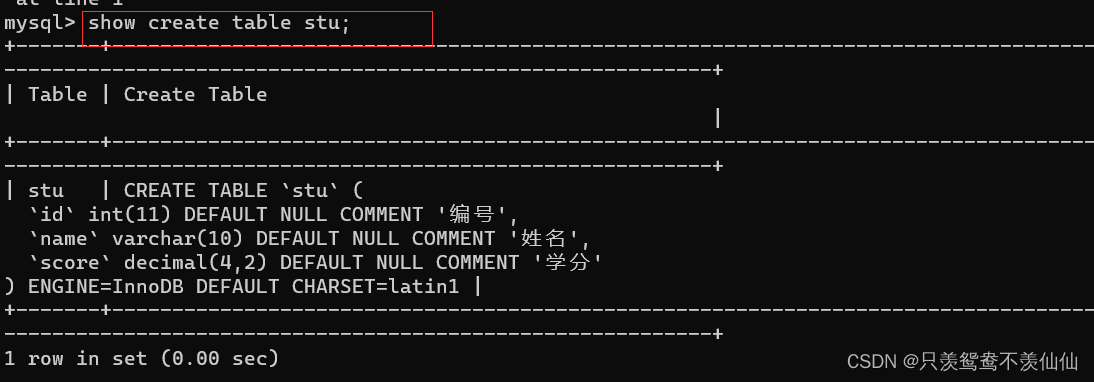
View comment information
show create table Table name
(5) Delete table
drop table [if exists] Table name ;
Deleting a table is as dangerous as deleting a database

(6) After the table is created, the attribute is modified
alter table Table name add New attribute name Attribute types ;

Delete a column
alter table Table name drop Column name ;

Modify a column , Data already exists in this column
alter table Table name change Original field name new field name type [ constraint ];

Modify the name of the table
alter table The old name of the table rename The new name of the table ;

Modify the character set encoding of the table
alter table Table name convert to character set New character set ;

边栏推荐
- Non photorealistic rendering (NPR) paper understanding and reproduction (unity) - stylized highlights for cartoon rendering and animation
- yum获取rpm软件包的三种方法
- 英语基础知识:非谓语使用规则上篇
- Linu性能调优:面对DDOS攻击,我们如何缓解局面?
- wireshark图形界面抓包
- The concept of interface testing and the use of postman tools
- 如何规范式编写yaml文件
- TF coordinate transformation
- C language -- string operation function and memory operation function
- bug分类及缺陷和csv文件测试
猜你喜欢





随机推荐
自动追随跟踪
wireshark图形界面抓包
Multi coordinate transformation
wireshark数据包修改--IP地址修改(一)
Remote sensing image recognition misclassification under multi class recognition
文件内容的读写——数据流
Remote sensing image recognition training strategy
接口测试概念及Postman工具简介使用
5g network identity - detailed explanation of 5g Guti
Some descriptions and usage of database index
ROS话题名称设置
Multi threaded CAS, synchronized lock principle, JUC and deadlock
通信机制比较
Programming learning records - Lesson 9 [operators]
Progress in remote sensing image recognition 2022/5/5
Pzk learns data types, binary conversion, input and output, operators, branch statements, ifelse of C language
Unity shader overview
selenium知识点
机器人导航
允许或者禁止同时连接到一个non-domain和一个domain网络