当前位置:网站首页>Qt practical cases (54) - using transparency QPixmap design pictures
Qt practical cases (54) - using transparency QPixmap design pictures
2022-07-31 15:33:00 【wendy_ya】
一、项目介绍
本文介绍利用QPixmapDesign image transparency,You can see the progress bar below the drag,Used to control the transparency of the image above.
二、项目基本配置
新建一个Qt案例,项目名称为“TransparencyTest”,基类选择“QWidget”,点击选中创建UI界面复选框,完成项目创建.
三、UI界面设置
UI界面如下:
| 序号 | 名称 | 类型 | 属性 |
|---|---|---|---|
| ① | label_photo | QLabel | / |
| ② | slider | QSlider | minimum:0;maximum:255; |
四、主程序实现
4.1 widget.h头文件
The slider movement slot function needs to be declared in the header file:
右键——>滑动条——>sliderMoved: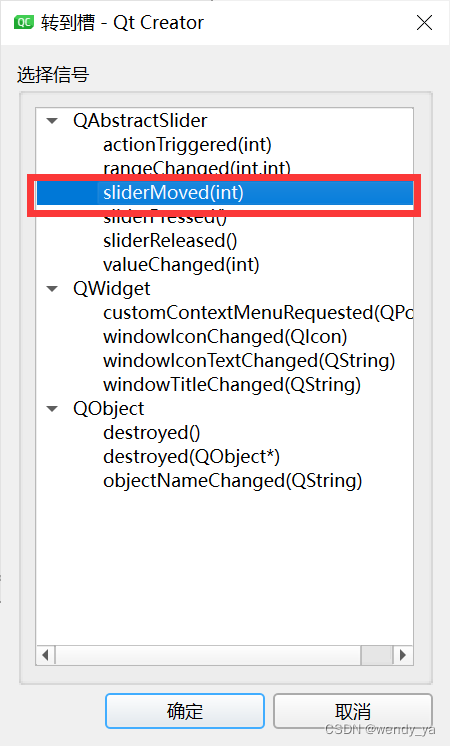
我这里是:
private slots:
    void on_Slider_sliderMoved(int position);
4.2 widget.cpp源文件
The source file first sets the background in the constructorlabel的图片,然后设置label位置,Set the initial position of the slider to the far right:
    //设置窗口大小
    setFixedSize(800,600);

    //设置背景label的图片
    QPixmap pix(":/test.jpg");
    ui->label_photo->setPixmap(pix);

    //设置lable位置
    ui->label_photo->setScaledContents(true);
    ui->label_photo->setGeometry(10,10,200,150);
    ui->label_photo->raise();
    ui->label_photo->show();
    //Set the initial slider position to the far right
    ui->Slider->setValue(255);
Define the slider slot function:
void Widget::on_Slider_sliderMoved(int position)
{

    //Sets the transparency of the new image
    QPixmap pix1(":/test.jpg");

    QPixmap temp(pix1.size());
    temp.fill(Qt::transparent);

    QPainter p1(&temp);
    p1.setCompositionMode(QPainter::CompositionMode_Source);
    p1.drawPixmap(0, 0, pix1);
    p1.setCompositionMode(QPainter::CompositionMode_DestinationIn);

    //根据QColorThe fourth parameter in sets the transparency,此处position的取值范围是0~255
    p1.fillRect(temp.rect(), QColor(0, 0, 0, position));
    p1.end();

    pix1 = temp;
    ui->label_photo->setPixmap(pix1);
}
五、效果演示
完整效果如下:
如果没有看懂的话,完整代码可以参考:https://download.csdn.net/download/didi_ya/86268287
ok,以上便是本文的全部内容了,如果对你有所帮助,记得点个赞哟~
边栏推荐
猜你喜欢




随机推荐
AVH Deployment Practice (1) | Deploying the Flying Paddle Model on Arm Virtual Hardware
多主复制的适用场景(1)-多IDC
R language test whether the sample conforms to normality (test whether the sample comes from a normally distributed population): shapiro.test function tests whether the sample conforms to the normal d
R语言ggplot2可视化:使用ggpubr包的ggboxplot函数可视化分组箱图、使用ggpar函数改变图形化参数(legend、修改可视化图像的图例在整图中的位置)
what exactly is json (c# json)
RecyclerView的高效使用第一节
.NET 20周年专访 - 张善友:.NET 技术是如何赋能并改变世界的
mongo进入报错
hough变换检测直线原理(opencv霍夫直线检测)
TRACE32——C源码关联
ASP.NET Core generates continuous Guid
工程力学复习资料
WeChat chat record search in a red envelope
JVM参数解析 Xmx、Xms、Xmn、NewRatio、SurvivorRatio、PermSize、PrintGC「建议收藏」
11 pinia使用
7、常见面试口语提问问题汇总
How does automated testing create business value?
Why is the field of hacking almost filled with boys?
Insert into data table to insert data
修改SQL语言实现Mysql 多表关联查询优化