当前位置:网站首页>01 邂逅typescript,环境搭建
01 邂逅typescript,环境搭建
2022-07-31 15:06:00 【是云呀!】
我们编写的typescript代码最后都会编译成javascript代码来运行,所以需要搭建对应的环境
npm全局安装typescript
npm install typescript -g查看版本
tsc --version编写第一个ts文件

此时直接运行这个ts文件是报错的,我们需要转为js文件,通过我们刚才安装的tsc
// 在控制台输入 tsc 加你的文件
tsc .\01_hello-typescript.ts
此时你会发现你的目录下多了一个文件,这个js文件就是转化后的
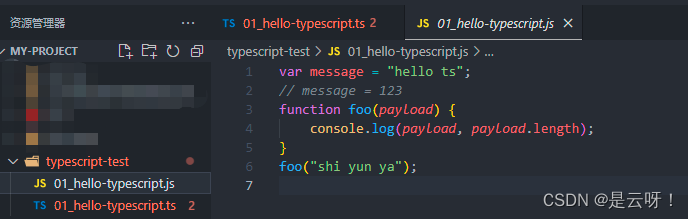
这样处理ts代码太麻烦,目前有两种方案解决
方案一:搭建webpack环境
方案二:安装ts-node ,ts-node帮我们做两件事,编译,运行在node环境
这里学习阶段先用ts-node
npm install ts-node -g
// ts-node还依赖其他两个包,我们也需要全局安装
npm install tslib @types/node -g
通过ts-node运行ts文件,

webpack搭建ts环境(可跳过)
这是我的初始目录,创建main.ts util.ts 后 npm init 之后一直回车创建package.json文件

局部安装webpack webpack-cli
npm install webpack webpack-cli -D先在package.json中配置build命令,

在根目录创建index.html(创建本地服务用的模板)用!生成模板后就OK了
之后创建webpack.config.js文件
const path = require("path");
const HtmlWebpackPlugin = require("html-webpack-plugin");
module.exports = {
  mode: "development",
  entry: "./src/main.ts",
  output: {
    path: path.resolve(__dirname, "./dist"),
    filename: "bundle.js",
  },
  resolve: {
    extensions: [".ts", ".js", ".json", ".cjs"],
  },
  devServer: {},
  module: {
    rules: [
      {
        test: /\.ts$/,
        loader: "ts-loader",
      },
    ],
  },
  plugins: [
    new HtmlWebpackPlugin({
      template: "./index.html",
    }),
  ],
};
以下是各种安装,在命令行
// ts-loader依赖typescript
npm install ts-loader typescript -D
// 需要tsconfig.json文件,这里我们自动生成
tsc --init
// 到这里就可以打包了,引用打包后的文件
// 调试麻烦,我们开启本地服务
npm install webpack-dev-server -D
// 这里指定模板
npm install html-webpack-plugin -D
设置serve脚本

npm run serve就ok了
边栏推荐
猜你喜欢



随机推荐
华医网冲刺港股:5个月亏2976万 红杉与姚文彬是股东
为什么黑客领域几乎一片男生?
Efficient use of RecyclerView Section 3
基于极限学习机(ELM)进行多变量用电量预测(Matlab代码实现)
element-plus虚拟表格virtual-list组件中是怎么实现清理lodash.memoize缓存的?
How to clean up the lodash.memoize cache in the element-plus virtual table virtual-list component?
PDF 拆分/合并
STM32(十)------- SPI通信
TRACE32——C源码关联
Trigonometric identity transformation formula
R语言向前或者向后移动时间序列数据(自定义滞后或者超前的期数):使用dplyr包中的lag函数将时间序列数据向前移动一天(设置参数n为正值)
TRACE32——基于SNOOPer的变量记录
R语言计算时间序列数据的移动平均值(滚动平均值、例如5日均线、10日均线等):使用zoo包中的rollmean函数计算k个周期移动平均值
力扣:714. 买卖股票的最佳时机含手续费
《微信小程序-进阶篇》Lin-ui组件库源码分析-Icon组件
R language ggplot2 visualization: use the ggboxplot function of the ggpubr package to visualize the grouped box plot, use the ggpar function to change the graphical parameters (caption, add, modify th
Gorm—Go language database framework
为什么毕业季不要表白?
TRACE32——常用操作
TRACE32 - SNOOPer-based variable logging