当前位置:网站首页>TRACE32 - SNOOPer-based variable logging
TRACE32 - SNOOPer-based variable logging
2022-07-31 14:57:00 【Rainmicro】
TRACE32 - SNOOPer-based variable logging
In our daily debugging work, we often encounter a scenario: for some variables or memory values, we want to monitor them.
When these variables are written or read, these operations are recorded for subsequent statistical analysis or chart drawing.
In order to achieve the above functions, we can use the SNOOPer function provided by TRACE32.
The implementation of this function only requires the debug module of TRACE32, without any additional trace module.
SNOOPer function can record the changes of variables in real time during program execution, and has little effect on the normal execution of the program.
Let's take a look at how to configure this function in TRACE32:
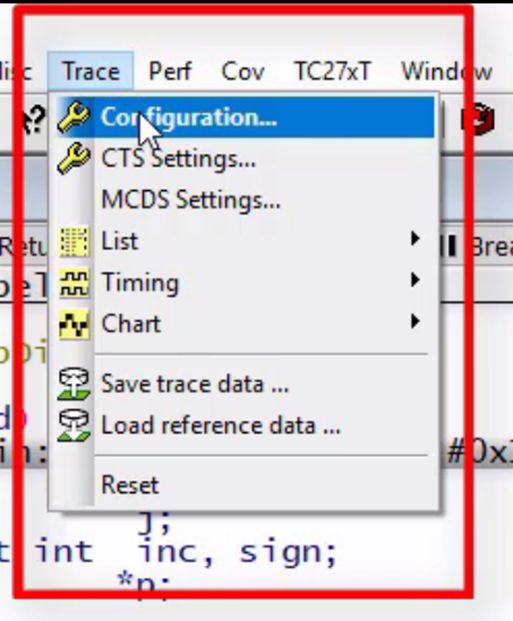
Select "Trace" from the TRACE32 menu bar,
Then select "Configuration",
Select SNOOPer as the tracking method.
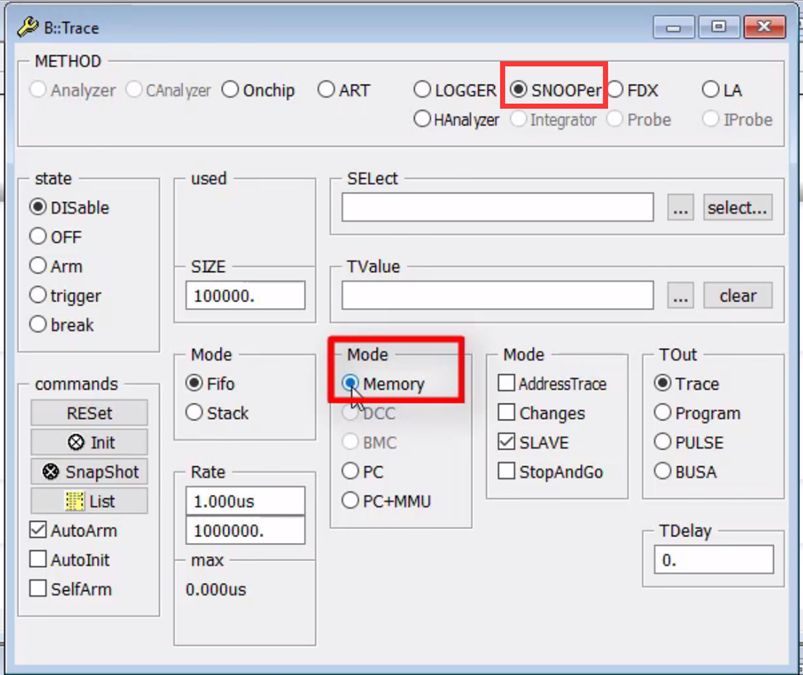


The "SELect" field allows you to enter the address directly,
Or with the help of the select... button, the name of the variable to be recorded can be selected by mouse operation.
With the "i" symbol database, we will choose the variable plot1 as an example.

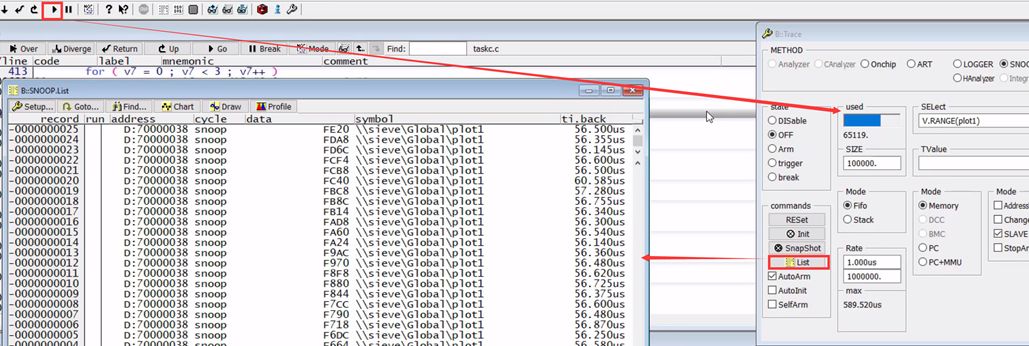
Then click the Go button to start the program.
The progress bar of the Trace window will continue to increase, indicating that SNOOPer is continuously collecting data.
After collecting for a period of time, you can click the Break button to stop the CPU.
Then click the List button in the Trace window to see the recorded data and time and other information.
In the upper window, click the Draw button,
The recorded variable values can be displayed graphically.

Of course, the values of multiple variables can also be recorded at the same time (up to 16 can be recorded).

In addition, the SNOOPer function can record other information, the most commonly used is the PC (Program Counter).
边栏推荐
- 微信聊天记录中搜索红包
- 如何进行需求分析评审
- [Pytorch] torch.argmax() usage
- In the future, the interviewer asks you why it is not recommended to use Select *, please answer him out loud!
- NC | 斯坦福申小涛等开发数据可重复分析计算框架TidyMass
- 49. The copy constructor and overloaded 】
- MySQL 23 classic interviews hang the interviewer
- R语言ggplot2可视化:使用ggpubr包的ggboxplot函数可视化箱图、使用font函数自定义图例标题文本(legend.title)字体的大小、颜色、样式(粗体、斜体)
- 搭建私有的的Nuget包服务器教程
- DBeaver连接MySQL 8.x时Public Key Retrieval is not allowed 错误解决
猜你喜欢
基于极限学习机(ELM)进行多变量用电量预测(Matlab代码实现)

UnityShader入门学习(三)——Unity的Shader

The JVM a class loader
最小费用最大流问题详解

2021 OWASP TOP 10 漏洞指南
Ubuntu Topic 5: Setting a Static IP Address

Asynchronous processing business using CompletableFuture

RecyclerView的高效使用第一节
2021 OWASP TOP 10 Vulnerability Guide

"Listen to me, thank you" can be said in ancient poetry?Tsinghua University has developed an artifact of "Searching Sentences According to Meaning", which can search for the famous sayings you want wi
随机推荐
[QNX Hypervisor 2.2 User Manual]9.14 safety
Nuget package and upload tutorial
Sentinel限流和异常处理
R语言检验样本是否符合正态性(检验样本是否来自一个正态分布总体):shapiro.test函数检验样本是否符合正态分布(normality test)
abaqus find contact pairs报错:surface name is already in use
华医网冲刺港股:5个月亏2976万 红杉与姚文彬是股东
Sentinel安装与部署
三、数组
Network cable RJ45 interface pins [easy to understand]
LeetCode二叉树系列——226.翻转二叉树
易驱线主控芯片对比(电动三轮电机90O瓦世纪通达)
OAuth2:使用JWT令牌
In the future, the interviewer asks you why it is not recommended to use Select *, please answer him out loud!
OAuth2:搭建授权服务器
element-plus虚拟表格virtual-list组件中是怎么实现清理lodash.memoize缓存的?
/etc/profile、/etc/bashrc、~/.bash_profile、~/.bashrc 文件的作用
高等数学——常用不定积分公式
BigDecimal 简介,常用方法
名创优品斥资6.95亿购买创始人叶国富所持办公楼股权
OAuth2:微服务权限校验Session共享