当前位置:网站首页>How to use JWT authentication in thinkphp6
How to use JWT authentication in thinkphp6
2022-06-24 19:14:00 【Yisu cloud】
thinkphp6 How to use jwt authentication
This article mainly explains “thinkphp6 How to use jwt authentication ”, Interested friends might as well come and have a look . The method introduced in this paper is simple and fast , Practical . Now let Xiaobian take you to learn “thinkphp6 How to use jwt authentication ” Well !
thinkphp6 Use jwt
The client uses the user name and password to request login
The server receives the request , Verify user name and password
After successful verification , The server will issue a token, Put this again. token Return to the client
Client received token Then you can store it , For example, put it in cookie in
Each time the client requests resources from the server, it needs to carry the certificate issued by the server token, Can be in cookie perhaps header Middle carry
The server receives the request , Then go to verify the client request token, If the validation is successful , Just return the request data to the client
install jwt Expand
composer require firebase/php-jwt
After installation vender In the catalog firebase Under the folder
call JWT Inside encode and decode Method token And verification token
project app In the catalog common.php Used by global files , Made a public method , Because I am multi - application , So it was written in api Below common.php, You can adjust it according to your own needs
First introduce JWT , Then write two methods , Generate signature verification and verification token.
<?phpuse \Firebase\JWT\JWT;use Firebase\JWT\Key;// Apply public files /** * Generate check * @param $uid user id * @return mixed */function signToken($uid){ $key='abcdefg'; // A user-defined random string, which is commonly used by users in encryption salt salt $token=array( "iss"=>$key, // Issuer Can be null "aud"=>'', // Face users , Can be null "iat"=>time(), // The issuance of time "nbf"=>time(), // when jwt Take effect "exp"=> time()+30, //token Expiration time "data"=>[ // Records of the uid Information about 'uid'=>$uid, ] ); $jwt = JWT::encode($token, $key, "HS256"); // Generated token return $jwt;}/** * verification token * @param $token * @return array|int[] */function checkToken($token){ $key='abcdefg'; // A user-defined random string, which is commonly used by users in encryption salt salt $res['status'] = false; try { JWT::$leeway = 60;// Subtract... From the current time 60, Leave some room for time $decoded = JWT::decode($token, new Key($key, 'HS256')); //HS256 The way , This should correspond to the time of issuance $arr = (array)$decoded; $res['status'] = 200; $res['data'] =(array)$arr['data']; return $res; } catch(\Firebase\JWT\SignatureInvalidException $e) { // Incorrect signature $res['info'] = " Incorrect signature "; return $res; }catch(\Firebase\JWT\BeforeValidException $e) { // Signature can only be used after a certain point in time $res['info'] = "token invalid "; return $res; }catch(\Firebase\JWT\ExpiredException $e) { // token Be overdue $res['info'] = "token Be overdue "; return $res; }catch(Exception $e) { // Other mistakes $res['info'] = " Unknown error "; return $res; }}Use jwt Generate token
/** * Use jwt Generate token character string */ public function setJwtToken() { $uid = input('uid'); // Receive generation token character string Such as :123 $token = signToken($uid); // Generate string : eyJ0eXAiOiJKV1QiLCJhbGciOiJIUzI1NiJ9.eyJpc3MiOiJhYmNkZWZnIiwiYXVkIjoiIiwiaWF0IjoxNjQxNDUwMTU0LCJuYmYiOjE2NDE0NTAxNTcsImV4cCI6MTY0MTQ1NzM1NCwiZGF0YSI6eyJ1aWQiOiIxMjMifX0.I_GAkMsOhtEpIPkizCuQA-b9H6ovSovWx0AwAYI-b0s echo $token;die; } /** * Use jwt verification token character string */ public function checkJwtToken() { $token = input('token'); // Receive generation token character string $result = checkToken($token); // Array ( [status] => 200 [data] => Array ( [uid] => 123 ) ) print_r($result);die; }establish user controller
<?phpdeclare (strict_types = 1);namespace app\api\controller;use think\facade\Db;use think\Request;class User{ public function login(Request $request) { if ($request->isPost()){ $username = $request->param('username','','trim'); $password = $request->param('password','','trim'); // Query the database $user = Db::name('user')->where('username',$username)->find(); if (!$user){ return json(['status' => 'fail','msg' => ' The username does not exist ']); } if ($user['password']!==md5($password)){ return json(['status' => 'fail','msg' => ' Wrong password ']); } $getToken = $this->token($user); return json(['status' => 'success','msg' => ' Landing successful ','token' => $getToken]); } } public function token($user) { $uid = $user['username']; // Receive generation token character string Such as :123 $token = signToken($uid); dd($token); } /** * verification token */ public function chToken() { $token = 'eyJ0eXAiOiJKV1QiLCJhbGciOiJIUzI1NiJ9.eyJpc3MiOiJhYmNkZWZnIiwiYXVkIjoiIiwiaWF0IjoxNjQ4MDkwMDkyLCJuYmYiOjE2NDgwOTAwOTIsImV4cCI6MTY0ODA5MDEyMiwiZGF0YSI6eyJ1aWQiOiJcdTVmMjBcdTRlMDlcdTk4Y2UifX0.oJFpNcZ6stMymOCbD-meX0IPEIYLYNcwKxhMItF2cMw'; $result = checkToken($token); // Array ( [status] => 200 [data] => Array ( [uid] => 123 ) ) print_r($result);die; }}The user logs in successfully and returns to the front end token, Front end will be token Store it , Carry this on your head the next time you ask token, Back end accepts token, Verify in the middleware
establish api middleware
<?phpdeclare (strict_types = 1);namespace app\middleware;class Api{ /** * Processing requests * * @param \think\Request $request * @param \Closure $next * @return Response */ public function handle($request, \Closure $next) { //toke Validation of validity $header = $request->header(); // Judge whether there is in the request header token if(!isset($header['token'])){ return json(['code'=>440,'msg'=>'request must with token']); } $token = $header['token']; try { // token legal $token = checkToken($token); }catch (\Exception $e){ return json(['code'=>440,'msg'=>'invalid token']); } return $next($request); }}Here we are , I'm sure you're right “thinkphp6 How to use jwt authentication ” Have a deeper understanding of , You might as well put it into practice ! This is the Yisu cloud website , For more relevant contents, you can enter the relevant channels for inquiry , Pay attention to our , Continue to learn !
边栏推荐
猜你喜欢
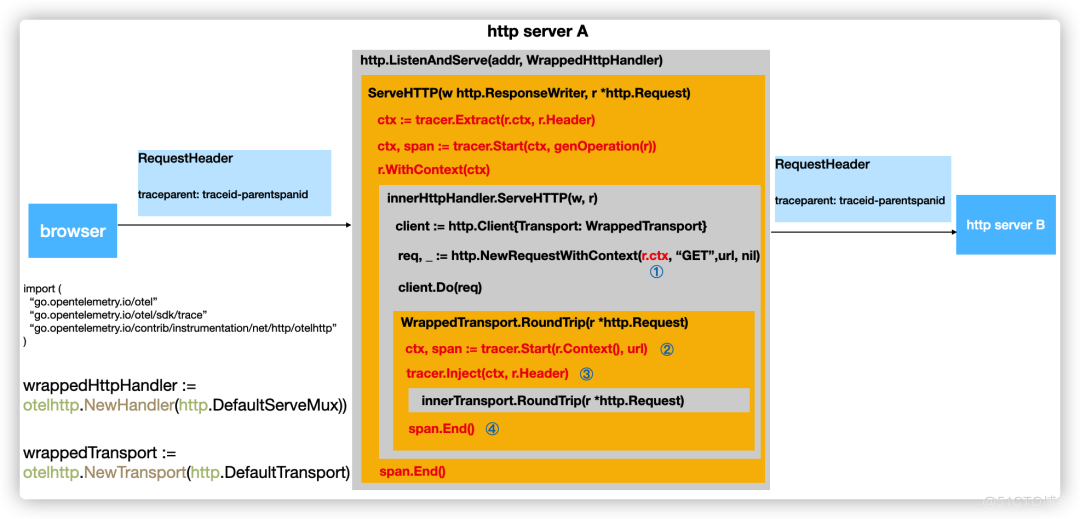
一文详解|Go 分布式链路追踪实现原理
![[leetcode] rotation series (array, matrix, linked list, function, string)](/img/9e/079311df16fa8e28708f4e050e531f.png)
[leetcode] rotation series (array, matrix, linked list, function, string)

为什么生命科学企业都在陆续上云?

Volcano becomes spark default batch scheduler
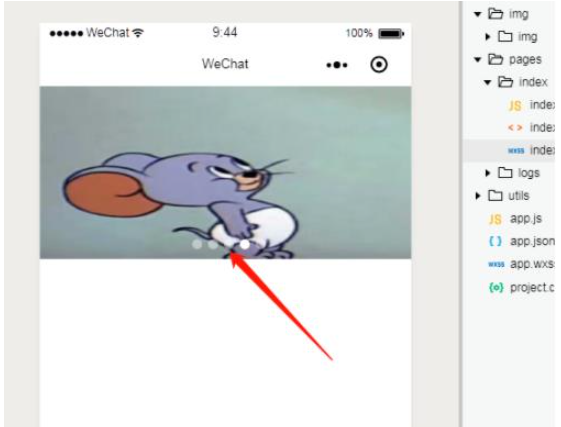
微信小程序轮播图怎么自定义光标位置

R language 4.1.0 software installation package and installation tutorial

API管理之利剑 -- Eolink

使用阿里云RDS for SQL Server性能洞察优化数据库负载-初识性能洞察

Intel and Microsoft give full play to the potential energy of edge cloud collaboration to promote the large-scale deployment of AI
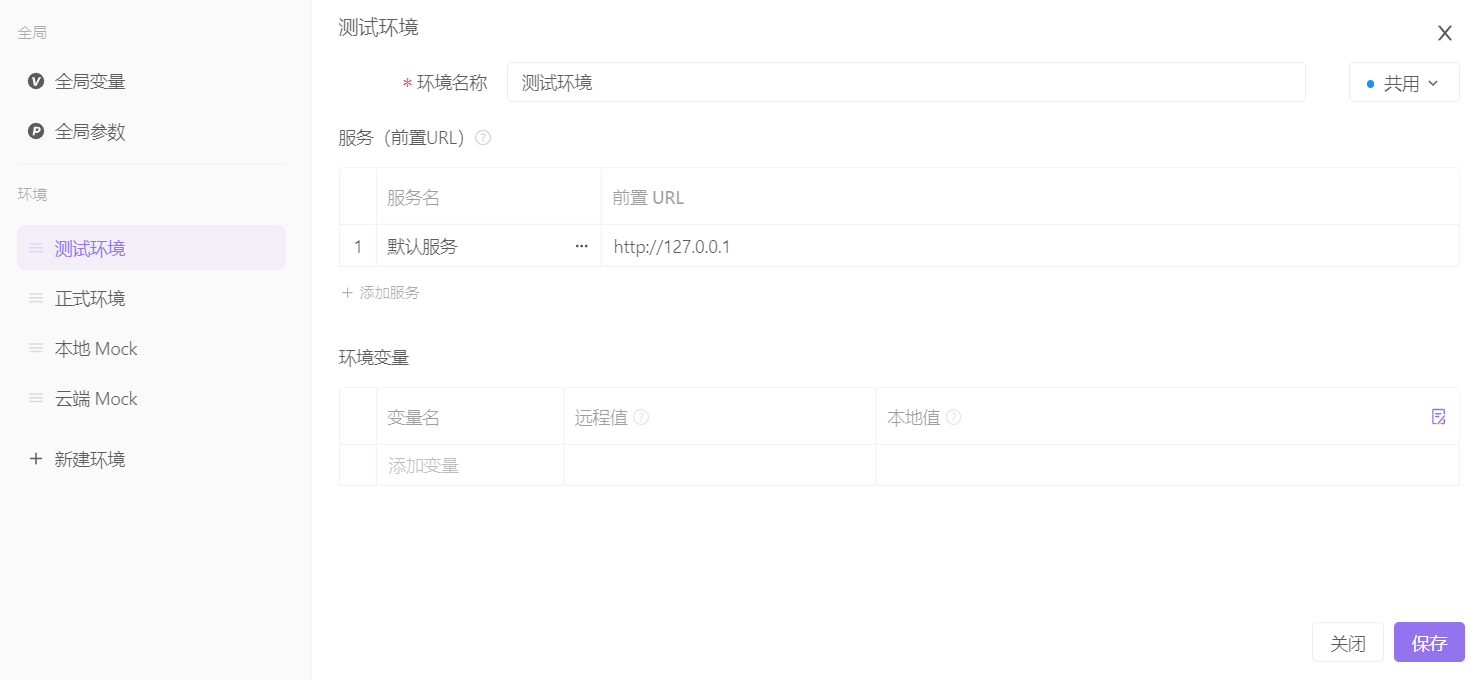
Apifox与其他接口开发工具的博弈
随机推荐
使用阿里云RDS for SQL Server性能洞察优化数据库负载-初识性能洞察
LabView之MQTT协议使用
Vite+web3: referenceerror: process is not defined
【Leetcode】旋转系列(数组、矩阵、链表、函数、字符串)
智能合约安全审计入门篇 —— delegatecall (2)
Volcano成Spark默认batch调度器
The sharp sword of API management -- eolink
多云模式并非“万能钥匙”
我用sql形式的会出现cdc读取乱序吗
finkcdc支持sqlserver2008么?
Starring V6 platform development take out point process
Use ado Net call stored procedure
Spatial simulation model acquisition future land cover tutorial
模块五
Does finkcdc support sqlserver2008?
API管理之利剑 -- Eolink
8 challenges of BSS application cloud native deployment
Exponential regression in R
Freeswitch uses origin to dialplan
Buddha bless you that there will never be a bug