当前位置:网站首页>How to customize cursor position in wechat applet rotation chart
How to customize cursor position in wechat applet rotation chart
2022-06-24 19:14:00 【Yisu cloud】
How to customize the cursor position in the wechat applet rotation chart
This article introduces “ How to customize the cursor position in the wechat applet rotation chart ” Knowledge about , During the operation of the actual case , Many people will encounter such difficulties , Next, let Xiaobian lead you to learn how to deal with these situations ! I hope you will read carefully , Be able to learn !
Pictured
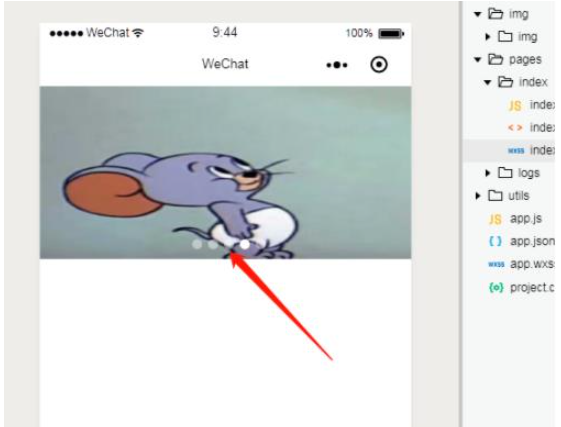
The cursor of the rotation chart can be positioned to change the up, down, left and right positions
wxml:
<!--start banner --><swiper class='home-swiper' autoplay='true' bindchange='changDot' interval='4000'> <!-- Set up autoplay , Switching interval --> <swiper-item wx:for="{{slider}}" wx:for-index="index" wx:key="slider"> <image src='{{item.img}}'></image> </swiper-item></swiper><!-- Carousel cursor --><view class="dots"> <block wx:for="{{slider}}" wx:key="slider"> <view class="dot {{index == swiperCurrent?'actives':''}}"></view> </block></view><!-- end banner -->wxss:
/* Carousel picture size */ .home-swiper { width: 100%; height: 350rpx; position: relative;} .home-swiper image { width: 100%; height: 100%;} /* The rotation chart indicates the point */ .dots { display: flex; flex-direction: row; position: absolute; top: 311rpx; width: 100%; height: 50rpx; justify-content: center;} .dots .dot { width: 20rpx; height: 20rpx; /* background-color: #333; */ /* border: 1rpx solid #e8672e; */ margin-left: 12rpx; background: #fff; border-radius: 20rpx; /* transform: all 0.6; */ opacity: 0.44;} /* Called css effect */ .dots .actives { background-color: #fff; opacity: 1;}js:
Page({ /** * Initial data of the page */ data: { swiperCurrent: 0, slider :[ {'img':'/img/img/1.jpg'}, { 'img': '/img/img/1.jpg' }, { 'img': '/img/img/1.jpg' }, { 'img': '/img/img/1.jpg' }, { 'img': '/img/img/1.jpg' } ] }, // Carousel subscript changDot(e) { this.setData({ swiperCurrent: e.detail.current }); }, /** * Life cycle function -- Monitor page loading */ onLoad: function(options) { }, /** * Life cycle function -- Listening page first rendering completed */ onReady: function() { }, /** * Life cycle function -- Monitor page display */ onShow: function() { }, /** * Life cycle function -- Monitor page hidden */ onHide: function() { }, /** * Life cycle function -- Monitor page uninstall */ onUnload: function() { }, /** * Page related event handler -- Monitor user pull-down action */ onPullDownRefresh: function() { }, /** * Handling function of page pull bottom event */ onReachBottom: function() { }, /** * Users click the upper right corner to share */ onShareAppMessage: function() { }})“ How to customize the cursor position in the wechat applet rotation chart ” That's all for , Thanks for reading . If you want to know more about the industry, you can pay attention to Yisu cloud website , Xiaobian will output more high-quality practical articles for you !
边栏推荐
- Why is nodejs so fast?
- 应用程序DDoS攻击原理及防御方法
- JS position operation
- 为什么生命科学企业都在陆续上云?
- 1: Mosaic of 100W basic geographic information data
- In depth learning of movement methods
- Multi segment curve temperature control FB (SCL program) of PLC function block series
- Stored procedures in sqlserver
- Volcano成Spark默認batch調度器
- JS deep understanding of functions
猜你喜欢
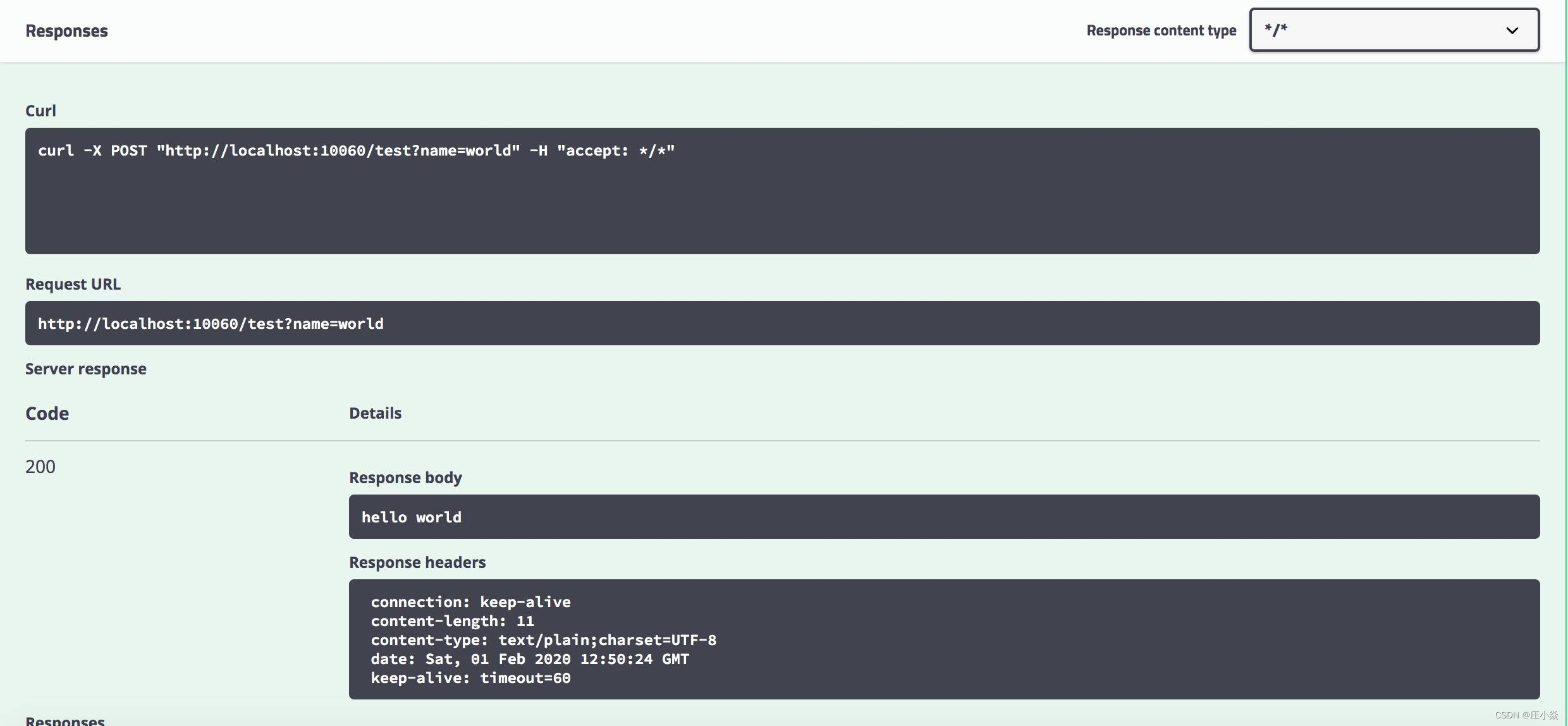
Microservice system design -- interface document management design

怎么使用R包ggtreeExtra绘制进化树
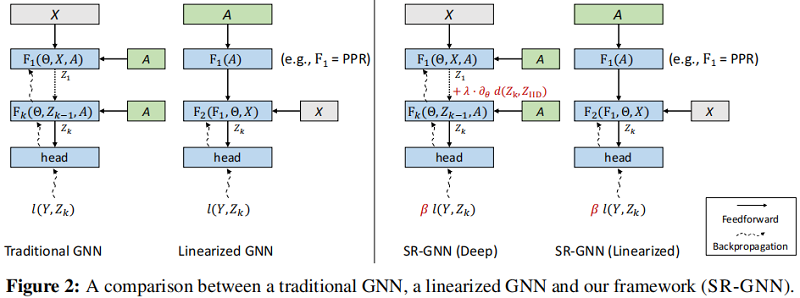
Sr-gnn shift robot gnns: overlapping the limitations of localized graph training data

Generate the last login user account report of the computer through SCCM SQL

Microservice system design - sub service project construction

Using alicloud RDS for SQL Server Performance insight to optimize database load - first understanding of performance insight

时间溯源的系统设计思路

Module V

This is not safe

网络安全审查办公室对知网启动网络安全审查
随机推荐
初步学习Nuxt3
cdc+mysql connector从维表中join的日期时间字段会被+8:00,请问阿里云托管的
特尔携手微软发挥边云协同势能,推动AI规模化部署
为什么生命科学企业都在陆续上云?
thinkphp6中怎么使用jwt认证
MySQL basic commands
实时渲染:实时、离线、云渲染、混合渲染的区别
ls 常用参数
Starring develops httpjson access point + Database
subject may not be empty [subject-empty]
finkcdc支持sqlserver2008么?
Northwestern Polytechnic University attacked by hackers? Two factor authentication changes the situation!
JS pre parsing
Ls common parameters
「碎语杂记」这事儿不安全
1: Mosaic of 100W basic geographic information data
模块五
JS position operation
Application scenarios of channel of go question bank · 11
8 challenges of BSS application cloud native deployment