当前位置:网站首页>Right click the general solution of file rotation jam, refresh, white screen, flash back and desktop crash
Right click the general solution of file rotation jam, refresh, white screen, flash back and desktop crash
2022-06-12 07:23:00 【Autumn leaves from all over the world】
I have encountered many similar problems recently .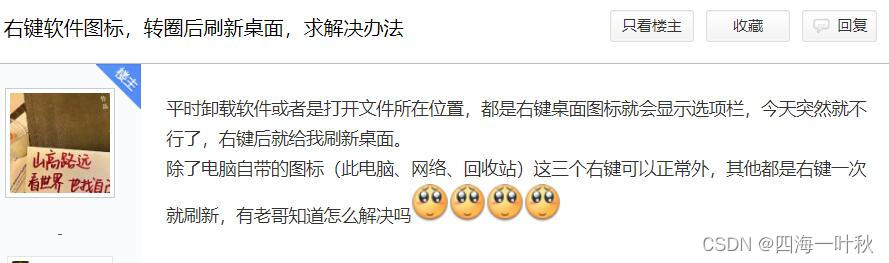

Right click the desktop shortcut to go around , Then the white screen flashes back . This problem is usually a right-click add-on dll error , Cause desktop processes explorer.exe collapse .
Most of the flash back problems are recorded in the event viewer . function eventvwr.msc,windows journal , Applications , Find source yes Application Error And the wrong application is explorer.exe Log , Look at the wrong module path .

In general , Deleting or renaming results in explorer.exe Crumble dll, Or administrator cmd perform “regsvr32 /u error dll route ” Anti registration .
Of course, event viewer crash logs are not always useful , For example, the error module in the figure above is a system file ntdll.dll, You can never delete system files ? So we need other solutions .
That's what I do :
Now that you right-click the file, it will crash and flash back , Right click on the file ?
Test by right clicking on these file types , See what crashes :
txt、jpg、exe、dll、lnk, And right click on the blank space of the folder 、 A blank space on the desk .
1. For example, the top picture 1 The netizen , Right click txt、jpg、exe、dll、 Folder 、 The desktop is normal , Only right click lnk Shortcut crash flash back .
So my conclusion is that there is a problem with an add-on to the following registry key :
HKEY_CLASSES_ROOT\lnkfile\shellex\ContextMenuHandlers
How to get the registry key ?lnkfile yes HKCR\.lnk The default value of , Right click Add ins are usually in shellex Next ,ContextMenuHandlers Is the item to be loaded in the pop-up menu when you right-click the file .
function regedit Open registry editor , Expand the above registry , Right click ContextMenuHandlers Export to desktop backup , Delete this registry key after backup , Right click to see if the crash problem is solved , Solved the problem that the representative is really related to .
Related words , Double click Import backup , Then consider deleting half of the children , See if the problem is solved , If it is solved, it means that the problem is in the deleted half of the sub items ( Otherwise in the other half ), Then import the backup , Delete half of the previous half , The repeated dichotomy quickly finds out the really problematic item and deletes it .
The netizen's computer registry found that it was a right-click menu of Lenovo's computer steward , The event viewer error module shows wps some dll The problem of . Finally, the minority obeys the majority , Kill the right-click menu of Lenovo computer manager .
Of course , If you can use a third-party right-click menu management tool ( Such as ContextMenuManager), You can also use these tools for troubleshooting .
2. Top picture 2 That netizen right clicked any file to crash , Besides folders and desktops , The relevant registry is :
HKEY_CLASSES_ROOT\*\shellex\ContextMenuHandlers
Other :
1. If the folder and desktop are stuck or crashed by right clicking . Possibly these registry keys :
HKEY_CLASSES_ROOT\Folder\shellex\ContextMenuHandlers
HKEY_CLASSES_ROOT\Directory\shellex\ContextMenuHandlers
2. If you just right-click the desktop and something goes wrong , Maybe these registries :
HKEY_CLASSES_ROOT\DesktopBackground\ShellEx\ContextMenuHandlers
HKEY_CLASSES_ROOT\Directory\Background\ShellEx\ContextMenuHandlers
3. Open folder , No right click on the flash back crash . Encountered similar problems , The error module displayed by the event viewer is ntdll.dll( It doesn't help solve the problem ).
After investigation , New folder will not crash , Only folders with pictures or documents crash . Found to be WPS Associated with a picture file , Then open with pictures or office、pdf Previewing these files while document folders causes a crash .
The solution is to change how these files are opened , Or unload WPS.
边栏推荐
- D
- 我人生中的第一个需求——Excel数据批量上传到数据库
- 1.3-1.9 summary
- Kotlin插件 kotlin-android-extensions
- Gd32f4 (5): gd32f450 clock is configured as 200m process analysis
- tmux 和 vim 的快捷键修改
- Construction of running water lamp experiment with simulation software proteus
- 2022年危险化学品经营单位安全管理人员特种作业证考试题库及答案
- Day 5 of pyhon
- Demonstrate "topic communication, action communication, service communication and parameter server" with a small turtle case
猜你喜欢

Imx6q PWM drive

ROS dynamic parameter configuration: use of dynparam command line tool (example + code)
![[image denoising] image denoising based on partial differential equation (PDE) with matlab code](/img/65/f8617beb05e163bd5f7dbade99a4a1.png)
[image denoising] image denoising based on partial differential equation (PDE) with matlab code

Nine project management issues that PM should understand

Summary of software testing tools in 2021 - unit testing tools

Federated meta learning with fast convergence and effective communication

Detailed explanation of TF2 command line debugging tool in ROS (parsing + code example + execution logic)

Design an open source continuous deployment pipeline based on requirements

AI狂想|来这场大会,一起盘盘 AI 的新工具!

Embedded gd32 code read protection
随机推荐
Kotlin插件 kotlin-android-extensions
esp32 hosted
Difference and application of SPI, UART and I2C communication
晶闸管,它是很重要的,交流控制器件
Freshmen are worried about whether to get a low salary of more than 10000 yuan from Huawei or a high salary of more than 20000 yuan from the Internet
Scons编译IMGUI
[image denoising] image denoising based on partial differential equation (PDE) with matlab code
Lambda function perfect use guide
The most understandable explanation of coordinate transformation (push to + diagram)
[image denoising] image denoising based on nonlocal Euclidean median (nlem) with matlab code
Federated meta learning with fast convergence and effective communication
Imx6q pwm3 modify duty cycle
Paddepaddl 28 supports the implementation of GHM loss, a gradient balancing mechanism for arbitrary dimensional data (supports ignore\u index, class\u weight, back propagation training, and multi clas
Pyhon的第六天
Detailed principle of 4.3-inch TFTLCD based on warship V3
AcWing——4268. 性感素
linux下怎么停止mysql服务
Decoupling in D
Learning to continuously learn paper notes + code interpretation
ROS dynamic parameter configuration: use of dynparam command line tool (example + code)