当前位置:网站首页>Tkinter study notes (III)
Tkinter study notes (III)
2022-06-11 22:07:00 【Chrn morning】
Tkinter The commonly used control

1.Label Control
Grammar format :label=tk.Label(master,option,…)
among master Is its parent control , Used to place this control .
Tkinter Container control has no background property , Usually use Label Image property to add a background image to the container control
import tkinter as tk
import time
from PIL import Image,ImageTk
root=tk.Tk()
root.title(' Latest time ')
root.geometry('400x400')
imgg=Image.open('D://anaconda3//1.jpg')
img=ImageTk.PhotoImage(imgg)
label_img=tk.Label(root,image=img)
label_img.place(x=0,y=0)
time1=tk.StringVar()
time2=tk.StringVar()
L1=tk.Label(root,textvariable=time1,bg='#1E288F',fg='red')
L2=tk.Label(root,textvariable=time2,bg='#1E288F',fg='blue')
L1.pack()
L2.pack()

def settime():
    today=str(' Current date :'+time.strftime('%Y-%m-%d',time.localtime(time.time())))
    time3=str(' present time :'+time.strftime('%H:%M:%S',time.localtime(time.time())))
    time1.set(today)
    time2.set(time3)
settime()

root.mainloop()
2.Frame Control
Frame Control is responsible for arranging the location of other controls .
Window screen layout process :
First establish the layout : Main window layout , In different colors and sizes Frame Class , Adjust the position until you are satisfied .
Secondly, the sub windows with different functions are designed , Is to put Frame Class placement Frame in
Finally, different functions can be programmed according to the needs Frame Class is displayed in the corresponding main window
import tkinter as tk
root=tk.Tk()
root.title('Frame demonstration ')

labels=[]
reliefs=[tk.FLAT,tk.SUNKEN,tk.RAISED,tk.GROOVE,tk.RIDGE]

i=0
for color in ['blue','red','yellow','purple','pink']:
    f=tk.Frame(root,borderwidth=1,bg=color,relief=reliefs[i],bd=20,width=100,height=100).pack(side=tk.LEFT)
    i+=1
root.mainloop()
# Picture 3

3.Button Control
Used to implement various buttons containing text and graphics .
import tkinter as tk
def hello():
    print('hello!')
root=tk.Tk()
root.title('Button test ')
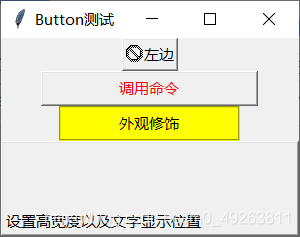
tk.Button(root,text=' On the left ',compound='left',bitmap='error',cursor='heart').pack()
tk.Button(root,text=' Call the command ',width=23,fg='red',bd=2,command=hello,cursor='icon',underline=4).pack()
tk.Button(root,text=' Appearance decoration ',width=19,relief=tk.GROOVE,bg='yellow',cursor='mouse').pack()
tk.Button(root,text=' Set the height, width and text display position ',anchor=tk.SW,width=32,height=4,cursor='man').pack()
root.mainloop()
# picture 4,5

4.Entry Control
The control is Tkinter Text box , A control used to receive input such as strings , Allow users to view and modify a line of text .
import tkinter as tk
root=tk.Tk()
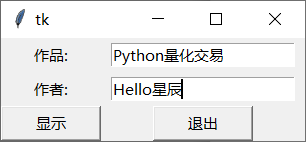
tk.Label(root,text=' works :').grid(row=0)
tk.Label(root,text=' author :').grid(row=1)

a1=tk.Entry(root)
a2=tk.Entry(root)

a1.grid(row=0,column=1,padx=10,pady=5)
a2.grid(row=1,column=1,padx=10,pady=5)

def show():
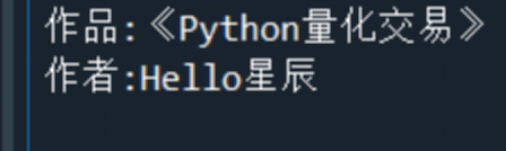
    print(' works :《%s》'%a1.get())
    print(' author :%s'%a2.get())
    a1.delete(0,"end")
    a2.delete(0,"end")
tk.Button(root,text=' Show ',command=show,width=10).grid(row=3,column=0)
tk.Button(root,text=' sign out ',command=root.quit,width=10).grid(row=3,column=1)

root.mainloop()
# picture 6,7
5.Text Control
The main function is to display multiple lines of text , It is often used as a simple text processor 、 Text editor to use .
import tkinter as tk
root=tk.Tk()
text=tk.Text(root,width=30,height=10)
#INSERT The index indicates inserting... At the cursor
text.insert(tk.INSERT,' middle ')
text.insert(tk.END,' Last ')
text.pack()

# eliminate text Control
#text.delete(1.0,tk.END)

# Get all the contents of the control
t1=text.get(1.0,tk.END)

# Insert a picture
#photo=PhotoImage(file='cat.gif')
#text.image_create(END,image=photo)

# Insert button Button
def show():
    text.insert(tk.END,' Oh dear , I was clicked ')
b1=tk.Button(text,text=' Am I ',command=show).pack()
# stay text Commands for creating controls in
text.window_create(tk.INSERT,window=b1)
root.mainloop()
6.Scrollbar Control
Used to scroll the visible range of some controls , Usually with text,canvas,listbox Control .
It is divided into vertical scroll bar and horizontal scroll bar .
import tkinter as tk
root=tk.Tk()
root.title('scrollbar Control ')

s=tk.Scrollbar(root).pack(side=tk.RIGHT,fil=tk.Y)
t=tk.Text(root,height=4,width=50).pack(side=tk.LEFT,fill=tk.Y)
s.config(command=t.yview)
t.config(yscrollcommand=s.set)
quote="""Nothing is impossible to a willing heart"""
t.insert(tk.END,quote)
root.mainloop()
7.Canvas Control
Usually used to display and edit graphics , That is, draw line segments 、 Circles and polygons and even other controls .
import tkinter as tk
root=tk.Tk()
canvas_width=300
canvas_height=200
def check(canvas,line_distance):
    for x in range(line_distance,canvas_width,line_distance):
        canvas.create_line(x,0,x,canvas_height,fill='red')
    for y in range(line_distance,canvas_height,line_distance):
        canvas.create_line(0,y,x,canvas_width,fill='red')
def paint(event):
    a='black'
    x1,y1=(event.x-1),(event.y-1)
    x2,y2=(event.x+1),(event.y+1)
    canvas.create_oval(x1,y1,x2,y2,fill=a)
root.title(' mapping ')
canvas=tk.Canvas(root,width=canvas_width,height=canvas_height)
canvas.pack(expand=tk.YES,fill=tk.BOTH)

# Bind the left mouse button
canvas.bind("<B1-Motion>",paint)

check(canvas,20)

message=tk.Label(root,text=' Press the left key to draw ').pack(side=tk.BOTTOM)
root.mainloop()

import tkinter as tk
from tkinter import messagebox,filedialog,simpledialog,colorchooser
import tkinter.tix as tix

# Move the window to the center
def setplace(window,x,y):
    width=window.winfo_width()
    height=window.winfo_height()
    window.geometry('{}x{}+{}+{}'.format(width,height,x,y))
def run(w):
    top=tix.Label(w,padx=20,pady=20,text='tixbuttonbox Use \n')
    box=tix.ButtonBox(w)
    def quit():
        result=messagebox.askyesno(' Tips ',' Really want to end ?')
        if result==True:
            w.destroy()
    box.add('ok',text='OK',underline=1,width=5,command=w.destroy)
    box.add('quit',text='QUIT',underline=1,width=5,command=quit)
    box.pack(side=tix.BOTTOM,fill=tix.X)
    top.pack(side=tix.TOP,fill=tix.BOTH,expand=1)

def run2(w):
    top=tix.Label(w,padx=20,pady=20,text='tixbuttonbox Use \n')
    box=tix.ButtonBox(w)
    def quit():
        result=messagebox.askyesno(' Tips ',' Really want to end ?')
        if result==True:
            w.destroy()
    box.add('ok',text=' determine ',underline=0,width=5,command=w.destroy)
    box.add('quit',text=' Cancel ',underline=0,width=5,command=quit)
    box.pack(side=tix.BOTTOM,fill=tix.X)
    top.pack(side=tix.TOP,fill=tix.BOTH,expand=1)
if __name__=='__main__':
    root=tix.Tk()
    run(root)
    top=tix.Toplevel(root)
    run2(top)
    root.update()
    root.title('tix.ButtonBox demonstration ')
    setplace(root,100,100)
    top.title('tix demonstration ')
    setplace(top,200, 200)
    root.mainloop()


边栏推荐
- 快速排序的非递归写法
- 大学三年应该这样过
- The college entrance examination is over, and life has just begun. Suggestions from a 10-year veteran in the workplace
- All inherited features
- Why is the printer unable to print the test page
- Nmap performs analysis of all network segment IP survivals in host detection
- 3.3 测试模块的命名规则
- 重温c语言一
- 67. binary sum
- [Yu Yue education] basic engineering English of Zhejiang industrial and Commercial University (wuyiping) reference materials
猜你喜欢
![[academic related] under the application review system, how difficult is it to study for a doctoral degree in a double first-class university?](/img/cd/e7ffecbee13596f2298ee8c0a5b873.jpg)
[academic related] under the application review system, how difficult is it to study for a doctoral degree in a double first-class university?

R语言书籍学习03 《深入浅出R语言数据分析》-第八章 逻辑回归模型 第九章 聚类模型
Regular execution of shell scripts in crontab
![[niuke.com] dp31 [template] complete Backpack](/img/81/5f35a58c48f05a5b4b6bdc106f5da0.jpg)
[niuke.com] dp31 [template] complete Backpack
![[today in history] June 11: the co inventor of Monte Carlo method was born; Google launched Google Earth; Google acquires waze](/img/eb/147d4aac20639d50b204dcf424c9e2.png)
[today in history] June 11: the co inventor of Monte Carlo method was born; Google launched Google Earth; Google acquires waze

R语言相关文章、文献整理合集(持续更新)
Nmap performs analysis of all network segment IP survivals in host detection

The shortcomings of the "big model" and the strengths of the "knowledge map"

C language to achieve eight sorts (2)

206.反转链表
随机推荐
BUUCTF(5)
Matlab: 文件夹锁定问题的解决
189. rotation array
被忽略的技巧:位运算
Glory earbud 3 Pro with three global first strong breakdowns flagship earphone Market
How to view the installation date of the win system
超标量处理器设计 姚永斌 第2章 Cache --2.2 小节摘录
How to use the transaction code sat to find the name of the background storage database table corresponding to a sapgui screen field
206. reverse linked list
R language book learning 03 "in simple terms R language data analysis" - Chapter 10 association rules Chapter 11 random forest
360 online enterprise security cloud is open to small, medium and micro enterprises for free
Flink error: multiple tasks are started, and only one task is executed
Neglected technique: bit operation
Classes and objects (1)
大学三年应该这样过
Why is the printer unable to print the test page
Two methods to judge the storage of large and small end
Static PVC with CEPH CSI
链表基本操作与题型总结
Top - k问题