当前位置:网站首页>QTableWidget懒加载剩内存,不卡!
QTableWidget懒加载剩内存,不卡!
2022-07-03 01:06:00 【kchmmd】
前言
用到表格加载数据,少量数据看不出什么异常,当数据过于庞大,特别是表格中可能还加入了一些界面实时刷新如进度条等,那最终体现出来的效果很差,加载卡,占内存。
所以,下面总结分享的是一种懒加载的策略。
加载策略说明
主要有两个点:
1、对于需要实时更新加载的情况,每次加载数据时,不用调clearContents()、removeRow(int row)等方法去清空再new,而是去重复利用上次已经new出的Item,改变其内容为最新即可
2、只加载界面可见范围内Item,数据的具体数量只需通过滚动条的值体现出来,每次改变滚动条时,再去按照上述1去刷新Item的内容
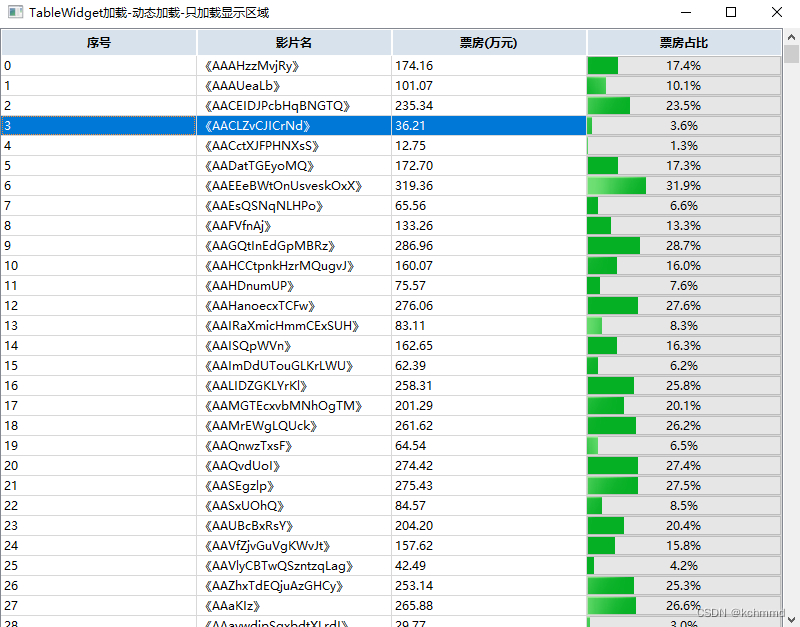
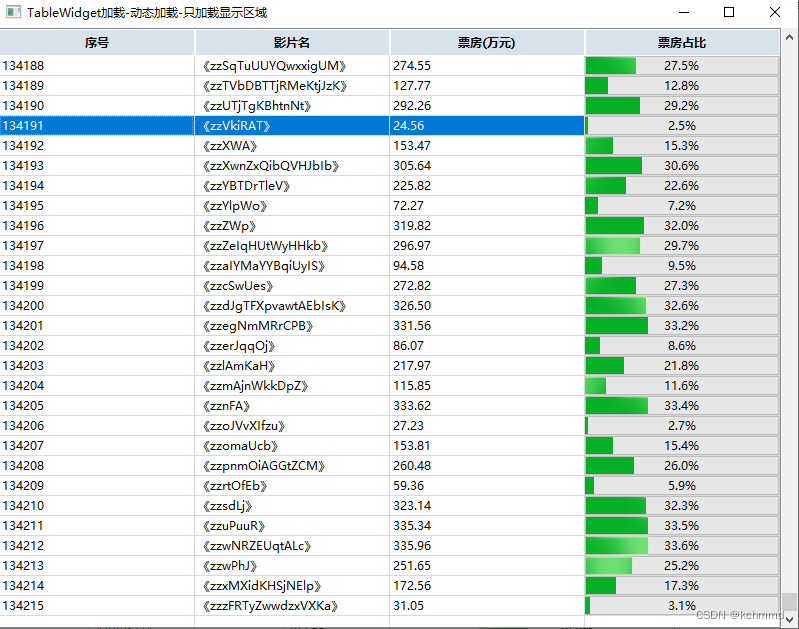
直接上代码
代码结构
mytablewidget.h
#ifndef MYTABLEWIDGET_H
#define MYTABLEWIDGET_H

#include <QTableWidget>
#include <QResizeEvent>
#include <QWheelEvent>
#include <QScrollBar>
#include <QProgressBar>
#include <QHBoxLayout>
#include <QHeaderView>
#include <QMenu>
#include <QContextMenuEvent>
class TableWidget: public QTableWidget
{

public:
    TableWidget(QWidget *parent = nullptr):QTableWidget(parent){
    }
    ~TableWidget(){
    }
protected:
    void wheelEvent(QWheelEvent *event) override {
    }//屏蔽鼠标滑轮事件
};

class MyTableWidget: public QWidget
{

public:
    MyTableWidget(QWidget *parent = nullptr);
    ~MyTableWidget();
    virtual void InitTable();
    virtual void LoadTableWidget();

    void UpdateView();
    void SetMenu(QMenu* menu);

    void SetItemText(int row, int colunm, QString str);
    void SetItemProgress(int row, int colunm, double value, double total);
protected:
    void wheelEvent(QWheelEvent *event) override;
    void resizeEvent(QResizeEvent *event) override;
    void contextMenuEvent(QContextMenuEvent *event) override;
private:
    TableWidget* m_table;
    QScrollBar *m_scrollBar;
    int m_itemHeight;
    int m_currentRow;
    int m_dataCnt;
public:
    //data
    std::map<QString, double> m_mapData;//name boxOffice
    QMenu* m_menu = nullptr;
};
#endif // MYTABLEWIDGET_H
mytablewidget.cpp
#include "mytablewidget.h"

MyTableWidget::MyTableWidget(QWidget *parent):QWidget(parent)
{

    m_table = new TableWidget(this);
    //点击表头排序
// connect(m_table->horizontalHeader(),&QHeaderView::sectionClicked,this,[=](int colunm){

// m_table->sortItems(colunm,Qt::AscendingOrder);
// });
    m_table->setVerticalScrollBarPolicy(Qt::ScrollBarAlwaysOff);//关闭滚动条
    QHBoxLayout* hbox =new QHBoxLayout(this);
    hbox->setMargin(0);
    hbox->setSpacing(0);
    hbox->addWidget(m_table);
    m_itemHeight = 20;
    m_dataCnt = 0;
    m_scrollBar = new QScrollBar(Qt::Vertical);
    connect(m_scrollBar,&QScrollBar::valueChanged,this,[=](int value){

       // qDebug()<<"value:"<<value;
        LoadTableWidget();
    });
    hbox->addWidget(m_scrollBar);

    InitTable();
    LoadTableWidget();
}

MyTableWidget::~MyTableWidget()
{


}

void MyTableWidget::InitTable()
{

    QStringList headList;
    headList<<"序号"<<"影片名"<<"票房(万元)"<<"票房占比";
    m_table->setColumnCount(headList.length());
    m_table->setHorizontalHeaderLabels(headList);
    m_table->verticalHeader()->setVisible(false);//隐藏行号
    m_table->verticalHeader()->setDefaultSectionSize(m_itemHeight);//默认行高
    m_table->horizontalHeader()->setSectionResizeMode(QHeaderView::Stretch);//自动分均每列列宽
    //m_table->horizontalHeader()->setMinimumSectionSize(100);//默认列宽
    m_table->horizontalHeader()->setDefaultAlignment(Qt::AlignCenter);//表头居中对齐
    m_table->setSelectionBehavior(QAbstractItemView::SelectRows);//以行为单位选择
    m_table->setEditTriggers(QAbstractItemView::NoEditTriggers);//禁止编辑
    m_table->horizontalHeader()->setStyleSheet("QHeaderView::section{background-color:rgb(216,226,236);"
                                                     "border:0.5px solid rgb(254,254,254);}");

}

void MyTableWidget::SetItemText(int row, int colunm, QString str)
{

    QTableWidgetItem* item = m_table->item(row, colunm);
    if(nullptr == item)
    {

        item = new QTableWidgetItem;
        m_table->setItem(row, colunm, item);
    }
    item->setText(str);
}

void MyTableWidget::SetItemProgress(int row, int colunm, double value, double total)
{

    QWidget *widget = m_table->cellWidget(row, colunm);
    QProgressBar* bar = static_cast<QProgressBar*>(widget);
    if(nullptr == bar)
    {

        bar = new QProgressBar;
        bar->setObjectName("progress");
        m_table->setCellWidget(row, colunm, bar);//设置后会自动show
        bar->hide();//先hide 加载完会自动show
    }
    double percent =(double) value/total;
    bar->setAlignment(Qt::AlignCenter);
    bar->setRange(0,100);
    bar->setValue(percent*100);
    bar->setFormat(QString("%1%").arg(QString::number(percent*100,'f',1)));
}

void MyTableWidget::LoadTableWidget()
{

    int oldRow = m_table->rowCount() - 1;
    if(m_currentRow < oldRow)//如果item有了就不删了重新创建,在之前item修改内容即可,界面尺寸改变,显示的行就改变,多了就删除,
    for (int i=oldRow - 1; i>oldRow - m_currentRow - 1; i--)
    {

        m_table->removeRow(i);
    }
     m_table->setRowCount(m_currentRow+1);
     int total = 1000;
     std::map<QString, double>::iterator itor = m_mapData.begin();
     int beginRow = m_scrollBar->value();//滚动条值,表格行
     for (int i=0; i<beginRow; i++){
     itor++;}//从滚动条的值对应显示
     for (int i =0 ; i<m_currentRow; i++,itor++)
     {

         if(itor == m_mapData.end())
         {

             m_table->removeRow(i);
             break;
         }
         SetItemText(i, 0, QString::number(beginRow++));
         SetItemText(i, 1, itor->first);
         SetItemText(i, 2, QString::number(itor->second,'f',2));
         SetItemProgress(i, 3, itor->second, total);
     }
}

void MyTableWidget::UpdateView()
{

    LoadTableWidget();
}

void MyTableWidget::SetMenu(QMenu *menu)
{

    m_menu = menu;
}

void MyTableWidget::resizeEvent(QResizeEvent *event)
{

    m_currentRow = height()/m_itemHeight;
    m_dataCnt = m_mapData.size();
    if(m_dataCnt - m_currentRow > 0)
    {

        m_scrollBar->setRange(0,m_dataCnt - m_currentRow + 2);
        m_scrollBar->show();
    }
    else
    {

        m_scrollBar->setRange(0,0);
        m_scrollBar->hide();
    }

    LoadTableWidget();
}

void MyTableWidget::contextMenuEvent(QContextMenuEvent *event)
{

    QTableWidgetItem* item = m_table->itemAt(event->pos());
    if(item && m_menu)
        m_menu->exec(event->globalPos());
}

void MyTableWidget::wheelEvent(QWheelEvent *event)
{

    int value = m_scrollBar->value();
    if(event->delta() > 0)
    {

        value -= m_currentRow;
        if(value < m_scrollBar->minimum())
            value = m_scrollBar->minimum();
        m_scrollBar->setValue(value);
    }
    else
    {

        value += m_currentRow;
        if(value > m_scrollBar->maximum())
            value = m_scrollBar->maximum();
        m_scrollBar->setValue(value);
    }
}
widget.h
#ifndef WIDGET_H
#define WIDGET_H

#include <QWidget>
#include "mytablewidget.h"

QT_BEGIN_NAMESPACE
namespace Ui {
     class Widget; }
QT_END_NAMESPACE

class Widget : public QWidget
{

    Q_OBJECT

public:
    Widget(QWidget *parent = nullptr);
    ~Widget();

    QString GetStr();

private:
    Ui::Widget *ui;
    MyTableWidget* m_myTable;
};
#endif // WIDGET_H
widget.cpp
#include "widget.h"
#include "ui_widget.h"
#include <QHBoxLayout>
#include <QTimer>
#include <QHeaderView>
#include <QProgressBar>
#include <QScrollBar>
#include <QActionGroup>
#include <QMessageBox>
#include <QDebug>
Widget::Widget(QWidget *parent)
    : QWidget(parent)
    , ui(new Ui::Widget)
{

    ui->setupUi(this);
    this->setWindowTitle("TableWidget加载-动态加载-只加载显示区域");//放在 ui->setupUi(this); 之后不然没效果
    qsrand(time(nullptr));

    m_myTable=new MyTableWidget(this);
    QHBoxLayout* hbox =new QHBoxLayout(this);
    hbox->setMargin(0);
    hbox->setSpacing(0);
    hbox->addWidget(m_myTable);

    int dataCnt = 134217;
    for (int i=0; i<dataCnt;i++) {

        double value = rand()%1000000+1000;
        m_myTable->m_mapData[GetStr()] = value/100;
    }
    QMenu* menu = new QMenu(this);
    connect(menu,&QMenu::triggered,this,[=](QAction* action){

        QString str = action->text();
        if("test_1" == action->text())
        {


            QMessageBox::information(nullptr,"Info","you choice test_1");
        }
        else if("test2" == action->text())
        {


            QMessageBox::information(nullptr,"Info","you choice test2");
        }
        else if("test1" == action->text())
        {

           QMessageBox::information(nullptr,"Info","you choice test1");
        }
    });
    QMenu* menu_1 = new QMenu("test",this);
    m_myTable->SetMenu(menu);
    QAction *action_Desc = new QAction("test1");
    QAction *action_Asce = new QAction("test2");
    action_Desc->setCheckable(true);
    action_Asce->setCheckable(true);
    action_Asce->setChecked(true);
    QActionGroup *group = new QActionGroup(this);
    group->addAction(action_Asce);
    group->addAction(action_Desc);
    menu_1->addAction(action_Desc);
    menu_1->addAction(action_Asce);
    menu->addMenu(menu_1);
    menu->addAction("test_1");

    QTimer* m_timer = new QTimer(this);
    connect(m_timer,&QTimer::timeout,this,[=]()mutable{


        std::map<QString, double>::iterator itor = m_myTable->m_mapData.begin();
        for (; itor!=m_myTable->m_mapData.end();itor++) {

            double value = rand()%1000000+1000;
            itor->second = value/100;
        }
        m_myTable->UpdateView();
    });
    m_timer->start(1000);
}

Widget::~Widget()
{

    delete ui;
}

QString Widget::GetStr()
{

   int length = rand()%15+5;
   const char ch[] = "abcdefghijklmnopqrstuvwxyzABCDEFGHIJKLMNOPQRSTUVWXYZ";
   int size = sizeof(ch);
   char* str = new char[length + 1];
   int num = 0;
   int i;
   for (i = 0; i < length; ++i)
   {

       num = rand() % (size - 1);
       str[i] = ch[num];
   }
    str[i] = '\0';
   QString res(str);
   //return res;
   return "《"+res+"》";
}
总结
有兴趣自己可以对比一下,我分享的和正常一次加载百万级别的数据到表格中,这俩种方式,看下程序内存,和加载速度,逻辑处理还是很快的 ,绘制UI确实比较慢,占内存。理论上,我分享的这种策略加载数据的大小上限,主要就跟数据存储方式和容量有关了,毕竟加载界面可视范围的Item还是比较快的.,但是比如你用容器map存储还是有上限的。
边栏推荐
- Tp6 fast installation uses mongodb to add, delete, modify and check
- Work experience of a hard pressed programmer
- [day 29] given an integer, please find its factor number
- C#应用程序界面开发基础——窗体控制(4)——选择类控件
- Niu Ke swipes questions and clocks in
- 數學知識:臺階-Nim遊戲—博弈論
- Mongodb common commands of mongodb series
- Button wizard play strange learning - automatic return to the city route judgment
- Mathematical knowledge: Nim game game theory
- 机器学习术语
猜你喜欢
![[flutter] icons component (fluttericon Download Icon | customize SVG icon to generate TTF font file | use the downloaded TTF icon file)](/img/ca/1d2473ae51c59b84864352eb17de94.jpg)
[flutter] icons component (fluttericon Download Icon | customize SVG icon to generate TTF font file | use the downloaded TTF icon file)
Daily topic: movement of haystack

MySQL - database query - basic query

MySQL basics 03 introduction to MySQL types
C#应用程序界面开发基础——窗体控制(3)——文件类控件
![[interview question] 1369 when can't I use arrow function?](/img/7f/84bba39965b4116f20b1cf8211f70a.png)
[interview question] 1369 when can't I use arrow function?
Arduino dy-sv17f automatic voice broadcast
【FH-GFSK】FH-GFSK信号分析与盲解调研究

dotConnect for PostgreSQL数据提供程序
什么是调。调的故事
随机推荐
[C language] detailed explanation of pointer and array written test questions
[system analyst's road] Chapter V double disk software engineering (development model development method)
Mathematical knowledge: Nim game game theory
Machine learning terminology
kivy教程之在 Kivy App 中使用 matplotlib 的示例
【系统分析师之路】第五章 复盘软件工程(开发模型开发方法)
Vim 9.0正式发布!新版脚本执行速度最高提升100倍
给你一个可能存在 重复 元素值的数组 numbers ,它原来是一个升序排列的数组,并按上述情形进行了一次旋转。请返回旋转数组的最小元素。【剑指Offer】
Soft exam information system project manager_ Real topic over the years_ Wrong question set in the second half of 2019_ Morning comprehensive knowledge question - Senior Information System Project Man
What is tone. Diao's story
leetcode 6103 — 从树中删除边的最小分数
Key wizard hit strange learning - automatic path finding back to hit strange points
【面试题】1369- 什么时候不能使用箭头函数?
MySQL
C application interface development foundation - form control (2) - MDI form
Androd gradle's substitution of its use module dependency
Test shift right: Elk practice of online quality monitoring
一比特苦逼程序員的找工作經曆
MySQL foundation 04 MySQL architecture
C#应用程序界面开发基础——窗体控制(1)——Form窗体