当前位置:网站首页>VTK example -- three intersecting planes
VTK example -- three intersecting planes
2022-06-11 00:11:00 【Black mountain old demon's blog】
VTK note - Graphics related - Plane -vtkPlaneSource_ Heishan old demon's blog -CSDN Blog _vtkplanevtkPlaneSource Create a quadrilateral array in a plane vtkPlaneSource Create a quadrilateral m x n Array , These quadrangles are arranged as regular tiles in the plane . The plane is defined by specifying an origin , Then specify the other two points that define the two axes of the plane together with the origin . These axes need not be orthogonal - So you can create a parallelogram ( Axes cannot be parallel .) The resolution of the plane ( That is, the number of subdivisions ) from ivars X Resolution and Y Resolution control . By default , The plane is centered at the origin and perpendicular to z Axis , The length of width and height is 1, The resolution is set to 1. There are three convenient ways to move your plane easily . first SetNorhttps://blog.csdn.net/liushao1031177/article/details/117110232 In the previous example , You can draw a plane ; Now use vtkPlaneSource Draw three intersecting planes ;
vtkNew<vtkPlaneSource> planeSource_xy;
planeSource_xy->SetOrigin(-1, -1, 0.0);
planeSource_xy->SetPoint1(1, -1, 0);
planeSource_xy->SetPoint2(-1, 1, 0);
planeSource_xy->Update();

vtkNew<vtkPolyDataMapper> planeMapper_xy;
planeMapper_xy->SetInputConnection(planeSource_xy->GetOutputPort());
vtkNew<vtkActor> planeActor_xy;
planeActor_xy->SetMapper(planeMapper_xy);
planeActor_xy->GetProperty()->SetColor(0, 255, 0);

vtkNew<vtkPlaneSource> planeSource_yz;
planeSource_yz->SetOrigin(0.0, -1, -1);
planeSource_yz->SetPoint1(0, 1, -1);
planeSource_yz->SetPoint2(0, -1, 1);
planeSource_yz->Update();

vtkNew<vtkPolyDataMapper> planeMapper_yz;
planeMapper_yz->SetInputConnection(planeSource_yz->GetOutputPort());
vtkNew<vtkActor> planeActor_yz;
planeActor_yz->SetMapper(planeMapper_yz);

vtkNew<vtkPlaneSource> planeSource_xz;
planeSource_xz->SetOrigin(-1, 0, -1);
planeSource_xz->SetPoint1(1, 0, -1);
planeSource_xz->SetPoint2(-1, 0, 1);
planeSource_xz->Update();

vtkNew<vtkPolyDataMapper> planeMapper_xz;
planeMapper_xz->SetInputConnection(planeSource_xz->GetOutputPort());
vtkNew<vtkActor> planeActor_xz;
planeActor_xz->SetMapper(planeMapper_xz);
planeActor_xz->GetProperty()->SetColor(255, 0, 0);

vtkNew<vtkRenderer> renderer;
renderer->AddActor(planeActor_xy);
renderer->AddActor(planeActor_yz);
renderer->AddActor(planeActor_xz);

vtkNew<vtkRenderWindow> renderWindow;
renderWindow->AddRenderer(renderer);
renderWindow->SetWindowName("PlaneSourceDemo");
renderWindow->SetSize(640, 480);

vtkNew<vtkRenderWindowInteractor> interactor;
interactor->SetRenderWindow(renderWindow);
renderWindow->Render();
renderer->GetActiveCamera()->SetPosition(1, 0, 0);
renderer->GetActiveCamera()->SetFocalPoint(0, 1, 0);
renderer->GetActiveCamera()->SetViewUp(0, 0, 1);
renderer->GetActiveCamera()->Azimuth(30);
renderer->GetActiveCamera()->Elevation(30);
renderer->ResetCamera();
renderWindow->Render();
interactor->Start();
Rotate the red plane , Around the z Shaft rotation 45°;
planeActor_xz->RotateWXYZ(45, 0, 0, 1);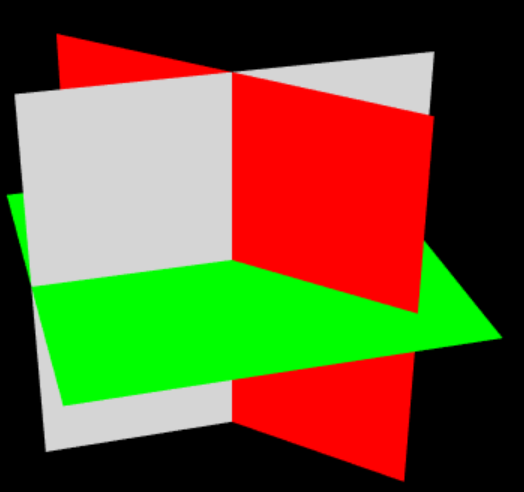
Red plane rewind (1,1,0) Direction rotation 45° and 90°;(1,1,0) The direction is after the initial rotation , The intersection of the red plane and the green plane ; rotate 90° after , The red plane intersects the green plane ;


边栏推荐
- 【JVM】线程
- Opencv实战之图像的基本操作:这效果出来惊艳了众人(附代码解析)
- Kubernetes 基本介绍及核心组件
- Judgment and other issues: how to determine whether the judgment of the procedure is correct?
- 希尔排序
- curl导入postman报错小记
- Easyrecovery15 simple and convenient data recovery tool
- 2022 college entrance examination quantitative paper | please answer the questions for quantitative candidates
- LabVIEW uses the visa read function to read USB interrupt data
- 【数据库】Nosql数据库的种类
猜你喜欢

【Pygame小游戏】这款“打地鼠”小游戏要火了(来来来)

vtk. VTP download in JS
How to measure the refresh rate of oscilloscope

【JVM】垃圾回收机制

SystemVerilog (x) - user defined type

【Pygame合集】回忆杀-“童年游戏”,看看你中几枪?(附五款源码自取)

【颜值检测神器】来,请拿出你们的绝活(这颜值,对得起观众么?)
Leetcode-713 subarray with product less than k

【Pygame小游戏】Chrome上的小恐龙竟可以用代码玩儿了?它看起来很好玩儿的样子~

【JVM】线程
随机推荐
博文推荐|构建 IoT 应用——FLiP 技术栈简介
Multipartfile rename upload
[turtle confessions collection] "the moon at the bottom of the sea is the moon in the sky, and the person in front of us is the sweetheart." Be happy for the rest of your life, and be safe for ever ~
Is it safe for changtou school to open an account? Is it reliable?
curl导入postman报错小记
归并排序
Chapter 2 application layer 2.4 DNS
【Pygame小游戏】这款经典的炸弹人超能游戏上线,你爱了嘛?(附源码)
30 | how to reset the consumer group displacement?
[pyGame games] tank battle, how many childhood games do you remember?
Judgment and other issues: how to determine whether the judgment of the procedure is correct?
Njupt South Post collection_ Experiment 1
MP框架基本操作(自用)
IGBT and third generation semiconductor SiC double pulse test scheme
【AI出牌器】第一次见这么“刺激”的斗地主,胜率高的关键因素竟是......
SQL查询,子查询作为结果字段
【Pygame小遊戲】別找了,休閑遊戲專題來了丨泡泡龍小程序——休閑遊戲研發推薦
A simple understanding of B tree
WinDriver compilation summary
Kubernetes 基本介绍及核心组件