当前位置:网站首页>34. 分析flexible.js
34. 分析flexible.js
2022-07-27 04:54:00 【Suyuoa】
目录
1 设置body字体大小 setBodyFontSize()
flexible.js是配合rem布局用的,不了解rem布局可以先看一下这个 38. rem适配布局_Suyuoa的博客-CSDN博客
flexible.js项目地址 GitHub - amfe/lib-flexible: 可伸缩布局方案
我们分析其中的index.js
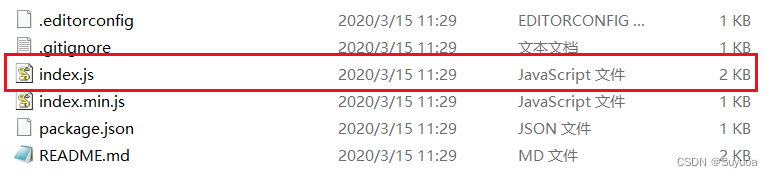
内容如下
(function flexible (window, document) {
  var docEl = document.documentElement
  var dpr = window.devicePixelRatio || 1

  // adjust body font size
  function setBodyFontSize () {
    if (document.body) {
      document.body.style.fontSize = (12 * dpr) + 'px'
    }
    else {
      document.addEventListener('DOMContentLoaded', setBodyFontSize)
    }
  }
  setBodyFontSize();

  // set 1rem = viewWidth / 10
  function setRemUnit () {
    var rem = docEl.clientWidth / 10
    docEl.style.fontSize = rem + 'px'
  }

  setRemUnit()

  // reset rem unit on page resize
  window.addEventListener('resize', setRemUnit)
  window.addEventListener('pageshow', function (e) {
    if (e.persisted) {
      setRemUnit()
    }
  })

  // detect 0.5px supports
  if (dpr >= 2) {
    var fakeBody = document.createElement('body')
    var testElement = document.createElement('div')
    testElement.style.border = '.5px solid transparent'
    fakeBody.appendChild(testElement)
    docEl.appendChild(fakeBody)
    if (testElement.offsetHeight === 1) {
      docEl.classList.add('hairlines')
    }
    docEl.removeChild(fakeBody)
  }
}(window, document))
它被一个立即执行函数包裹,我们可以放心去引用(立即执行函数不会与其他js代码中的变量名冲突)
首先获取html的根元素,之后获取dpr(物理像素比)。使用window.devicePixelTatio可以拿到物理像素比,如果使用window.devicePixelTatio拿不到物理像素比,那么就将物理像素比设置为1(|| 1)

- 物理像素比的概念可以看一下这个 35. 多倍图_Suyuoa的博客-CSDN博客_多倍图
1 设置body字体大小 setBodyFontSize()
- body的字体大小与html的字体大小不相同

首先判断有没有body元素,如果你在body标签前引入flexible.js,那么肯定是没有body元素的
- 如果读到了body元素,就将body中的文字设置为 12*物理像素比px(比如像iphone6等物理像素比为2的,body就会被设置为24px)
- 如果没读到就设置一个DOMContentLoaded(页面内容加载后触发)事件,事件函数为执行自身,也就是说你在body标签前引入flexible.js,第一次没有body元素,第二次就有了
由于JS的执行顺序是从上到下执行,如果在setBodyFontSize()中没执行过去,是不会继续向下执行的,这样的好处是下面的代码不需要加上窗口加载事件的情况下,把script写在body的上方也可以正常使用
2 设置html字体大小 setRemUnit()
flexible.js设置rem为屏幕宽度的十分之一,定义好rem后,设置字体大小为 单位为px的rem值(比如你的屏幕是375px,那么你的html的font-size就被设置为37.5px)

当页面尺寸发生改变时,改变html字体大小

pageshow是重新加载页面事件,这里是为了兼容有缓存读取页面的情况

我们总结一下这里,它一共有三个分支

首先在setBodyFontSize()中设置的DOMContentLoaded实质上是对下面所有的代码生效的(这个也正式在pageshow时间中要加判断的原因,目的是不让同一个函数执行两边影响速度),所以当你第一次打开页面的时候就会进行一遍setRemUnit()
之后如果改变了窗口大小会执行setRemUnit()
在缓存中读取页面也会执行setRemUnit()
3 最后的判断
部分移动端的浏览器不支持0.5px,有时会把0.5px处理为0px,下面的判断是用来解决这个问题的

详细原理可以看一下前端常见问题——一像素显示_weixin_34318272的博客-CSDN博客 和 https://www.jianshu.com/p/7e63f5a32636
边栏推荐
- The usage syntax and scene of selector, as well as the usage of background picture size, text box shadow and excessive effect
- Stm32 cubemx hal----- PWM - change frequency
- JS tips
- 事件的接受与忽略
- Replication of df-gan experiment -- detailed steps of replication of dfgan and forwarding from remote port to local port using mobaxtem
- HCIA static routing comprehensive experiment
- QT 菜单栏、工具栏和状态栏
- UUID and indexing rules
- 【Acwing】第61场周赛 题解
- Event filter
猜你喜欢

HCIA static routing comprehensive experiment
Raspberry pie output PWM wave to drive the steering gear

小程序项目如何创建
HCIA dynamic routing rip basic experiment

单元测试chapter6

Hiding skills of Photoshop clipping tool

ps太卡怎么办?几步帮您解决问题

【搜索】DFS之连通性模型 + 搜索顺序
![[search] - multi source BFS + minimum step model](/img/42/11b5b89153ab48d837707988752268.png)
[search] - multi source BFS + minimum step model

Final Cut Pro Chinese tutorial (1) basic understanding of Final Cut Pro
随机推荐
STM32 Hal serial port (uart/usart) debugging experience (I) -- basic knowledge of serial port communication +hal library code understanding
写代码涉及到的斜杠/和反斜杠\
TCP three handshakes and four disconnects
Raspberry pie output PWM wave to drive the steering gear
vim的基本操作
js小技巧
Web框架介绍
Plane conversion (displacement, rotation, scaling)
Transaction database and its four characteristics, principle, isolation level, dirty read, unreal read, non repeatable read?
安装Pygame
C中文件I/O的使用
File dialog box
There is no need to install CUDA and cudnn manually. You can install tensorflow GPU through a one-line program. Take tensorflow gpu2.0.0, cuda10.0, cudnn7.6.5 as examples
树莓派输出PWM波驱动舵机
对话框简介
Svn usage details
事件总结-常用总结
The usage syntax and scene of selector, as well as the usage of background picture size, text box shadow and excessive effect
[untitled] I is circularly accumulated under certain conditions. The condition is usually the length of the loop array. When it exceeds the length, the loop will stop. Because the object cannot judge
【报错】Cannot read property ‘parseComponent‘ of undefined