当前位置:网站首页>Fabric.js 渐变
Fabric.js 渐变
2022-07-02 05:08:00 【德育处主任】
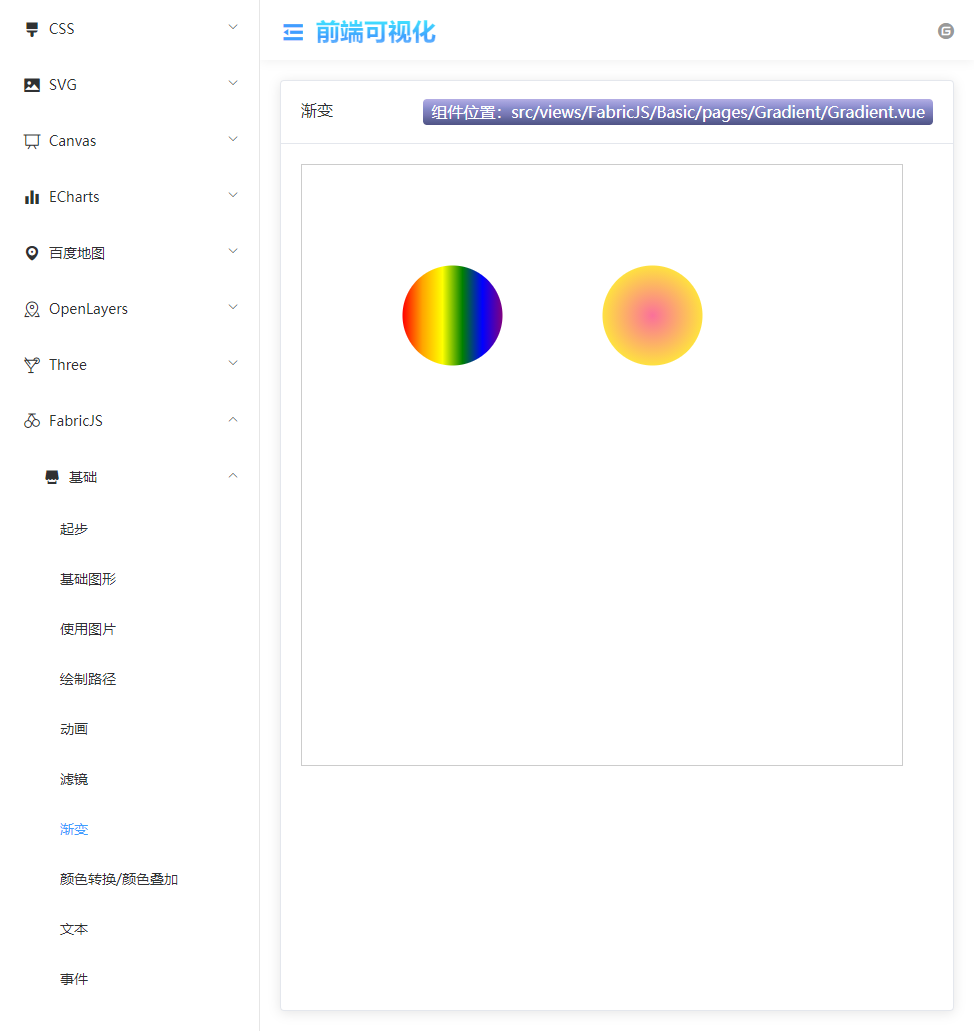
在 Vue3中使用Fabric.js实现渐变(Gradient)效果,包括径向渐变radial
Fabric.js 简介

用官方的话来讲
Fabric.js是一个强大而简单的Javascript HTML5 canvas工具库
简单来说,如果你需要用 canvas 做特效或者做交互,那不妨试试 Fabric.js 这个库,它会使开发更加简单和直观。
Fabric.js 官网Fabric.js npm地址Fabric.js github地址
本文使用的开发环境
本文案例中使用了 Fabric.js 4.6 这个版本。
使用了 Vite 构建 Vue3 项目。
搭建项目
npm init @vitejs/app选择 Vue3,之后再根据提示初始化项目即可。
安装 Fabric.js
npm install fabric --save为什么本文只写渐变?
渐变是 Fabric.js 的基础功能,但网上大部分文章都只写 线性渐变,很少有写到径向渐变的,因为官方好像也没给出径向渐变的例子。
甚至还见过有些文章和评论说 Fabric.js 只支持线性渐变。但这个说法是错的!!!
请看这个案例:【Fabric.js 渐变效果】

没错,本文只想证明在 Fabric.js 4.6版本中是可以实现径向渐变的。
线性渐变 linear

<template> <canvas width="600" height="600" id="canvas" style="border: 1px solid #ccc;"></canvas></template><script setup>import { onMounted } from 'vue'import { fabric } from 'fabric'function init() { let canvas = new fabric.Canvas('canvas') // 实例化fabric,并绑定到canvas元素上 // 圆 let circle = new fabric.Circle({ left: 100, top: 100, radius: 50, }) // 线性渐变 let gradient = new fabric.Gradient({ type: 'linear', // linear or radial gradientUnits: 'pixels', // pixels or pencentage 像素 或者 百分比 coords: { x1: 0, y1: 0, x2: circle.width, y2: 0 }, // 至少2个坐标对(x1,y1和x2,y2)将定义渐变在对象上的扩展方式 colorStops:[ // 定义渐变颜色的数组 { offset: 0, color: 'red' }, { offset: 0.2, color: 'orange' }, { offset: 0.4, color: 'yellow' }, { offset: 0.6, color: 'green' }, { offset: 0.8, color: 'blue' }, { offset: 1, color: 'purple' }, ] }) circle.set('fill', gradient); canvas.add(circle)}onMounted(() => { init()})</script>径向渐变 radial
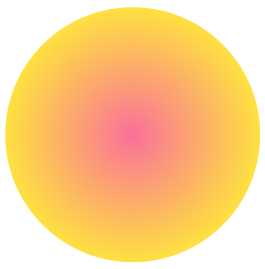
<template> <canvas width="600" height="600" id="canvas" style="border: 1px solid #ccc;"></canvas></template><script setup>import { onMounted } from 'vue'import { fabric } from 'fabric'function init() { let canvas = new fabric.Canvas('canvas') // 实例化fabric,并绑定到canvas元素上 // 圆 let circle = new fabric.Circle({ left: 100, top: 100, radius: 50, }) let gradient = new fabric.Gradient({ type: 'radial', coords: { r1: 50, // 该属性仅径向渐变可用,外圆半径 r2: 0, // 该属性仅径向渐变可用,外圆半径 x1: 50, // 焦点的x坐标 y1: 50, // 焦点的y坐标 x2: 50, // 中心点的x坐标 y2: 50, // 中心点的y坐标 }, colorStops: [ { offset: 0, color: '#fee140' }, { offset: 1, color: '#fa709a' } ] }) circle.set('fill', gradient); canvas.add(circle)}onMounted(() => { init()})</script>r1、r2、x1、y1、x2、y2 这几个参数可以自己修改值然后看看效果,自己亲手改一下会理解得更深刻。
仓库地址
点赞 + 关注 + 收藏 = 学会了
边栏推荐
- Differential identities (help find mean, variance, and other moments)
- Mathematical knowledge (Euler function)
- Win10 disk management compressed volume cannot be started
- el form 表单validate成功后没有执行逻辑
- Precipitate yourself and stay up late to sort out 100 knowledge points of interface testing professional literacy
- go实现leetcode旋转数组
- Global and Chinese market of insulin pens 2022-2028: Research Report on technology, participants, trends, market size and share
- DJB Hash
- Black Horse Notes - - set Series Collection
- Change deepin to Alibaba image source
猜你喜欢
创新永不止步——nVisual网络可视化平台针对Excel导入的创新历程
黑马笔记---Map集合体系
Steam教育的实际问题解决能力

VMware installation win10 reports an error: operating system not found
![[bus interface] Axi interface](/img/ee/95ade7811ec2c37fb67a77f0b6ae2a.jpg)
[bus interface] Axi interface

About PROFIBUS: communication backbone network of production plant
![[opencv] image binarization](/img/7e/b56a59ffae3bf6cac9c0bb7e090b85.jpg)
[opencv] image binarization
Practical problem solving ability of steam Education
LeetCode 241. 为运算表达式设计优先级(分治/记忆化递归/动态规划)

Summary of main account information of zhengdaliu 4
随机推荐
Set the default style of scroll bar Google browser
Map in JS (including leetcode examples)
Johnson–Lindenstrauss Lemma(2)
CubeMx DMA笔记
Creation and destruction of function stack frames
Mathematical knowledge (Euler function)
LeetCode 1175. 质数排列(质数判断+组合数学)
[opencv] image binarization
Pyechats 1.19 generate a web version of Baidu map
Global and Chinese market of insulin pens 2022-2028: Research Report on technology, participants, trends, market size and share
Video cover image setting, put cover images into multiple videos in the simplest way
Ruby replaces gem Alibaba image
Essence and physical meaning of convolution (deep and brief understanding)
js面试收藏试题1
Record my pytorch installation process and errors
Global and Chinese market of impact roll 2022-2028: Research Report on technology, participants, trends, market size and share
Orthogonal test method and function diagram method for test case design
在{{}}中拼接字符
Typescript function details
Paddlepaddle project source code