当前位置:网站首页>yolov5 tensorrt加速
yolov5 tensorrt加速
2022-07-06 04:42:00 【Recurss】
视频教程
https://www.bilibili.com/video/BV113411J7nk?p=1
Github仓库地址
https://github.com/Monday-Leo/Yolov5_Tensorrt_Win10
环境
Tensorrt 8.2.1.8
Cuda 10.2 Cudnn 8.2.1
Cuda安装链接:http://t.csdn.cn/AXNks
Opencv 3.4.6
Cmake 3.17.1
Cmake安装教程:http://t.csdn.cn/f2TYW
VS 2017
GTX1650
Opencv配置方法
1、在OpenCV官网下载适用于Windows平台的3.4.6版本
2、运行下载的可执行文件,将OpenCV解压至指定目录,例如 D:\propencv
3、我的电脑->属性->高级系统设置->环境变量,在系统变量中找到Path(如没有,自行创建),并双击编辑,将opencv路径填入并保存,如D:\opencv\build\x64\vc15\bin
Tensorrt配置方法
1、在tensorrt官网下载适用于Windows平台的版本
2、将TensorRT/lib下所有lib复制到cuda/v10.2/lib/x64下,将TensorRT/lib下所有dll复制到cuda/v10.2/bin下,将TensorRT/include下所有.h文件复制到cuda/v10.2/include下
3、我的电脑->属性->高级系统设置->环境变量,在系统变量中找到Path(如没有,自行创建),并双击编辑,将TensorRT/lib路径填入并保存,如G:\TensorRT-8.2.1.8\lib
打开本仓库的CMakeLists.txt,修改Opencv、Tensorrt、dirent.h的目录,其中dirent.h在本仓库的include中,须绝对路径。修改arch=compute_75;code=sm_75,参考https://developer.nvidia.com/zh-cn/cuda-gpus,GPU为GTX1650,计算能力7.5,所以这边设置为arch=compute_75;code=sm_75。
cmake_minimum_required(VERSION 2.6)

project(yolov5)

#change to your own path
##################################################
set(OpenCV_DIR "D:\\opencv\\build")
set(TRT_DIR "D:\\TensorRT-8.2.1.8")
set(Dirent_INCLUDE_DIRS "D:\\Pycharm.project\\Yolov5_Tensorrt_Win10-master\\include")
##################################################

add_definitions(-std=c++11)
add_definitions(-DAPI_EXPORTS)
option(CUDA_USE_STATIC_CUDA_RUNTIME OFF)
set(CMAKE_CXX_STANDARD 11)
set(CMAKE_BUILD_TYPE Debug)

set(THREADS_PREFER_PTHREAD_FLAG ON)
find_package(Threads)

# setup CUDA
find_package(CUDA REQUIRED)
message(STATUS "    libraries: ${CUDA_LIBRARIES}")
message(STATUS "    include path: ${CUDA_INCLUDE_DIRS}")
include_directories(${CUDA_INCLUDE_DIRS})
include_directories(${Dirent_INCLUDE_DIRS})

#change to your GPU own compute_XX
###########################################################################################
set(CUDA_NVCC_FLAGS ${CUDA_NVCC_FLAGS};-std=c++11;-g;-G;-gencode;arch=compute_75;code=sm_75)
###########################################################################################

####
enable_language(CUDA)  # add this line, then no need to setup cuda path in vs
####
include_directories(${PROJECT_SOURCE_DIR}/include)
include_directories(${TRT_DIR}\\include)

# -D_MWAITXINTRIN_H_INCLUDED for solving error: identifier "__builtin_ia32_mwaitx" is undefined
set(CMAKE_CXX_FLAGS "${CMAKE_CXX_FLAGS} -std=c++11 -Wall -Ofast -D_MWAITXINTRIN_H_INCLUDED")

# setup opencv
find_package(OpenCV QUIET
    NO_MODULE
    NO_DEFAULT_PATH
    NO_CMAKE_PATH
    NO_CMAKE_ENVIRONMENT_PATH
    NO_SYSTEM_ENVIRONMENT_PATH
    NO_CMAKE_PACKAGE_REGISTRY
    NO_CMAKE_BUILDS_PATH
    NO_CMAKE_SYSTEM_PATH
    NO_CMAKE_SYSTEM_PACKAGE_REGISTRY
)

message(STATUS "OpenCV library status:")
message(STATUS "    version: ${OpenCV_VERSION}")
message(STATUS "    libraries: ${OpenCV_LIBS}")
message(STATUS "    include path: ${OpenCV_INCLUDE_DIRS}")

include_directories(${OpenCV_INCLUDE_DIRS})
link_directories(${TRT_DIR}\\lib)

add_executable(yolov5 ${PROJECT_SOURCE_DIR}/yolov5.cpp ${PROJECT_SOURCE_DIR}/yololayer.cu ${PROJECT_SOURCE_DIR}/yololayer.h ${PROJECT_SOURCE_DIR}/preprocess.cu)

target_link_libraries(yolov5 "nvinfer" "nvinfer_plugin")
target_link_libraries(yolov5 ${OpenCV_LIBS})
target_link_libraries(yolov5 ${CUDA_LIBRARIES})
target_link_libraries(yolov5 Threads::Threads)
下载yolov5 6.0源代码和本仓库代码
git clone -b v6.0 https://github.com/ultralytics/yolov5.git
git clone https://github.com/Monday-Leo/Yolov5_Tensorrt_Win10
生成WTS模型
将仓库中的gen_wts.py和刚才下载好的yolov5s.pt拷贝至yolov5 6.0的目录下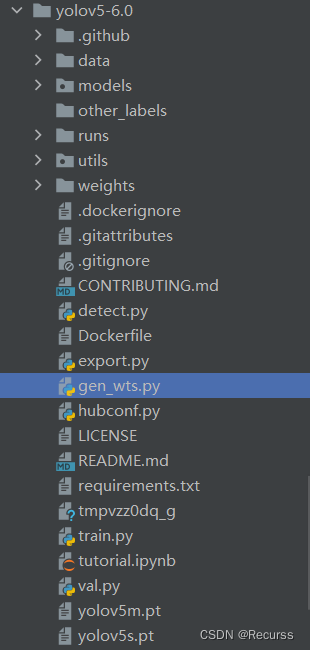
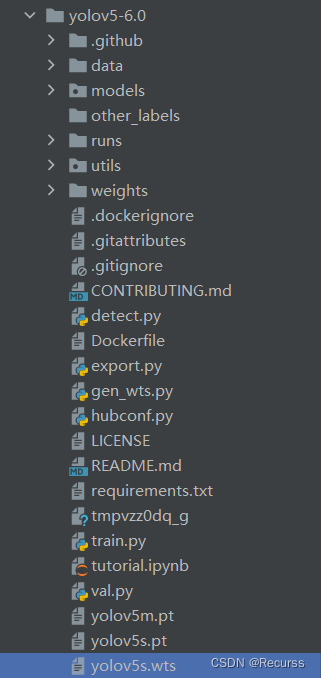
运行gen_wts.py
python gen_wts.py -w yolov5s.pt -o yolov5s.wts
生成wts文件
Cmake过程
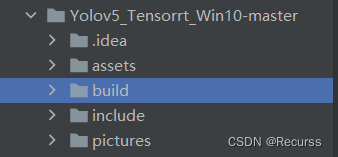
目录下新建一个build文件夹
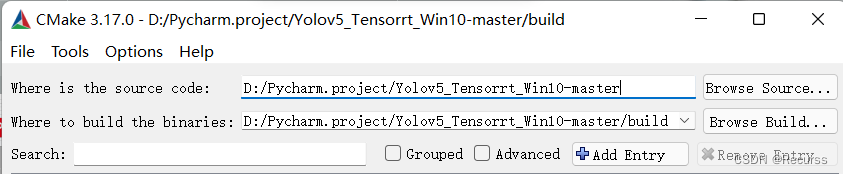
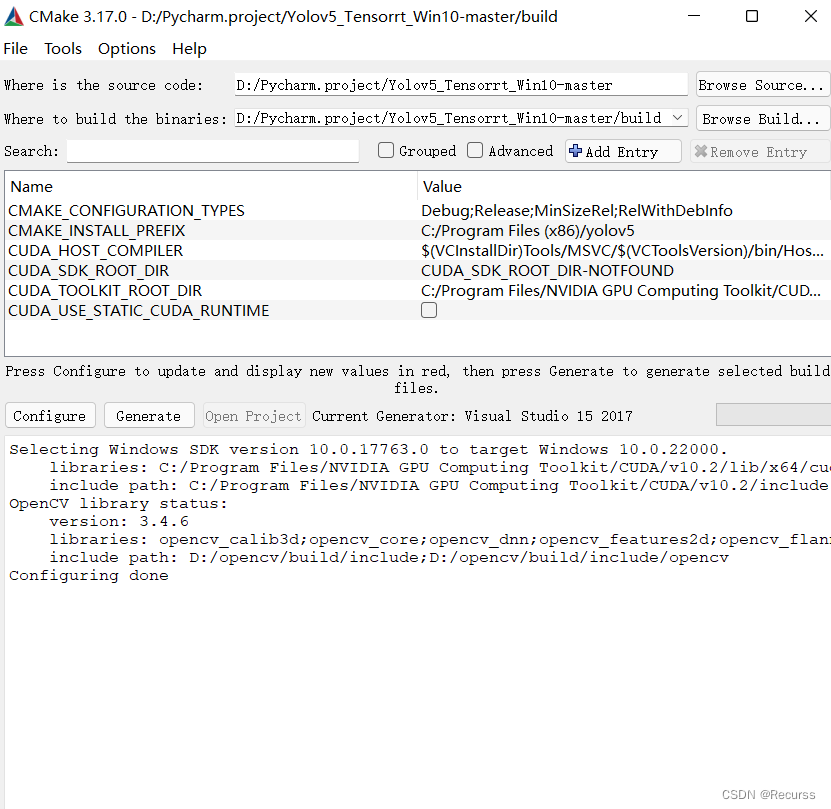
打开Cmake,选择本仓库目录,以及新建的build目录,再点击左下方configure按钮。
选择自己的Visual Studio版本,如2017,第二个框中选择x64,之后点击finish
运行结果
*
依次点击Generate和Open Project
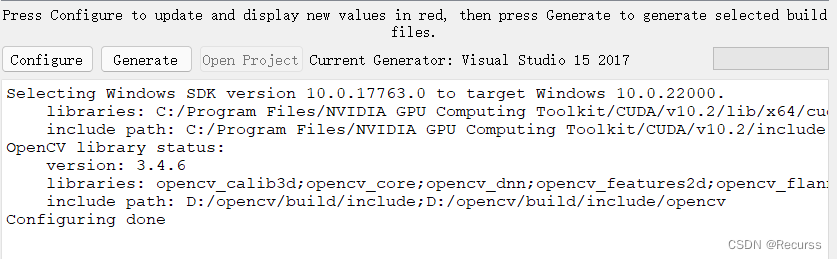
编译

将界面上方Debug改为Release,右键yolov5项目,点击重新生成。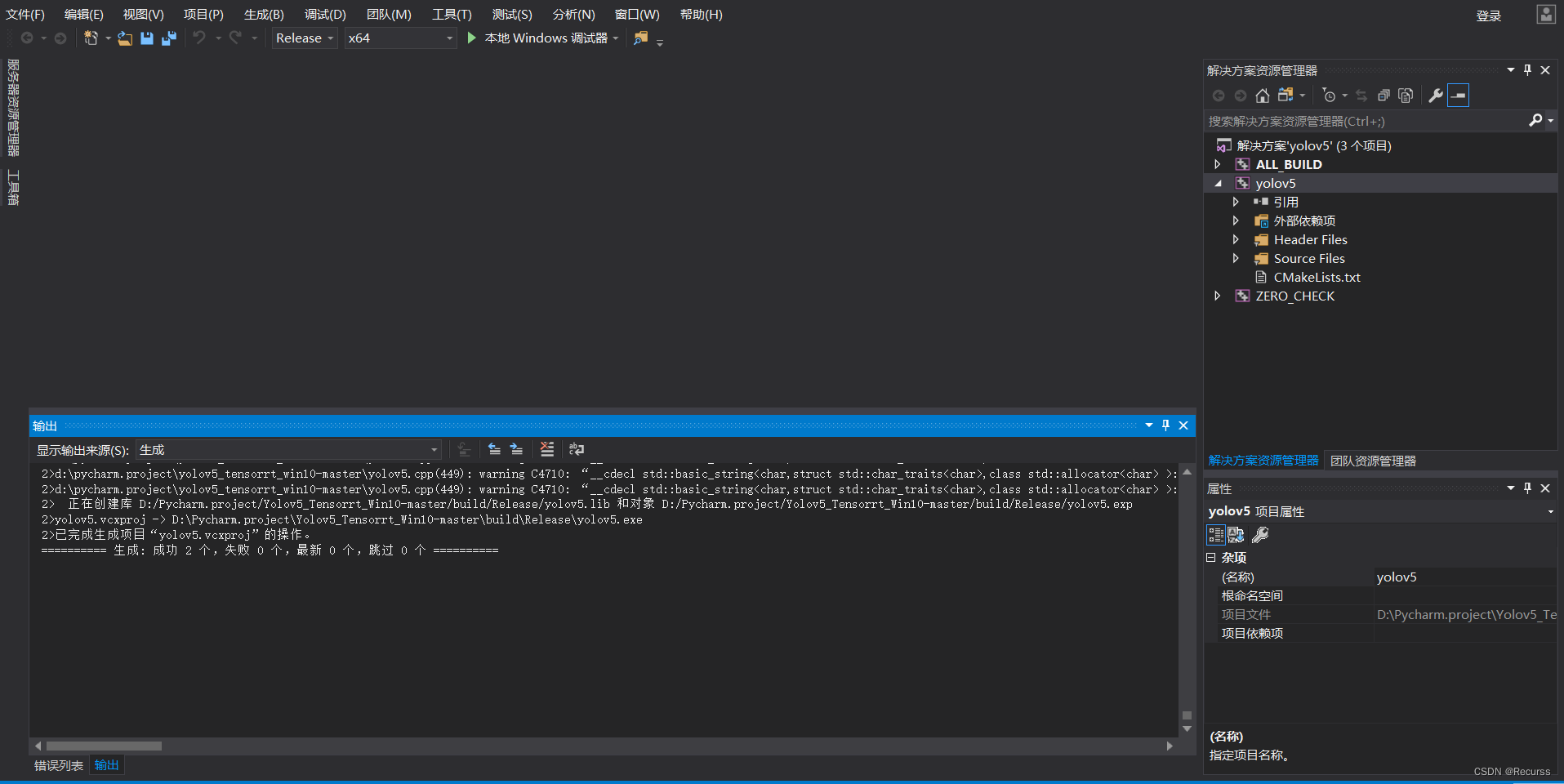
编译成功打开build/Release,可以看到生成的exe可执行文件。
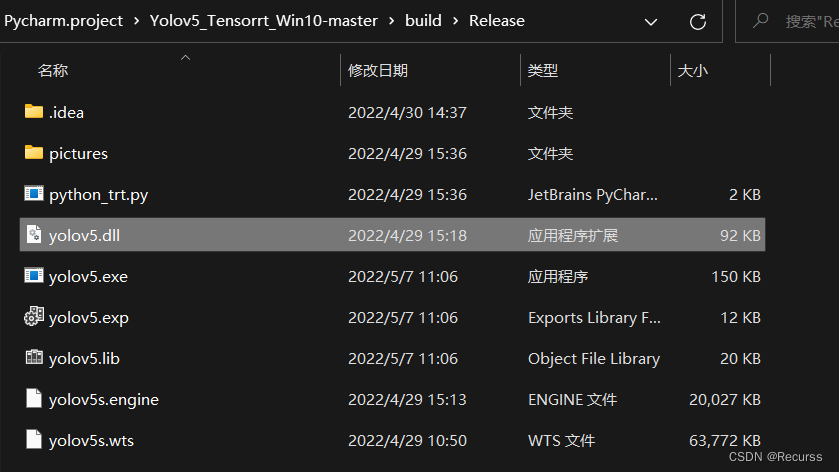
将第一步生成的yolov5s.wts模型复制到exe的文件夹中,在这个目录下打开cmd输入
yolov5 -s yolov5s.wts yolov5s.engine s
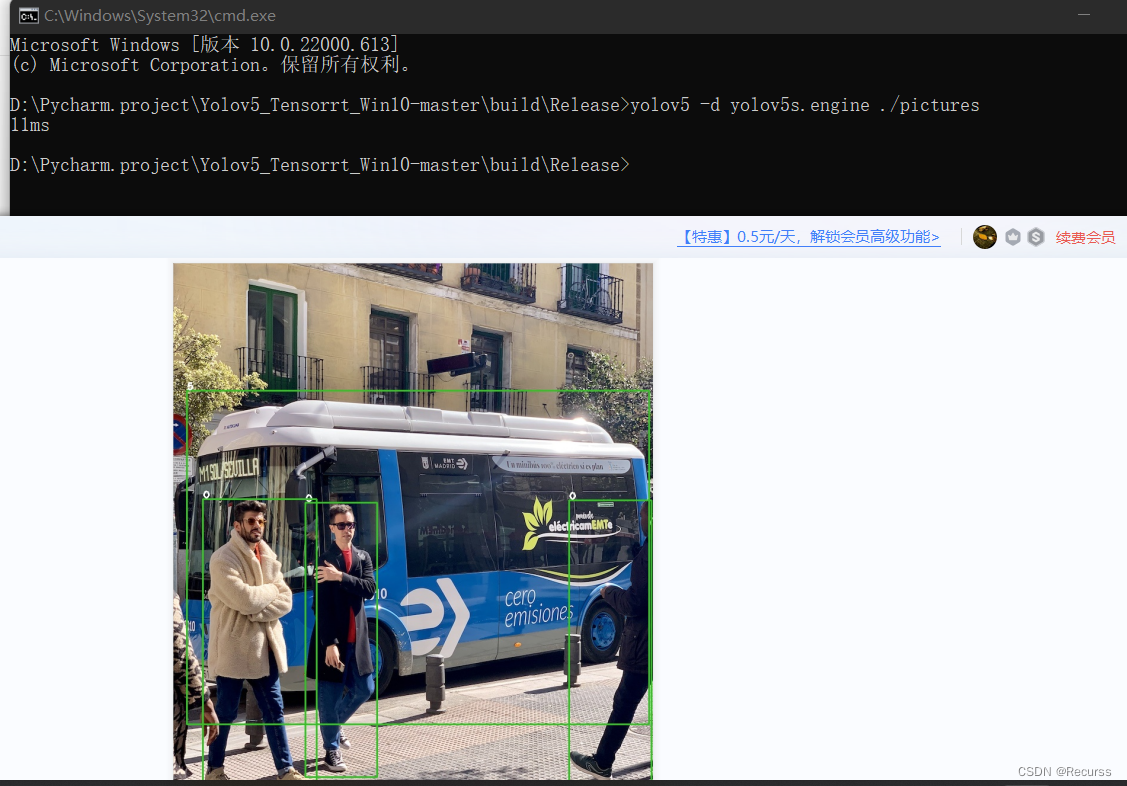
正常运行,此时程序在将wts转换为engine序列化模型,需要等待预计10-20分钟左右。生成engine完成后,会在文件夹下出现yolov5s.engine模型。将本仓库的pictures文件夹复制到exe文件夹下,尝试预测是否正确,输入:
yolov5 -d yolov5s.engine ./pictures
边栏推荐
- 729. My schedule I (set or dynamic open point segment tree)
- [HBZ sharing] how to locate slow queries in cloud database
- acwing周赛58
- The IPO of mesk Electronics was terminated: Henan assets, which was once intended to raise 800 million yuan, was a shareholder
- win10电脑系统里的视频不显示缩略图
- Redis —— Redis In Action —— Redis 实战—— 实战篇一 —— 基于 Redis 的短信登录功能 —— Redis + Token 的共享 session 应用— 有代码
- 拉格朗日插值法
- NPM command -- install dependent packages -- Usage / explanation
- [数学建模] 微分方程--捕鱼业的持续发展
- Postman测试报告
猜你喜欢

Patent | subject classification method based on graph convolution neural network fusion of multiple human brain maps
Visio draw fan
Sorting out the latest Android interview points in 2022 to help you easily win the offer - attached is the summary of Android intermediate and advanced interview questions in 2022

The implementation of the maize negotiable digital warehouse receipt standard will speed up the asset digitization process of the industry
Case of Jiecode empowerment: professional training, technical support, and multiple measures to promote graduates to build smart campus completion system
Postman关联

Visio draws Tai Chi
Uva1592 Database
RTP gb28181 document testing tool
满足多元需求:捷码打造3大一站式开发套餐,助力高效开发
随机推荐
The implementation of the maize negotiable digital warehouse receipt standard will speed up the asset digitization process of the industry
CADD course learning (7) -- Simulation of target and small molecule interaction (flexible docking autodock)
【HBZ分享】云数据库如何定位慢查询
Finance online homework
ue5 小知识 FreezeRendering 查看视锥内渲染的物体
捷码赋能案例:专业培训、技术支撑,多措并举推动毕业生搭建智慧校园毕设系统
Can Flink SQL read multiple topics at the same time. How to write in with
Platformio create libopencm3 + FreeRTOS project
拉格朗日插值法
MPLS experiment
The kernel determines whether peripherals are attached to the I2C address
The value of two date types is subtracted and converted to seconds
RTP GB28181 文件测试工具
麦斯克电子IPO被终止:曾拟募资8亿 河南资产是股东
Sorting out the latest Android interview points in 2022 to help you easily win the offer - attached is the summary of Android intermediate and advanced interview questions in 2022
Lagrange polynomial
Postman关联
CADD课程学习(8)-- 化合物库虚拟筛选(Virtual Screening)
MySQL reported an error datetime (0) null
What should the project manager do if there is something wrong with team collaboration?