当前位置:网站首页>[wechat applet] to solve button, input and image components
[wechat applet] to solve button, input and image components
2022-07-01 06:32:00 【Front end Xiao Liu is not afraid of cattle】
Hello, audience , This is the front-end blog of Xiao Liu who is not afraid of cattle , Above, we explained the view container component and basic content component of the applet , Small programs also have a common class of components , Form components .
So today, , Let Niuniu take you into the form component (˵◕ω◕˵).

List of articles
One ,button Components
The first one to introduce is button Components , We can find it and HTML The button label in has the same name , Yes , The component is in WXML It also acts as a button setting function , however , by comparison ,button Components have more functions than the latter , Now let's go into more detail , What does wechat applet provide us button function .
typeattribute , Used to set the style type of the button , There are currently three values ,primarygreen ,defaultwhite ,warnRed , We can understand what they mean from the meaning of their values , Green is important , Red is a warning , These two colors will give users the effect of prompts , The default style is white
The effect is as follows :
tip: Some friends may see some differences in the styles , This may be because you haven't set the latest style version , At this time we need to app.json File settings
"style": "v2"
So the declaration is displayed in the latest style
sizeattribute , Used to set the size of the button , The default isdefault, That's normal size , We can also choose Mini buttons , takesizeSet tomini
The effect is as follows :
plainattribute , Is it hollow out , Transparent background color , The default value isdefault, But let's change it totruewhen
The effect is as follows :
loadingattribute , Whether to set the name with loading Icon , It is usually set after the user clicks or when the page is still loaded , use JS YesloadingData binding and operation with the attribute value of .
The effect is as follows :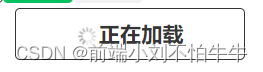
form-typeattribute , No default , This property is used forformIn the component , Click on the triggerformComponent'ssubmit\resetevent , When we set the attribute value tosubmitTrigger submit form event , andresetIs the reset form event .
button There are also many powerful properties in the component , such as open-type You can directly call the open capability of wechat , For example, trigger user forwarding, etc , If you are interested, you can learn about
Two ,input Components
The second thing I want to talk about is input Components , The content is expressed as an input box , This component is roughly the same as HTML Medium input The label is the same , Is a native component , However, we should pay attention to the usage of this component
valueattribute , We are familiar with this property , I'm not going to elaborate here , Is to set the initial content of the input box , Generally used as a default value for users , Users may be able to use , Such as gender , The default is male , It should be noted that , This attribute is required in the applettypeattribute , Enter the type of keyboard , When we use applet forms to submit things , You will find that the keyboard it pops up is different , Such as normal text input keyboard , There is also a special password input keyboard , These are implemented by this attribute . The attribute values and descriptions are shown in the following table
| Property value | explain |
|---|---|
| text | Text input keyboard |
| number | Numeric input keyboard |
| idcard | ID card input keyboard |
| safe-password | Password security input keyboard |
passwordattribute , Password type or not , When we set theta to zero true, The entered password will be automatically displayed with a small black dot
The effect is as follows :
placeholderattribute , As a placeholder when the input box is empty , The text inside is usually used to prompt the user
3、 ... and ,image Components
Similar in function to HTML Medium img label , Used to carry pictures , But in use ,image There are several more attributes provided by wechat , More diverse in function , Support JPG、PNG、SVG、WEBP、GIF Equiform , Next, let's talk about the attribute functions of this component .
First of all, I need to say image Components have a default size , Wide for 300px, High for 240px, This means that even if you don't have a picture in it , Empty picture , Without changing its width and height , An empty picture will occupy a width 300px high 240px Space. , As shown below .
<!-- html -->
<image></image>
<!-- css -->
image{
 	border: solid lightcoral 2px;
}
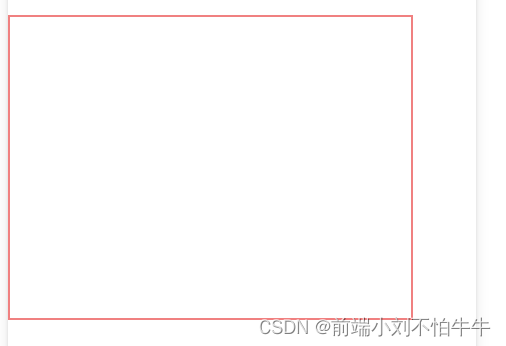
srcattribute , That goes without saying , AndimgThe label is the same , Refers to the image resource address .modeattribute , This is an important attribute , It sets the cropping of the picture 、 Zoom mode , The default value isscaleToFill, Called zoom mode , That is, do not maintain aspect ratio scaling , Stretch the width and height of the original image to completely fillimageElements , This attribute value is prone to image deformation , Other attribute values are as follows .
| Property value | explain | chart |
|---|---|---|
| aspectFit | Keep the aspect ratio scaled , It's a picture The long side can be completely displayed , Can display the picture completely , But the short side image Components may have blank blocks |  |
| aspectFill | Keep the aspect ratio scaled , Only the short side can be fully displayed , in other words , The long side may be intercepted because it is too long |  |
| widthFix | image The width of the element does not change , Automatic height change , The width and height of the original drawing remain unchanged | - |
| heightFit | image The height of the element does not change , The width changes automatically , The width and height of the original drawing remain unchanged | - |
| center | Cut pattern , Unscaled picture , Show only the middle part of the picture |  |
show-menu-by-longpressattribute , Long press the picture to display the menu , Send it to a friend \ Collection \ Save the picture \ Search for … The default value isfalse, This may be common in use , It is often set on QR code pictures
Four ,API Three broad categories
Finally, let's talk about API Three categories of ,API It can be divided into event monitoring API、 Sync API、 asynchronous API
4.1 Event monitoring API
seeing the name of a thing one thinks of its function , This kind API It is used to monitor the triggering of certain events , Events are the communication mode from the rendering layer to the logic layer , We get the user's behavior in the rendering layer through event listening , So as to respond at the logical layer 、 Business processing .
- This kind of API With
onstart , Such aswx.onWindowResize(function callback), Listen for window size changes , If the trigger , That is, call the following callback function . wxObject in the applet is equivalent to the browserwindow, It belongs to the top-level object of wechat applet , Can be called globally
4.2 Sync API
- With
Syncending , The result of execution can be obtained directly through the return value of the function , But when the execution is wrong , Return the exception directly - Such as
wx.setStorageSync('key', 'value'), Write content to local storage
4.3 asynchronous API
- adopt success、false、conplete Receive the result of the call
- Such as
wx.request(), Initiate network request , Can passsuccessThe callback function receives data
First of all, this time API Make a simple description of the classification of , We will use these examples later API
That's the end of this article , If it helps you , You can pay attention to Niuniu's subsequent articles , Thank you for your support !
Debt see ~~
边栏推荐
- [postgraduate entrance examination advanced mathematics Wu Zhongxiang +880 version for personal use] advanced mathematics Chapter II Basic Stage mind map
- How does the port scanning tool help enterprises?
- [ManageEngine Zhuohao] what is network operation and maintenance management and what is the use of network operation and maintenance platform
- @Propagation property of transactional requires_ New in-depth understanding
- 谷粒商城-环境(p1-p27)
- JSON module
- SQL学习笔记九种连接2
- 自开发软件NoiseCreater1.1版本免费试用
- HCM Beginner (IV) - time
- Picture server project test
猜你喜欢

Idea easy to use plug-in summary!!!
![[unity shader custom material panel part II]](/img/d1/8632ae680299a27b7431b2d6e03fd3.png)
[unity shader custom material panel part II]

谷粒商城-环境(p1-p27)
![[ITSM] what is ITSM and why does it department need ITSM](/img/e1/85b5f00f124829b6a6b40c5cf621bd.png)
[ITSM] what is ITSM and why does it department need ITSM
![[unity shader amplify shader editor (ASE) Chapter 9]](/img/f5/f0f6786406e149187e71c8e12cde0d.png)
[unity shader amplify shader editor (ASE) Chapter 9]

Record MySQL troubleshooting caused by disk sector damage

连续四年入选Gartner魔力象限,ManageEngine卓豪是如何做到的?

async 与 await
![阿里OSS Postman Invalid according to Policy: Policy Condition failed: [“starts-with“, “$key“, “test/“]](/img/3c/7684b7c594f7871471f89007294703.png)
阿里OSS Postman Invalid according to Policy: Policy Condition failed: [“starts-with“, “$key“, “test/“]

Promise
随机推荐
SystemVerilog learning-09-interprocess synchronization, communication and virtual methods
C how to print out the original array
Free trial of self-developed software noisecreater1.1
Detailed steps for installing redis on Windows system
Promise
Draw a directed graph based on input
HCM Beginner (II) - information type
【Unity Shader 描边效果_案例分享第一篇】
如果我在广州,到哪里开户比较好?究竟网上开户是否安全么?
连续四年入选Gartner魔力象限,ManageEngine卓豪是如何做到的?
【Unity Shader 消融效果_案例分享】
TCL statements in SQL (transaction control statements)
What is a port scanning tool? What is the use of port scanning tools
H5网页判断是否安装了某个APP,安装则跳转未安装则下载的方案总结
三说 拷贝构造之禁用
根据输入画有向图
C语言课设物业费管理系统(大作业)
Comment imprimer le tableau original
[ManageEngine] how to realize network automatic operation and maintenance
C language course set up library information management system (big homework)