当前位置:网站首页>Kibana - installation and configuration of kibana
Kibana - installation and configuration of kibana
2022-07-03 11:37:00 【Fly link】
One 、 matters needing attention :
1. Kibana Is and ElasticSearch Used in combination with , During installation, try to ensure Kibana and ElasticSearch Consistent versions of
2. ElasticSearch and java The installation tutorial of is here => Elastic and JDK Installation tutorial for
Two 、Kibana Installation
1. Upload the compressed package to /export/server/ Under the table of contents 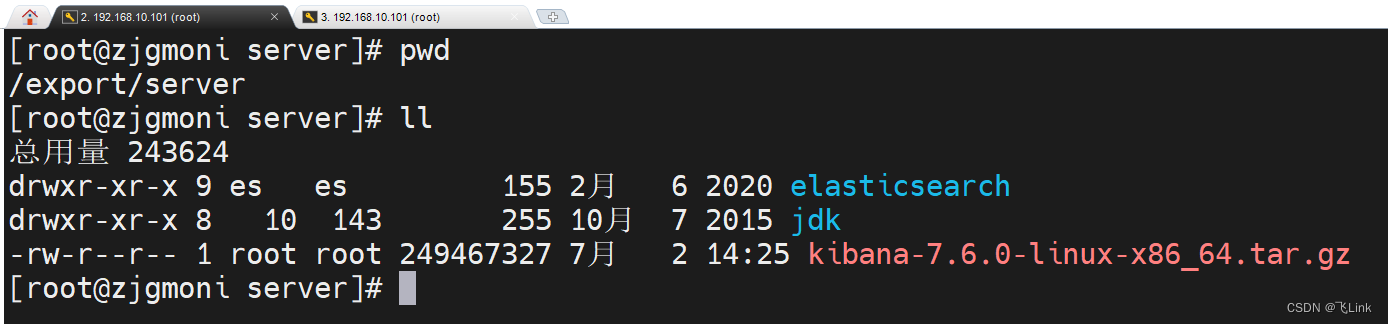
2. Decompress the package
tar -zxvf kibana-7.6.0-linux-x86_64.tar.gz
3. Delete compressed package
rm -rf kibana-7.6.0-linux-x86_64.tar.gz
4. Rename folder
mv kibana-7.6.0-linux-x86_64/ kibana
3、 ... and 、Kibana Configuration of
vim /export/server/kibana/config/kibana.yml
#####----- Kibana relevant  -----#####

#  The port that provides the service , The default is 5601
server.port: 5601

#  The host address , It can be ip、 Host name
server.host: "192.168.10.101"

#  Run behind the agent , You can specify the installation kibana The path of
#  Use server.rewriteBasePath Settings tell kibana Whether to delete basePath Received requests , And prevent outdated warnings at startup
#  This setting cannot end with a slash
# server.basePath: ""

#  Appoint kibana Whether it should be rewritten to server.bashPath Request with prefix , Or ask them to be overridden by a reverse proxy , The default is false
# server.rewriteBasePath: false

#  Maximum payload size of incoming server request , In bytes , Default 1048576
#server.maxPayloadBytes: 1048576

#  The kibana Name of service , Default your-hostname
server.name: kibana-server


#####----- ElasticSearch relevant  -----#####

# kibana visit es Server's URL, There can be multiple , By comma "," separate
elasticsearch.hosts: ["http://192.168.10.101:9200"]

#  When this value is true when ,kibana Use server.host Set the host name
#  When this value is false yes ,kibana Use connections kibana The hostname of the instance
#  The default is true
#elasticsearch.preserveHost: true

# kibana Use ElasticSearch To store saved searches , Visualization and dashboard
#  If it does not exist on the index ,kibana A new index will be created
#  Default .kibana
#kibana.index: ".kibana"

#  Default application loaded
#kibana.defaultAppId: "home"

# kibana visit elasticsearch Your account number and password ( If elasticsearch If it's set up )
#elasticsearch.username: "kibana"
#elasticsearch.password: "pass"

#  from kibana Whether server to browser outgoing requests are enabled SSL
#  Set to true when , need server.ssl.certificate and server.ssl.key
#server.ssl.enabled: false
#server.ssl.certificate: /path/to/your/server.crt
#server.ssl.key: /path/to/your/server.key

#  from kibana To elasticsearch Enable ssl after ,ssl.certificate and ssl.key The location of
#elasticsearch.ssl.certificate: /path/to/your/client.crt
#elasticsearch.ssl.key: /path/to/your/client.key

# PEM Path list of files
#elasticsearch.ssl.certificateAuthorities: [ "/path/to/your/CA.pem" ]

#  control ElasticSearch Certificate validation provided
#  Valid values are none,certificate and ,full
#elasticsearch.ssl.verificationMode: full

# ElasticSearch Server response ping Time for , Company ms
#elasticsearch.pingTimeout: 1500

# ElasticSearch Response time of , Company ms
#elasticsearch.requestTimeout: 30000

# Kibana Client sent to ElasticSearch List of headers
#  If the client header is not sent , Please set this value to null
#elasticsearch.requestHeadersWhitelist: [ authorization ]

# Kibana The client sends to ElasticSearch Title name and value of
#elasticsearch.customHeaders: {}

# ElasticSearch Time to wait for fragment response
#elasticsearch.shardTimeout: 30000

# Kibana Wait at startup ElasticSearch Time for , Company ms, And then try again
#elasticsearch.startupTimeout: 5000

#  The record is sent to ElasticSearch Query for
#elasticsearch.logQueries: false

#  Service pid File path , Default /var/run/kibana.pid
#pid.file: /var/run/kibana.pid


#####-----  Log correlation  -----#####

# Kibana Log file storage path , Default stdout
#logging.dest: stdout

#  This value is true when , Disable all logging output
#  The default is false
#logging.silent: false

#  This value is true when , Disable all logging output except error messages
#  The default is false
#logging.quiet: false

#  This value is true when , Record all events , Including system usage information and all requests
#  Default false
#logging.verbose: false


#####-----  other  -----#####

#  System and process sampling interval , Company ms, minimum value 100ms
#  Default 5000ms
#ops.interval: 5000

# Kibana web Language
#  Default  en
#i18n.locale: "en"
Four 、Kibana Start of
1. Switch non root user
su es
2. Modify user rights
chown -R es:es /export/server/kibana/
3. start-up ElasticSearch service
/export/server/elasticsearch/bin/elasticsearch -d
4. start-up Kibana service
#  The front desk starts
/export/server/kibana/bin/kibana
#  Background start
# nohup /export/server/kibana/bin/kibana &
5. Successful launch

边栏推荐
- Empire CMS no thumbnail smart tag (e:loop) two ways to judge whether there is a titlepic
- 一文搞懂Go语言Context
- 2022 东北四省赛 VP记录/补题
- VPP三层网络互联配置
- R language ggplot2 visualization: gganimate package creates dynamic line graph animation (GIF) and uses transition_ The reveal function displays data step by step along a given dimension in the animat
- Phpcms prompt message page Jump showmessage
- Tablespace creation management and control file management
- How to become a senior digital IC Design Engineer (1-5) Verilog coding syntax: operand
- Function details of CorelDRAW graphics suite 2022
- C语言 AES加解密
猜你喜欢

随机推荐
Empire CMS no thumbnail smart tag (e:loop) two ways to judge whether there is a titlepic
After a month, I finally got Kingdee offer! Share tetrahedral Sutra + review materials
动态规划(区间dp)
鸿蒙第三次培训(项目实训)
GCC compilation process and dynamic link library and static link library
一文搞懂Go语言Context
Abandon the Internet after 00: don't want to enter a big factory after graduation, but go to the most fashionable Web3
剑指offer专项32-96题做题笔记
AI模型看看视频,就学会了玩《我的世界》:砍树、造箱子、制作石镐样样不差...
导师对帮助研究生顺利完成学业提出了20条劝告:第一,不要有度假休息的打算.....
Use typora to draw flow chart, sequence diagram, sequence diagram, Gantt chart, etc. for detailed explanation
基于turtlebot3实现SLAM建图及自主导航仿真
Kubernetes 三打探针及探针方式
CSRF
金额计算用 BigDecimal 就万无一失了?看看这五个坑吧~~
Intel 13th generation core flagship exposure, single core 5.5ghz
ASP. Net hotel management system
Phpcms prompt message page Jump to showmessage
Driver development based on I2C protocol
How to become a senior digital IC Design Engineer (1-4) Verilog coding syntax: expression