当前位置:网站首页>Cesium dynamic diffusion point effect
Cesium dynamic diffusion point effect
2022-07-02 02:10:00 【Sun batian】
cesium- Dynamic diffusion point effect
Introduce
Sometimes we need to mark some important points and events , For example, an earthquake happened somewhere , We need to be in real time cesium Highlight in , Real time messages can be used websocket Push from the background to the front desk ( I won't start here for the time being )
Realization effect
The effect is as follows :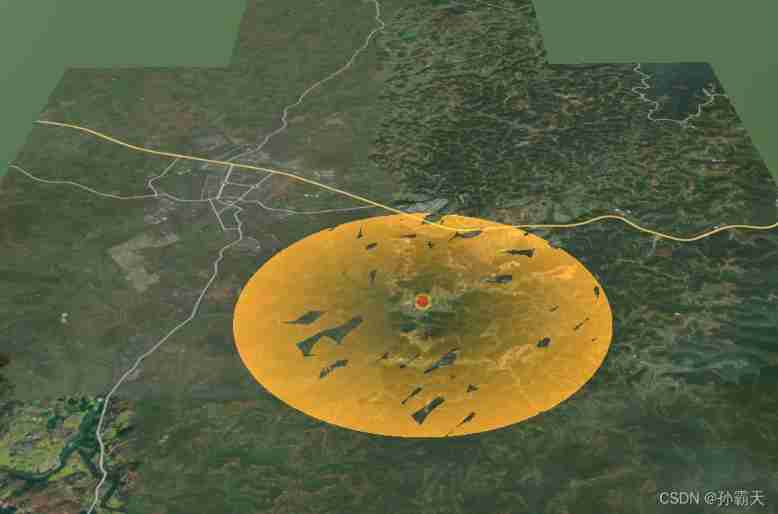
Complete code
Use here vue Realization
<template>
  <div class="home">
    <el-row type="flex" :gutter="20">
      <el-col :span="24">
        <div class="grid-content bg-purple">
          <el-breadcrumb separator="/">
            <el-breadcrumb-item>cesium</el-breadcrumb-item>
            <el-breadcrumb-item> effect </el-breadcrumb-item>
            <el-breadcrumb-item> Dynamic diffusion point </el-breadcrumb-item>
          </el-breadcrumb>
        </div>
      </el-col>
    </el-row>
    <el-row type="flex" :gutter="20">
      <el-col :span="24">
        <div class="grid-content bg-purple">
          <cesiumComponent id="cesium" ref="refCesium"/>
        </div>
      </el-col>
    </el-row>
  </div>
</template>

<script>
import cesiumComponent from '../cesium.vue'

export default {
  name: "dynamic_diffusion_point",
  data() {
    return {
      _viewer: undefined,
      _camera: undefined,
    };
  },
  components: {
    cesiumComponent
  },
  mounted() {
    this.init();
    this.addPoint();
  },
  methods: {
    init() {
      let that = this;
      that.$refs.refCesium.initMap();
      that._viewer = that.$refs.refCesium._viewer;
      that._camera = that._viewer.camera;
      that._viewer.scene.globe.depthTestAgainstTerrain = true;
    },
    addPoint() {
      let that = this;
      let viewer = that._viewer;
      // Turn off depth detection
      viewer.scene.globe.depthTestAgainstTerrain = true;
      // Cancel double click event
      viewer.cesiumWidget.screenSpaceEventHandler.removeInputAction(Cesium.ScreenSpaceEventType.LEFT_DOUBLE_CLICK);
      // Set up homebutton The location of
      Cesium.Camera.DEFAULT_VIEW_RECTANGLE =
          Cesium.Rectangle.fromDegrees(110.15, 34.54, 110.25, 34.56);//Rectangle(west, south, east, north)
      // Set the initial position
      viewer.camera.setView({
        destination: Cesium.Cartesian3.fromDegrees(110.20, 34.55, 3000000)
      });

      /*
       Flow texture line
      color  Color
      duration  The duration of the   millisecond
      */
      function EllipsoidFadeMaterialProperty(color, duration) {
        this._definitionChanged = new Cesium.Event();
        this._color = undefined;
        this._colorSubscription = undefined;
        this.color = color;
        this.duration = duration;
        this._time = (new Date()).getTime();
      }

      Object.defineProperties(EllipsoidFadeMaterialProperty.prototype, {
        isConstant: {
          get: function () {
            return false;
          }
        },
        definitionChanged: {
          get: function () {
            return this._definitionChanged;
          }
        },
        color: Cesium.createPropertyDescriptor('color')
      });
      EllipsoidFadeMaterialProperty.prototype.getType = function (time) {
        return 'EllipsoidFade';
      }
      EllipsoidFadeMaterialProperty.prototype.getValue = function (time, result) {
        if (!Cesium.defined(result)) {
          result = {};
        }
        result.color = Cesium.Property.getValueOrClonedDefault(this._color, time, Cesium.Color.WHITE, result.color);

        result.time = (((new Date()).getTime() - this._time) % this.duration) / this.duration;
        return result;

        // return Cesium.defined(result) || (result = {}),
        //     result.color = Cesium.Property.getValueOrClonedDefault(this._color, time, Cesium.Color.WHITE, result.color),
        //     void 0 === this._time && (this._time = time.secondsOfDay),
        //     result.time = time.secondsOfDay - this._time,
        //     result
      }
      EllipsoidFadeMaterialProperty.prototype.equals = function (other) {
        return this === other ||
            (other instanceof EllipsoidFadeMaterialProperty &&
                Property.equals(this._color, other._color))
      }
      Cesium.EllipsoidFadeMaterialProperty = EllipsoidFadeMaterialProperty;
      Cesium.Material.EllipsoidFadeType = 'EllipsoidFade';
      Cesium.Material.EllipsoidFadeSource =
          "czm_material czm_getMaterial(czm_materialInput materialInput)\n" +
          "{\n" +
          "czm_material material = czm_getDefaultMaterial(materialInput);\n" +
          "material.diffuse = 1.5 * color.rgb;\n" +
          "vec2 st = materialInput.st;\n" +
          "float dis = distance(st, vec2(0.5, 0.5));\n" +
          "float per = fract(time);\n" +
          "if(dis > per * 0.5){\n" +
          "material.alpha = 0.0;\n" +
          "discard;\n" +
          "}else {\n" +
          "material.alpha = color.a  * dis / per / 1.0;\n" +
          "}\n" +
          "return material;\n" +
          "}";
      Cesium.Material._materialCache.addMaterial(Cesium.Material.EllipsoidFadeType, {
        fabric: {
          type: Cesium.Material.EllipsoidFadeType,
          uniforms: {
            color: new Cesium.Color(1.0, 0.0, 0.0, 1),
            time: 0
          },
          source: Cesium.Material.EllipsoidFadeSource
        },
        translucent: function (material) {
          return true;
        }
      });

      viewer.entities.add({
        name: 'EllipsoidFade',
        position: Cesium.Cartesian3.fromDegrees(104.0, 30.0, 100.0),
        ellipse: {
          height: 0,
          semiMinorAxis: 3000.0,
          semiMajorAxis: 3000.0,
          material: new Cesium.EllipsoidFadeMaterialProperty(Cesium.Color.ORANGE, 2000)
        },
        point:{
          show: true,
          pixelSize: 30,
          // heightReference: Cesium.HeightReference.CLAMP_TO_GROUND,
          color: Cesium.Color.RED,
          outlineColor: Cesium.Color.YELLOW,
          outlineWidth: 10,
          scaleByDistance: new Cesium.NearFarScalar(1500, 1, 20000, 0.3),
          translucencyByDistance: new Cesium.NearFarScalar(1500, 1, 20000, 0.2),
          distanceDisplayCondition: new Cesium.DistanceDisplayCondition(0, 20000)
        }
      });


      viewer.zoomTo(viewer.entities);
    }
  },
  created() {

  },
}
</script>

<style scoped>
.home {
  height: 100%;
  margin: 0;
  padding: 0;
  overflow-y: auto;
  overflow-x: hidden;
}

.el-breadcrumb {
  margin: 10px;
  font-size: 15px;
}

#cesium {
  max-height: 700px;
}
</style>
Core code
addPoint() {

      let that = this;
      let viewer = that._viewer;
      // Turn off depth detection
      viewer.scene.globe.depthTestAgainstTerrain = true;
      // Cancel double click event
      viewer.cesiumWidget.screenSpaceEventHandler.removeInputAction(Cesium.ScreenSpaceEventType.LEFT_DOUBLE_CLICK);
      // Set up homebutton The location of
      Cesium.Camera.DEFAULT_VIEW_RECTANGLE =
          Cesium.Rectangle.fromDegrees(110.15, 34.54, 110.25, 34.56);//Rectangle(west, south, east, north)
      // Set the initial position
      viewer.camera.setView({

        destination: Cesium.Cartesian3.fromDegrees(110.20, 34.55, 3000000)
      });

      /*  Flow texture line  color  Color  duration  The duration of the   millisecond  */
      function EllipsoidFadeMaterialProperty(color, duration) {

        this._definitionChanged = new Cesium.Event();
        this._color = undefined;
        this._colorSubscription = undefined;
        this.color = color;
        this.duration = duration;
        this._time = (new Date()).getTime();
      }

      Object.defineProperties(EllipsoidFadeMaterialProperty.prototype, {

        isConstant: {

          get: function () {

            return false;
          }
        },
        definitionChanged: {

          get: function () {

            return this._definitionChanged;
          }
        },
        color: Cesium.createPropertyDescriptor('color')
      });
      EllipsoidFadeMaterialProperty.prototype.getType = function (time) {

        return 'EllipsoidFade';
      }
      EllipsoidFadeMaterialProperty.prototype.getValue = function (time, result) {

        if (!Cesium.defined(result)) {

          result = {
    };
        }
        result.color = Cesium.Property.getValueOrClonedDefault(this._color, time, Cesium.Color.WHITE, result.color);

        result.time = (((new Date()).getTime() - this._time) % this.duration) / this.duration;
        return result;

        // return Cesium.defined(result) || (result = {}),
        // result.color = Cesium.Property.getValueOrClonedDefault(this._color, time, Cesium.Color.WHITE, result.color),
        // void 0 === this._time && (this._time = time.secondsOfDay),
        // result.time = time.secondsOfDay - this._time,
        // result
      }
      EllipsoidFadeMaterialProperty.prototype.equals = function (other) {

        return this === other ||
            (other instanceof EllipsoidFadeMaterialProperty &&
                Property.equals(this._color, other._color))
      }
      Cesium.EllipsoidFadeMaterialProperty = EllipsoidFadeMaterialProperty;
      Cesium.Material.EllipsoidFadeType = 'EllipsoidFade';
      Cesium.Material.EllipsoidFadeSource =
          "czm_material czm_getMaterial(czm_materialInput materialInput)\n" +
          "{\n" +
          "czm_material material = czm_getDefaultMaterial(materialInput);\n" +
          "material.diffuse = 1.5 * color.rgb;\n" +
          "vec2 st = materialInput.st;\n" +
          "float dis = distance(st, vec2(0.5, 0.5));\n" +
          "float per = fract(time);\n" +
          "if(dis > per * 0.5){\n" +
          "material.alpha = 0.0;\n" +
          "discard;\n" +
          "}else {\n" +
          "material.alpha = color.a * dis / per / 1.0;\n" +
          "}\n" +
          "return material;\n" +
          "}";
      Cesium.Material._materialCache.addMaterial(Cesium.Material.EllipsoidFadeType, {

        fabric: {

          type: Cesium.Material.EllipsoidFadeType,
          uniforms: {

            color: new Cesium.Color(1.0, 0.0, 0.0, 1),
            time: 0
          },
          source: Cesium.Material.EllipsoidFadeSource
        },
        translucent: function (material) {

          return true;
        }
      });

      viewer.entities.add({

        name: 'EllipsoidFade',
        position: Cesium.Cartesian3.fromDegrees(104.0, 30.0, 100.0),
        ellipse: {

          height: 0,
          semiMinorAxis: 3000.0,
          semiMajorAxis: 3000.0,
          material: new Cesium.EllipsoidFadeMaterialProperty(Cesium.Color.ORANGE, 2000)
        },
        point:{

          show: true,
          pixelSize: 30,
          // heightReference: Cesium.HeightReference.CLAMP_TO_GROUND,
          color: Cesium.Color.RED,
          outlineColor: Cesium.Color.YELLOW,
          outlineWidth: 10,
          scaleByDistance: new Cesium.NearFarScalar(1500, 1, 20000, 0.3),
          translucencyByDistance: new Cesium.NearFarScalar(1500, 1, 20000, 0.2),
          distanceDisplayCondition: new Cesium.DistanceDisplayCondition(0, 20000)
        }
      });

      viewer.zoomTo(viewer.entities);
    }
Online example
边栏推荐
- How to use redis ordered collection
- WebGPU(一):基本概念
- 5g/4g pole gateway_ Smart pole gateway
- 大厂裁员潮不断,双非本科出身的我却逆风翻盘挺进阿里
- What are the necessary things for students to start school? Ranking list of Bluetooth headsets with good sound quality
- Iterative unified writing method of binary tree
- 分卷压缩,解压
- 花一个星期时间呕心沥血整理出高频软件测试/自动化测试面试题和答案
- Golang lock
- Construction and maintenance of business websites [14]
猜你喜欢
Redis有序集合如何使用

【OpenCV】-5种图像滤波的综合示例

What is the MySQL column to row function

CSDN article underlined, font color changed, picture centered, 1 second to understand

From January 11, 2007 to January 11, 2022, I have been in SAP Chengdu Research Institute for 15 years

The wave of layoffs in big factories continues, but I, who was born in both non undergraduate schools, turned against the wind and entered Alibaba

Opencascade7.6 compilation
Number of palindromes in C language (leetcode)
如何用一款产品推动「品牌的惊险一跃」?
大厂裁员潮不断,双非本科出身的我却逆风翻盘挺进阿里
随机推荐
leetcode2310. The one digit number is the sum of integers of K (medium, weekly)
【LeetCode 43】236. The nearest common ancestor of binary tree
Design and implementation of key value storage engine based on LSM tree
医药管理系统(大一下C语言课设)
DNS domain name resolution
大厂裁员潮不断,双非本科出身的我却逆风翻盘挺进阿里
What is the MySQL column to row function
牛客网——华为题库(51~60)
* and & symbols in C language
Five skills of adding audio codec to embedded system
Quality means doing it right when no one is looking
Sword finger offer 47 Maximum value of gifts
Redis有序集合如何使用
Software development life cycle -- waterfall model
Construction and maintenance of business websites [10]
No programming code technology! Four step easy flower store applet
Ubuntu20.04 PostgreSQL 14 installation configuration record
Open that kind of construction document
【C#】使用正则校验内容
1217 supermarket coin processor