当前位置:网站首页>Unity Shader学习(七)纹理图像的简单使用
Unity Shader学习(七)纹理图像的简单使用
2022-08-02 06:04:00 【ToDoNothing】
今天我们来了解一下怎么使用贴图,把贴图渲染出来
先上代码:
Shader "Unlit/shader9"
{

    ///鼠标移动正方形
    Properties
    {

        _MainTex("Main Texture",2D)="white"{
    }
    }
    SubShader
    {

        Tags {
     "RenderType"="Opaque" }
        LOD 100

        Pass
        {


            CGPROGRAM
            #pragma vertex vert
            #pragma fragment frag


            #include "UnityCG.cginc"
        struct v2f{

            float4 vertex:SV_POSITION;
            float4 position:TEXCOORD1;
            float2 uv:TEXCOORD;
            float4 screenPos:TEXCOORD2;
        };
        v2f vert(appdata_base v){

            v2f o;
            o.vertex=UnityObjectToClipPos(v.vertex);
            o.position=v.vertex;
            o.uv=v.texcoord;
            o.screenPos=ComputeScreenPos(o.vertex);
            return o;
        }

            sampler2D _MainTex;
            fixed4 frag (v2f i) : SV_Target
            {

                fixed3 color=tex2D(_MainTex,i.uv).rgb;
                return fixed4(color,1.0);
            }
            ENDCG
        }
    }
}
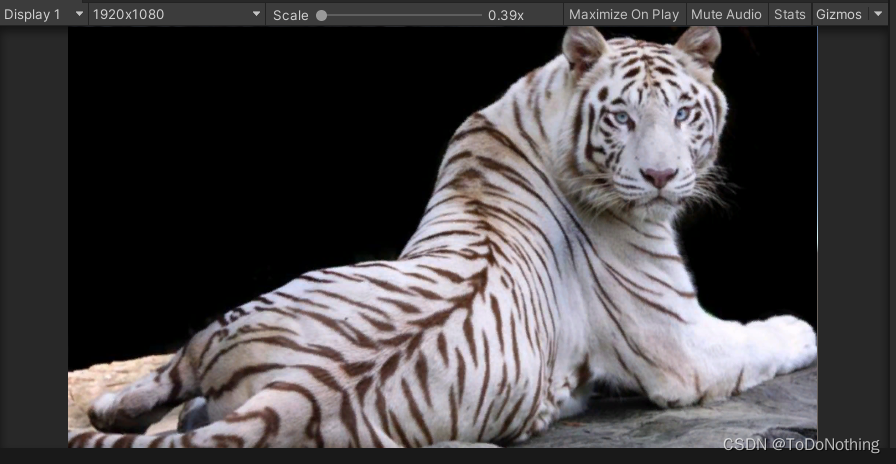
其实也就是获取到贴图的颜色信息,再直接输出,此处用到tex2D函数,传入两个参数
sampler2D:贴图信息
uv:UV值 如果uv值为(0,0),则返回左下角的像素,如果uv值为(1,1),则返回右上角的像素,如果uv值为(0.5,0.5),则返回中间像素
在代码中我们剥离了alpha值,只取了rgb三种颜色
如果们需要把图像左右翻转或倒过来,可以通过操作uv的坐标值来实现,如下是左右翻过来
     float2 uv=float2(1-i.uv.x,i.uv.y);
     fixed3 color=tex2D(_MainTex,uv).rgb;
     return fixed4(color,1.0);

上下翻转:
  float2 uv=float2(i.uv.x,1-i.uv.y);
  fixed3 color=tex2D(_MainTex,uv).rgb;
  return fixed4(color,1.0);

旋转90°
Shader "Unlit/shader9"
{

    ///鼠标移动正方形
    Properties
    {

        _MainTex("Main Texture",2D)="white"{
    }
    }
    SubShader
    {

        Tags {
     "RenderType"="Opaque" }
        LOD 100

        Pass
        {


            CGPROGRAM
            #pragma vertex vert
            #pragma fragment frag


            #include "UnityCG.cginc"
        struct v2f{

            float4 vertex:SV_POSITION;
            float4 position:TEXCOORD1;
            float2 uv:TEXCOORD;
            float4 screenPos:TEXCOORD2;
        };
        v2f vert(appdata_base v){

            v2f o;
            o.vertex=UnityObjectToClipPos(v.vertex);
            o.position=v.vertex;
            o.uv=v.texcoord;
            o.screenPos=ComputeScreenPos(o.vertex);
            return o;
        }
        float2 rotate(float2 pt,float theta,float aspect){

            float c=cos(theta);
            float s=sin(theta);
            float2x2 mat=float2x2(c,s,-s,c);
            pt.y/=aspect;
            pt=mul(pt,mat);
            pt.y*=aspect;
            return pt;
        }
            sampler2D _MainTex;
            fixed4 frag (v2f i) : SV_Target
            {

                float center=0.5;
                float2 uv=rotate(i.uv-center,UNITY_HALF_PI,2.0/1.5)+center;
                fixed3 color;
                if(uv.x<0||uv.x>1||uv.y<0||uv.y>1){

                    color=fixed3(0,0,0);
                }else{

                    color=tex2D(_MainTex,uv).rgb;
                }
                return fixed4(color,1.0);
            }
            ENDCG
        }
    }
}
旋转过程中添加了一个rotate函数,该函数主要是通过矩阵实现旋转相应的度数theta,aspect参数主要是处理拉伸的情况。
在旋转之后,会多出相同的画面,这里进行了判断处理,多出的部分变成黑色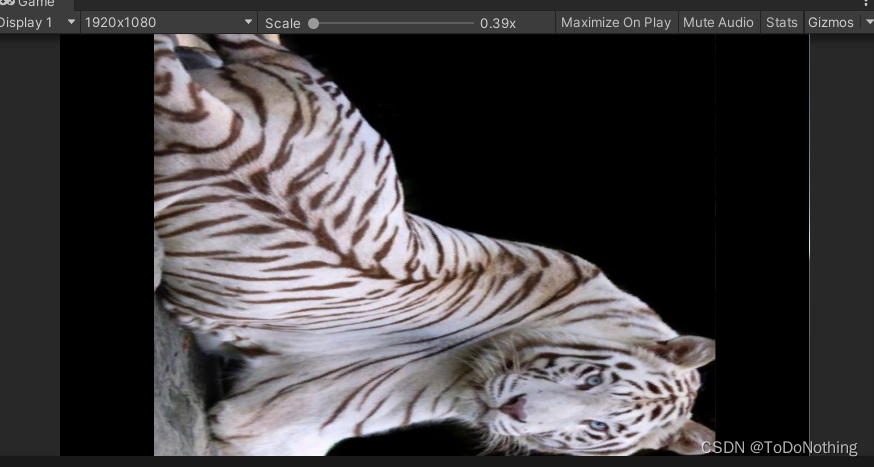
边栏推荐
- request.getSession(),的故事
- node安装及环境变量配置
- typescript 'props' is declared but its value is never read solution
- GCC编译器技术解析
- 两篇不错的php debug教程
- C# FileInfo class
- .NET Static Code Weaving - Rougamo Release 1.1.0
- MySQL classic 50 practice questions and the most detailed analysis of the whole network
- awk语法-01-基础语法(命令、选项、内部变量)
- MySQL - 多表查询与案例详解
猜你喜欢

SphereEx苗立尧:云原生架构下的Database Mesh研发实践

能与观众实时互动的Claper

Pagoda+FastAdmin 404 Not Found
![[Dataset][VOC] Eyewear dataset 6000 in VOC format](/img/66/37f76d9ce5d5f68d6ea0e18710fa04.png)
[Dataset][VOC] Eyewear dataset 6000 in VOC format

rhce homework

HCIP 第二天

Wuhan 2022 organizing of the high-performance computing added new ecological development of high-performance computing

(部分不懂,笔记整理未完成)【图论】差分约束

zabbix email alarm and WeChat alarm
关于ue4.27像素流送打包后的本地服务器问题
随机推荐
How does abaqus quickly import the assembly of other cae files?
zabbix email alarm and WeChat alarm
数据库概论之MySQL表的增删改查2
At age 94, pioneer Turing award winner, computational complexity theory, Juris Hartmanis, died
武汉高性能计算大会2022举办,高性能计算生态发展再添新动力
C# FileInfo class
Clapper that can interact with the audience in real time
GCC编译器技术解析
推出 Space On-Premises (本地部署版) Beta 版!
两篇不错的php debug教程
PMP新考纲考试内容介绍
In-depth analysis of the initialization of member variables and local variables
CAT1 4G+Ethernet development board Tencent cloud mobile phone WeChat applet display temperature and delivery control
Leetcode周赛304
MySQL高级SQL语句(二)
APP special test: traffic test
Launch Space on-premises deployment (local) Beta!
Analysis of port 9848 error at startup of Nacos client (non-version upgrade problem)
Project development specification
Py之mlxtend:mlxtend库的简介、安装、使用方法之详细攻略