当前位置:网站首页>[unity3d] emission (raycast) physical ray (Ray)
[unity3d] emission (raycast) physical ray (Ray)
2022-06-28 18:47:00 【little_ fat_ sheep】
1 Preface
Impactor assembly Collider This paper introduces the in 2 Collision detection between collision bodies , This paper will introduce the collision detection between physical ray and collision body . Physical rays are composed of Ray Definition , adopt Physics.RayCast / Physics.RayCastAll Emit radiation , return RayCastHit Collision detection information .
Rays are only used to detect collisions , The game interface cannot be seen , But users can use Debug.DrawRay Draw rays , adopt Debug.DrawLine Draw line segments , The rays and line segments they draw can only be in Scene Window view , stay Game The window is invisible .
1) Defining rays
// origin:  The starting point , direction:  Direction
public Ray(Vector3 origin, Vector3 direction)
//  Screen ray :  Start with the camera position ,  Rays projected to the direction of the mouse position on the near plane
Ray ray = Camera.main.ScreenPointToRay(Input.mousePosition);
2) Emit radiation
// ray:  Rays to be emitted , hitInfo:  Collision detection information , maxDistance:  The farthest distance from which a ray is emitted ,  Returns whether a collision occurred ,  Only the first collision object is detected
public static bool Raycast(Ray ray)
public static bool Raycast(Ray ray, out RaycastHit hitInfo)
public static bool Raycast(Ray ray, float maxDistance)
public static bool Raycast(Ray ray, out RaycastHit hitInfo, float maxDistance)
//  Check all collisions within the range of the ray
public static RaycastHit[] RaycastAll(Ray ray)
public static RaycastHit[] RaycastAll(Ray ray, float maxDistance)
explain : The above method is Physics Class static methods ,hitInfo Encapsulates collision information , Contains the collision location point、 Colliding body collider etc. .
3) Commissioning ray
// start:  Ray starting point , dir:  The direction of the ray , color:  Ray color
public static void DrawRay(Vector3 start, Vector3 dir)
public static void DrawRay(Vector3 start, Vector3 dir, Color color)
// start:  The starting point of the line segment , end:  End of line segment , color:  Line color
public static void DrawLine(Vector3 start, Vector3 end)
public static void DrawLine(Vector3 start, Vector3 end, Color color)
4) Area collision detection
//  Check whether there is a collision body within the scope of the cube
public static bool CheckBox(Vector3 center, Vector3 halfExtents)
public static bool CheckBox(Vector3 center, Vector3 halfExtents, Quaternion orientation, int layermask)
//  Check whether there is a collision body within the sphere
public static bool CheckSphere(Vector3 position, float radius)
public static bool CheckSphere(Vector3 position, float radius, int layerMask)
//  Inspect whether there is collision body within the scope of capsule
public static bool CheckCapsule(Vector3 start, Vector3 end, float radius)
public static bool CheckCapsule(Vector3 start, Vector3 end, float radius, int layermask)
explain : The above method is Physics Class static methods .
5) Project objects
//  Project Cube
public static bool BoxCast(Vector3 center, Vector3 halfExtents, Vector3 direction)
public static bool BoxCast(Vector3 center, Vector3 halfExtents, Vector3 direction, out RaycastHit hitInfo, Quaternion orientation, float maxDistance, int layerMask)
public static RaycastHit[] BoxCastAll(Vector3 center, Vector3 halfExtents, Vector3 direction)
public static RaycastHit[] BoxCastAll(Vector3 center, Vector3 halfExtents, Vector3 direction, Quaternion orientation, float maxDistance, int layermask)
//  Project a sphere
public static bool SphereCast(Ray ray, float radius)
public static bool SphereCast(Ray ray, float radius, out RaycastHit hitInfo, float maxDistance, int layerMask)
public static bool SphereCast(Vector3 origin, float radius, Vector3 direction, out RaycastHit hitInfo)
public static bool SphereCast(Vector3 origin, float radius, Vector3 direction, out RaycastHit hitInfo, float maxDistance, int layerMask)
public static RaycastHit[] SphereCastAll(Ray ray, float radius)
public static RaycastHit[] SphereCastAll(Ray ray, float radius, float maxDistance, int layerMask)
public static RaycastHit[] SphereCastAll(Vector3 origin, float radius, Vector3 direction)
public static RaycastHit[] SphereCastAll(Vector3 origin, float radius, Vector3 direction, float maxDistance, int layerMask)
//  Project capsule
public static bool CapsuleCast(Vector3 point1, Vector3 point2, float radius, Vector3 direction)
public static bool CapsuleCast(Vector3 point1, Vector3 point2, float radius, Vector3 direction, out RaycastHit hitInfo, float maxDistance, int layerMask)
public static RaycastHit[] CapsuleCastAll(Vector3 point1, Vector3 point2, float radius, Vector3 direction)
public static RaycastHit[] CapsuleCastAll(Vector3 point1, Vector3 point2, float radius, Vector3 direction, float maxDistance, int layermask)
explain : The above method is Physics Class static methods .
2 application
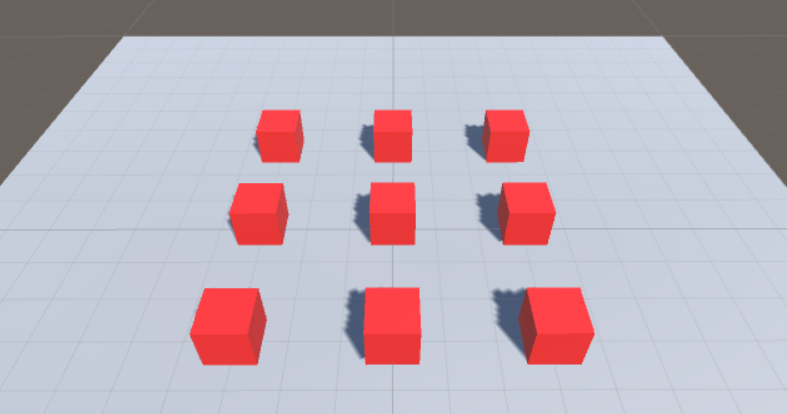
1) The game object
The object of the game Transform The component parameters are as follows :
| Name | Type | Position | Rotation | Scale | Color |
|---|---|---|---|---|---|
| Plane | Plane | (0, 0, 0) | (0, 0, 0) | (2, 2, 2) | #B8B2B2FF |
| Cube1 | Cube | (-3, 0.5, 3) | (0, 0, 0) | (1, 1, 1) | #F91D1DFF |
| Cube2 | Cube | (0, 0.5, 3) | (0, 0, 0) | (1, 1, 1) | #F91D1DFF |
| Cube3 | Cube | (3, 0.5, 3) | (0, 0, 0) | (1, 1, 1) | #F91D1DFF |
| Cube4 | Cube | (-3, 0.5, 0) | (0, 0, 0) | (1, 1, 1) | #F91D1DFF |
| Cube5 | Cube | (0, 0.5, 0) | (0, 0, 0) | (1, 1, 1) | #F91D1DFF |
| Cube6 | Cube | (3, 0.5, 0) | (0, 0, 0) | (1, 1, 1) | #F91D1DFF |
| Cube7 | Cube | (-3, 0.5, -3) | (0, 0, 0) | (1, 1, 1) | #F91D1DFF |
| Cube8 | Cube | (0, 0.5, -3) | (0, 0, 0) | (1, 1, 1) | #F91D1DFF |
| Cube9 | Cube | (3, 0.5, -3) | (0, 0, 0) | (1, 1, 1) | #F91D1DFF |
| Bullet | Sphere | (0, 0.5, -5) | (0, 0, 0) | (0.3, 0.3, 0.3) | #FDF723FF |
| BulletCreater | Empty | (0, 0, 0) | (0, 0, 0) | (1, 1, 1) | —— |
Add :Cube1~Cube9 and Bullet Add the Rigidbody Rigid body components , take Bullet Drag to Assets Window Resources/Prefabs Under the table of contents , Generate preset (prefab), And then delete Hierarchy Under the window Bullet object .
2) Script components
to BulletCreater Add game objects RayController Script components .
RayController.cs
using UnityEngine;

public class RayController : MonoBehaviour {
	private GameObject bulletPrefab; //  Shell preset
	private RaycastHit hit; //  Collision information

	void Start () {
		bulletPrefab = (GameObject) Resources.Load("Prefabs/Bullet");
		hit = new RaycastHit();
	}

	void Update () {
		if (Input.GetMouseButtonDown(0)) {
			Ray ray = Camera.main.ScreenPointToRay(Input.mousePosition);
			if (Physics.Raycast(ray, out hit, 100)) {
				// ray.origin = Camera.main.transform.position
				GameObject bullet = Instantiate(bulletPrefab, ray.origin, Quaternion.identity); //  Create shells from presets
				bullet.GetComponent<Rigidbody>().velocity = ray.direction * 100;
				Destroy(bullet, 3);
			}
		}
	}
}
3) Running effect

边栏推荐
猜你喜欢

C# 41. int与string互转

Professor Michael Wooldridge of Oxford University: how the AI community views neural networks in the past 40 years

微信小程序接入百度统计报错 Cannot read property ‘mtj‘ of undefined

About Statistical Distributions

180.1.连续登录N天(数据库)

Lumiprobe ProteOrange 蛋白质凝胶染料说明书
PHP使用栈解决迷宫问题

数字化转型的1个目标,3大领域,6大因素和9个环节

抗兔Dylight 488丨Abbkine通用型免疫荧光(IF)工具箱

Alist+RaiDrive 给电脑整个80亿GB硬盘
随机推荐
Graphic system - 2 View drawing
tensorboard 使用总结
使用.NetCore自带的后台作业,出入队简单模拟生产者消费者处理请求响应的数据
解析机器人主持教学的实践发展
进阶高级-业务事务设计 开发入门
启牛学堂的vip证券账户是真的安全正规吗?怎么说
About Covariance and Correlation(协方差和相关)
做跨境电商一定要学会用PRA软件,解放双手提高效率!
Professor Michael Wooldridge of Oxford University: how the AI community views neural networks in the past 40 years
BioVendor游离轻链(κ和λ)Elisa 试剂盒检测步骤
基于固态激光雷达辅助的十六线机械雷达和单目相机的外参标定方法
向上转型和向下转型
CORBA 架构体系指南(通用对象请求代理体系架构)
打破学科之间壁垒的STEAM教育
Win 10创建一个gin框架的项目
SqlTransaction
select/poll/epoll
An in-depth analysis of the election mechanism in kubernetes
牛津大學教授Michael Wooldridge:AI社區近40年如何看待神經網絡
业务层修改--根据现有框架的反推修改